

Improve Security and Simplify Connectivity with PrivateLink for Snowflake
AWS recently announced PrivateLink, the newest generation of VPC Endpoints that allows direct and secure connectivity between AWS VPCs, without traversing the public Internet. We’ve been working closely with the AWS product team to integrate PrivateLink with Snowflake and we’re excited to be among the first launch partners. By integrating with PrivateLink, we allow customers with strict security policies to connect to Snowflake without exposing their data to the Internet. In this blog post, we’ll highlight how PrivateLink enhances our existing security capabilities, and how customers can easily set up PrivateLink with Snowflake.
Snowflake is an enterprise-grade, cloud data warehouse with a unique, multi-cluster, shared data architecture purpose-built for the cloud. From day one, security has been a central pillar of Snowflake’s architecture, with advanced security features baked into the solution. Customers get varying levels of security from Snowflake’s five different product editions: Standard, Premier, Enterprise, Enterprise for Sensitive Data (ESD) and Virtual Private Snowflake (VPS).
Across all editions, Snowflake provides a secure environment for customer data, protecting it in-transit and at rest. All customer data is encrypted by default using the latest security standards and best practices, and validated by compliance with industry-standard security protocols. In addition, customers have access to a host of security features and data protection enhancements such as IP whitelisting, role-based access control, and multi-factor authentication.
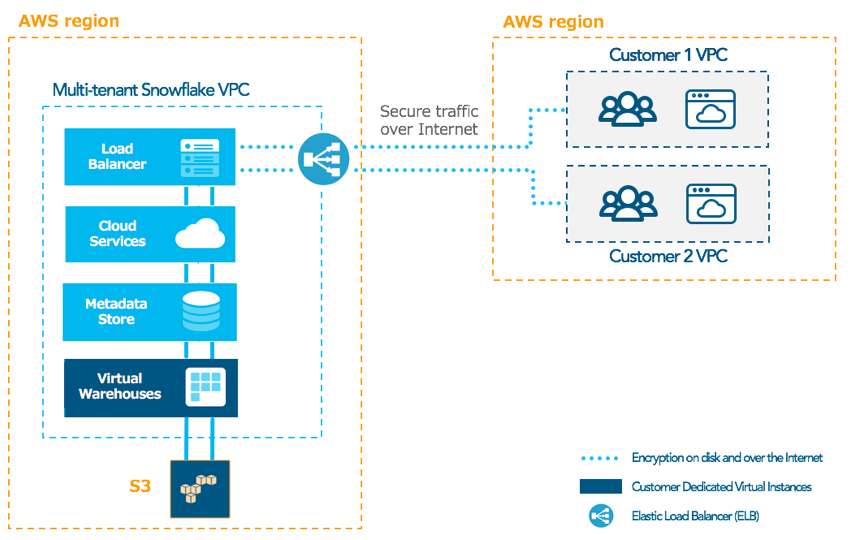
As shown in figure 1 below, Snowflake’s multi-tenant service runs inside a Virtual Private Cloud (VPC), isolating and limiting access to its internal components. Incoming traffic from customer VPCs is routed through an Elastic Load Balancer (ELB) to the Snowflake VPC.
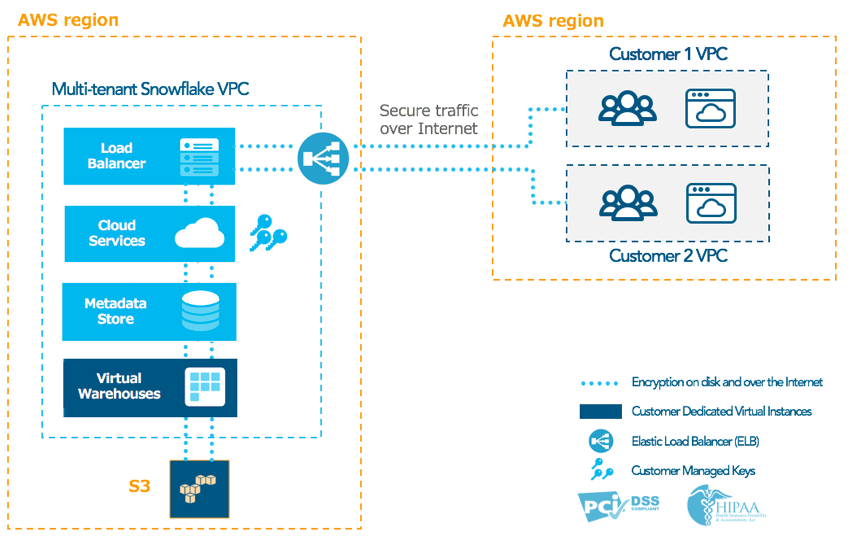
For customers working with highly sensitive data or with specific compliance requirements, such as HIPAA and PCI, Snowflake offers Enterprise for Sensitive Data (ESD). With ESD edition, customer data is encrypted in transit across all networks including within Snowflake’s own VPC. ESD customers also benefit from additional security features such as Tri-Secret Secure, giving them full control over access to their data. See figure 2 below.
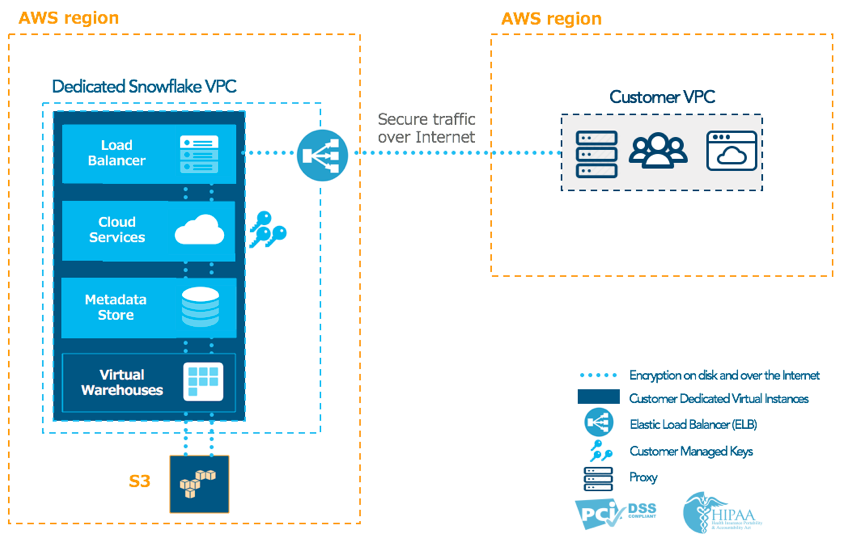
Earlier this year, we also introduced a private, single-tenant version of the Snowflake service – Virtual Private Snowflake. VPS, which is the most advanced and secure edition of Snowflake, includes all features of ESD and addresses the specific needs of regulated companies such as those in the financial industries. With VPS, customers get a dedicated and managed instance of Snowflake within a separate, dedicated VPC. Additionally, VPS customers can use secure proxies for egress traffic control to minimize risks associated with their internal users and systems communicating with unauthorized external hosts, as shown in figure 3 below:
But we recognize that a key area of concern for some customers has been around how data is sent from their private subnet to Snowflake. These customers need to enforce restrictive firewall rules on egress traffic. Others have restrictive policies about their resources accessing the Internet at all. So, how do you send data without allowing unrestricted outbound access to the public Internet and without violating existing security compliance requirements?
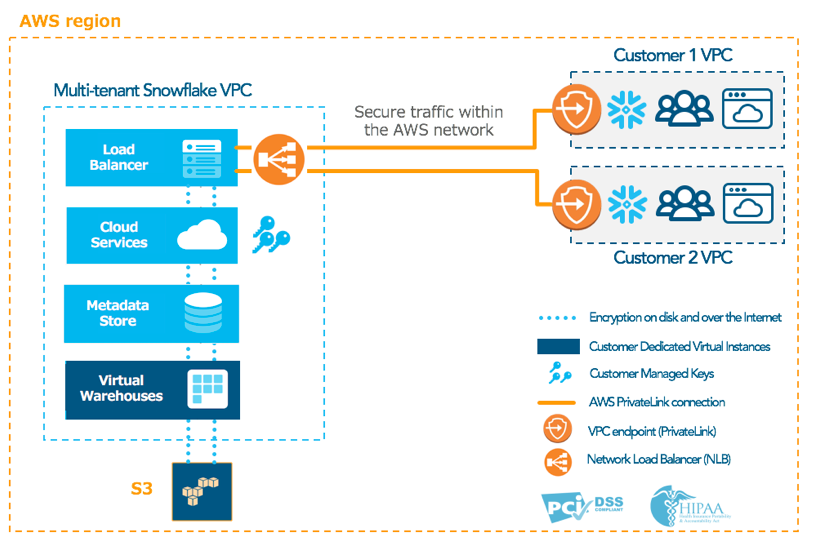
Enter AWS PrivateLink: a purpose-built technology that enables direct, secure connectivity among VPCs while keeping network traffic within the AWS network. Using PrivateLink, customers can connect to Snowflake without going over the public Internet, and without requiring proxies to be setup between Snowflake and their network as a stand-in solution for egress traffic control. Instead, all communication between the customer VPC and Snowflake is performed within the AWS private network backbone.
Snowflake leverages PrivateLink by running its service behind a Network Load Balancer (NLB) and shares the endpoint with customers’ VPCs. The Snowflake endpoint appears in the customer VPC, enabling direct connectivity to Snowflake via private IP addresses. Customers can then accept the end point and choose which of their VPCs and subnets to have access to Snowflake. This effectively allows Snowflake to function like a service that is hosted directly on the customer’s private network. Figures 4 and 5 show PrivateLink connectivity from customer VPCs to Snowflake in both multi-tenant (ESD) and single-tenant (VPS) scenarios.
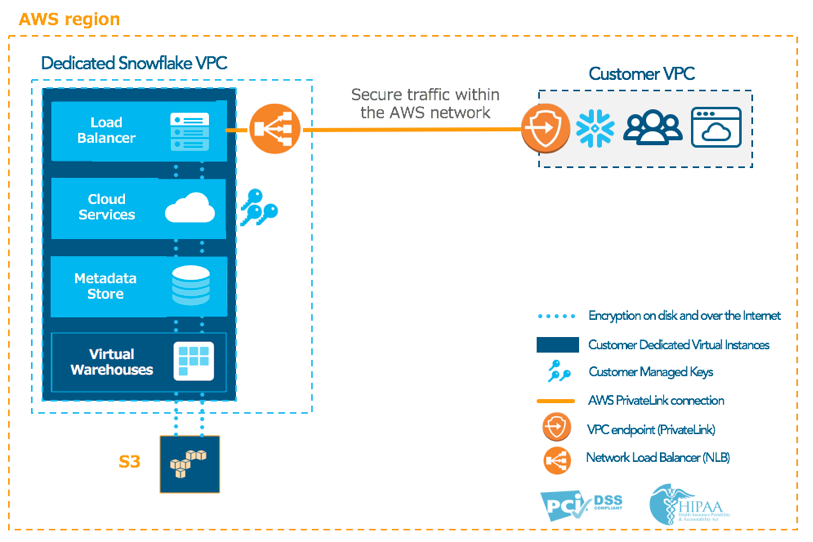
Additionally, customers can access PrivateLink endpoints from their on-premise network via AWS Direct Connect, allowing them to connect all their virtual and physical environments in a single, private network. As such, Direct Connect can be used in conjunction with PrivateLink to connect customer’s datacenter to Snowflake. See figure 6 below.
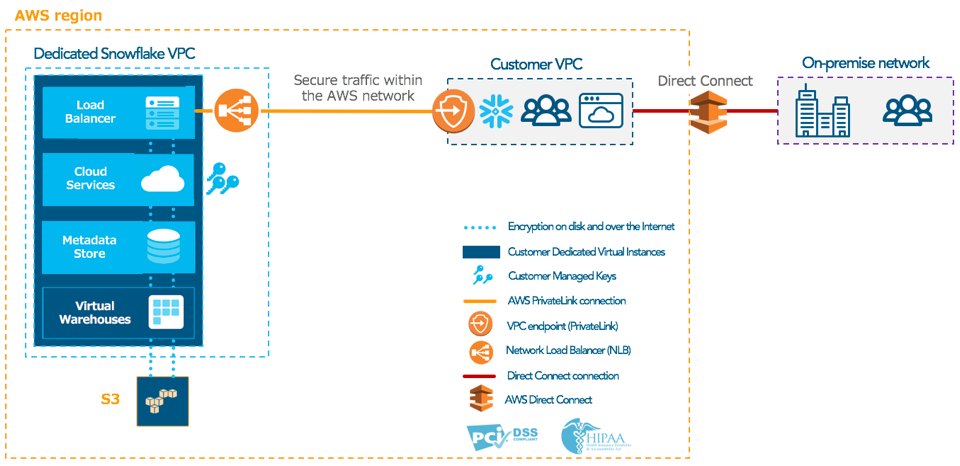
Snowflake already delivers the world’s most secure data warehouse built for the cloud. Our ESD and VPS product editions are designed to address the highest security needs and compliance requirements of organizations large and small. With PrivateLink, we’re taking that a step further by allowing our customers to establish direct and private connectivity to Snowflake, without ever exposing their data to the public Internet.
PrivateLink is available to all Snowflake customers with ESD and VPS product editions. You can visit our user guide for instructions on how to get started with PrivateLink.
You can also try Snowflake for free. Sign up and receive $400 US dollars worth of free usage. You can create a sandbox or launch a production implementation from the same Snowflake environment.
