Build, Evaluate, and Optimize AI Functions in Snowflake
Overview
Total Duration: ~35 minutes
Writing a prompt that works on a handful of examples is easy. Knowing whether it actually works across your data — and whether a cheaper model or a better prompt would do the job — is hard. Snowflake now lets you treat AI calls like any other engineered asset: version them, measure them against labeled data, and optimize them automatically, all in SQL.
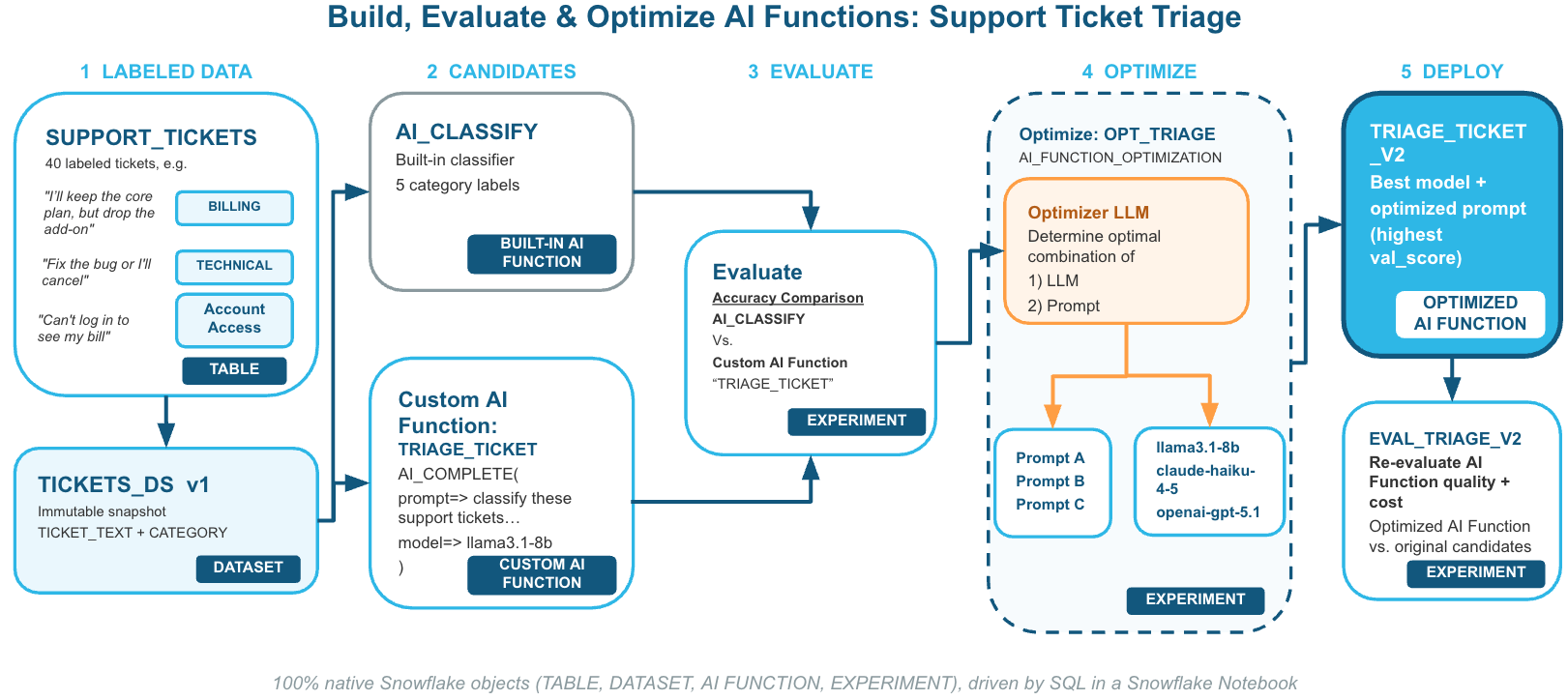
In this guide you will triage customer support tickets into five queues (BILLING, TECHNICAL, ACCOUNT_ACCESS, FEATURE_REQUEST, CANCELLATION) using business rules that trip up naive prompts. You will:
- Baseline the built-in
AI_CLASSIFYfunction and score it with an AI function evaluation experiment. - Wrap
AI_COMPLETEin a custom, versionable function withCREATE AI FUNCTION, deliberately starting with a small model and a naive prompt. - Run an AI function optimization experiment that rewrites the function body and compares several models on cost and quality.
- Deploy the winning body as a new function version and compare all three approaches side by side.
Prerequisites
- Familiarity with SQL
- Basic understanding of LLM prompting concepts
What You'll Learn
- How to create a custom AI function with
CREATE AI FUNCTION - How to snapshot labeled data as a versioned
DATASET - How to score any AI expression with an
AI_FUNCTION_EVALUATIONexperiment - How to auto-tune a function's prompt and model with an
AI_FUNCTION_OPTIMIZATIONexperiment - How to read experiment results with
SHOW RUNSandSHOW RUN PARAMETERSand deploy the best candidate
What You'll Need
- A Snowflake account in a region where Cortex AI functions and the models used in this guide (
llama3.1-8b,claude-haiku-4-5,openai-gpt-5.1,claude-opus-4-7) are available, or with cross-region inference enabled - A role with privileges to create databases, schemas, and AI functions (this guide uses
ACCOUNTADMINfor simplicity) - Access to Snowflake Notebooks in Workspaces
What You'll Build
- A labeled support-ticket dataset and a versioned
DATASETsnapshot - A custom
TRIAGE_TICKETAI function, plus an optimizedTRIAGE_TICKET_V2 - Evaluation and optimization experiments with a quality-vs-cost comparison chart
Setup
Duration: 3 minutes
Import the Notebook
- Download the notebook vhol_ai_evaluate_optimize.ipynb (select Download raw file).
- In Snowsight, go to Projects » Workspaces.
- Click + Add new » Upload files and select the downloaded
.ipynbfile. - Open the notebook and connect it to a warehouse when prompted.
Every SQL step below is also a cell in the notebook, so you can either run the notebook top-to-bottom or follow along here and paste each snippet into a SQL worksheet.
Create the Database and Schema
USE ROLE ACCOUNTADMIN;
CREATE DATABASE IF NOT EXISTS VHOL_AI_DB;
CREATE SCHEMA IF NOT EXISTS VHOL_AI_DB.AI_FUNC;
USE SCHEMA VHOL_AI_DB.AI_FUNC;
Load Labeled Data
Duration: 3 minutes
Optimization is only as good as the data you measure against. This lab uses 40 hand-labeled tickets. The last ten are deliberately tricky: they mention billing or cancelling but belong elsewhere, according to these routing rules:
- A ticket is
CANCELLATIONonly if the customer wants to end the whole account or contract. Dropping an add-on isBILLING. - Threats to cancel don't change the category — route by the actual problem.
- Broken billing pages or links are
TECHNICAL; being unable to log in to see a bill isACCOUNT_ACCESS.
CREATE OR REPLACE TABLE SUPPORT_TICKETS (TICKET_ID INT, TICKET_TEXT VARCHAR, CATEGORY VARCHAR) AS
SELECT * FROM VALUES
  (1, 'I was charged twice for my October invoice, please refund the duplicate.', 'BILLING'),
  (2, 'Our credit card on file expired, how do I update payment details?', 'BILLING'),
  (3, 'Why did my monthly bill jump from $49 to $99 without notice?', 'BILLING'),
  (4, 'Can I get a copy of last quarter''s invoices for our auditors?', 'BILLING'),
  (5, 'We were billed for 50 seats but only have 32 users.', 'BILLING'),
  (6, 'Please switch us from monthly to annual billing to get the discount.', 'BILLING'),
  (7, 'The dashboard throws a 500 error every time I export to CSV.', 'TECHNICAL'),
  (8, 'API calls to /v2/orders started timing out after your last release.', 'TECHNICAL'),
  (9, 'The mobile app crashes on launch on Android 15.', 'TECHNICAL'),
  (10, 'Webhooks are firing twice for every event.', 'TECHNICAL'),
  (11, 'Reports load extremely slowly, over 2 minutes for a 1k-row table.', 'TECHNICAL'),
  (12, 'SSO login worked yesterday but now SAML returns an invalid signature error.', 'TECHNICAL'),
  (13, 'I forgot my password and the reset email never arrives.', 'ACCOUNT_ACCESS'),
  (14, 'My account got locked after too many login attempts.', 'ACCOUNT_ACCESS'),
  (15, 'Our admin left the company, how do we transfer ownership of the workspace?', 'ACCOUNT_ACCESS'),
  (16, 'I need to add two new users but the invite button is greyed out for me.', 'ACCOUNT_ACCESS'),
  (17, 'I lost my phone and can''t get past two-factor authentication.', 'ACCOUNT_ACCESS'),
  (18, 'How do I change the email address I use to sign in?', 'ACCOUNT_ACCESS'),
  (19, 'It would be great if you supported dark mode.', 'FEATURE_REQUEST'),
  (20, 'Could you add a Slack integration for alert notifications?', 'FEATURE_REQUEST'),
  (21, 'Please let us schedule reports to be emailed every Monday.', 'FEATURE_REQUEST'),
  (22, 'We''d love bulk-edit for tags instead of one at a time.', 'FEATURE_REQUEST'),
  (23, 'Any plans to support exporting to Parquet?', 'FEATURE_REQUEST'),
  (24, 'A Spanish-language UI would really help our LATAM team.', 'FEATURE_REQUEST'),
  (25, 'We''d like to cancel our subscription at the end of this term.', 'CANCELLATION'),
  (26, 'Please close our account, we''re moving to another vendor.', 'CANCELLATION'),
  (27, 'How do I downgrade to free and stop all future charges? We''re winding down the project.', 'CANCELLATION'),
  (28, 'Do not renew our contract next month.', 'CANCELLATION'),
  (29, 'We''re shutting down the team that used this; terminate the account please.', 'CANCELLATION'),
  (30, 'I want out. Your product has been nothing but trouble, end it today.', 'CANCELLATION'),
  (31, 'Since the last update the invoice PDF download link is broken.', 'TECHNICAL'),
  (32, 'If you don''t fix the export bug I''ll cancel, but for now just fix it please.', 'TECHNICAL'),
  (33, 'I can''t log in to view my bill.', 'ACCOUNT_ACCESS'),
  (34, 'Feature idea: let us pay invoices with ACH instead of card.', 'FEATURE_REQUEST'),
  (35, 'Refund me for the month the service was down or I''m leaving.', 'BILLING'),
  (36, 'The billing page shows a spinner forever and never loads.', 'TECHNICAL'),
  (37, 'We''d like to stop paying for the analytics add-on but keep the core plan.', 'BILLING'),
  (38, 'Can you reactivate my deactivated user so I can log in again?', 'ACCOUNT_ACCESS'),
  (39, 'Please remove the auto-renew so our account ends on Dec 31.', 'CANCELLATION'),
  (40, 'Would be helpful to see usage per user on the invoice.', 'FEATURE_REQUEST');

SELECT CATEGORY, COUNT(*) AS N FROM SUPPORT_TICKETS GROUP BY 1 ORDER BY 1;
Wrap the Table as a Versioned Dataset
Experiments read from a DATASET version — an immutable snapshot — rather than a raw table, so every run is scored against exactly the same rows. Version names are case-sensitive.
CREATE OR REPLACE DATASET VHOL_AI_DB.AI_FUNC.TICKETS_DS;
ALTER DATASET VHOL_AI_DB.AI_FUNC.TICKETS_DS
  ADD VERSION 'v1' FROM (SELECT TICKET_TEXT, CATEGORY FROM SUPPORT_TICKETS);
Baseline with AI_CLASSIFY
Duration: 4 minutes
Start with the simplest option: the built-in AI_CLASSIFY function. Preview it on the tricky tickets:
SELECT TICKET_TEXT, CATEGORY AS EXPECTED,
       AI_CLASSIFY(TICKET_TEXT, ['BILLING','TECHNICAL','ACCOUNT_ACCESS','FEATURE_REQUEST','CANCELLATION']):labels[0]::VARCHAR AS PREDICTED
FROM SUPPORT_TICKETS ORDER BY TICKET_ID DESC LIMIT 10;
Evaluate the Built-in Call
An evaluation experiment takes a query_text (any SQL expression over the dataset's columns), one or more metrics, and a dataset version with a ground-truth column.
DROP EXPERIMENT IF EXISTS EVAL_BUILTIN_CLASSIFY;
CREATE EXPERIMENT EVAL_BUILTIN_CLASSIFY
  TYPE = 'AI_FUNCTION_EVALUATION'
  FROM SPECIFICATION $$
    query_text: AI_CLASSIFY(TICKET_TEXT, ['BILLING','TECHNICAL','ACCOUNT_ACCESS','FEATURE_REQUEST','CANCELLATION']):labels[0]::VARCHAR
    metrics:
      - name: exact_match
    dataset:
      name: VHOL_AI_DB.AI_FUNC.TICKETS_DS
      version: v1
      ground_truth: CATEGORY
    evaluation:
      num_eval_runs: 1
  $$;
EXECUTE EXPERIMENT EVAL_BUILTIN_CLASSIFY;
Note:
EXECUTE EXPERIMENTruns asynchronously. The evaluation keeps running in the background while you continue; you'll check its results in a later step.
Create a custom AI Function
Duration: 4 minutes
A custom AI function wraps AI_COMPLETE with a system prompt, a user template, and structured JSON output, and gives it a stable name you can call like any SQL function. To leave room for the optimizer, start with a small, inexpensive model and a naive prompt that omits the business rules.
CREATE OR REPLACE AI FUNCTION VHOL_AI_DB.AI_FUNC.TRIAGE_TICKET(TICKET_TEXT VARCHAR)
RETURNS VARCHAR
COMMENT = 'Route a support ticket to a queue'
AS
$$
    SELECT AI_COMPLETE(
    model=>'llama3.1-8b',
    messages=>ARRAY_CONSTRUCT(
        OBJECT_CONSTRUCT('role', 'system', 'content', 'You are a customer support triage assistant for a SaaS company. Classify the support ticket into exactly one category: BILLING, TECHNICAL, ACCOUNT_ACCESS, FEATURE_REQUEST, or CANCELLATION.'),
        OBJECT_CONSTRUCT('role', 'user', 'content', 'Ticket: ' || TICKET_TEXT)
    ),
    response_format=>PARSE_JSON('{
      "type": "json",
      "schema": {"type": "object",
                 "properties": {"category": {"type": "string", "description": "One of BILLING, TECHNICAL, ACCOUNT_ACCESS, FEATURE_REQUEST, CANCELLATION"}},
                 "required": ["category"], "additionalProperties": false}}')
    ):category::VARCHAR
$$;
Try it out:
SELECT TICKET_TEXT, CATEGORY AS EXPECTED, TRIAGE_TICKET(TICKET_TEXT) AS PREDICTED
FROM SUPPORT_TICKETS ORDER BY TICKET_ID DESC LIMIT 10;
Evaluate the Custom Function
Duration: 5 minutes
Use the same experiment type to score the custom function — only query_text changes.
DROP EXPERIMENT IF EXISTS EVAL_TRIAGE_CUSTOM_V1;
CREATE EXPERIMENT EVAL_TRIAGE_CUSTOM_V1
  TYPE = 'AI_FUNCTION_EVALUATION'
  FROM SPECIFICATION $$
    query_text: VHOL_AI_DB.AI_FUNC.TRIAGE_TICKET(TICKET_TEXT)
    metrics:
      - name: exact_match
    dataset:
      name: VHOL_AI_DB.AI_FUNC.TICKETS_DS
      version: v1
      ground_truth: CATEGORY
    evaluation:
      num_eval_runs: 1
  $$;
EXECUTE EXPERIMENT EVAL_TRIAGE_CUSTOM_V1;
Check Status and Scores
Re-run these queries until both experiments show FINISHED (usually 1–3 minutes). Scores live in metadata:metrics.
SHOW RUNS IN EXPERIMENT EVAL_BUILTIN_CLASSIFY;
SELECT 'EVAL_BUILTIN_CLASSIFY' AS EXPERIMENT, "name" AS RUN,
       PARSE_JSON("metadata"):status::VARCHAR AS STATUS,
       PARSE_JSON("metadata"):metrics AS METRICS
FROM TABLE(RESULT_SCAN(LAST_QUERY_ID()));

SHOW RUNS IN EXPERIMENT EVAL_TRIAGE_CUSTOM_V1;
SELECT 'EVAL_TRIAGE_CUSTOM_V1' AS EXPERIMENT, "name" AS RUN,
       PARSE_JSON("metadata"):status::VARCHAR AS STATUS,
       PARSE_JSON("metadata"):metrics AS METRICS
FROM TABLE(RESULT_SCAN(LAST_QUERY_ID()));
Inspect Per-Row Failures
Each evaluation writes row-level detail you can query directly to see where the model went wrong:
CREATE OR REPLACE TEMPORARY FILE FORMAT EVAL_JSON TYPE = JSON STRIP_OUTER_ARRAY = TRUE;
SELECT $1:input_text::STRING      AS INPUT,
       $1:expected::STRING        AS EXPECTED,
       $1:predicted::STRING       AS PREDICTED,
       $1:metric_feedback::STRING AS FEEDBACK,
       $1:metric_score::FLOAT     AS SCORE
FROM 'snow://experiment/EVAL_TRIAGE_CUSTOM_V1/versions/EVAL_1/eval_detail.json' (FILE_FORMAT => EVAL_JSON)
WHERE $1:metric_score::FLOAT < 1;
Expect most misses to come from the tricky tickets — exactly the business rules the naive prompt doesn't know about.
Optimize the Function
Duration: 10 minutes
The optimizer (based on GEPA) uses a strong reflection_model to study failures, rewrites the entire function body — prompt, model reference, and SQL pre/post-processing — and scores each candidate for every model in models concurrently. strategy: quality_first favors accuracy; budget controls how many iterations it runs. ultra-light (about two iterations) fits a lab; use light, medium, or heavy for real workloads.
DROP EXPERIMENT IF EXISTS OPT_TRIAGE;
CREATE EXPERIMENT OPT_TRIAGE
  TYPE = 'AI_FUNCTION_OPTIMIZATION'
  FROM SPECIFICATION $$
    function:
      function_name: "VHOL_AI_DB.AI_FUNC.TRIAGE_TICKET(VARCHAR)"
    metrics:
      - name: exact_match
    dataset:
      name: VHOL_AI_DB.AI_FUNC.TICKETS_DS
      version: v1
      column_mapping:
        argument_mapping:
          TICKET_TEXT: TICKET_TEXT
        ground_truth: CATEGORY
    optimization:
      models: [llama3.1-8b, claude-haiku-4-5, openai-gpt-5.1]
      reflection_model: claude-opus-4-7
      strategy: quality_first
      budget: ultra-light
  $$;
EXECUTE EXPERIMENT OPT_TRIAGE;
Note: This experiment typically takes 5–10 minutes for this dataset.
Monitor the Runs
Runs are named SEED, ITER_1 … ITER_N. Re-run until all are FINISHED:
SHOW RUNS IN EXPERIMENT OPT_TRIAGE;
Key metrics:
val_score— exact-match accuracy on the validation splitcost_compared_to_seed— relative cost (1.0= the original function)is_frontier = 1— the run is on the cost/quality Pareto frontier
The notebook's opt_status cell joins SHOW RUNS with SHOW RUN PARAMETERS so you can see each run's score, relative cost, model, and generated body in one table.
Deploy the Winner
Duration: 4 minutes
The following block selects the run with the highest val_score (cheapest on ties), reads its optimized function body, and deploys it as TRIAGE_TICKET_V2. The original function stays in place so you can A/B test.
EXECUTE IMMEDIATE $$
DECLARE best_run VARCHAR; best_model VARCHAR; body VARCHAR; res RESULTSET;
BEGIN
  -- 1. Pick the winner: highest val_score, cheapest on ties
  SHOW RUNS IN EXPERIMENT VHOL_AI_DB.AI_FUNC.OPT_TRIAGE;
  SELECT "name" INTO :best_run FROM TABLE(RESULT_SCAN(LAST_QUERY_ID()))
  WHERE PARSE_JSON("metadata"):status = 'FINISHED'
    AND PARSE_JSON("metadata"):metrics:val_score:value IS NOT NULL
    AND PARSE_JSON("metadata"):metrics:cost_compared_to_seed:value IS NOT NULL
  ORDER BY PARSE_JSON("metadata"):metrics:val_score:value::FLOAT DESC NULLS LAST,
           PARSE_JSON("metadata"):metrics:cost_compared_to_seed:value::FLOAT ASC NULLS LAST
  LIMIT 1;
  -- 2. Read its optimized function body + model
  EXECUTE IMMEDIATE 'SHOW RUN PARAMETERS IN EXPERIMENT VHOL_AI_DB.AI_FUNC.OPT_TRIAGE RUN ' || :best_run;
  SELECT MAX(IFF("name"='function_impl', "value", NULL)), MAX(IFF("name"='model', "value", NULL))
    INTO :body, :best_model FROM TABLE(RESULT_SCAN(LAST_QUERY_ID()));
  -- 3. Deploy as V2 (seed stays for A/B)
  EXECUTE IMMEDIATE 'CREATE OR REPLACE AI FUNCTION VHOL_AI_DB.AI_FUNC.TRIAGE_TICKET_V2(TICKET_TEXT VARCHAR) RETURNS VARCHAR AS '
                    || '$' || '$' || :body || '$' || '$';
  res := (SELECT :best_run AS BEST_RUN, :best_model AS MODEL, :body AS OPTIMIZED_BODY);
  RETURN TABLE(res);
END;
$$;
Review OPTIMIZED_BODY — you'll typically see the business rules from the Load Labeled Data step written into the prompt, along with an explicit priority order across categories.
Evaluate V2 on the Same Dataset
DROP EXPERIMENT IF EXISTS EVAL_TRIAGE_V2;
CREATE EXPERIMENT EVAL_TRIAGE_V2
  TYPE = 'AI_FUNCTION_EVALUATION'
  FROM SPECIFICATION $$
    query_text: VHOL_AI_DB.AI_FUNC.TRIAGE_TICKET_V2(TICKET_TEXT)
    metrics:
      - name: exact_match
    dataset:
      name: VHOL_AI_DB.AI_FUNC.TICKETS_DS
      version: v1
      ground_truth: CATEGORY
    evaluation:
      num_eval_runs: 1
  $$;
EXECUTE EXPERIMENT EVAL_TRIAGE_V2;
Compare Results
Duration: 4 minutes
Once EVAL_TRIAGE_V2 finishes, collect the scores from all three evaluations into one table:
EXECUTE IMMEDIATE $$
DECLARE
  res RESULTSET;
  c1 CURSOR FOR SELECT column1 AS EXP FROM VALUES ('EVAL_BUILTIN_CLASSIFY'), ('EVAL_TRIAGE_CUSTOM_V1'), ('EVAL_TRIAGE_V2');
  x VARCHAR;
BEGIN
  CREATE OR REPLACE TEMPORARY TABLE EVAL_SCORES (
    EXPERIMENT VARCHAR, RUN VARCHAR, STATUS VARCHAR, EXACT_MATCH FLOAT, MODEL VARCHAR, PROMPT_OR_QUERY VARCHAR
  );
  FOR rec IN c1 DO
    x := rec.EXP;
    EXECUTE IMMEDIATE 'SHOW RUNS IN EXPERIMENT VHOL_AI_DB.AI_FUNC.' || :x;
    INSERT INTO EVAL_SCORES (EXPERIMENT, RUN, STATUS, EXACT_MATCH)
      SELECT :x, "name", PARSE_JSON("metadata"):status::VARCHAR, PARSE_JSON("metadata"):metrics:score:value::FLOAT
      FROM TABLE(RESULT_SCAN(LAST_QUERY_ID()));
  END FOR;

  LET c2 CURSOR FOR SELECT EXPERIMENT, RUN FROM EVAL_SCORES;
  FOR rec IN c2 DO
    BEGIN
      EXECUTE IMMEDIATE 'SHOW RUN PARAMETERS IN EXPERIMENT VHOL_AI_DB.AI_FUNC.' || rec.EXPERIMENT || ' RUN ' || rec.RUN;
      CREATE OR REPLACE TEMPORARY TABLE _eval_params AS
        SELECT * FROM TABLE(RESULT_SCAN(LAST_QUERY_ID()));
      UPDATE EVAL_SCORES SET
        MODEL = COALESCE((SELECT "value" FROM _eval_params WHERE "name" = 'model'), 'built-in'),
        PROMPT_OR_QUERY = COALESCE(
          (SELECT LEFT("value", 200) FROM _eval_params WHERE "name" = 'function_impl'),
          (SELECT LEFT("value", 200) FROM _eval_params WHERE "name" = 'query_text'))
      WHERE EXPERIMENT = rec.EXPERIMENT AND RUN = rec.RUN;
    EXCEPTION WHEN OTHER THEN NULL;
    END;
  END FOR;

  res := (SELECT * FROM EVAL_SCORES ORDER BY EXACT_MATCH DESC NULLS LAST);
  RETURN TABLE(res);
END;
$$;
Visualize Quality and Cost
The notebook includes two Python cells that chart the results:
- Quality — a bar chart of exact-match score for the built-in baseline, the original custom function, and the optimized V2.
- Cost + Quality — uses
AI_COUNT_TOKENSto estimate input tokens for each approach and overlays estimated credits on the quality chart.
Note: The cost chart is an illustrative estimate. It uses example per-token credit rates and a representative optimized prompt. For exact numbers, paste your own
OPTIMIZED_BODYand winning model into the cell, and check current rates in the Snowflake Service Consumption Table orSNOWFLAKE.ACCOUNT_USAGE.CORTEX_FUNCTIONS_QUERY_USAGE_HISTORY.
Clean Up
Duration: 1 minute
Remove everything created in this guide:
DROP DATABASE IF EXISTS VHOL_AI_DB;
Conclusion And Resources
Duration: 1 minute
Congratulations! You built an AI function, measured it against labeled data, and let Snowflake automatically rewrite its prompt and choose a model that balances cost and quality — all in SQL. You can apply the same loop of dataset → evaluate → optimize → deploy → re-evaluate to any classification, extraction, or generation task you run with Cortex AI.
What You Learned
- How to build a versionable custom AI function with
CREATE AI FUNCTION - How to snapshot labeled data as an immutable
DATASETversion - How to score built-in and custom AI expressions with
AI_FUNCTION_EVALUATIONexperiments - How to auto-tune prompts and compare models with
AI_FUNCTION_OPTIMIZATIONexperiments - How to read results with
SHOW RUNS/SHOW RUN PARAMETERSand deploy the winning body
Related Resources
This content is provided as is, and is not maintained on an ongoing basis. It may be out of date with current Snowflake instances
