Nov 2, 2026/10 min readOpen Source
Postgres 19 REPACK: Faster, Built-In Table Bloat Cleanup


REPACK is my favorite feature in Postgres 19. It's not the flashiest, but it is the one that’s going to matter most if you’re running a production database. Vacuum, autovacuum and bloat have always been this sore spot for Postgres users. On the one hand, Postgres MVCC design is not new. And yet, on high update systems, this churn of having dead rows that get freed up later, vacuum being tweaked to the right levels to maintain low bloat is still a bit of an inexact science.
Once bloat does exist, it’s just sitting there. And you see that unclaimed space not being used.
Before Postgres 19, your options for reclaiming that space were:
- VACUUM FULL: Built-in, but takes a read/write lock for the entire duration. On a large table, that means minutes of downtime.
- dump/restore: Fail over to a fresh database that is a clean snapshot.
- pg_repack: A third-party extension for online rebuilds from an external process. Generally a good option, but not without caveats and risks.
- pg_squeeze: Another third-party extension for online rebuilds via a background worker, also solid in production but again not without caveats and risks.
Enter Postgres 19:
- REPACK CONCURRENTLY: reclaims bloated table space while the table stays fully readable and writable, takes only a brief lock at the very end, and runs without any extension
How Postgres tables become bloated
Let’s back up. You may be familiar with bloat as a seasoned Postgres user, but just to make sure we’re all on the same page… It's one of those Postgres realities, the tradeoff for MVCC. Tables accumulate dead tuples over time: when rows are updated or deleted, the old versions stick around. Regular autovacuum typically marks that space as reusable. For most tables, that's enough. But for large, update-intensive tables, vacuum can fall behind. Dead rows accumulate as table bloat. The file grows, but since VACUUM can only mark that space as internally reusable, it doesn't shrink the table or return space to the OS. To actually reclaim disk space, you need to rebuild the table.
How do you know if you have a bloat problem? You can do a quick check using pg_stat_user_tables. The tuple counts are estimates, but this is one good diagnostic signal.
SELECT
    schemaname,
    relname,
    pg_size_pretty(pg_relation_size(schemaname || '.' || relname)) AS size,
    n_live_tup,
    n_dead_tup,
    CASE WHEN n_live_tup > 0
         THEN round((n_dead_tup::float / n_live_tup::float)::numeric, 4)
    END AS dead_tup_ratio,
    last_autovacuum,
    last_autoanalyze
FROM pg_stat_user_tables
ORDER BY dead_tup_ratio DESC NULLS LAST;
(Query adapted from Crunchy Data's bloat checking guide)
A rough rule of thumb:
Below 50% bloat: Generally acceptable. Monitor it and check autovacuum settings, but no urgent action needed.
Above 50% bloat: You're likely wasting disk space and paying a performance cost from extra page reads. It's at least worth investigating — and possibly addressing — if you see slow queries or growing table sizes.
There is no single bloat percentage that determines whether a table needs attention. Consider wasted bytes, workload, growth, and whether reclaiming space is worth the rewrite.
How pg_repack works
The pg_repack extension was the option for online table rebuilds for years. Here's how it works:
- External tool: pg_repack runs as a command-line utility (pg_repack --table my_table -d mydb) from an external server or management host. You needed to install both the extension inside Postgres (CREATE EXTENSION pg_repack) and the client binary on whatever machine would run it.
- Trigger-based change capture: It creates a log table and installs triggers on your target table to capture all INSERT/UPDATE/DELETE operations during the rebuild. This adds trigger overhead on every write for the duration of the operation.
- Shadow table approach: It creates a new copy of the table, populates it from the original, replays the trigger log, then does a brief lock-and-swap, along with a final table rename.
This worked well, and many production systems relied on it for years. But installing third-party extensions makes some teams nervous, and the external binary adds operational overhead.
How pg_squeeze works
pg_squeeze (from CYBERTEC, the same team behind much of the Postgres 19 REPACK work) came along and took a more modern approach. It's also seen wide production use.
- Logical decoding: pg_squeeze uses Postgres’ WAL-based logical decoding to capture concurrent changes. This means no triggers are installed on your table. This is the same approach that PG 19's built-in REPACK (CONCURRENTLY) now uses.
- Background worker: This runs entirely inside the database as a background worker process which means unlike pg_repack, you don’t need an external CLI tool. You can also configure it to run automatically when bloat thresholds are exceeded.
- Still an extension: Lots of folks prefer a built-in option, but this still requires wal_level = logical, a replication slot, compiling and installing the extension, and adding it to shared_preload_libraries.
pg_squeeze in a sense is the prototype for what became PG 19's REPACK (CONCURRENTLY). The built-in version inherits the logical decoding approach but integrates it directly into the server without an extension, shared_preload_libraries, or separate configuration tables.
Enter REPACK
Postgres 19 adds REPACK as a first-class SQL command with three modes:
-- Basic repack, like VACUUM FULL — takes ACCESS EXCLUSIVE lock
REPACK my_table;

-- Online repack using CONCURRENTLY just like you would with indexes
REPACK (CONCURRENTLY) my_table;

-- Online repack + reorder by index
REPACK (CONCURRENTLY) my_table USING INDEX my_index;
REPACK (CONCURRENTLY)
This is what makes the feature production-ready. With CONCURRENTLY, the ACCESS EXCLUSIVE lock is only held briefly at the end. During the bulk of the operation, which for a large table could take minutes, the table remains fully readable and writable.
Here's what happens internally:
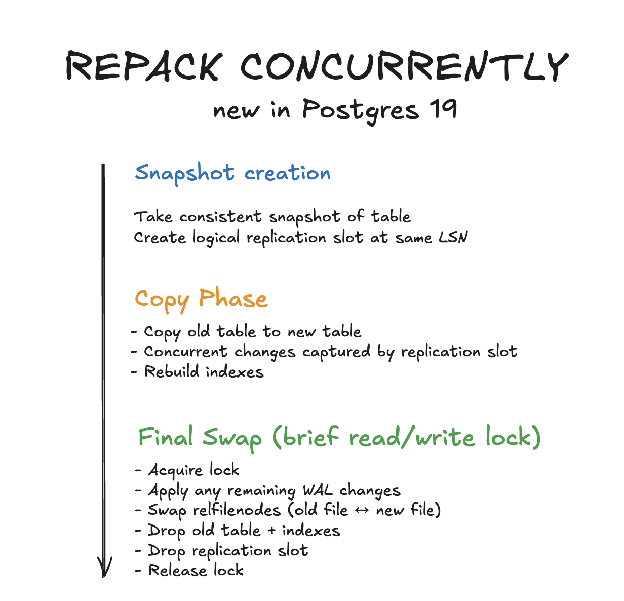
REPACK (CONCURRENTLY, VERBOSE, ANALYZE) repack_test;INFO: repacking "public.repack_test" in physical order
INFO: "public.repack_test": found 0 removable, 1000000 nonremovable
row versions in 38452 pages
Time: 9406.788 ms (00:09.407)
Before: 493 MB → After: 228 MB (54% reduction)Three options in play here:
- CONCURRENTLY: Rebuilds online, with only a brief exclusive lock at the very end for the file swap.
- VERBOSE: Prints progress at INFO level.
- ANALYZE: Runs ANALYZE after the repack completes to update planner statistics.
REPACK with USING INDEX
REPACK can also physically reorder your table's rows to match an index. If your workload frequently reads ranges of related rows, clustering with USING INDEX may improve locality. Measure the effect on your own queries; later updates are not automatically clustered.
This is a big deal for the REPACK feature beyond just bloat removal. It's a performance feature in its own right. For example, say you have an orders table and frequently query WHERE created_at BETWEEN '2026-01-01' AND '2026-01-31'. Without physical ordering, those rows could be scattered across hundreds of pages. With REPACK orders USING INDEX idx_orders_created_at, the rows are stored sequentially on disk in date order, so a range scan reads pages in sequence instead of random I/O across the whole table.
You might know CLUSTER from older Postgres versions. It did the same thing, but took a lock.
REPACK (VERBOSE, ANALYZE) product_inventory USING INDEX idx_product_category;INFO: repacking "public.product_inventory" using index scan
on "idx_product_category"
Time: 15230.264 ms (00:15.230)
Before: 618 MB → After: 320 MB (48% reduction, rows now ordered by category)REPACK vs. VACUUM FULL sample performance
I did some testing just to verify how this works. For the 493 MB test case with 1M live rows remaining after deleting 1M of the original 2M rows, the reported timings were:
| Method | Time | Result | Table Accessible? |
|---|---|---|---|
| VACUUM FULL | 2.7s | 228 MB | No (locked entire time) |
| REPACK | 5.9s | 228 MB | No (locked entire time) |
| REPACK (CONCURRENTLY) | 9.4s | 228 MB | Yes (brief lock at end only) |
In one test on a constrained system, REPACK (CONCURRENTLY) took 9.4 seconds for the stated table and test conditions. Results vary with table, indexes, workload, and hardware.
REPACK CONCURRENTLY is slower in wall-clock time. It's doing more work: logical decoding and WAL replay on top of the table rebuild. The tradeoff here is more time to keep your table online.
Requirements for REPACK CONCURRENTLY
- You need 2x the space for the table and indexes you are repacking, since for a period, you will have two copies of it.
- The table must be logged with WAL, cannot be UNLOGGED.
- The table cannot be partitioned.
- The table must have an indexable primary key.
- The table cannot be a system catalog or TOAST table.
- Only one concurrent REPACK can run per database at a time.
- Tables using non-heap access methods are not supported.
A note on MVCC safety: REPACK CONCURRENTLY is not fully MVCC-safe. During the brief final swap, a long-running transaction could theoretically miss concurrent changes. A concurrent transaction using a snapshot taken before repacking began can see the table as empty. This is the same limitation pg_repack had, and it's documented in the Postgres 19 release notes. Review this behavior against your workload’s transaction and consistency requirements.
When to use REPACK vs. VACUUM
Regular VACUUM and REPACK solve different problems:
| Situation | Use | Why |
|---|---|---|
| Routine maintenance | VACUUM (autovacuum) | Marks dead tuples reusable, updates visibility map. Fast, no lock, runs automatically. |
| Some bloat, may be growing faster than autovacuum clears dead rows | Tune autovacuum settings | Adjust autovacuum_vacuum_scale_factor for large/busy tables. Also worth trying the parallel vacuum features in Postgres 19. |
| Table has high bloat AND you need disk space back | REPACK (CONCURRENTLY) | Rewrites the table, returns space to OS, table stays online |
| Table has high bloat AND you have a maintenance window | REPACK or VACUUM FULL | Faster than REPACK CONCURRENTLY, but locks the table |
| Range queries are slow on a column that has an index | REPACK CONCURRENTLY ... USING INDEX | Physically reorders rows for better sequential access patterns |
| Index is bloated but table is fine | REINDEX CONCURRENTLY | Rebuilds just the index without touching the table |
The rule of thumb: autovacuum handles day-to-day maintenance. REPACK is for when you need to reclaim space back to the OS or physically reorder data, —hings that regular VACUUM fundamentally cannot do.
Estimating how long REPACK will take
REPACK time scales with table size, index count and available I/O. A rough model:
REPACK time ≈ (time to read entire table) + (time to write new copy) + (time to rebuild all indexes)You can estimate this before running REPACK:
-- How large is the table + indexes that need to be rewritten?
SELECT
    pg_size_pretty(pg_relation_size(relid)) AS table_data,
    pg_size_pretty(pg_indexes_size(relid)) AS all_indexes,
    pg_size_pretty(pg_total_relation_size(relid)) AS total,
    n_live_tup AS rows_to_copy
FROM pg_stat_user_tables
WHERE relname = 'my_table';
From my tests on a constrained system (1 CPU, 512 MB, 4 MB maintenance_work_mem):
| Table Size (before) | Live Rows | Time (REPACK) | Time (CONCURRENTLY) |
|---|---|---|---|
| 493 MB | 1M | 5.9s | 9.4s |
| 839 MB | 2M | 7.5s | ~12s (estimated) |
| 1,252 MB | 1.7M | 17.2s | ~27s (estimated) |
The CONCURRENTLY overhead is roughly 1.5x to 2x the basic REPACK time, because it has to set up logical decoding and replay any concurrent changes. On a real production server with fast NVMe and more CPUs, these times would be significantly lower, but the ratio holds.
For very large tables (100+ GB), expect REPACK to take minutes to tens of minutes. Plan accordingly, and use pg_stat_progress_repack to monitor.
Monitoring REPACK progress
While REPACK is running, query pg_stat_progress_repack from another session:
SELECT
    pid,
    datname,
    relid::regclass AS table_name,
    command,
    phase,
    heap_tuples_scanned,
    heap_tuples_inserted,
    heap_blks_total,
    heap_blks_scanned,
    index_rebuild_count
FROM pg_stat_progress_repack;
The phases you'll see progress through:
| Phase | What's Happening |
|---|---|
| initializing | Preparing to scan |
| seq scanning heap | Reading the old table sequentially |
| index scanning heap | Reading via index |
| sorting tuples | Sorting rows by index order |
| writing new heap | Writing compacted rows to new file |
| catch-up | Replaying concurrent DML (CONCURRENTLY only) |
| swapping relation files | Brief lock, swapping old/new files |
| rebuilding index | Rebuilding each index on the new heap |
| performing final cleanup | Done, cleaning up |
You can estimate percent complete during the scan phase:
SELECT
    phase,
    heap_blks_scanned,
    heap_blks_total,
    CASE WHEN heap_blks_total > 0
         THEN round(100.0 * heap_blks_scanned / heap_blks_total, 1)
    END AS pct_complete
FROM pg_stat_progress_repack;
REPACK CONCURRENTLY is the most significant DBA-facing feature in Postgres 19. It brings online table rebuilds into core, eliminates the need for pg_repack, in most cases, and gives you a cleaner interface than the VACUUM FULL / CLUSTER split that's existed forever. If you manage tables with significant bloat in production, this is your upgrade reason.
Postgres 19 currently has a first release candidate (RC1) with an expected RC2 Nov 12 and GA expected later in November/December 2026. If you want to try REPACK today, spin up a beta instance and see how it performs on your most bloated tables.
