Aug 5, 2026/8 min readData Engineering
Bring Your Customer-Hosted Python Repository to Snowflake


Enterprise Python teams often rely on approved package repositories to manage which packages can be used in production. These repositories help teams screen packages, manage vulnerabilities, enforce internal policies, and give developers a trusted way to install the libraries they need.
As more teams build Python workloads in Snowflake, they want those workloads to use the same package process they already trust. Customer-hosted Python Artifact Repository (currently in Public Preview) helps make that possible by allowing Snowflake to connect to your Python package repository and use it as a package source for supported Snowflake Python workloads.
In this post, we'll walk through how the feature works: how Snowflake connects to your repository, how admins register that repository in Snowflake, how developers use it in Python workloads, and how teams can roll it out more broadly with default repository settings.
Connect Snowflake to your repository
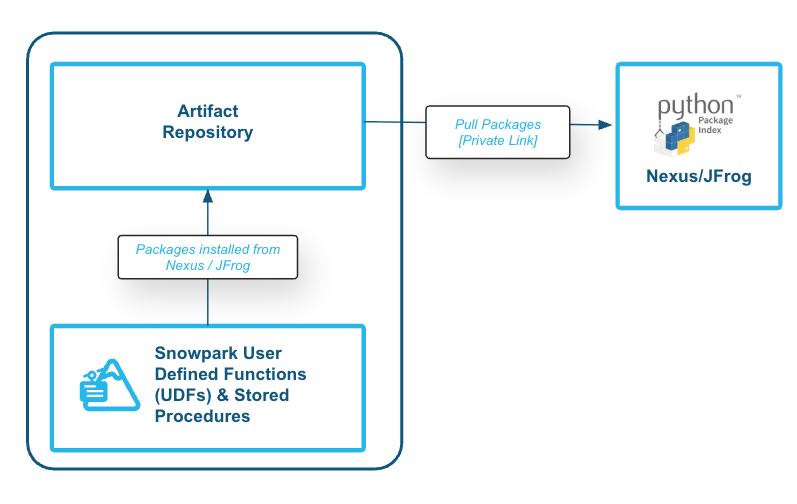
The first step is choosing how Snowflake should reach your Python repository. Different customers have different network requirements, so Snowflake supports both public HTTPS access and PrivateLink-based private connectivity.
The right connectivity option depends on where your repository runs and how your security team controls inbound access.
- Use public HTTPS when your repository can be reached over the internet and your security model allows Snowflake to connect to it directly, optionally with IP allow-listing.
- Use PrivateLink when package traffic should stay on a private network path, or when your organization already requires private connectivity for enterprise services.
Public HTTPS access
For repositories that are reachable over the public internet, public HTTPS is often the simplest place to start. Snowflake connects to the repository endpoint, authenticates with the configured secret, and resolves packages from the repository.
Some customers also restrict inbound access to their repository by IP address. In those environments, admins can allow traffic from Snowflake by adding Snowflake egress IP ranges to the repository firewall or allow-list, where supported. This gives customers a straightforward way to keep the repository protected while still allowing Snowflake to reach it.
PrivateLink access
For enterprise deployments with stricter network requirements, PrivateLink is designed to provide a private connectivity path between Snowflake and your repository. This is useful when customers want package access to follow the same private network model they use for other enterprise systems.
PrivateLink requires customers to have Snowflake Business Critical edition, as well as cloud-provider alignment, private endpoint provisioning, and a valid certificate for the repository domain. The detailed setup steps are covered in the product documentation.
PrivateLink setup depends on where the repository runs.
If the repository is hosted in the customer's cloud environment, such as inside a VPC or VNet, Snowflake can connect through a private endpoint to the customer's PrivateLink service and route HTTPS traffic to the repository.

If the repository is outside the cloud network, such as an on-premises repository or a repository hosted in another network, customers can use a proxy pattern. In this model, Snowflake connects privately to the customer's cloud infrastructure, and a proxy such as nginx redirects HTTPS traffic from that private endpoint to the repository server.
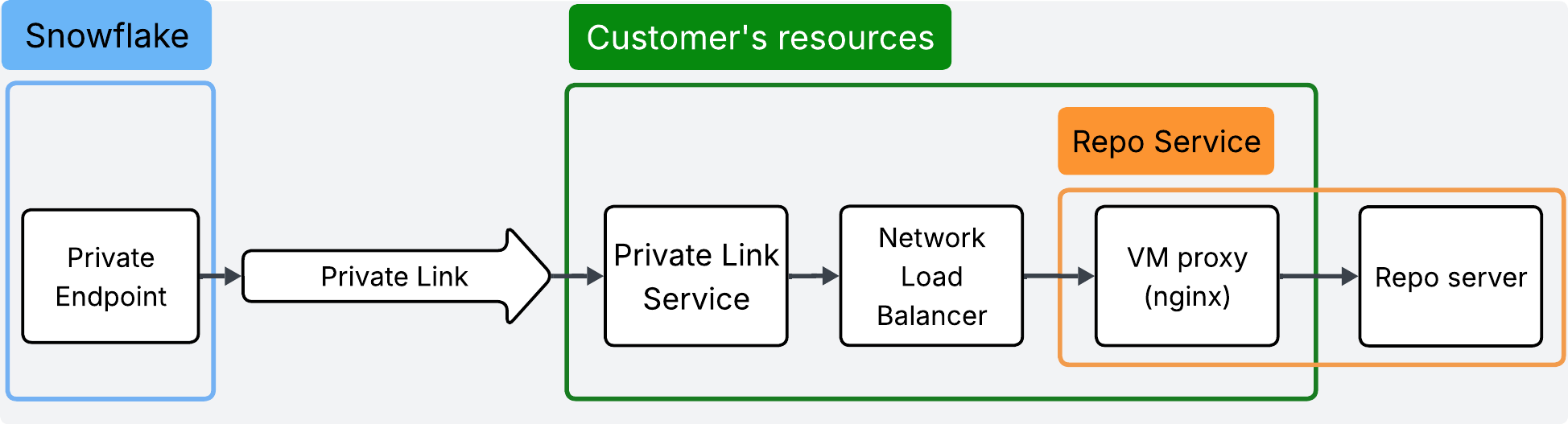
The developer experience is the same across these network models. Developers still declare the packages their Python workloads need, and Snowflake resolves those packages from the configured repository. The main difference is how Snowflake reaches the repository: public HTTPS, public HTTPS with egress IP allow-listing, or PrivateLink through the customer's private infrastructure.
Snowflake object model
After the network path is ready, admins register the repository in Snowflake using three objects:
- A secret stores the credentials Snowflake uses to authenticate to the repository.
- An API integration defines the repository endpoints Snowflake is allowed to reach and the authentication secret it can use.
- An artifact repository object ties together the API integration, the repository index URL, and the associated secret.
Together, these objects make the package source reusable. Admins configure the connection once, and developers can use the registered repository from Python workloads without embedding repository credentials or connection details in their code.
First, create a secret to store the repository credentials.
CREATE OR REPLACE SECRET python_repo_secret
  TYPE = PASSWORD
  USERNAME = '<username>'
  PASSWORD = '<password>';
Next, create an API integration. This tells Snowflake which repository endpoints it can access and which secret it can use for authentication.
CREATE OR REPLACE API INTEGRATION python_repo_integration
API_PROVIDER = ARTIFACT_REPOSITORY_API
API_ALLOWED_PREFIXES = ( 'https://customer.repo.example.com', 'https://backing-storage.example.com' )
ALLOWED_AUTHENTICATION_SECRETS = (python_repo_secret)
ENABLED = TRUE;
For a PrivateLink-based setup, the API integration can include the PrivateLink configuration as part of the connection path.
CREATE OR REPLACE API INTEGRATION python_repo_integration
API_PROVIDER = ARTIFACT_REPOSITORY_API
API_ALLOWED_PREFIXES = ( 'https://customer.repo.example.com', 'https://backing-storage.example.com' )
ALLOWED_AUTHENTICATION_SECRETS = (python_repo_secret)
USE_PRIVATELINK_ENDPOINT = TRUE
ENABLED = TRUE;
Finally, create the artifact repository object. This object ties together the API integration, authentication secret, and package index URL.
CREATE OR REPLACE ARTIFACT REPOSITORY python_repo
  TYPE = PYPI
  API_INTEGRATION = python_repo_integration
  AUTHENTICATION_SECRET = python_repo_secret
  INDEX_URL = 'https://customer.repo.example.com/repository/python/simple/';
At this point, the repository is available as a Snowflake object. Python workloads can reference it directly, and admins can reuse the same repository configuration across teams and projects.
Use approved packages in Python UDFs and stored procedures
Once the repository is registered, developers can use packages from that repository in Python workloads.
The following example creates a Python UDF that uses the phonenumbers package. The function normalizes a phone number into E.164 format. The package itself is resolved from the repository configured in Snowflake.
CREATE OR REPLACE FUNCTION normalize_phone_number(raw_number STRING, region STRING)
RETURNS STRING
LANGUAGE PYTHON
RUNTIME_VERSION = '3.13'
ARTIFACT_REPOSITORY = python_repo
PACKAGES = ('phonenumbers==8.13.40')
HANDLER = 'normalize_phone_number'
AS $$
import phonenumbers

def normalize_phone_number(raw_number, region):
   parsed = phonenumbers.parse(raw_number, region)
   return phonenumbers.format_number(
       parsed,
       phonenumbers.PhoneNumberFormat.E164
   )
$$;
The function can then be called like any other Snowflake UDF.
SELECT normalize_phone_number('(415) 555-2671', 'US');The important point is that the developer experience stays familiar. Developers still write Python, declare the packages their workload needs, and run the workload in Snowflake. The difference is that package resolution now goes through the customer's approved package source.
The same pattern also applies to Python stored procedures. Platform teams can manage the package source centrally, while developers use approved packages to build production workflows in Snowflake.
Keep workloads running with package retention
For production workloads, package availability matters after deployment too. A repository may change over time. A package version may be removed. A network issue may temporarily prevent Snowflake from reaching the repository.
Package retention helps make Python UDFs and stored procedures more resilient to those changes. When a function or procedure is created with packages from the registered repository, Snowflake can retain the exact package files in Snowflake-managed storage. After packages are retained, later executions can use the retained copy instead of fetching the package from the upstream repository at runtime.
Admins can control when packages are retained with the PACKAGE_RETENTION setting on the artifact repository object. By default, packages are retained asynchronously after a function or procedure is created. For stricter rollout requirements, admins can use PACKAGE_RETENTION = ON_OBJECT_CREATION so package retention must complete before the function or procedure creation succeeds.
CREATE OR REPLACE ARTIFACT REPOSITORY python_repo
  TYPE = PYPI
  API_INTEGRATION = python_repo_integration
  AUTHENTICATION_SECRET = python_repo_secret
  INDEX_URL = 'https://customer.repo.example.com/repository/python/simple/'
  PACKAGE_RETENTION = ON_OBJECT_CREATION;
You can also enable this behavior on an existing repository.
ALTER ARTIFACT REPOSITORY python_repo
  SET PACKAGE_RETENTION = ON_OBJECT_CREATION;
Package retention protects execution, not creation. When a new function or procedure is created or replaced, Snowflake still needs to resolve packages from the upstream repository. After the packages are retained, subsequent executions can use the retained copy.
Use the repository in Snowflake Notebooks
This feature is also useful during interactive development. Data scientists, data engineers, and application developers often use notebooks to validate package availability, test code, and iterate before moving logic into production workloads.
With customer-hosted Python artifact repositories, teams can bring the same approved package source into Snowflake Notebooks by picking the artifact repository object from the Artifact repositories dropdown list when creating a Notebook service.
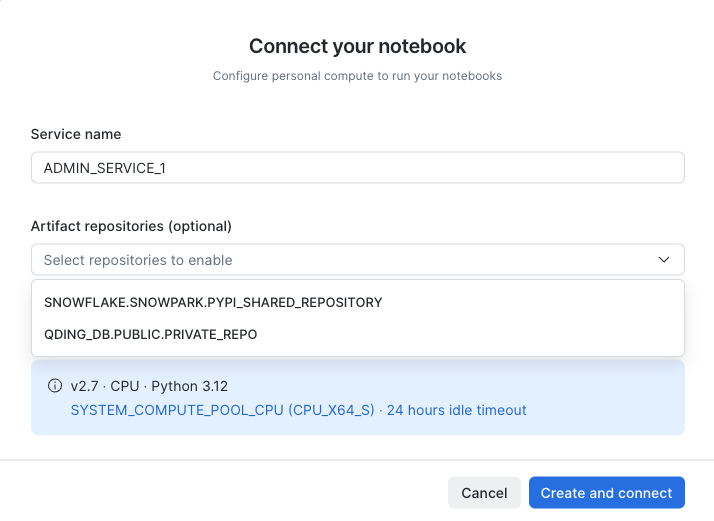
Then a notebook user can install an approved package as part of the normal development flow:
!pip install phonenumbersMake the repository the default package source
Referencing a repository directly is useful when teams are validating a setup or when a workload needs to use a specific repository. Over time, many customers want a simpler rollout model. They want Snowflake Python workloads to use the approved repository by default, without requiring every developer to specify it manually.
Default Python artifact repository settings help with that rollout. Admins can define a default repository at the account, database, or schema level.
For example, an admin can set a default repository at the account level:
ALTER ACCOUNT SET DEFAULT_PYTHON_ARTIFACT_REPOSITORY = python_repo;After a default repository is configured, workload definitions can become simpler. A developer can declare the packages the function needs, and Snowflake resolves those packages from the configured default repository.
CREATE OR REPLACE FUNCTION normalize_phone_number(raw_number STRING, region STRING)
RETURNS STRING
LANGUAGE PYTHON
RUNTIME_VERSION = '3.13'
PACKAGES = ('phonenumbers==8.13.40')
HANDLER = 'normalize_phone_number'
AS
$$
import phonenumbers

def normalize_phone_number(raw_number, region):
    parsed = phonenumbers.parse(raw_number, region)
    return phonenumbers.format_number(
        parsed,
        phonenumbers.PhoneNumberFormat.E164
    )
$$;
This makes the feature easier to roll out across teams. Platform teams can configure the approved package source once, and developers can use packages from that source without adding repository configuration to every function or procedure, providing engineering teams a more consistent package experience across Snowflake Python development.
Note on package policy
When using a customer-hosted Python artifact repository, package governance should be enforced in the customer-hosted repository itself. This includes package approval, vulnerability scanning, quarantine rules, allow lists, deny lists, and other controls that customers already use to manage their Python packages. Because of that, Snowflake package policy does not apply to packages resolved from customer-hosted repositories.
Get started
Customer-hosted Python artifact repositories help enterprise teams bring their approved Python package process into Snowflake. Teams can connect Snowflake to their repository, register it as an artifact repository object, use approved packages in Python workloads, and simplify adoption with default repository settings.
For detailed setup steps, network configuration guidance, and troubleshooting, see the customer-hosted Python artifact repository documentation and the quickstart.
