
Sep 4, 2026/10 min readCore Platform
Transforming Customer Support Operations with Snowflake Cortex AI Functions

Customer support is one of the most direct relationships a company has with its customers. Every ticket, whether it arrives by email, web form, or phone, is both an interface to the customer relationship and a valuable signal about the product. The support organization works to understand each ticket, prioritize it, and route it to the right place quickly, while turning the whole stream into insight the business can act on.
Doing that well at scale is where traditional tooling shows its limits. Rules-based routing breaks on natural language, typos, and phrasing it has not seen before. A custom machine learning pipeline requires moving data to an external service, managing infrastructure, and waiting on a data science team. Both approaches add latency and operational overhead before they deliver value, and that overhead is why so much triage still falls back to manual review.
Snowflake Cortex AI Functions take a different path. They bring large language models to the data as SQL functions, classifying issues, scoring sentiment, and generating recommended actions directly on the support tickets already stored in Snowflake. The data does not leave Snowflake; there is no external API to manage, and there is no separate model to train and host. This post walks through a support analytics pipeline built entirely from AI Functions, and the operational decisions it produces.
The tech stack
The architecture here is deliberately minimal. Everything lives inside Snowflake. Three functions do the heavy lifting:
AI_CLASSIFY takes a text string and a list of your own category labels, and routes the ticket. You define the taxonomy; Snowflake's LLM does the matching. Unlike rules-based regex classifiers, this handles natural language variation, typos, and ambiguous phrasing without any training data.
AI_TRANSCRIBE converts a phone call audio file stored in a Snowflake stage into text. This is the piece that makes a fully-automated support pipeline possible: voice tickets get the same AI treatment as written ones. The audio never leaves Snowflake's infrastructure; the transcription runs inside the platform.
AI_COMPLETE is the general-purpose LLM call. We use this for two jobs: scoring sentiment on a continuous numeric scale (something AI_SENTIMENT's categorical output isn't designed for) and generating the recommended operational action per ticket category.
Dynamic Tables, a declarative pipeline that automatically refreshes downstream enrichment as new tickets arrive, orchestrate everything. The results surface in a Streamlit in Snowflake dashboard. No external deployment required.
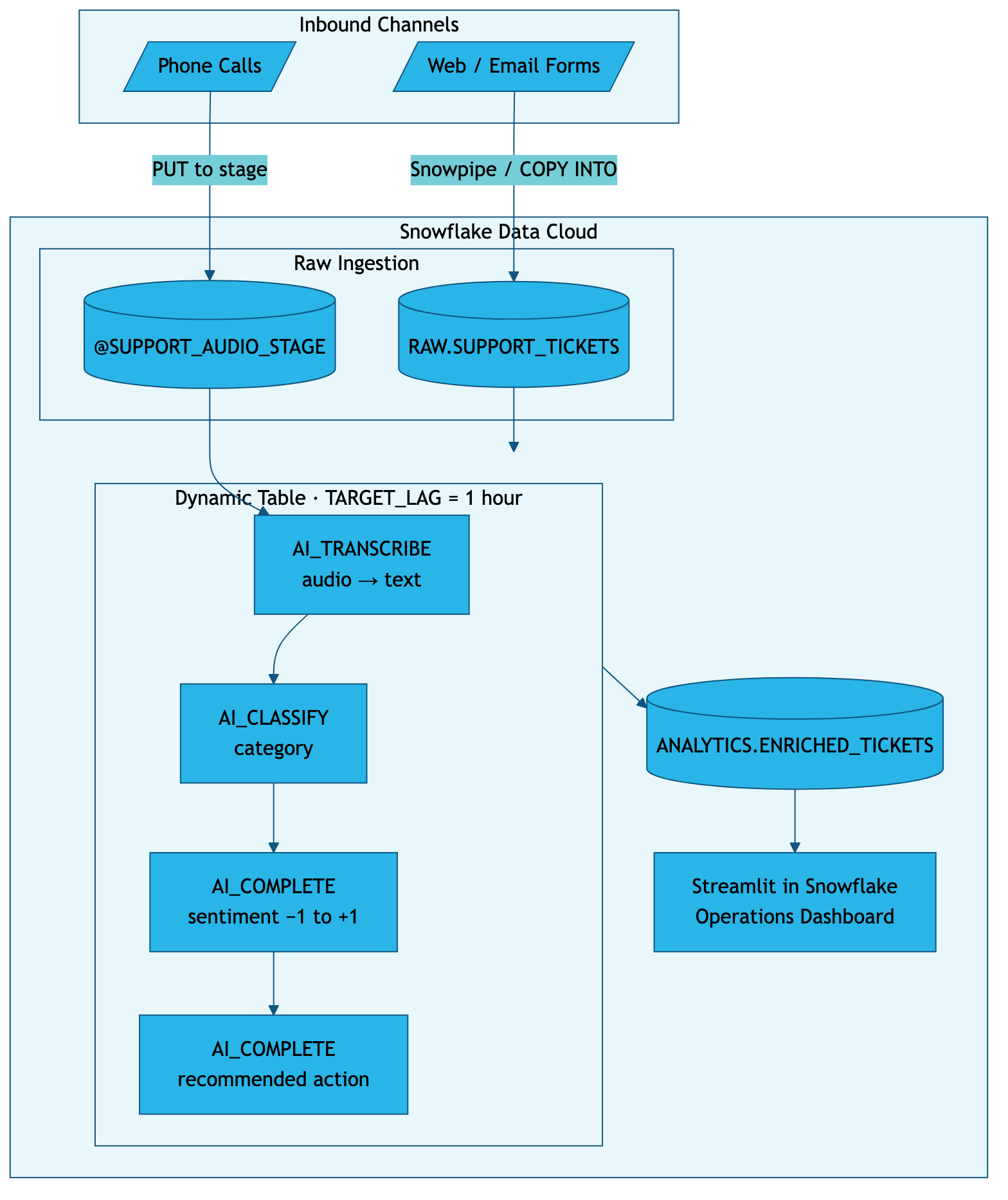
The entire stack runs inside your Snowflake account: no data leaves, no infrastructure to operate.
Step-by-step walkthrough
Step 1: Ingest inbound tickets
All channels converge into a single table. Text tickets (email, web form) land directly; phone recordings go to an internal stage. In our case the schema is minimal — a ticket ID, the channel it came from, the raw text (or a path to the audio file) and a timestamp. From here, every ticket follows the same enrichment path regardless of how it arrived.
Step 2: Transcribe phone calls
Phone recordings are converted to text automatically using AI_TRANSCRIBE. The audio stays within Snowflake — no external transcription service, no data movement. Once transcribed, a phone call looks exactly like an email ticket to the rest of the pipeline: just text ready to be classified and scored.
Step 3: Classify the issue
AI_CLASSIFY takes the ticket text and a list of your category labels, and routes the ticket. You define the taxonomy; the LLM does the matching. No training data, no regex rules, no maintenance when customers phrase things differently.
When a customer writes "I keep getting kicked out of the API and my integration has been broken since Tuesday," AI_CLASSIFY routes it to System Bug: API Timeout even though none of those exact words appear in the category label. That tolerance to natural language variation is what makes it a replacement for rules-based routing, not just an alternative.
Step 4: Score sentiment (numerically)
Snowflake gives you a few ways to measure sentiment, and the right one depends on what you want to do with the result. AI_SENTIMENT returns categorical labels (positive, negative, neutral, mixed, or unknown), a great fit for filtering and grouping tickets by sentiment. SENTIMENT returns a ready-made numeric score from -1 to 1 with no prompt to write. And AI_COMPLETE lets you define your own scale when you want full control over how sentiment is measured. To say "API timeout tickets are twice as frustrated as billing tickets," you need a number.
For this pipeline we use AI_COMPLETE: we prompt for a score from -1.0 (extremely frustrated) to +1.0 (satisfied) to get a custom intensity scale tuned to support triage. We ask the model to return only a decimal, with no explanation and no hedging. This gives you a continuous metric you can average across categories, chart over time, and use to trigger escalation thresholds.
Model choice note: claude-sonnet-5 handles structured numeric extraction reliably at a lower cost than the top-tier model. For very high ticket volumes, claude-haiku-4-5 steps down further. We'll revisit model selection in the Best Practices section.
Step 5: Generate recommended actions
The final enrichment step asks AI_COMPLETE to act as a support operations manager. Given the category and sentiment score, it generates a concrete operational recommendation: which team should be alerted, what process should change, or what product fix would reduce ticket volume. This is the step where model quality matters most, so we use claude-opus-5: the recommendation is what a human operator acts on, and a vague suggestion erodes trust in the whole pipeline.
The prompt is specific by design — it asks for one action in one to two sentences, naming the team or workflow. This produces recommendations that are actionable starting points for a human operator, not vague summaries.
Step 6: Tie it together with a Dynamic Table
The enrichment steps above (transcribe, classify, score, recommend) collapse into a single SQL object: a Dynamic Table that reads from the raw tickets table. No scheduler, no Airflow DAG, no cron job. When a new ticket lands in the raw table, Snowflake automatically re-runs the enrichment pipeline within the target lag you set (here, one hour). The pipeline is structured as layered CTEs for readability — one layer per enrichment step — making it easy to debug and extend.
Results — Operations dashboard
The enriched table feeds directly into a Streamlit in Snowflake app. No external BI tool, no data export, no deployment pipeline. The dashboard queries the Dynamic Table and renders KPIs, a category breakdown and a sentiment trend chart — all refreshing as new tickets are processed.
What the operations team sees:
| Issue Category | Avg. Sentiment | Volume | Sample Recommendation |
|---|---|---|---|
| System Bug: API Timeout | -0.85 (Frustrated) | 1,240 | Escalate to L2 Engineering; auto-post to status page. |
| Account Access: SSO | -0.60 (Stressed) | 890 | Revamp password reset flow; propose one-click widget. |
| Billing: Prorated Upgrades | -0.20 (Annoyed) | 450 | Draft standardized billing explanation macro for L1 agents. |
| Feature Request | +0.70 (Positive) | 3,100 | Tag in Product Board; low support priority, high product value. |
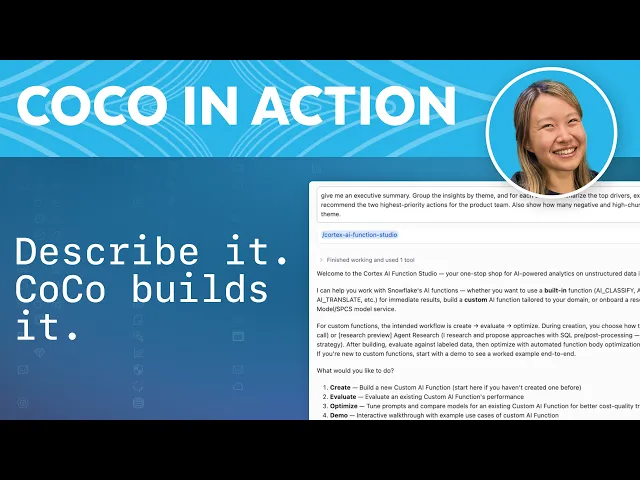
Everything above was built step by step in SQL, which gives you full control over the taxonomy, prompts, and pipeline. If you would like to build the pipeline from simple natural language, just ask Snowflake CoCo. In the video below, we walk through an example to build an agentic data pipeline using natural language. You can describe your tickets and the enrichment you need in plain language, and CoCo assembles the AI Functions and wires up the Dynamic Table. You review and refine the generated SQL instead of authoring it from scratch, shortening the path from idea to a working pipeline.
Best practices
Data privacy and AI_TRANSCRIBE
Phone call transcription is the highest-risk step in this pipeline. Before deploying, confirm that your call recording consent language covers AI transcription, and have a human-in-the-loop decide whether raw audio should be deleted from the stage after processing. Because AI_TRANSCRIBE processes the file inside Snowflake's infrastructure, the audio itself never reaches a third-party API, but the resulting transcript will contain whatever was said on the call, including customer PII.
Handling PII in tickets
Email and web form tickets routinely contain names, email addresses, account numbers and in some cases payment data. Recommended approach:
- Classify and score before redacting. AI functions need full context to classify correctly, so run enrichment on the raw text in a private schema.
- Redact before surfacing to the dashboard. Apply AI_REDACT, Snowflake's managed PII redaction function, when writing to the analytics layer that the Streamlit app reads.
- Apply column-level masking policies using Snowflake Dynamic Data Masking to restrict who can see raw ticket text based on role.
Human-in-the-loop fallbacks
No classifier is perfect. Build an escape hatch into the pipeline from day one:
- Add a confidence_flag column: if AI_CLASSIFY returns a low-confidence match (you can prompt AI_COMPLETE to return a score alongside the label), route that ticket to a human review queue instead of automated action.
- Treat AI-generated recommended actions as suggestions, not triggers. The dashboard surfaces recommendations; a human approves escalations.
- Audit a random 5% sample weekly. Tracking classification accuracy against human labels gives you the data to evaluate and optimize your prompts over time.
Cost optimization
Match the model to the task. Recommended actions are reasoning-heavy and operator-facing, so we use claude-opus-5, and the quality shows up in recommendations your team actually acts on. Numeric sentiment scoring is structured extraction that claude-sonnet-5 handles reliably at lower cost, and claude-haiku-4-5 steps down further for the simplest, highest-volume work.
| Task | Recommended Model | Reason |
|---|---|---|
| Classification | AI_CLASSIFY (no model param) | Optimized internally by Snowflake |
| Sentiment scoring (numeric) | claude-sonnet-5 | Reliable structured numeric output at lower cost than the top-tier model |
| Recommended actions | claude-sonnet-5 | Reasoning-heavy and operator-facing; recommendation quality compounds across the pipeline |
| Simpler / very high-volume tasks | claude-haiku-4-5 | Step down when the task is straightforward and volume makes cost the priority |
Compare candidate models systematically before you commit: run each on your labeled test set and measure accuracy against cost.
Evaluating quality
Before putting AI recommendations in front of your operations team:
- Build a labeled test set: export 50–100 tickets and have human agents categorize and score them. This is your ground truth.
- Measure classification accuracy by comparing AI_CLASSIFY output against human labels. Many teams target 85%+ accuracy as a production bar for support routing.
- Review sentiment correlation: spot-check that tickets your team would call "frustrated" score below -0.5. Outliers usually mean the prompt needs tightening.
- Re-evaluate after every prompt change before deploying. Use the labeled test set as a regression check.
Give it a try
Manual triage is a tax on your support team. Every minute an L1 agent spends reading a ticket to figure out what it is and how upset the customer sounds is a minute not spent resolving it. The pipeline described here (classify, transcribe, score, recommend) runs that analysis automatically for every ticket, in the same platform where your data already lives.
The business impact is direct: faster routing means lower time-to-resolution. Sentiment scoring at scale surfaces the ticket categories that are eroding customer satisfaction before they show up in your NPS. AI-generated operational recommendations give your team a starting point instead of a blank page.
Try it yourself here. The full hands-on quickstart walks you through setting up this pipeline in about 30 minutes, including sample audio files, a Dynamic Table, and a Streamlit dashboard. Everything runs in a Snowflake trial account with no external dependencies.
Or, if you want a quick taste first, paste this into a SQL worksheet — it generates 50 synthetic tickets, classifies them, and scores sentiment in a single query:
-- Generate, classify, and score 50 tickets in one shot
WITH fake_tickets AS (
  SELECT SEQ4() AS ticket_id,
    AI_COMPLETE('claude-sonnet-5',
      'Write a one-paragraph support ticket for a SaaS product. ' ||
      'Example ' || SEQ4()::VARCHAR || '. Vary topic and tone. Return only the text.'
    )::VARCHAR AS ticket_text
  FROM TABLE(GENERATOR(ROWCOUNT => 50))
)
SELECT ticket_id, ticket_text,
  AI_CLASSIFY(ticket_text, ['System Bug: API Timeout', 'Account Access: SSO',
    'Billing: Prorated Upgrades', 'Feature Request', 'General Inquiry']):labels[0]::VARCHAR AS category,
  TRY_TO_DOUBLE(AI_COMPLETE('claude-sonnet-5',
    CONCAT('Rate sentiment -1.0 to +1.0. Return only a number. Ticket: ', ticket_text))::VARCHAR) AS sentiment
FROM fake_tickets;
That query runs in seconds. Manual triage of the same tickets would take an agent the better part of an hour, and the pattern scales to every ticket you receive.
