Apr 17, 2026/6 min readMachine Learning
LLM Serving Made Easy: High-Throughput Inference with vLLM


Generative AI is transforming how organizations extract value from their data. They're GPU-hungry, generate variable-length responses, and require specialized engines to serve efficiently. However, customers consistently tell us that deploying, managing and scaling large language models (LLMs) in production introduces significant friction. Builders want the flexibility to use state-of-the-art open source models, but they want to avoid the undifferentiated heavy lifting of managing GPU infrastructure, optimizing complex inference engines and securing data perimeters.
Snowflake offers Cortex AI for managed access to frontier models. Model Serving from Snowflake ML is for teams that want to bring their own models — fine-tuned, domain-specific or open source — with full control over the serving infrastructure, model weights and inference parameters. We are excited to share how we have expanded Snowflake Model Serving from the Model Registry to natively support all of these cases. Now builders can securely deploy and scale generative AI applications using the exact same intuitive APIs they already use for traditional machine learning models, all while achieving industry-leading price-performance and strict data governance. In this blog, we show you how we architected Model Serving so that our customers can consistently take advantage of a 2.2x–2.3x P99 latency and TTFT on average in Snowflake over competing managed inference products.
Eliminating the heavy lifting of LLM inference
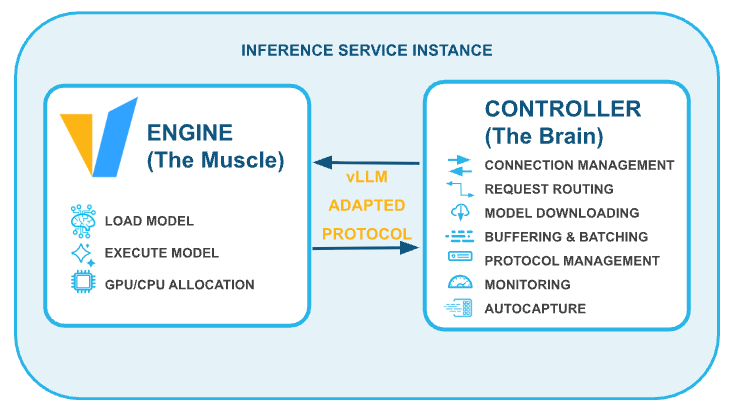
In previous posts (architecture, scaling real-time inference), we explored how Snowflake Model Serving turns logged models into highly scalable inference services. However, LLMs introduce unique bottlenecks. They are GPU-hungry, requiring massive matrix multiplication operations, and their autoregressive nature produces large, dynamic responses that complicate memory management and latency.
To help solve this for our customers, we continue to double down on vLLM, a high-throughput, memory-efficient inference engine. By leveraging vLLM's PagedAttention and continuous batching capabilities, Snowflake Model Serving dynamically manages GPU memory, allowing builders to optimize throughput and support streaming outputs without sacrificing performance.
Key features for builders
We built Snowflake Model Serving with the developer experience in mind, enabling you to go from prototype to production with minimal friction.
- Familiar, standardized APIs: We know builders don't want to rewrite their application logic. That's why Snowflake Model Serving exposes LLMs via the standard OpenAI protocol, including support for multimodal input specified inline with
base64encoding. Whether you are building in SQL, Python or calling a REST API, you can interface with your hosted models seamlessly.
Python example (OpenAI API):
from openai import OpenAI
from snowflake.ml.registry import Registry

reg = Registry(session=session)

mv = reg.get_model("QWEN3_4B").version("V1")
ENDPOINT = mv.list_services()["inference_endpoint"].iloc[0]
client = OpenAI(
    base_url=f"https://{ENDPOINT}/v1",
    api_key="unused",  # sometimes required but ignored
    default_headers={"Authorization": f'Snowflake Token="{SNOWFLAKE_PAT_TOKEN}"'},
)

response = client.chat.completions.create(
    model="QWEN3_4B",
    messages=[
        {
            "role": "user",
            "content": [
                {"type": "text", "text": "Explain vector databases in one sentence."},
            ],
        },
    ],
)

print(response.choices[0].message.content)
SQL example:
SELECT
    QWEN3_4B_SERVICE!__CALL__(
        [
            {
                'role': 'user',
                'content': [
                 {
                    'type': 'text',
                    'text': 'Summarize following support ticket: ' || ticket_text
                 }
               ]
            }
        ]
    ) AS response
FROM support_tickets
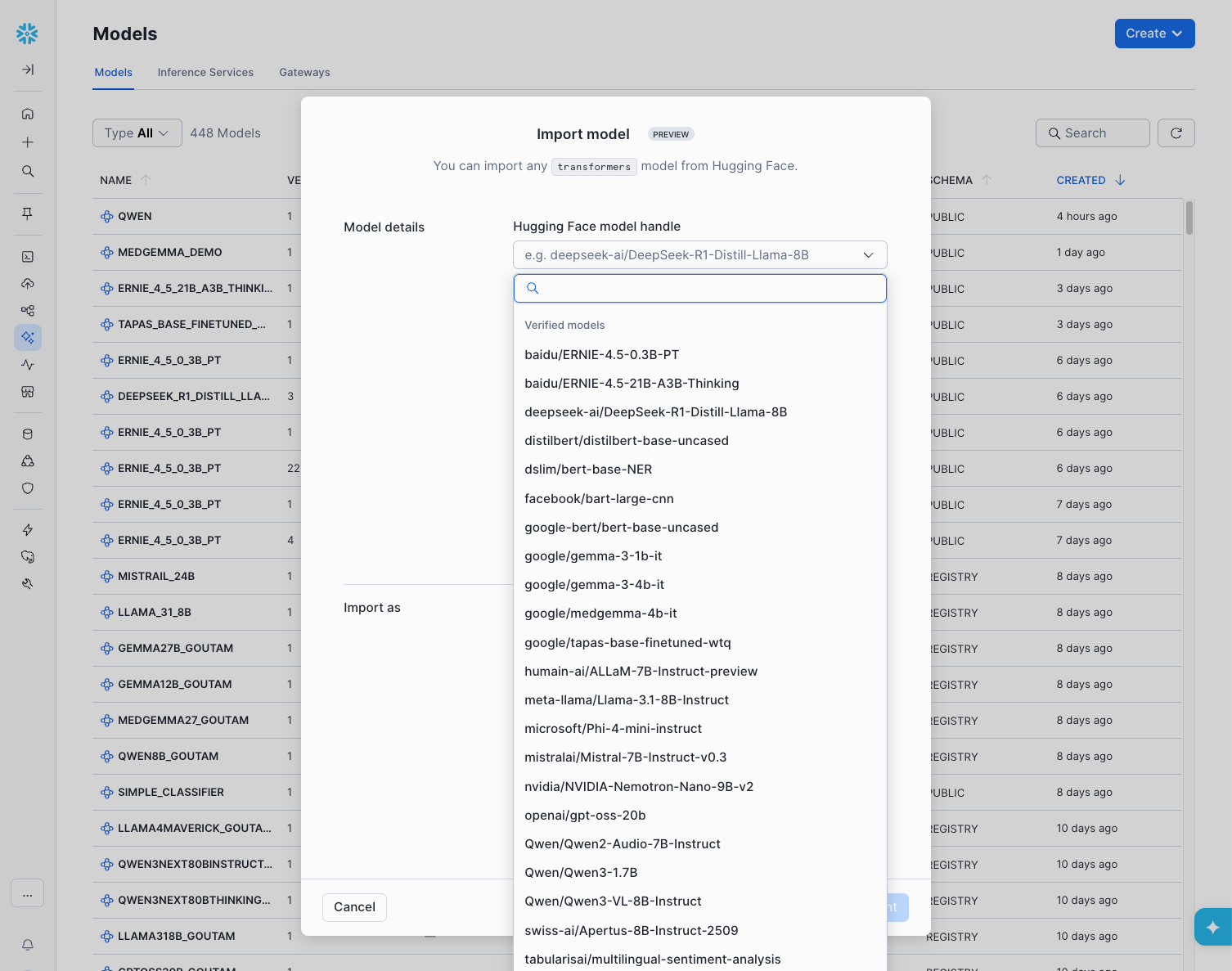
WHERE status = 'OPEN';- One-click model onboarding and remote logging: Customers can now import models directly from Hugging Face with a single click via our curated Model Garden. Additionally, we introduced a mechanism to remotely log massive models using file I/O. This means builders no longer need to provision scarce, expensive GPUs just to download and log a model into the Snowflake Model Registry.
Python example (remote logging):
from snowflake.ml.model.models import huggingface
from snowflake.ml.registry import Registry

reg = Registry(session=session)

model = huggingface.TransformersPipeline(
    task="text-generation",
    model="Qwen/Qwen3-4B-Instruct-2507",
    compute_pool_for_log = "SYSTEM_COMPUTE_POOL_CPU"
)

mv = reg.log_model(model, model_name="QWEN3_4B", version_name="V1")
From UI example (remote logging):
- Inference-time parameters: To give builders full control over model behavior, we separated inference parameters (like
temperatureandmax_tokens) from input data, allowing dynamic configuration at runtime without altering the core model signature.
Secure by design: Airgapped execution and optimized startup time
Security is our top priority. Enterprise customers want certainty that their proprietary data will not be exfiltrated during inference.
Snowflake Model Serving runs on the robust foundation of Snowpark Container Services (SPCS). Inference workloads are executed within an airgapped container runtime securely inside your Snowflake account perimeter.
During cold-start, downloading massive LLM weights into these secure environments historically presented a networking bottleneck due to required egress proxies. By co-engineering optimized, secure internal routing pathways with Snowflake SPCS, we drastically improved startup times. In our stress tests, this architecture successfully downloaded a 700GB model in just 83 seconds, achieving sustained network speeds of 67.5 Gbps, enabling us to quickly start inferencing.
Unmatched price-performance
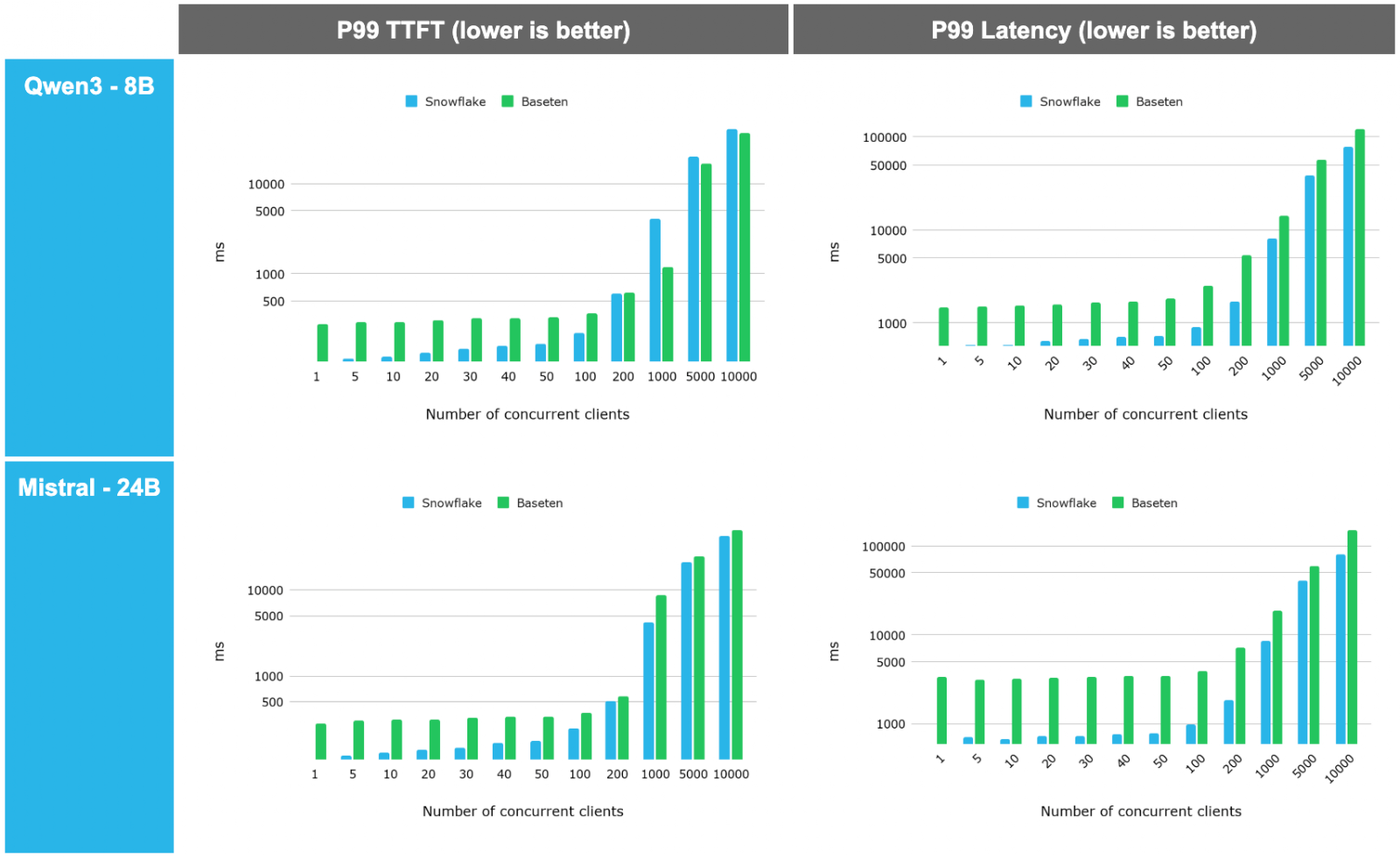
When evaluating LLM serving, stable Time to First Token (TTFT) and tail latency under load are critical for production-grade user experiences. We benchmarked Snowflake Model Serving against Databricks and Baseten using diverse architectures like Qwen3-4B, Gemma3-1B and Medgemma-27B.
The results demonstrate a clear architectural advantage:
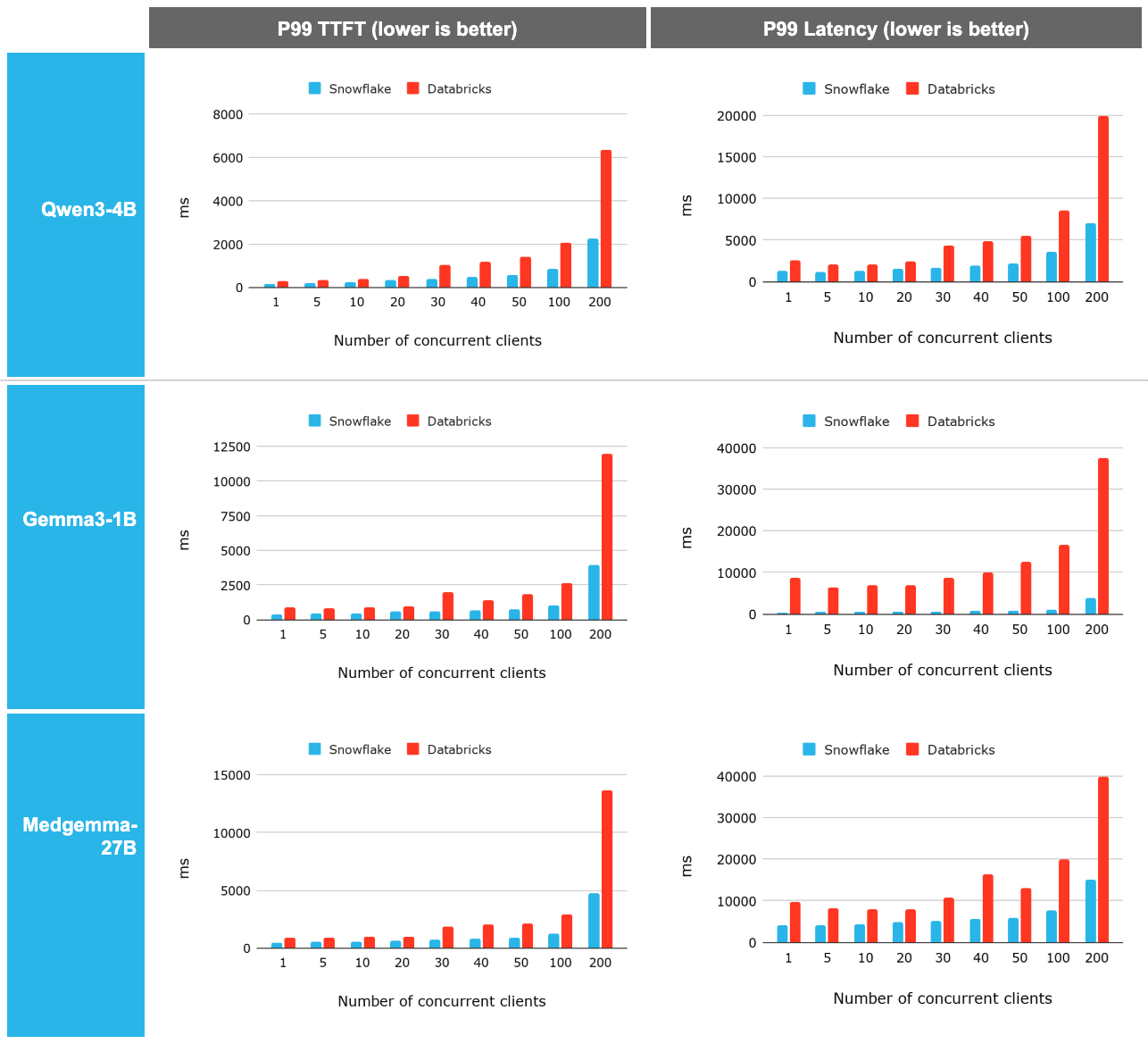
- Consistent superiority: Snowflake Model Serving demonstrated a 2.2x to 2.3x P99 latency and TTFT improvement on average over Databricks. This advantage remains remarkably constant across concurrency levels and becomes even more prominent as scale increases.
- High-concurrency scalability: When tested against Baseten, Snowflake outperformed across the spectrum.
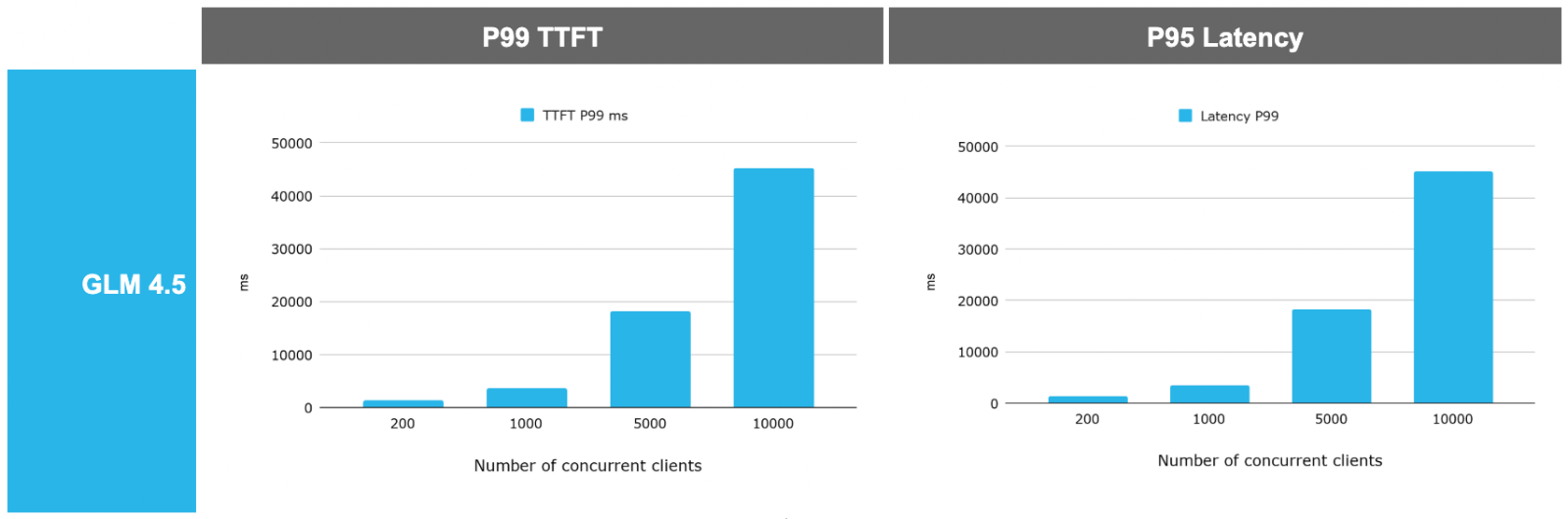
- Large model support: Finally the platform is tested against a very large model (GLM 4.5, a 700G model on a H200 GPU node) and observed that the system is able to scale and leverage the high end GPU really well.
Best practices for productionization
Snowflake empowers you to rethink how you pay for and structure your AI workloads:
- Pay by resource, not by token: Hosting a model on Snowflake Model Serving shifts the financial model from pay-per-token pricing to paying only for the fixed infrastructure consumed. Paired with auto-suspend and auto-scaling, this managed service offers a massive ROI for high-volume workloads when compared to competition. Snowflake's managed Model Serving reduces your operational expenses so that you can focus on your workload and not on managing infrastructure.
- Optimize with specialist models: Instead of sending every request to an expensive, massive commercial model, builders can route specific tasks to highly optimized, fine-tuned "expert" models (like MedGemma) to drastically reduce costs and improve speed.
- Protect sensitive data: Sending data to third-party APIs introduces breach risks. By keeping inference inside Snowflake, all data sent to your endpoint remains strictly within your secure deployment.
To learn more and start building, check out more Snowflake ML resources and visit the Snowflake Model Registry documentation today.
Note: All benchmarks were run on single-node services to evaluate baseline compute efficiency. Real-world deployments can utilize multi-node scaling. Some of the evaluations demonstrated (Figures 4 and 5) in this blog were achieved in an internal Snowflake testing environment using Nvidia H200 GPUs. This demonstration is intended to showcase the hardware-agnostic scalability and maximum architectural capabilities of Snowpark Container Services for ML workloads, and actual results may vary based on your workload, network and regions. The H200 is not currently available as a standard compute pool, but may be available upon request. Please reach out to your account team to discuss the highly performant GPU instances options currently available for your region to accelerate your ML workloads today. You can find our code to benchmark inference services here.