May 29, 2026/10 min readMachine Learning
Accelerating Distributed Training with Snowflake ML


Imagine a major financial services company training a foundation model to detect synthetic and account takeover fraud, requiring a cluster of GPUs to process massive streams of customer event sequences. At this scale, machine learning training stops being about the model — picking the architecture, engineering the features — and starts being constrained by infrastructure: juggling per-node memory limits, tuning dozens of cluster configurations (worker counts, executor memory) and battling out-of-memory failures that waste hours of compute. At Snowflake, we believe training should be about the model, not the infra. We encountered and solved these fundamental scale problems by building the ML Container Runtime. We engineered custom distributed training APIs, efficient data connectors, and tuned system defaults to eliminate infrastructure bottlenecks, allowing our users to focus on the model, not the infra. To validate the effectiveness of our engineering approach, we quantified its impact using the TPCx-AI benchmark.
Our results demonstrated up to 2.5x faster distributed PyTorch training (use case 9 in TPCx-AI) and up to 1.8x faster distributed XGBoost training (use case 8 in TPCx-AI), with up to 8× lower per-run infrastructure costs in those tested environments compared to Databricks.
Under the hood: Engineering the Snowflake Advantage
The optimizations that we have done can be characterized into three areas — data ingestion optimizations that efficiently pipeline data into the training nodes, performance optimizations with the distributed training APIs, and the memory architecture that sets the platform up for such complex AI/ML workloads.
Optimized data ingestion for unstructured data
While the core GPU compute for training models such as PyTorch DDP and ResNet-50 is identical on whichever platform it is run on, Snowflake's architectural advantage lies in its highly optimized data path for moving image bytes from cloud storage into the GPU.
Snowflake's direct data path. Snowflake reads images directly over HTTP, completely bypassing filesystems, which significantly streamlines the process:
- Single-trip file listing: File listing is performed as a single SQL
LISTcommand against the Snowflake stage, returning all file paths and metadata in one round trip. - Zero-copy, in-memory read: The File
open()operation uses a Pythonfsspecmethod that issues a direct HTTP GET against a presigned S3 URL, loading the data directly into an in-memoryBytesIObuffer. This eliminates intermediate steps such as kernel VFS layers, FUSE daemons or local disk writes. - Built-in backpressure: Ray Data's pull-based streaming executor dynamically sizes its operator queues, helping ensure reads operate only as fast as the GPUs can consume them, providing built-in backpressure.
Three additional optimizations are automatically included in the runtime's data path, requiring no user configuration:
- Authoritative file verification: Snowflake's reader treats the SQL
LISTresult as authoritative, skipping redundant file existence checks that would otherwise require a second round trip per image, effectively halving the request count. - Parallel fetching: The reader is multi-threaded, allowing files to be fetched in parallel within each Ray read task, even though the task might typically download files in a single-threaded fashion.
- Persistent connections: Each Ray worker maintains a long-lived
urllib3connection pool with automatic reconnect, avoiding the overhead of creating and tearing down TCP/TLS connections for every file.
XGBoost training pipeline optimizations: Smaller training matrix
Snowflake's distributed XGBoost trainer is built on Ray primitives, with additional optimizations on the ingestion and DMatrix construction path that materially shrink the training matrix held in worker memory.
- Automatic float32 downcast at ingestion. Snowflake's ingester casts float64 columns to float32 at the Arrow batch boundary, before the trainer sees them. The training matrix held by each worker is ~2× smaller than it would be on the raw float64 input, with no accuracy change (XGBoost's DMatrix is float32 internally anyway).
- Zero-copy Arrow ingestion. Snowflake reads training shards directly as Arrow from Ray's object store and feeds them into DMatrix construction without an intermediate pandas conversion — less peak memory and less CPU time spent on data conversion.
- QuantileDMatrix support. XGBoost's
histtree method only needs binned feature values to grow trees, not the original floats. The standardDMatrixstill stores raw float values and uses a sorted index to compute bin edges;QuantileDMatrixderives bin edges via streaming quantile sketches and stores only the compact binned representation (typicallyuint8with 256 bins) — up to 4x smaller peak memory, especially on wide tables. - Idle task-worker eviction. Ray retains worker processes after task completion for potential reuse. During XGBoost training, workers used for data loading remain resident for the entire training duration while still holding memory. Snowflake evicts these idle workers after DMatrix construction, reclaiming their memory with no impact on model quality or training time.
- Beyond the optimizations above, the trainer also exposes an opt-in external-memory mode (
ExtMemQuantileDMatrix) that streams batches from Ray's object store via a custom iterator and lets XGBoost cache histograms to disk, enabling training on data sets that exceed aggregate worker RAM.
Unified memory architecture
Snowflake's architecture provides a major advantage: its runtime lacks a JVM, unlike Spark-based engines that reserve significant memory for a JVM heap inaccessible to native training code. This has two key benefits:
Unified memory for peak training efficiency. Every node's full memory is available for training, including XGBoost's native C++ code. On a 28 GB node, Snowflake provides roughly 18 GB more memory to the trainer than standard JVM-heap configurations.
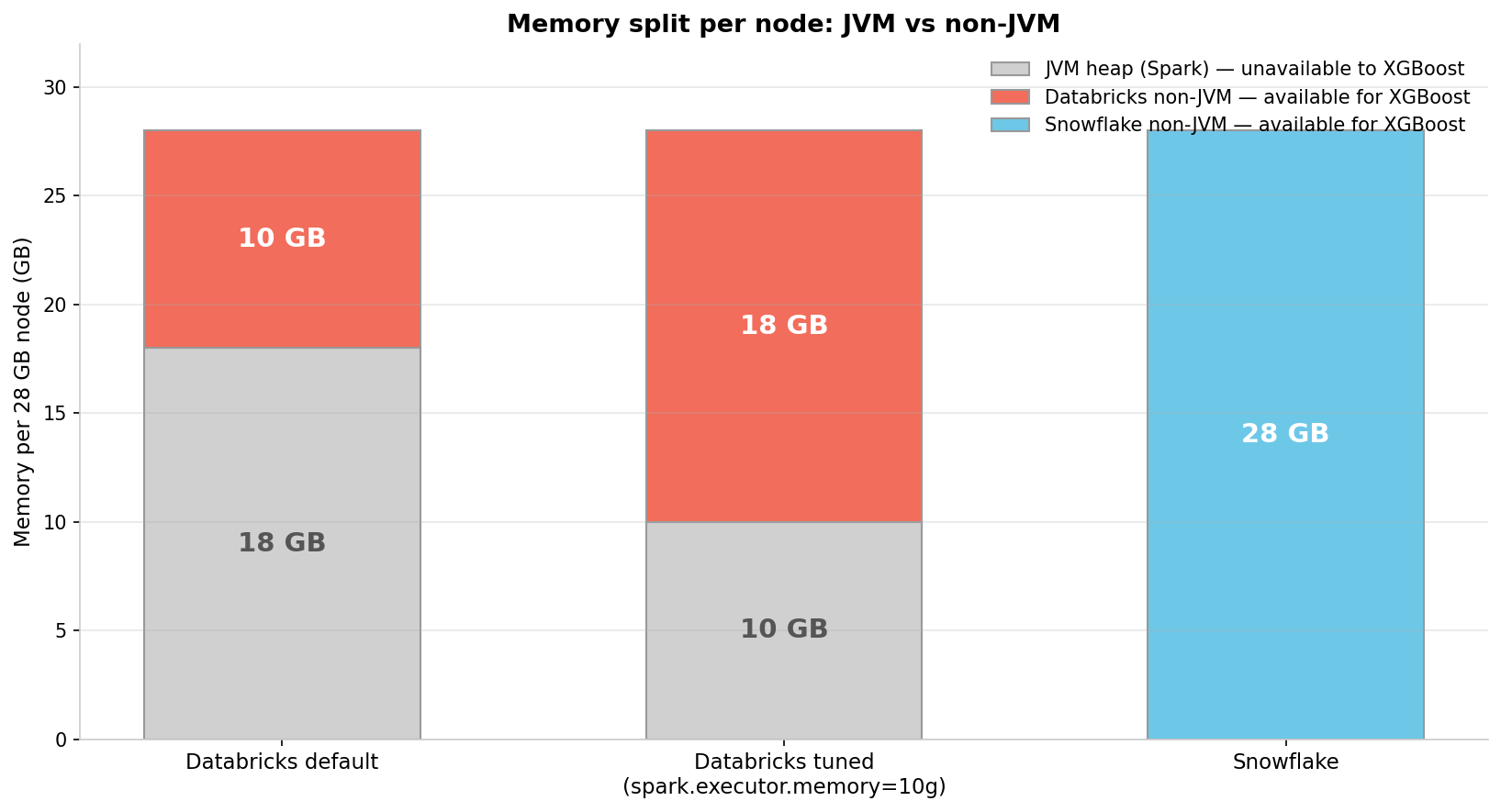
Automatic resource allocation. ML workflows often mix single-core SQL data prep with all-core distributed training. While Spark requires manual tuning of a single knob (spark.task.cpus) that forces a tradeoff between these patterns, Snowflake automatically allocates resources for both.
Benchmarking
We benchmarked the Snowflake ML Runtime against Databricks using two TPCx-AI use cases to validate performance and cost optimizations across the ML spectrum, focusing on the 2 most popular ML frameworks – PyTorch and XGBoost.
TPCx-AI UC9 (Images PyTorch): ResNet-50 classification on PNGs (20GB to 1TB). This use case tests data path architecture to determine if the pipeline can sustain GPU compute at scale.
TPCx-AI UC8 (Tabular XGBoost): A 37-class classification task using 77 features and XGBoost (tree_method=hist). Testing memory architecture at scale (SF1 to SF1000), it evaluates if nodes can handle large training matrices and overhead.
Benchmark setup
Tests were conducted in May 2026 on the Snowflake and Databricks platform versions specified in the Hardware section. Benchmark notebooks and configuration scripts are linked at the end of this post.
Each test used dedicated compute pools, with end-to-end wall clock time encompassing feature preparation and distributed training. We report the median of n=5 runs.
Multi-node Databricks clusters utilized the "N+1" pattern, requiring five nodes to match Snowflake's four compute nodes because the Databricks driver does no training compute. For single-node runs, the driver and worker shared a node. Databricks instances also held a slight CPU advantage (8 vCPU vs. 6) for UC8. All tests used standard ML offerings with comparable node specs.
UC9 — GPU clusters
| Snowflake | Databricks | |
|---|---|---|
| Node instance | GPU_NV_M (44 vCPU, 4× A10G, 178 GiB) |
g5.12xlarge (48 vCPU, 4× A10G, 192 GiB) |
| Runtime | ML Runtime 2.5.0 | DBR 17.3 LTS ML (GPU) |
| Distributed trainer | Snowflake distributed PyTorch trainer on Ray | TorchDistributor + PyTorch DDP |
UC8 — CPU clusters
| Snowflake | Databricks | |
|---|---|---|
| Node instance | CPU_X64_M (6 vCPU, 28 GiB) |
Standard_DS4_v2 (8 vCPU, 28 GiB) |
| Runtime | ML Runtime 2.5.0 | DBR 17.3 LTS ML (CPU) |
| Distributed trainer | Snowflake distributed XGBoost trainer (Ray-based, XGBoost 3) | SparkXGBClassifier on Spark (XGBoost 3) |
Tuning disclosure
In the benchmark configurations evaluated, Snowflake functioned optimally without the requirement for manual tuning interventions.
At the time of assessment and within the specific parameters tested, the default operation of Databricks's SparkXGBClassifier restricted XGBoost training to a single worker and a single core (num_workers=1, spark.task.cpus=1), irrespective of the total cluster dimensions. To ensure a balanced and equitable comparison, the following best-effort optimizations were implemented across multi-node configurations:
num_workerswas manually configured for each scale factor to align with the designated worker node count.spark.task.cpus=8was applied to enable comprehensive CPU utilization across each worker node.spark.executor.memory=10gwas utilized to decrease the JVM heap reservation from the default 18 GB to 10 GB, thereby allocating more memory for model training while maintaining sufficient capacity for data preprocessing operations.
Result summary
- TPCx-AI Use Case 8 (distributed XGBoost on tabular data)
- Snowflake was consistently faster, and specifically 1.83x faster at the largest scale factor despite using only half the resources. Snowflake demonstrated up to 8x lower cost per run at scale factor 1000.
- TPCx-AI Use Case 9 (distributed PyTorch ResNet-50 on images)
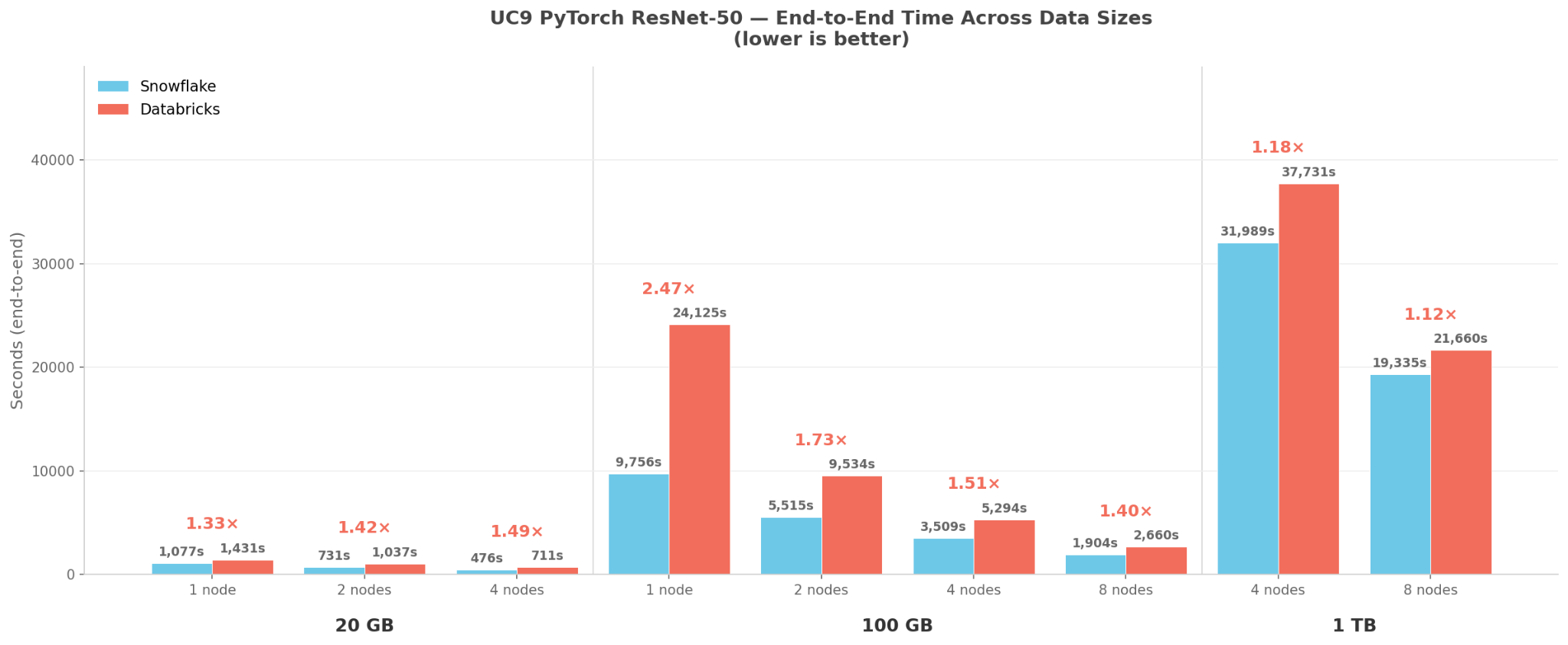
- Snowflake demonstrated superior performance of up to 2.5x faster at 100 GB data scale
- Costs were lower overall, ranging from 1.5x to 3x lower across every configuration
Result details
UC9 – ResNet-50 on images
Snowflake is consistently faster at every configuration.
Cost. GPU pricing on AWS Databricks separates the DBU fee from the EC2 VM cost. Snowflake's credit price bundles cloud infrastructure, so for an apples-to-apples rate we add both. Multi-node Databricks clusters also require an N+1 driver node billed at the same rate; the cost numbers below include it.
| Rate (all-in) | Derivation | |
|---|---|---|
Snowflake GPU_NV_M (Enterprise) |
$8.04 | 2.68 credits × $3/credit |
Databricks g5.12xlarge (Premium) |
$9.90 | $4.23 DBU + $5.67 AWS EC2 on-demand |
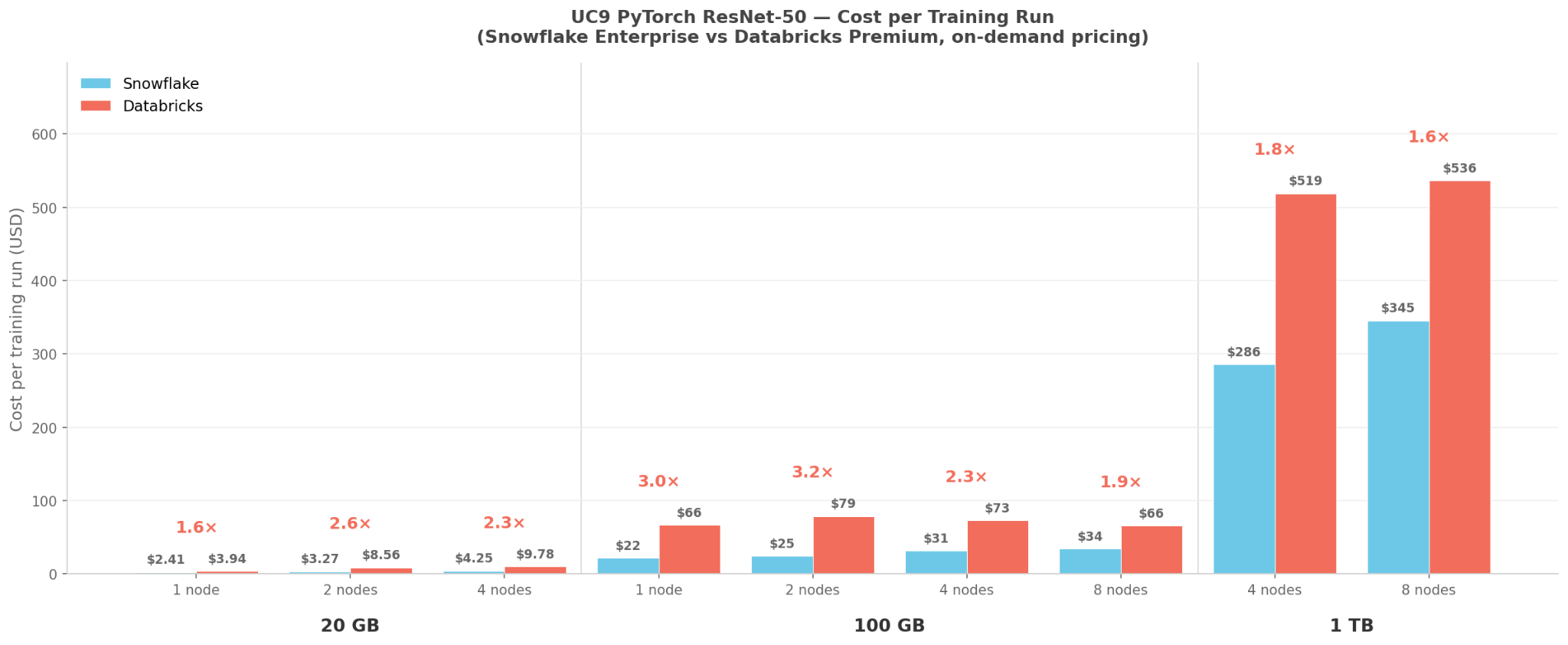
Snowflake cost was cheaper at every configuration benchmarked — from 1.55× at 1 TB / 8 nodes to 3.19× at 100 GB / 2 nodes. The peak cost gap shows up at small multi-node configs, where the N+1 Databricks driver represents the largest fraction of cluster overhead.
UC8 – XGBoost on tabular data
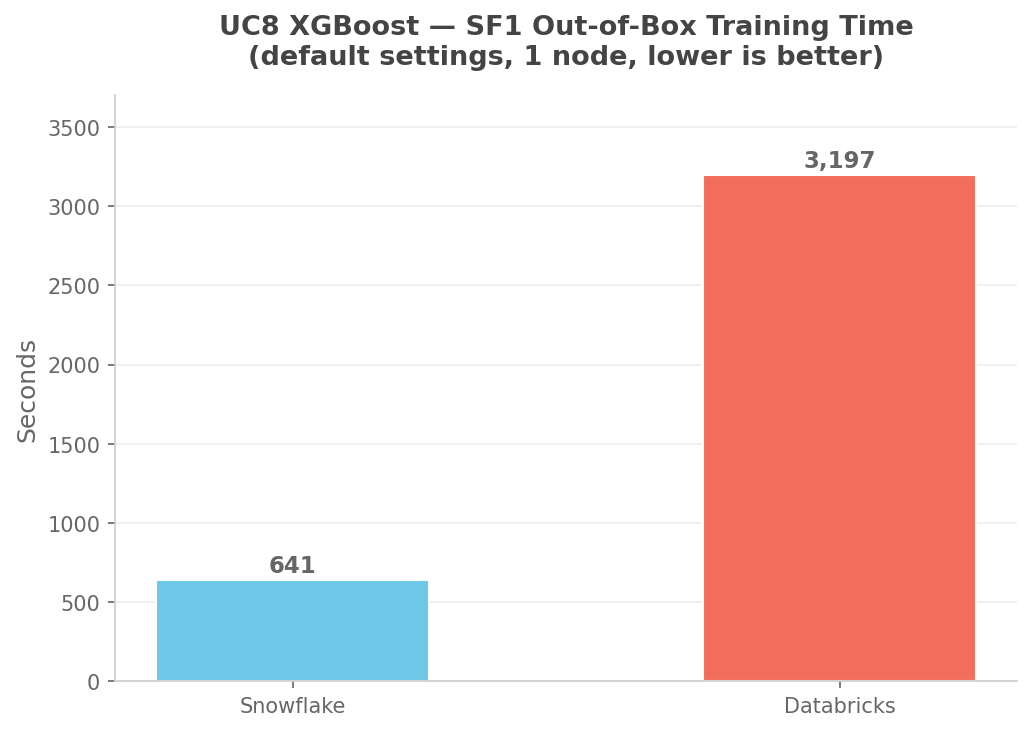
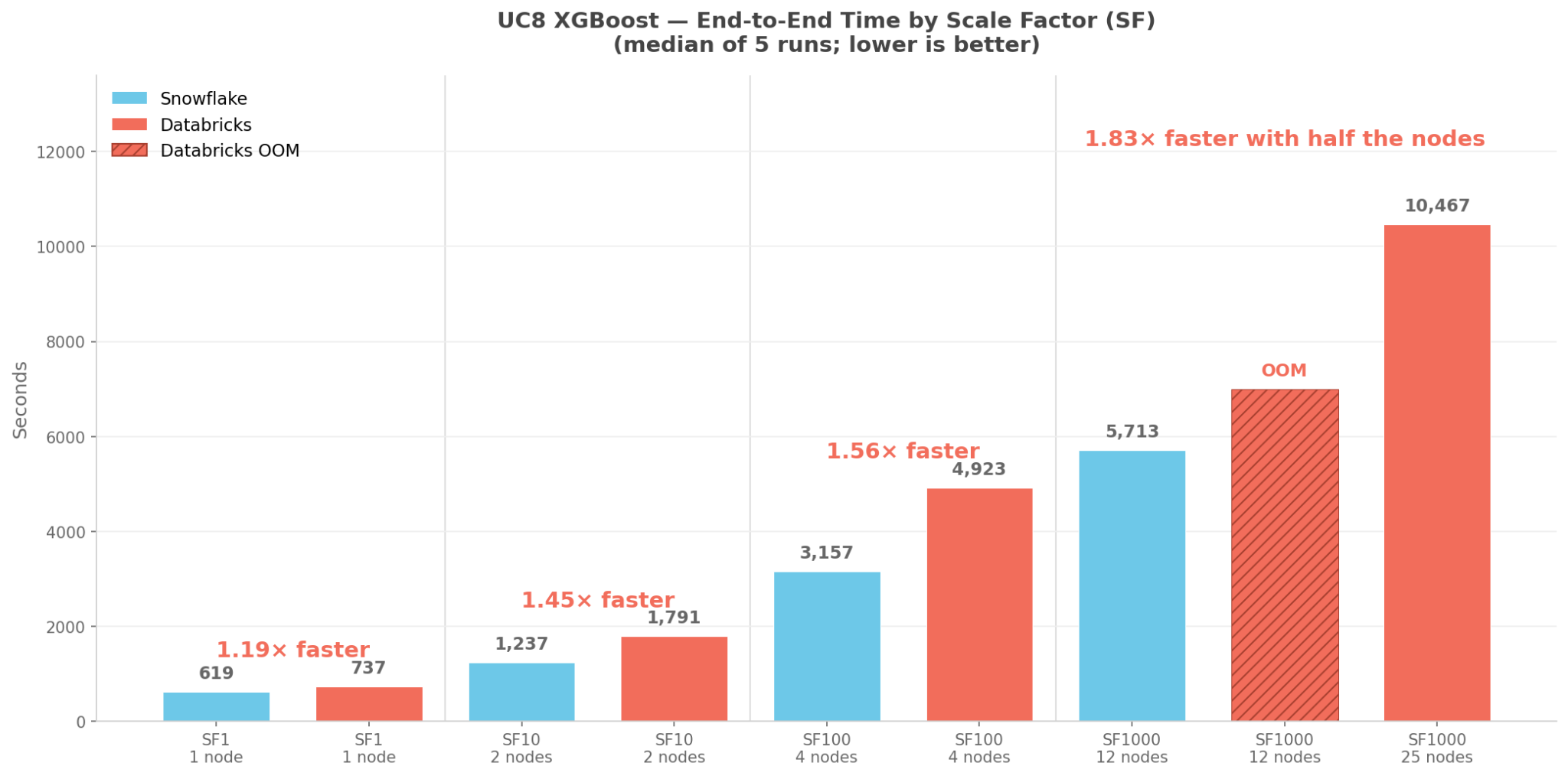
Without tuning, Databricks at SF1 takes 5× longer than Snowflake (3,197s vs 641s) because Spark's defaults pin the trainer to one worker, one core. Snowflake's runtime assigns workers and cores automatically.
Even with Databricks tuning, in the benchmark scales and configurations we tested, Snowflake completed runs faster — by a margin that grows with the data set:
Cost. Using each platform's published on-demand rates — Snowflake CPU_X64_M Enterprise at 0.22 credits × $3/credit = $0.66/node-hour, Databricks DS4 v2 Premium PAYG at $1,010.32/month ÷ 730 hrs = $1.38/node-hour — multiplied by cluster size and wall clock:
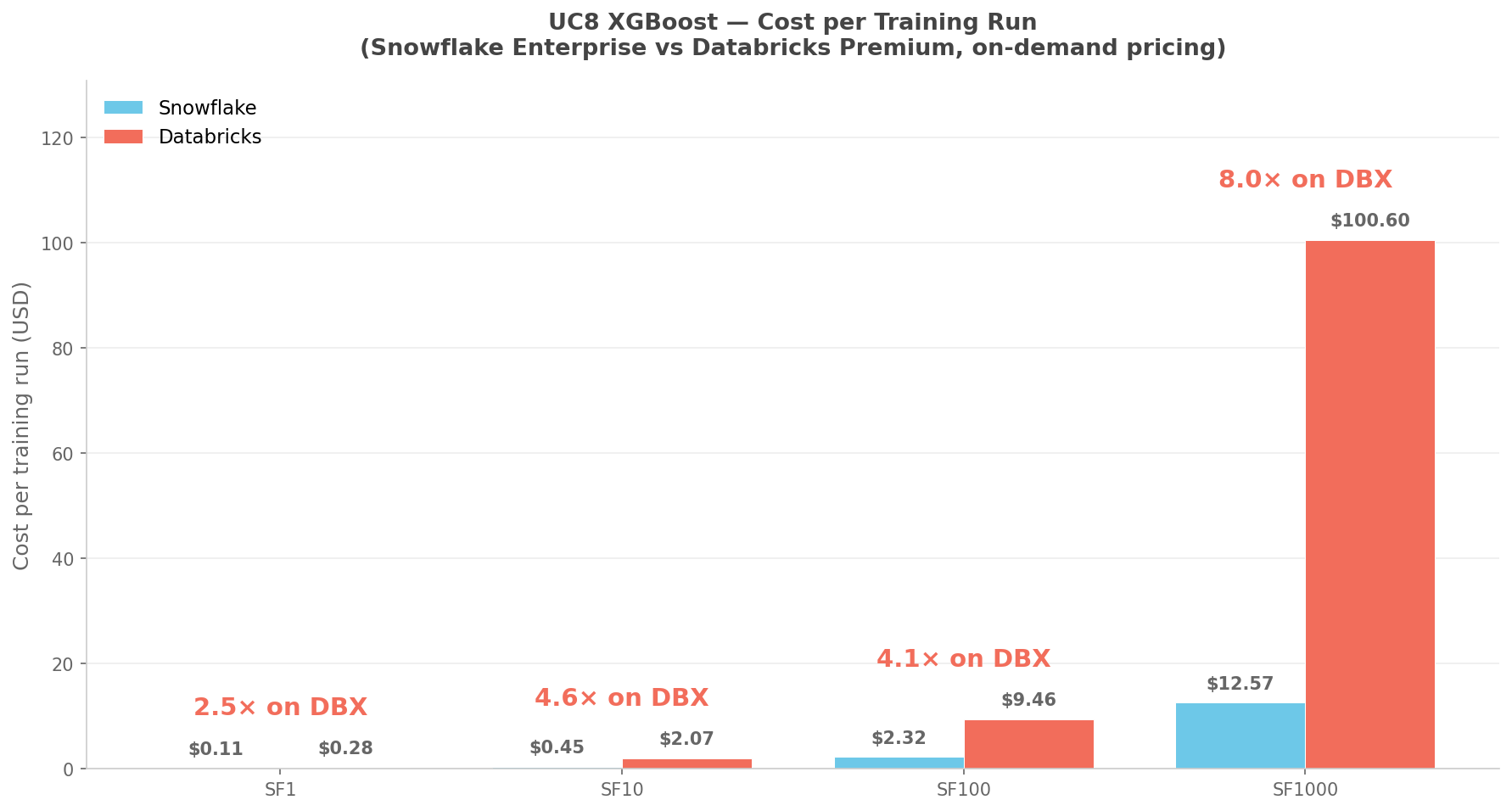
Figure 6: UC8 cost per training run. Databricks costs include the +1 driver node for multi-node clusters; SF1000 reflects Databricks's published 25-node cluster, since the matched 12-worker attempt OOM'd (see Figure 4). Sources: Databricks Azure pricing, Snowflake pricing, Snowflake credit consumption. Both platforms offer reserved/capacity discounts that would proportionally reduce both sides. Results above are the median of n=5 runs.
The gap widens with scale. At SF1000, Databricks costs 8.0× more (median) per training run — a product of 3.8× more node-seconds and 2.1× higher per-node hourly rate.
Key takeaways
Snowflake vs. Databricks at scale factor 1000 (SF1000), in our benchmark runs:
Snowflake trained ~1.83× faster, on fewer nodes and with no Spark-side tuning.
Snowflake's per-run cost was 8× lower.
Reliability: the Databricks configuration we evaluated encountered out-of-memory failures where Snowflake completed successfully with fewer nodes.
Across both UC8 and UC9 from TPCx-AI, Snowflake ML's runtime is faster, cheaper and tuning-free on the workloads and configurations we tested. Performance gains are delivered automatically through runtime defaults, eliminating the need for users to manually configure complex knobs. Visit this link to try it now.
Disclaimer: Benchmarks in this blog post ran on TPCx-AI UC8 and UC9 in May 2026 on the platform versions and hardware specified in this post. Results on your own workloads will vary with data set, model, configuration and use case.