Connect Snowflake to Azure DevOps with OAuth2
Overview
Snowflake's Git integration lets you create workspaces backed by a Git repository so you can edit, commit, and push files directly from Snowsight. By default, the integration authenticates with a personal access token stored in a Snowflake secret. With OAuth2, each Snowflake user authenticates individually with Azure DevOps through a browser-based Microsoft Entra ID flow — no shared tokens, no secrets to rotate per user.
This guide walks through configuring OAuth2 between Snowflake and Azure DevOps and creating your first OAuth-backed Git workspace.
Prerequisites
- A Snowflake account with the
ACCOUNTADMINrole (or a role with theCREATE INTEGRATIONprivilege). - An administrator (or a user permitted to register applications) in your Microsoft Entra ID tenant.
- An Azure DevOps organization and a repository you want to connect to Snowflake.
What You'll Learn
- How to find the correct Snowflake redirect URI for your account region.
- How to register an Entra ID application for Azure DevOps.
- How to add the right Azure DevOps API permissions (
vso.code_write,vso.packaging_write). - How to create a Snowflake API integration that uses OAuth2 with Entra ID.
- How to create a Snowsight workspace from an Azure DevOps repository and sign in via OAuth.
What You'll Need
- A Snowflake account (a 30-day trial works).
- An Azure portal account with permission to register applications in Microsoft Entra ID.
- An Azure DevOps organization linked to that Entra tenant.
What You'll Build
- A Microsoft Entra ID application registration with Azure DevOps API permissions.
- A Snowflake API integration that authenticates Snowflake users to Azure DevOps via OAuth2.
- A Snowsight workspace connected to an Azure DevOps repository over OAuth.
Determine your Snowflake redirect URI
Microsoft Entra ID requires a redirect URI when you register an application. This tells the provider where to send users after they authorize access.
Use the following format, based on the cloud region that hosts your Snowflake account:
https://apps-api.c1.<region>.<cloud>.app.snowflake.com/oauth/complete-secret
Examples:
| Cloud / Region | Redirect URI |
|---|---|
| AWS US West (Oregon) | https://apps-api.c1.us-west-2.aws.app.snowflake.com/oauth/complete-secret |
| AWS EU (Frankfurt) | https://apps-api.c1.eu-central-1.aws.app.snowflake.com/oauth/complete-secret |
| Azure East US 2 | https://apps-api.c1.eastus2.azure.app.snowflake.com/oauth/complete-secret |
| GCP US Central1 | https://apps-api.c1.us-central1.gcp.app.snowflake.com/oauth/complete-secret |
Tip: To find your account's region and cloud platform, run
SELECT CURRENT_REGION();in a Snowflake worksheet.
Keep this URI handy — you'll paste it into Microsoft Entra ID in the next step.
Register an OAuth application in Microsoft Entra ID
-
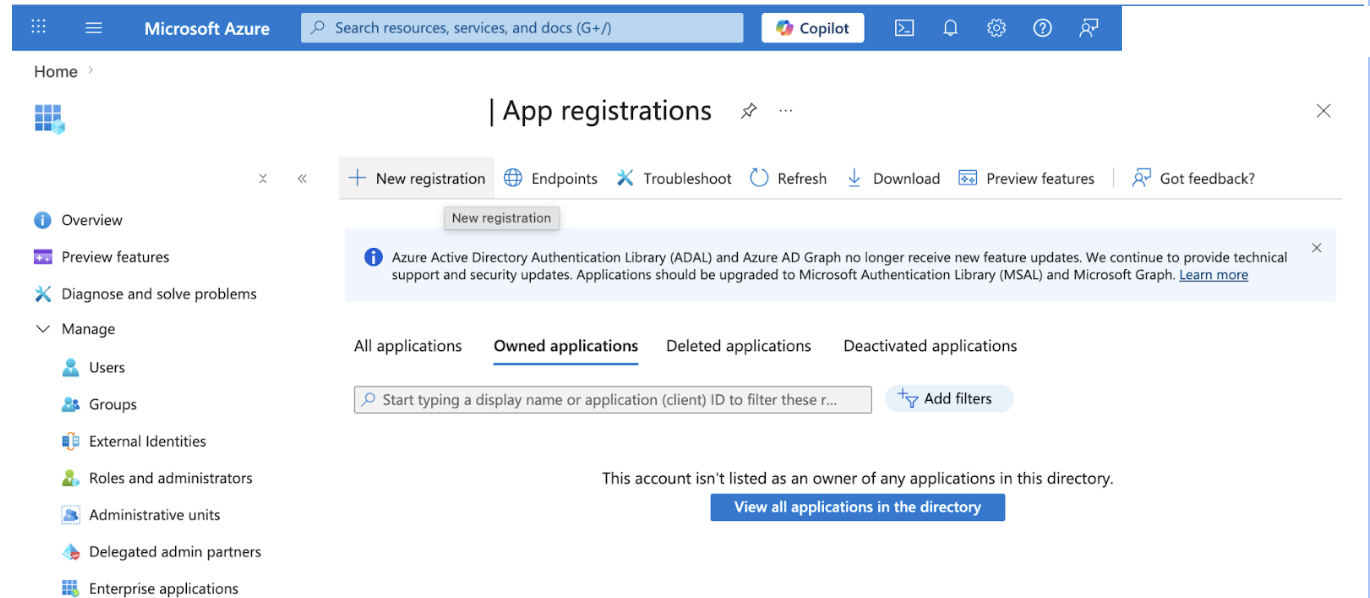
Sign in to the Azure portal and navigate to Microsoft Entra ID > App registrations.
-
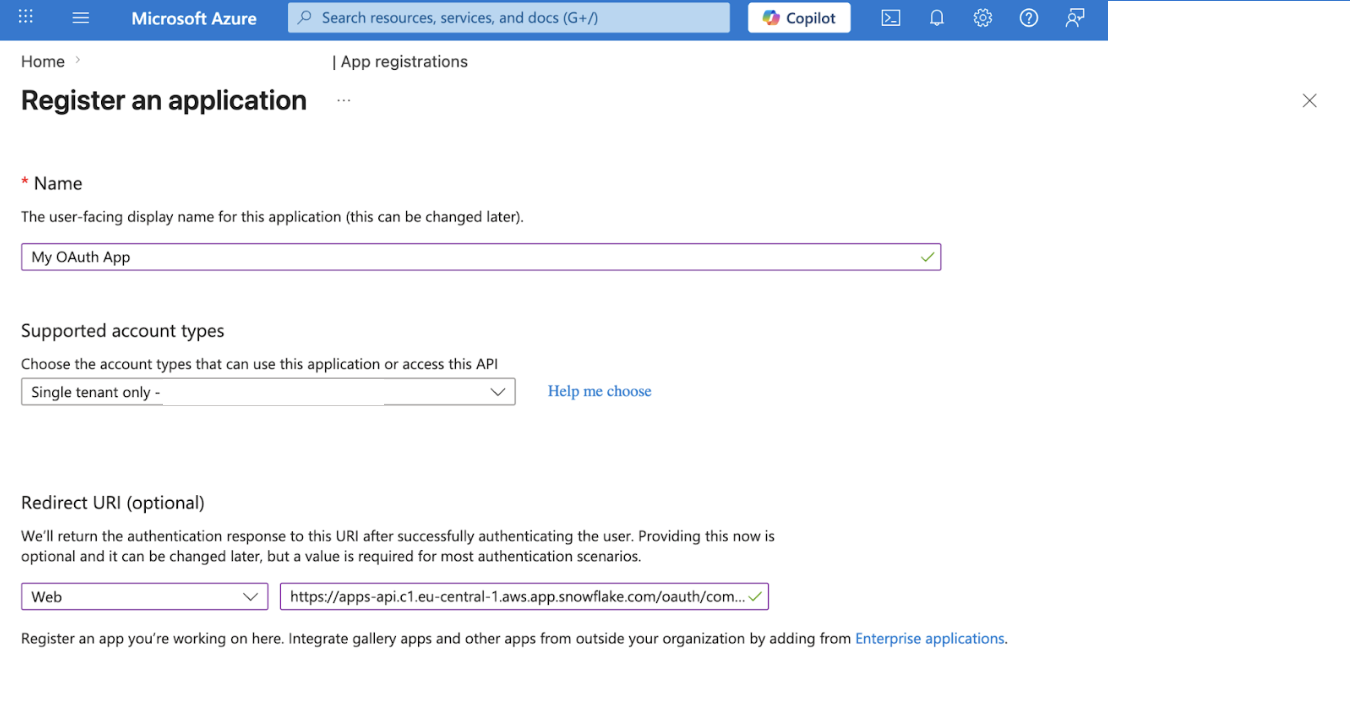
Select New registration and fill in:
- Name: A descriptive name, for example
Snowflake Git Integration. - Redirect URI: Select Web and enter your Snowflake redirect URI from the previous step.
- Name: A descriptive name, for example
-
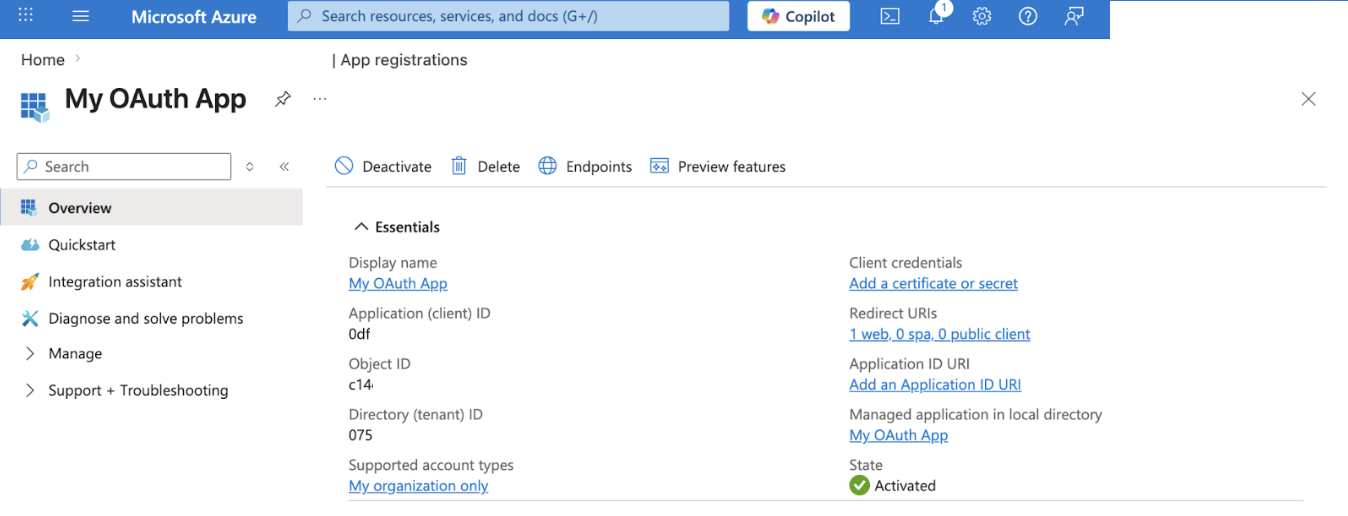
After registration, note the Application (client) ID and Directory (tenant) ID from the Overview page. You'll need both for the Snowflake API integration.
-
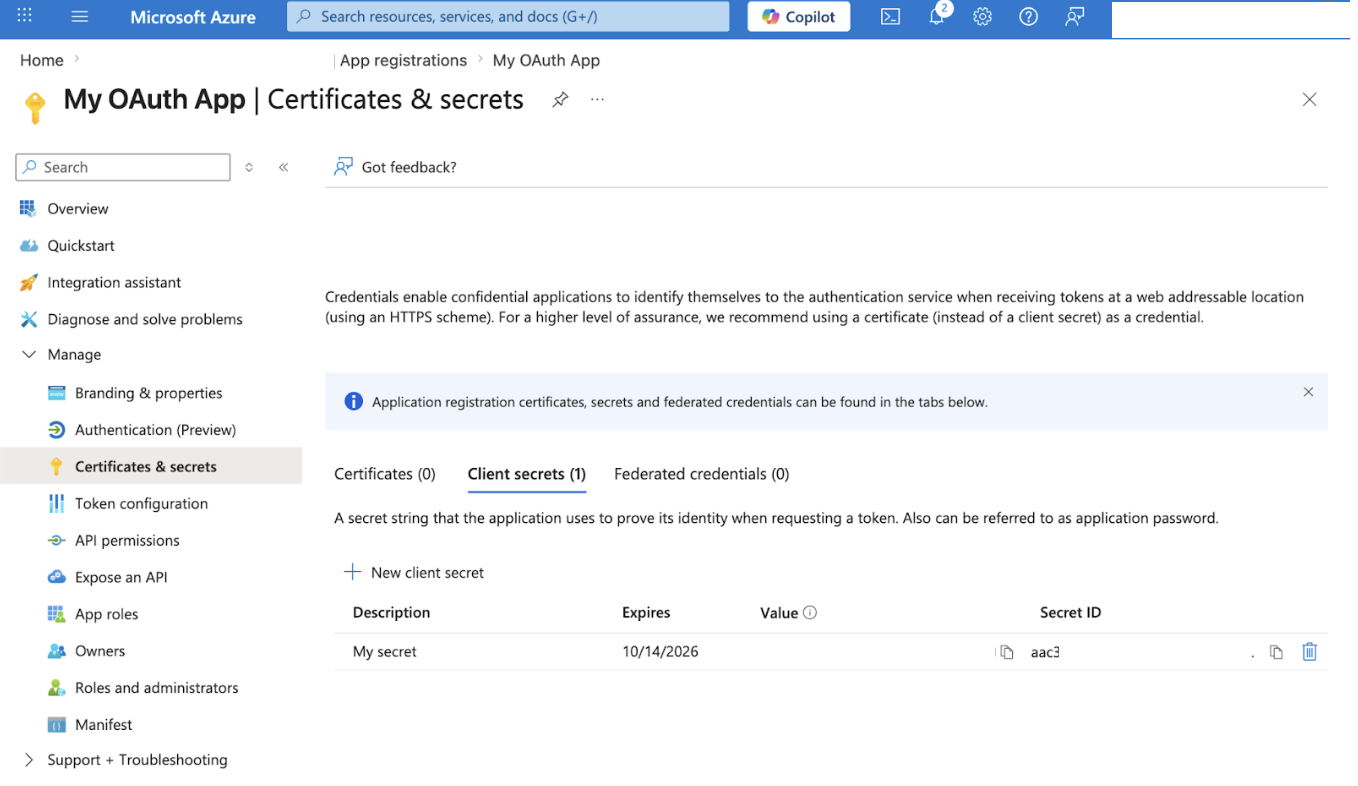
Go to Certificates & secrets > New client secret, create a secret, and copy its value immediately — it is only displayed once.
-
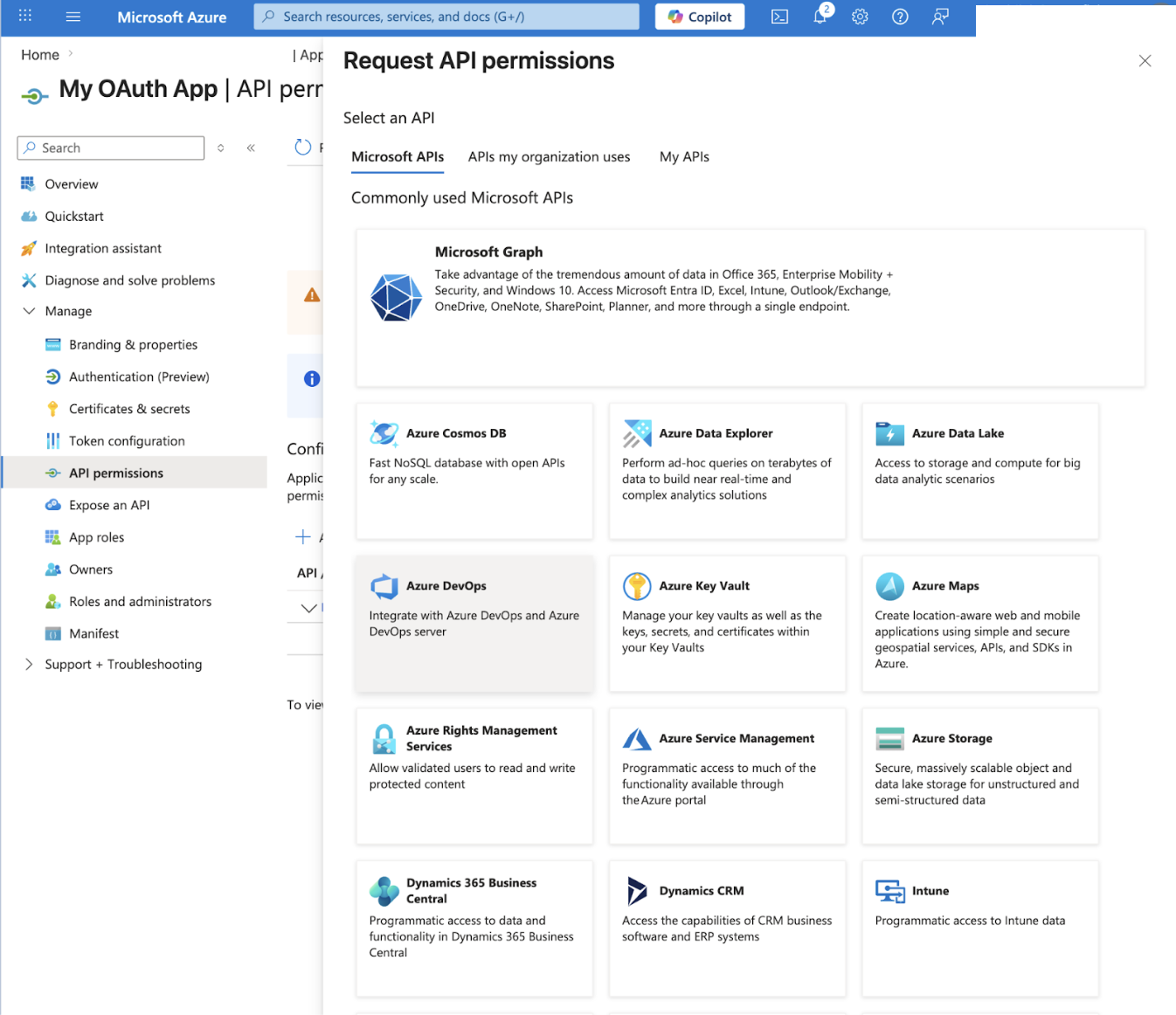
Go to API permissions > Add a permission > Azure DevOps and add the following delegated permissions:
vso.code_write— read and write access to source code.vso.packaging_write— read and write access to packages.
Select Grant admin consent if required by your organization.
Create an API integration in Snowflake
Run the following SQL, replacing the placeholder values with the Application (client) ID, client secret, and tenant ID from the previous step. Replace my-org in API_ALLOWED_PREFIXES with your Azure DevOps organization name.
CREATE OR REPLACE API INTEGRATION azdo_oauth_integration
  API_PROVIDER = git_https_api
  API_ALLOWED_PREFIXES = ('https://dev.azure.com/my-org')
  API_USER_AUTHENTICATION = (
    TYPE = OAUTH2
    OAUTH_AUTHORIZATION_ENDPOINT = 'https://login.microsoftonline.com/<tenant-id>/oauth2/v2.0/authorize'
    OAUTH_TOKEN_ENDPOINT = 'https://login.microsoftonline.com/<tenant-id>/oauth2/v2.0/token'
    OAUTH_CLIENT_ID = '<your-client-id>'
    OAUTH_CLIENT_SECRET = '<your-client-secret>'
    OAUTH_ACCESS_TOKEN_VALIDITY = 3600
    OAUTH_REFRESH_TOKEN_VALIDITY = 31536000
    OAUTH_ALLOWED_SCOPES = ('vso.code_write', 'vso.packaging_write')
    OAUTH_USERNAME = 'oauth2'
  )
  ENABLED = TRUE;
Important: Azure DevOps requires
OAUTH_USERNAME = 'oauth2'. Without this, Git operations will fail with authentication errors.
Tip: The two
<tenant-id>placeholders in the authorization and token endpoints must both be replaced with your Entra Directory (tenant) ID.
Create a workspace from your Azure DevOps repository
-
In Snowsight, open the workspace selector and select From Git repository.
-
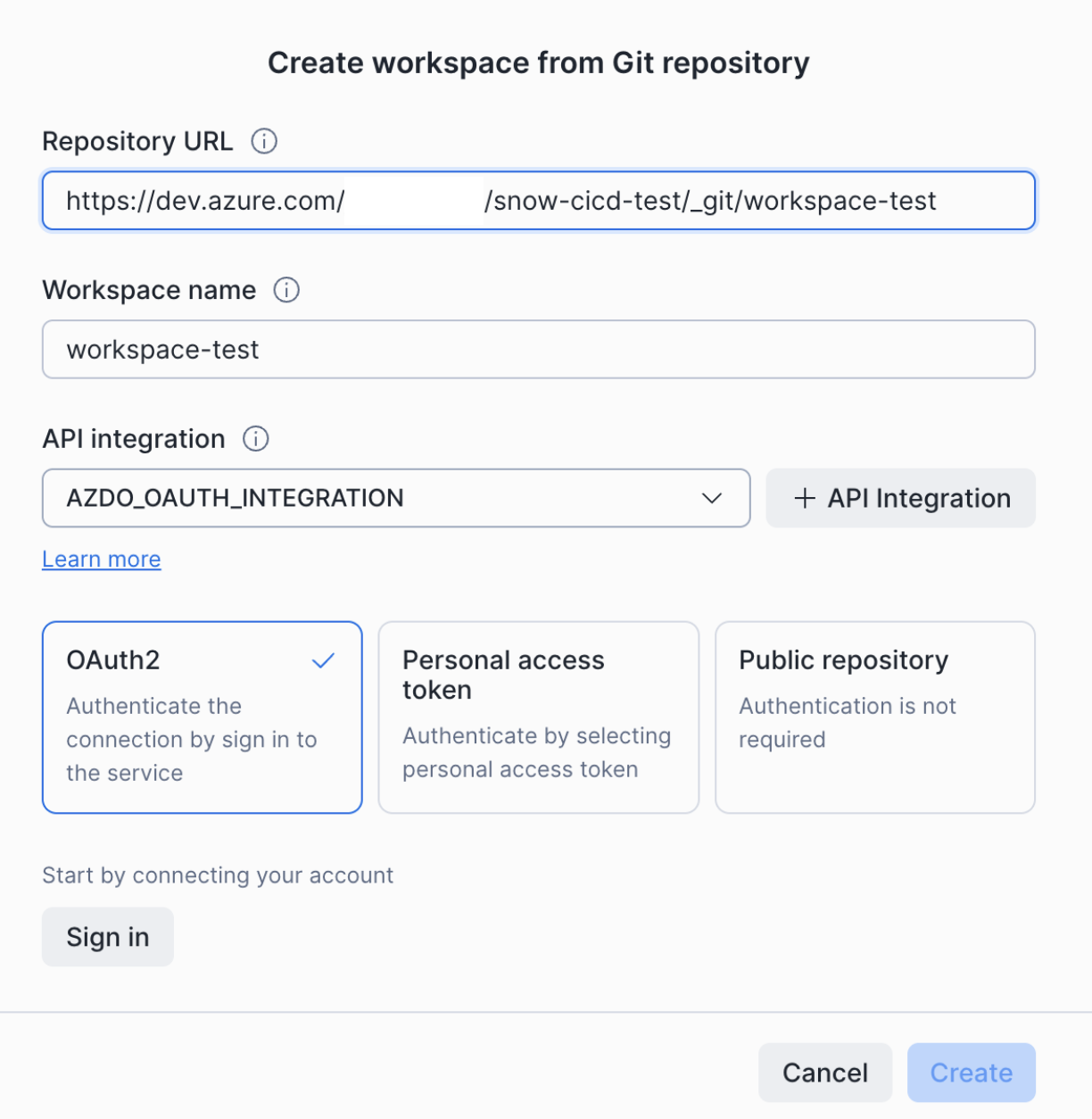
In the Create workspace from Git repository dialog:
- Repository URL: The HTTPS URL of your Azure DevOps repository, for example
https://dev.azure.com/my-org/my-project/_git/my-repo. - Workspace name: A name for the workspace.
- API integration: The integration you created in the previous step.
- Repository URL: The HTTPS URL of your Azure DevOps repository, for example
-
Select the OAuth2 card, then select Sign in.
-
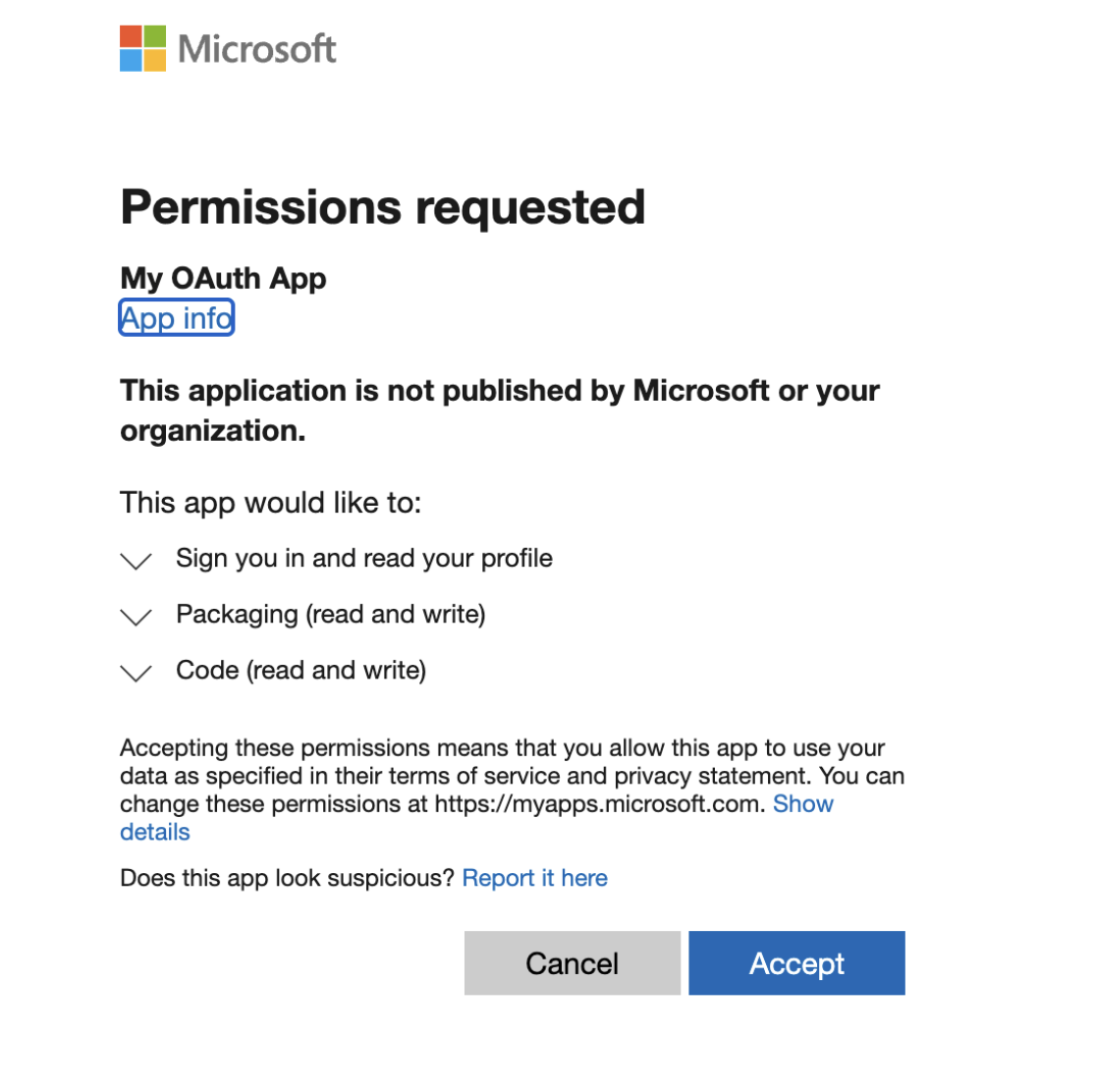
Complete the Microsoft sign-in flow and consent to the requested Azure DevOps permissions.
-
After authorization, the dialog shows a green Signed in confirmation. Select Create.
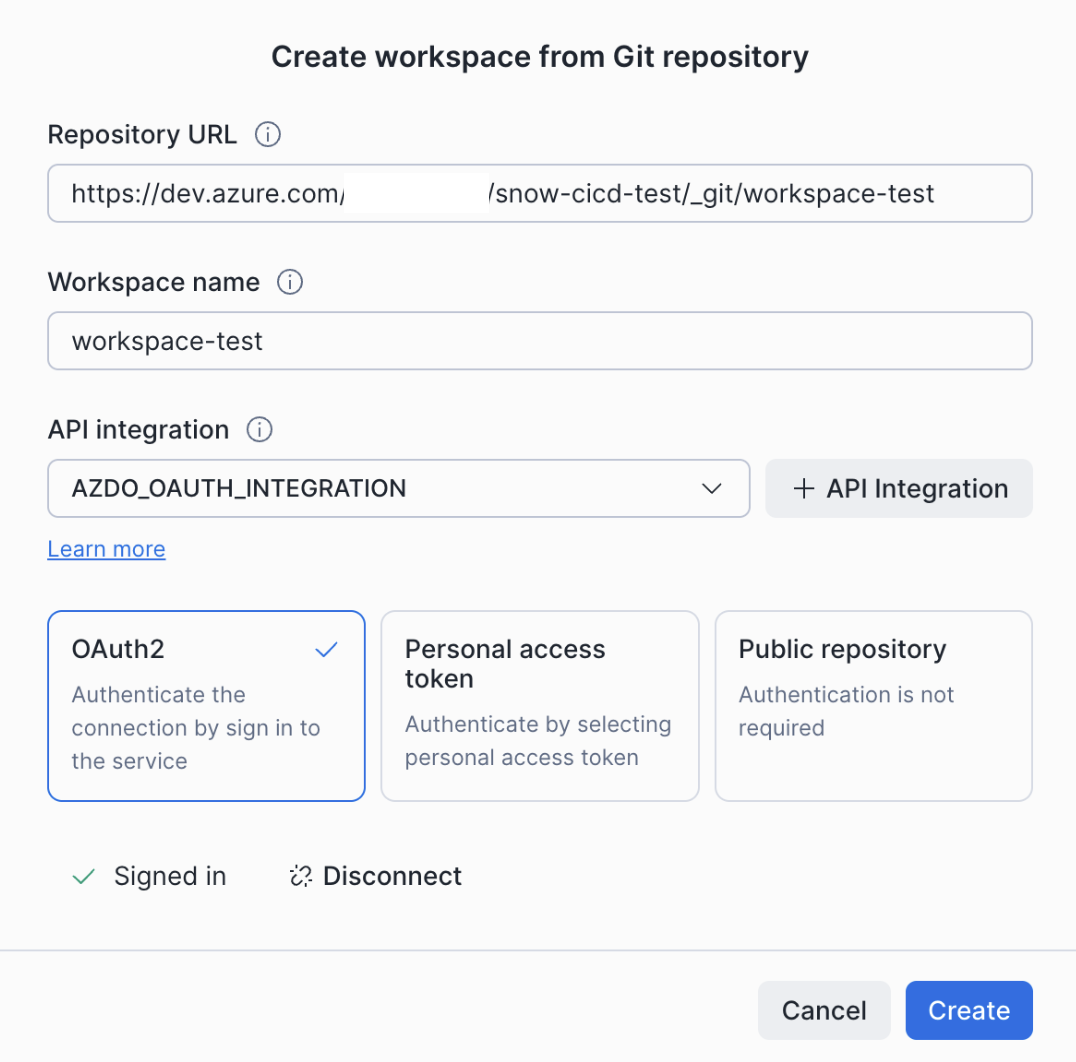
You can now push, pull, and work with files in your Azure DevOps repository directly from the workspace.
Troubleshooting
"Invalid redirect URI" error during authorization
Verify that the redirect URI registered in Microsoft Entra ID exactly matches the Snowflake redirect URI for your account's region (see Determine your Snowflake redirect URI).
Authorization succeeds but Git operations fail
- Confirm that
OAUTH_USERNAMEis set tooauth2in your API integration. - Check that
API_ALLOWED_PREFIXESmatches the repository URL you are connecting to (including organization and, if relevant, project segment). - Confirm that the
vso.code_writeandvso.packaging_writedelegated permissions are added in Entra and that admin consent has been granted if required.
Wrong endpoints
Make sure you are using login.microsoftonline.com/<tenant-id>/oauth2/v2.0/authorize and …/oauth2/v2.0/token — not the older app.vssps.visualstudio.com endpoints.
Client secret expired
Entra client secrets have a limited lifetime set when you create them. When a secret expires, create a new one in Certificates & secrets and recreate the Snowflake API integration with the updated OAUTH_CLIENT_SECRET.
Outbound Private Link
OAuth authentication is not supported with outbound Private Link connections to Git providers. If your Snowflake account uses outbound Private Link, use token-based authentication instead.
Conclusion And Resources
You configured OAuth2 between Snowflake and Azure DevOps via Microsoft Entra ID, and your team can now sign in to Azure DevOps from Snowsight without sharing personal access tokens.
What You Learned
- How to find your Snowflake redirect URI by region.
- How to register an Entra ID application and grant the right Azure DevOps API permissions.
- How to create a Snowflake API integration that uses OAuth2 with the correct
login.microsoftonline.comendpoints. - How to create a Snowsight workspace backed by an Azure DevOps repository over OAuth.
Related Resources
This content is provided as is, and is not maintained on an ongoing basis. It may be out of date with current Snowflake instances
