Build Workflows That Think, Decide, and Act Across Systems
Overview
Every organization runs workflows that span multiple systems. A customer submits a loan application — it needs to be scored by an AI model, checked against compliance rules, routed to an underwriter if the amount is high enough, and the decision needs to land back in the CRM and notify the operations team. A supplier sends an invoice — it needs to be matched against purchase orders in the ERP, flagged for anomalies, approved by finance if the amount exceeds a threshold, and posted to the ledger. A patient's lab results come in — they need to be compared against clinical baselines, escalated to the care team if values are critical, and the chart needs to be updated across three systems before the next appointment.
These workflows are not static. The next step depends on what the AI model returns, what the data says, or what a human decides. They cross system boundaries — databases, SaaS platforms, notification channels, approval systems. They need to recover when something fails midway. And they need observability — not just "did it run?" but "what did it decide, why, and who approved it?"
This is the kind of workflow Prefect is purpose-built for. Prefect is a Python-native orchestration platform that brings durable execution, event-driven automation, human-in-the-loop approvals, and runtime decision-making to any Python workflow. When paired with Snowflake and Cortex AI, Prefect becomes the nervous system that coordinates intelligent, multi-system workflows — while Snowflake serves as the data platform and AI engine at the center.
What We'll Build
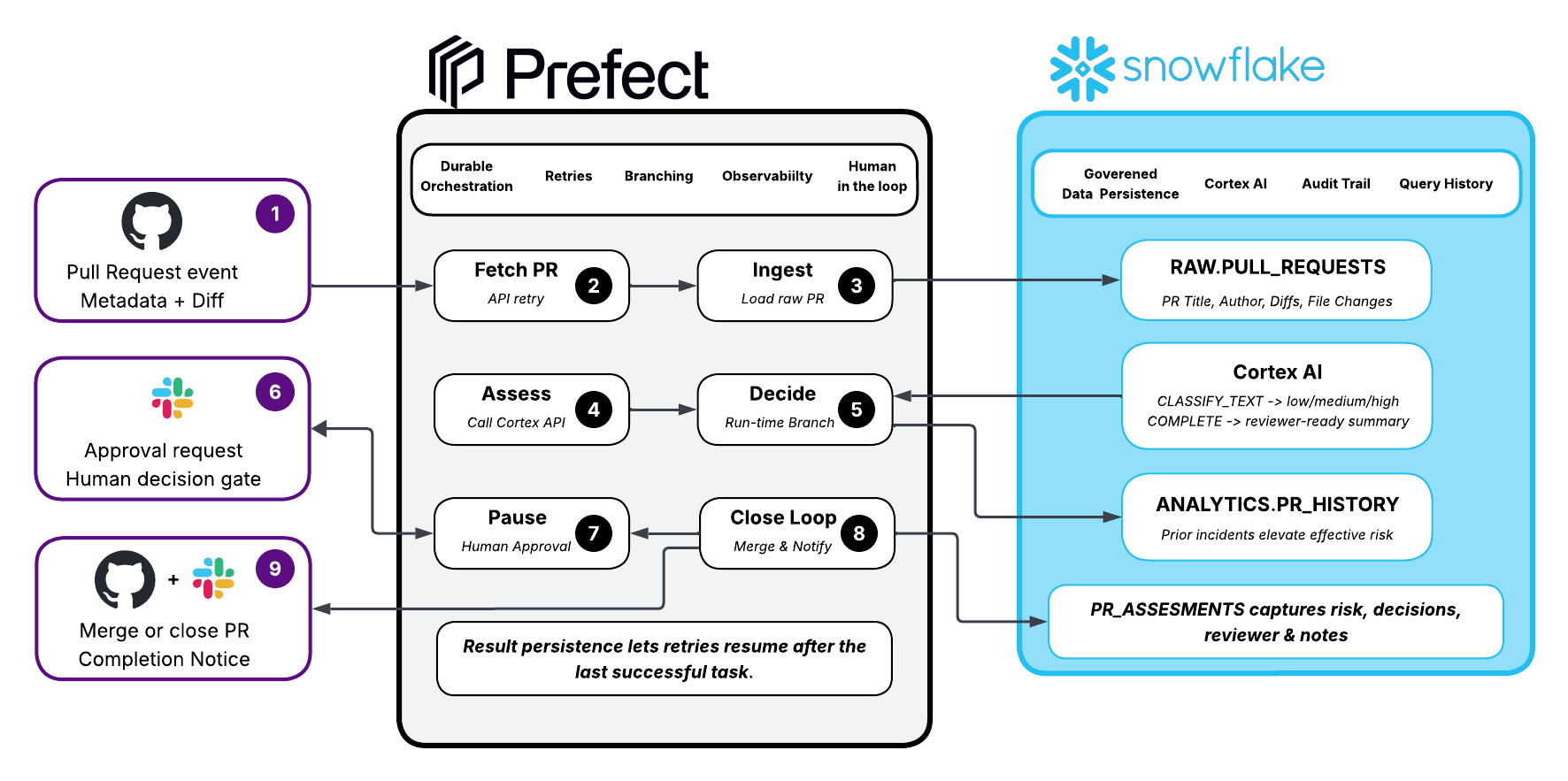
In this guide, we'll build an end-to-end agentic PR review pipeline in a matter of minutes — a practical example that demonstrates how Prefect and Snowflake work together for workflows that cross system boundaries and make decisions at runtime. The pipeline will:
- React to a pull request in GitHub
- Ingest the PR data into Snowflake
- Classify risk and summarize changes using Snowflake Cortex AI — the intelligence runs inside Snowflake, not an external LLM
- Query historical context from Snowflake to inform the decision
- Branch at runtime based on the AI assessment — low risk auto-approves, medium/high risk escalates
- Notify the team in Slack and pause for human approval
- Write the final assessment back to Snowflake
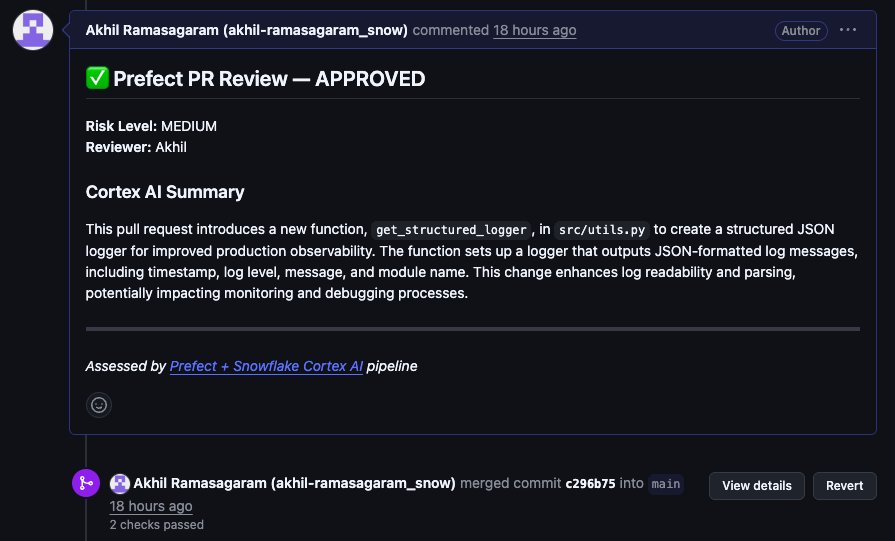
- Merge or close the PR on GitHub with a Cortex AI review comment
- Send a completion notice to Slack
If the pipeline fails at step 7, Prefect resumes from step 7 — it doesn't re-run the Cortex AI calls or re-fetch from GitHub. That's durable execution.
The Architecture
Prerequisites
- Snowflake account with Cortex AI access
- Prefect Cloud account (free tier works)
- GitHub account with a test repository
- Slack workspace with a bot app
- Python 3.9+
Detailed setup instructions for Snowflake, Python, Slack, and GitHub are in the companion repo. This guide focuses on the pipeline itself.
Setup
The companion repo has full setup instructions. Here's the minimum to get running:
Snowflake — Run this in a SQL Worksheet to create the database, tables, and seed data:
CREATE DATABASE IF NOT EXISTS PREFECT_QUICKSTART;
CREATE SCHEMA IF NOT EXISTS PREFECT_QUICKSTART.RAW;
CREATE SCHEMA IF NOT EXISTS PREFECT_QUICKSTART.ANALYTICS;
CREATE WAREHOUSE IF NOT EXISTS PREFECT_WH WITH WAREHOUSE_SIZE='XSMALL' AUTO_SUSPEND=60 AUTO_RESUME=TRUE;

-- Verify Cortex AI works in your region
SELECT SNOWFLAKE.CORTEX.COMPLETE('mistral-large2', 'Say hello') AS test;
If the Cortex test fails, try llama3.1-70b or claude-3-5-sonnet — model availability varies by region. You can also enable cross-region inference: ALTER ACCOUNT SET CORTEX_ENABLED_CROSS_REGION = 'ANY_REGION';
Full table DDL and seed data are in the repo's
setup.sql.
Python — Install dependencies and authenticate:
uv pip install prefect requests pandas "snowflake-connector-python[pandas]"
prefect cloud login
pause_flow_runrequires a connection to Prefect Cloud (or a self-hosted Prefect server). Make sureprefect cloud logincompletes before running the pipeline.
Secrets — Set these environment variables (or use Prefect Blocks/Secrets):
export GITHUB_TOKEN=your_github_pat
export SNOWFLAKE_CONNECTION_NAME=your_connection
export SLACK_BOT_TOKEN=xoxb-your-bot-token
export SLACK_CHANNEL=your-channel
See the repo README for Snowflake connection configuration, Slack app setup, GitHub token scopes, and
uv/pyproject.tomlsetup.
Fetch and Ingest
Create pr_review_pipeline.py. The pipeline starts by fetching PR data from GitHub and landing it in Snowflake.
# retries with exponential backoff — handles GitHub rate limits automatically
@task(retries=3, retry_delay_seconds=exponential_backoff(backoff_factor=2), log_prints=True)
def fetch_pr_data(repo: str, pr_number: int) -> dict:
    logger = get_run_logger()
    headers = {"Authorization": f"token {GITHUB_TOKEN}"} if GITHUB_TOKEN else {}

    # Fetch PR metadata (title, author, stats)
    pr_resp = requests.get(f"https://api.github.com/repos/{repo}/pulls/{pr_number}", headers=headers)
    pr_resp.raise_for_status()
    pr = pr_resp.json()

    # Fetch the raw diff separately (same endpoint, different Accept header)
    diff_resp = requests.get(
        f"https://api.github.com/repos/{repo}/pulls/{pr_number}",
        headers={**headers, "Accept": "application/vnd.github.v3.diff"},
    )

    # Return a clean dict — truncate diff to 50k chars to stay within Cortex limits
    return {
        "pr_number": pr_number, "repo": repo,
        "title": pr["title"], "author": pr["user"]["login"],
        "diff_content": diff_resp.text[:50000],
        "files_changed": pr["changed_files"],
        "additions": pr["additions"], "deletions": pr["deletions"],
        "created_at": pr["created_at"],
    }
Note the exponential backoff: exponential_backoff(backoff_factor=2) generates delays of 2s, 4s, 8s, etc. If GitHub's API is rate-limited, Prefect retries automatically with increasing wait times.
@task(retries=2, retry_delay_seconds=exponential_backoff(backoff_factor=2), log_prints=True)
def load_pr_to_snowflake(pr_data: dict) -> int:
    conn = get_connection()
    # Build a single-row DataFrame matching the PULL_REQUESTS table schema
    df = pd.DataFrame([{
        "PR_NUMBER": pr_data["pr_number"], "REPO": pr_data["repo"],
        "TITLE": pr_data["title"], "AUTHOR": pr_data["author"],
        "DIFF_CONTENT": pr_data["diff_content"],
        "FILES_CHANGED": pr_data["files_changed"],
        "ADDITIONS": pr_data["additions"], "DELETIONS": pr_data["deletions"],
        "CREATED_AT": pd.Timestamp(pr_data["created_at"]),
    }])

    # write_pandas bulk-loads via PUT + COPY INTO — fast even for large diffs
    write_pandas(conn=conn, df=df, table_name="PULL_REQUESTS",
                 database="PREFECT_QUICKSTART", schema="RAW")
    return 1
Every PR that enters this pipeline gets a permanent record in Snowflake.
Cortex AI Assessment
This is the most important step. Instead of calling an external LLM, the AI runs inside Snowflake — co-located with your data, governed by your access policies. We use CLASSIFY_TEXT for risk classification (returns a clean category — no prompt engineering or output parsing needed) and COMPLETE for the free-form summary.
@task(retries=2, retry_delay_seconds=exponential_backoff(backoff_factor=2), log_prints=True)
def cortex_assess_pr(pr_data: dict) -> dict:
    logger = get_run_logger()
    conn = get_connection()
    # Truncate diff to 5k chars — balances context vs. token cost
    diff_preview = pr_data["diff_content"][:5000]

    # Build a shared context string for both Cortex calls
    pr_context = (
        f"PR Title: {pr_data['title']}\n"
        f"Files changed: {pr_data['files_changed']}, "
        f"+{pr_data['additions']}/-{pr_data['deletions']}\n"
        f"Diff:\n{diff_preview}"
    )

    summarize_prompt = (
        f"Summarize this PR in 2-3 sentences for a technical reviewer.\n\n{pr_context}"
    )

    cur = conn.cursor()
    # CLASSIFY_TEXT: purpose-built for classification — returns one of the given categories
    cur.execute(
        "SELECT SNOWFLAKE.CORTEX.CLASSIFY_TEXT(%s, ['low', 'medium', 'high'])",
        (pr_context,),
    )
    risk_level = cur.fetchone()[0].strip().lower()

    # COMPLETE: free-form generation for the summary
    cur.execute("SELECT SNOWFLAKE.CORTEX.COMPLETE(%s, %s)", ("mistral-large2", summarize_prompt))
    summary = cur.fetchone()[0].strip()
    cur.close()

    # Defensive fallback in case CLASSIFY_TEXT returns something unexpected
    if risk_level not in ("low", "medium", "high"):
        risk_level = "medium"

    return {"risk_level": risk_level, "summary": summary}
Two Cortex calls happen here — CLASSIFY_TEXT for structured classification, COMPLETE for free-form generation. Each costs credits on an XSMALL warehouse (expect ~0.01-0.02 credits per call). This is the most expensive step in the pipeline. If anything downstream fails, Prefect doesn't re-execute these calls on retry — that's durable execution.
Why two different Cortex functions? Use the right tool for the job.
CLASSIFY_TEXTguarantees a clean category from your list — no regex parsing, no prompt engineering for output format.COMPLETEis for open-ended generation where you need free-form text.
Decision and Human Gate
Based on the Cortex AI classification and historical context, the pipeline decides at runtime what path to take.
@task(retries=2, retry_delay_seconds=exponential_backoff(backoff_factor=2), log_prints=True)
def get_historical_context(pr_data: dict) -> dict:
    conn = get_connection()
    cur = conn.cursor()
    # Bind parameter for AUTHOR — safe against SQL injection
    cur.execute(
        "SELECT COUNT(*) AS total_prs, "
        "SUM(CASE WHEN HAD_INCIDENT THEN 1 ELSE 0 END) AS incidents "
        "FROM PREFECT_QUICKSTART.ANALYTICS.PR_HISTORY "
        "WHERE AUTHOR = %s",
        (pr_data["author"],),
    )
    result = cur.fetchone()
    cur.close()
    return {"total_prs": result[0] or 0, "incident_count": result[1] or 0}


@task(log_prints=True)
def make_decision(pr_data: dict, assessment: dict, history: dict) -> dict:
    risk = assessment["risk_level"]

    # Elevate risk if Cortex said "medium" but the author has caused incidents before
    if risk == "high" or (risk == "medium" and history["incident_count"] > 0):
        effective_risk = "high"
    elif risk == "medium":
        effective_risk = "medium"
    else:
        effective_risk = "low"

    # This dict drives the runtime branching in the flow
    return {
        "effective_risk": effective_risk,
        "requires_approval": effective_risk in ("medium", "high"),
        "auto_approved": effective_risk == "low",
    }
This is runtime branching — the pipeline's next steps depend on values computed in this run, not a predetermined DAG. An author with prior incidents gets elevated risk, which triggers human approval.
For human-in-the-loop, define a type-safe input schema:
# Type-safe input schema — Prefect renders this as a form in the Cloud UI
class ReviewDecision(RunInput):
    approved: bool
    reviewer_name: str
    notes: str = ""
When the flow calls pause_flow_run(wait_for_input=ReviewDecision, timeout=86400), execution literally stops and waits for a human to submit this form in Prefect Cloud (up to 24 hours). No custom webhook infrastructure. No polling loop.
Close the Loop
After the decision, the pipeline closes the loop across all systems — Snowflake, GitHub, and Slack.
@task(retries=2, retry_delay_seconds=exponential_backoff(backoff_factor=2), log_prints=True)
def close_github_pr(pr_data: dict, assessment: dict, decision: dict) -> None:
    headers = {"Authorization": f"token {GITHUB_TOKEN}"}
    repo, pr_num = pr_data["repo"], pr_data["pr_number"]
    approved = decision.get("final_approved", False)

    # Post the Cortex AI summary as a review comment on the PR
    comment = (
        f"## {'✅' if approved else '❌'} Prefect PR Review\n\n"
        f"**Risk:** {decision['effective_risk'].upper()}\n"
        f"**Reviewer:** {decision.get('reviewer', 'auto')}\n\n"
        f"### Cortex AI Summary\n{assessment['summary']}\n\n"
        f"---\n*Assessed by Prefect + Snowflake Cortex AI*"
    )
    requests.post(f"https://api.github.com/repos/{repo}/issues/{pr_num}/comments",
                  headers=headers, json={"body": comment})

    # Merge (squash) if approved, close if rejected
    if approved:
        requests.put(f"https://api.github.com/repos/{repo}/pulls/{pr_num}/merge",
                     headers=headers, json={"merge_method": "squash"})
    else:
        requests.patch(f"https://api.github.com/repos/{repo}/pulls/{pr_num}",
                       headers=headers, json={"state": "closed"})
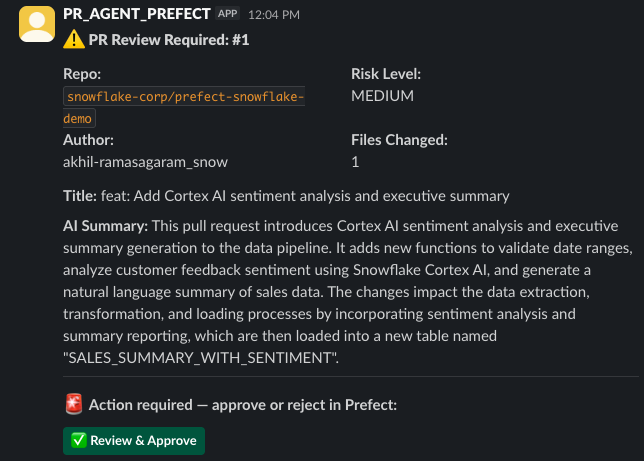
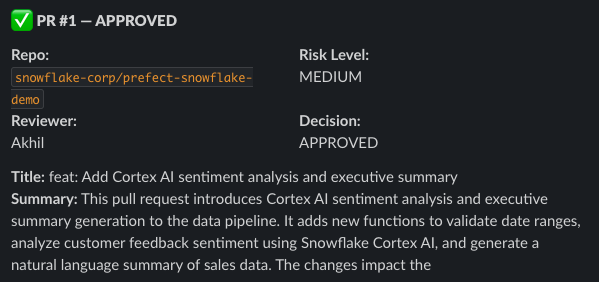
The pipeline also sends two Slack notifications — one when approval is needed (with a deep-link to Prefect Cloud), and one when the pipeline completes with the final decision.
Wiring It Together
Here's where the agentic behavior comes together. One flow, four systems, runtime branching, and a human gate:
@flow(name="pr-review-agent", log_prints=True, persist_result=True)
def pr_review_agent(repo: str, pr_number: int):
    logger = get_run_logger()

    # Get the flow run ID so we can deep-link Slack notifications to Prefect Cloud
    from prefect.runtime import flow_run
    flow_run_id = str(flow_run.id)

    # Open a single Snowflake connection for the entire flow — avoids repeated
    # OAuth browser popups and is more efficient than connecting per-task.
    conn = snowflake.connector.connect(connection_name=SF_CONNECTION)
    # Tag all queries so you can find them in Snowflake's QUERY_HISTORY
    conn.cursor().execute("ALTER SESSION SET QUERY_TAG = 'prefect-pr-review'")

    try:
        # ---- Phase 1: Fetch and Ingest ----
        # Pull PR metadata + diff from GitHub API
        pr_data = fetch_pr_data(repo=repo, pr_number=pr_number)
        # Land the raw data in Snowflake for auditability
        load_pr_to_snowflake(pr_data)

        # ---- Phase 2: AI Assessment ----
        # Use Snowflake Cortex AI to classify risk and generate a summary
        assessment = cortex_assess_pr(pr_data)
        # Query Snowflake for this author's historical PR track record
        history = get_historical_context(pr_data)
        # Combine Cortex output + history into an effective risk decision
        decision = make_decision(pr_data, assessment, history)

        # ---- Phase 3: Human Gate (conditional) ----
        # This is runtime branching — the path depends on what Cortex returned
        if decision["requires_approval"]:
            # Send a rich Slack message with a "Review & Approve" button
            slack_approval_request(pr_data, assessment, decision, flow_run_id)

            # PAUSE the flow — execution literally stops here and waits
            # for a human to submit the ReviewDecision form in Prefect Cloud.
            # timeout=86400 means the flow will fail if no one responds in 24h.
            review = pause_flow_run(
                wait_for_input=ReviewDecision.with_initial_data(
                    approved=False, reviewer_name="",
                ),
                timeout=86400,
            )

            decision["final_approved"] = review.approved
            decision["reviewer"] = review.reviewer_name

            # Write the assessment BEFORE the early return — every decision
            # (approved or rejected) gets an audit trail in Snowflake
            write_assessment(pr_data, assessment, decision,
                             reviewer=review.reviewer_name, reviewer_notes=review.notes)

            if not review.approved:
                # Rejected: close the PR on GitHub + notify Slack, then exit
                close_github_pr(pr_data, assessment, decision)
                slack_completion_notice(pr_data, assessment, decision)
                return

        else:
            # Low risk — auto-approve without human intervention
            decision["final_approved"] = True
            decision["reviewer"] = "auto"
            write_assessment(pr_data, assessment, decision)

        # ---- Phase 4: Close the Loop ----
        # Merge the PR on GitHub and post the Cortex AI review comment
        close_github_pr(pr_data, assessment, decision)
        # Send a final Slack notification with the outcome
        slack_completion_notice(pr_data, assessment, decision)

    finally:
        # Always close the Snowflake connection, even if the flow fails
        conn.close()


if __name__ == "__main__":
    pr_review_agent(repo="your-org/your-repo", pr_number=1)
What's happening:
- Result persistence — set
PREFECT_RESULTS_PERSIST_BY_DEFAULT=truein your environment to persist all task results automatically. This enables durable execution: retries skip completed work. By default results persist to~/.prefect/storage/locally; for production, configure a remote result storage block (S3, GCS, or Azure Blob) so results survive across machines. pause_flow_run(timeout=86400)— execution stops and waits up to 24 hours for human inputQUERY_TAG— tags all Snowflake queries for cost attribution inQUERY_HISTORY- The
ifbranch — a Pythonifevaluated at runtime based on Cortex AI output write_assessmentruns for both approved AND rejected PRs — every decision gets an audit trail in Snowflake- Module-level connection — tasks call
get_connection()internally rather than receiving the connection as a parameter. This keeps task signatures clean (only business data in/out), avoids serialization issues with caching, and follows idiomatic Prefect patterns.
Slack tasks and
write_assessmentare defined in the companion repo. They follow the same pattern: tasks callget_connection()internally and use bind parameters for all Snowflake queries.
Run It
GITHUB_TOKEN=your_token \
SNOWFLAKE_CONNECTION_NAME=your_connection \
SLACK_BOT_TOKEN=xoxb-your-token \
SLACK_CHANNEL=your-channel \
python pr_review_pipeline.py
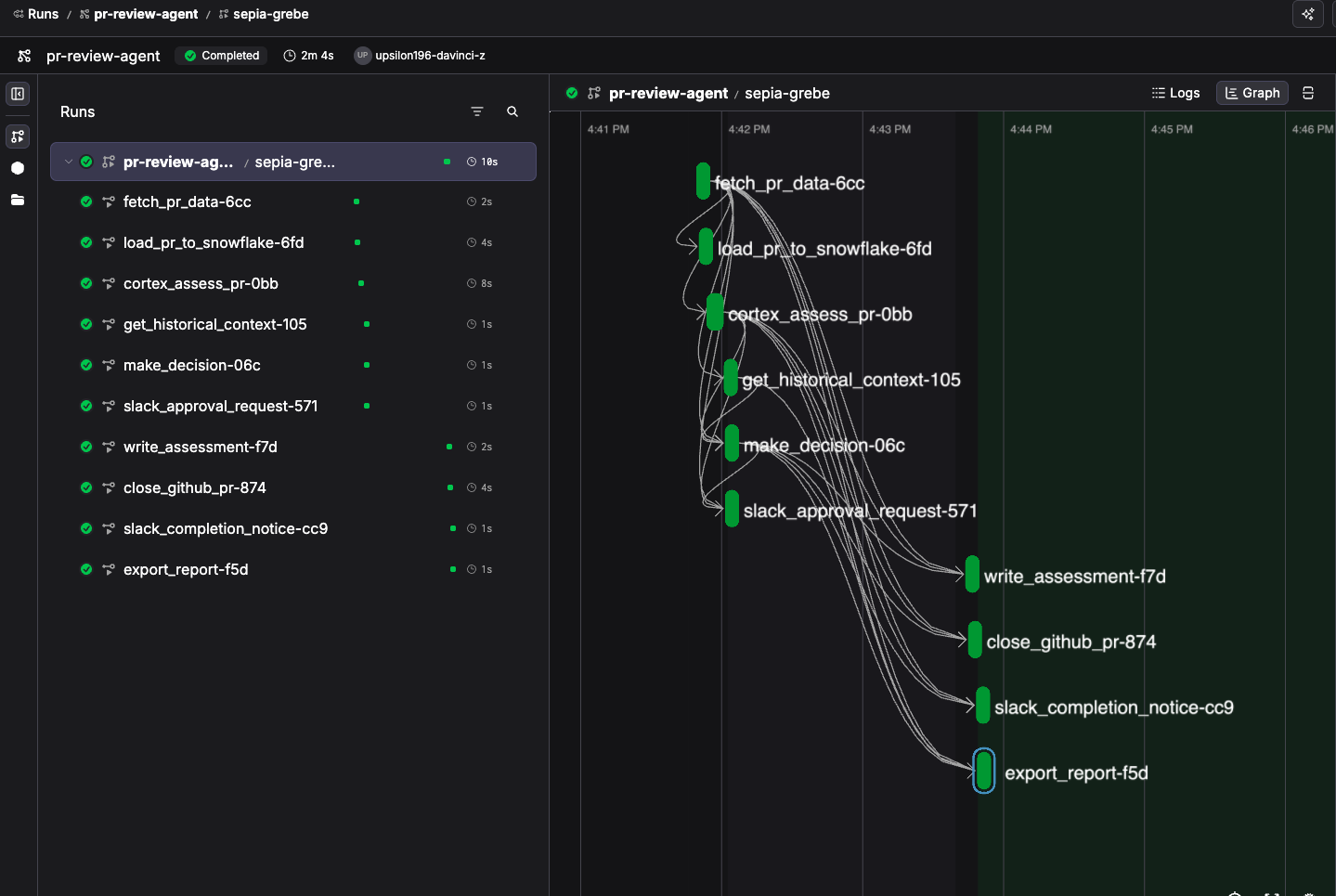
Watch the pipeline execute in real-time in Prefect Cloud. You'll see:
- Each task completing on the timeline
- The Cortex AI assessment results in the logs
- The Slack notification arrive
- The flow pause, waiting for your approval
- After you approve — the PR merges on GitHub, Slack gets the completion notice, and the assessment lands in Snowflake
This runs the flow as a local Python process connected to Prefect Cloud. For production, deploy with
prefect deployand run your worker on Snowpark Container Services — your orchestration compute stays inside Snowflake's security perimeter. See the companion repo for aprefect.yamldeployment example.
Deploy It
Running python pr_review_pipeline.py is great for development. To operate this as a production workflow — with authentication, RBAC, scheduling, and event triggers — deploy to Prefect Cloud. You'll need a worker to execute your flows. Options include:
- Process worker — runs on your local machine (simplest for testing)
- Prefect Managed Execution — Prefect runs it for you (no infrastructure to manage)
- SPCS worker — runs inside Snowpark Container Services (keeps compute in Snowflake's perimeter)
Create a prefect.yaml at the root of your project:
pull:
  - prefect.deployments.steps.git_clone:
      repository: "{{ $GIT_REPO_URL }}"
      branch: main
      access_token: "{{ $GIT_ACCESS_TOKEN }}"

deployments:
  - name: pr-review-agent
    entrypoint: pr_review_pipeline.py:pr_review_agent
    work_pool:
      name: spcs-pool    # Prefect Worker on Snowpark Container Services
    tags: [github, code-review, cortex-ai]
    parameters:
      repo: your-org/your-repo
      pr_number: 1
    enforce_parameter_schema: true
    description: "Agentic PR review: GitHub → Cortex AI → Human approval → Merge"
Deploy and run:
# Register the deployment with Prefect Cloud
prefect deploy --all

# Trigger it on-demand from the CLI
prefect deployment run pr-review-agent/pr-review-agent \
  --param repo=your-org/your-repo \
  --param pr_number=42
From here you can add Automations in Prefect Cloud to trigger this deployment from a GitHub webhook — turning python pr_review_pipeline.py into a fully event-driven workflow.
For production, we recommend Prefect Cloud (authentication, RBAC, audit logs, SSO) with a Prefect Worker running on Snowpark Container Services (SPCS) — keeping your orchestration compute inside Snowflake's security perimeter.
What Just Happened
Once your accounts are set up, the pipeline runs in under a minute:
- Fetched a PR from GitHub (external API)
- Loaded it into Snowflake (data persistence)
- Ran Cortex AI to classify risk and summarize changes (AI inside Snowflake)
- Queried author history for context (analytical query)
- Decided at runtime whether to auto-approve or escalate (dynamic branching)
- Notified your team in Slack with a rich message (external notification)
- Paused and waited for a human to approve (human-in-the-loop)
- Wrote the assessment to Snowflake (audit trail)
- Merged the PR on GitHub with a Cortex AI review comment (closing the loop)
- Sent a final Slack notification confirming the decision (completion notice)
That's four systems (GitHub, Snowflake, Slack, Prefect), two Cortex AI calls, a human approval gate, and runtime decision-making — all in one Python flow with full observability.
If the pipeline had failed at step 8, retrying would skip steps 1–5 entirely. Durable execution means you don't pay for expensive work twice.
Cleanup
Skip this if you want to keep your PR assessment history in Snowflake.
DROP DATABASE IF EXISTS PREFECT_QUICKSTART;
DROP WAREHOUSE IF EXISTS PREFECT_WH;
Conclusion
You built a pipeline that no single platform can run alone. GitHub triggers the work. Snowflake stores the data and runs the AI. Prefect coordinates everything — with durability, human gates, and runtime decisions. Slack keeps the team in the loop. And the PR gets merged or closed automatically.
Now Imagine Your Workflows
The PR review pipeline is one example. But think about the workflows in your organization that span systems and require runtime decisions:
-
Data quality incident response — A freshness check fails in Snowflake. The pipeline queries downstream impact using Cortex AI, pages the on-call team in PagerDuty, pauses for a human to decide whether to halt dependent pipelines or proceed, then updates the data catalog and Slack channel with the resolution.
-
ML model deployment with guardrails — A new model version is trained. The pipeline runs validation against holdout data in Snowflake, uses Cortex AI to compare performance against the current production model, pauses for ML lead approval if performance regresses on any segment, then promotes to production and notifies stakeholders.
-
Compliance-driven data access — A user requests access to a sensitive dataset. The pipeline checks their role and clearance in Snowflake, uses Cortex AI to classify the sensitivity of the requested data, routes approval to the data steward if sensitivity is high, provisions access on approval, and logs the entire chain for audit.
-
Multi-vendor ETL orchestration — Data arrives from Salesforce, Stripe, and a partner SFTP. The pipeline validates each source, loads to Snowflake, uses Cortex AI to detect anomalies in the combined dataset, pauses for analyst review if anomalies exceed thresholds, then triggers dbt transformations and refreshes downstream dashboards.
Any time your workflow crosses system boundaries, makes decisions at runtime, or needs a human in the loop — that's where Prefect and Snowflake work together.
We hope this guide gave you a glimpse of what's possible. Snowflake powers the intelligence. Prefect orchestrates the workflow. The code is in the companion repo — fork it and make it yours.
Resources
| Topic | Link |
|---|---|
| Full source code and setup | Companion Repo |
| Prefect Documentation | docs.prefect.io |
| Snowflake Cortex AI | Cortex AI Functions |
| Durable Execution | Task Caching |
| Human-in-the-Loop | Interactive Workflows |
| Prefect Workers on SPCS | Snowpark Container Services |
This content is provided as is, and is not maintained on an ongoing basis. It may be out of date with current Snowflake instances
