Integrating Cortex API with Cursor Agent
A quickstart for routing the Cursor Agent's chat completions to Snowflake Cortex (claude-4-sonnet) via a local LiteLLM proxy.
A local proxy pattern that exposes Snowflake Cortex's REST API as an OpenAI-compatible endpoint so any OpenAI-compatible coding agent can use it as a backend.
Why a proxy?
Cursor's "Add Models" dialog only accepts OpenAI-compatible endpoints (POST /v1/chat/completions). Snowflake Cortex's REST API uses its own request/response schema (POST /api/v2/cortex/inference:complete with header X-Snowflake-Authorization-Token-Type). LiteLLM has a built-in snowflake/ provider that translates between the two, so we run it locally as a 1-command proxy.
Cursor Agent ── OpenAI /v1/chat/completions ──▶ LiteLLM (localhost:4000) ──▶ Snowflake Cortex /api/v2/cortex/inference:complete
Prerequisites
- Cursor (Pro / Business / Enterprise — see "Team API key restriction" at the bottom).
- Python 3.10+ available locally.
- A Snowflake account with Cortex enabled in your region. This guide was verified on
AWS_US_WEST_2with modelclaude-4-sonnet. - A Snowflake Programmatic Access Token (PAT) scoped to a role that has
USAGEon Cortex. Generate from Snowsight → your profile → Programmatic access tokens.
1. Verify Cortex availability
In a Snowflake worksheet:
USE WAREHOUSE <your_wh>;
SELECT CURRENT_REGION();
SELECT SNOWFLAKE.CORTEX.COMPLETE('claude-4-sonnet', 'ping');
If claude-4-sonnet is unavailable in your region, swap to another supported Claude model (e.g. claude-3-5-sonnet, claude-3-7-sonnet) and use that name everywhere below.
2. Smoke-test the REST endpoint
ACCOUNT_HOST="<youraccount>.snowflakecomputing.com"
PAT="<your_pat>"

curl -sS https://$ACCOUNT_HOST/api/v2/cortex/inference:complete \
  -H "Content-Type: application/json" \
  -H "Authorization: Bearer $PAT" \
  -H "X-Snowflake-Authorization-Token-Type: PROGRAMMATIC_ACCESS_TOKEN" \
  -d '{"model":"claude-4-sonnet","messages":[{"role":"user","content":"ping"}],"max_tokens":20}'
Expect a data:-prefixed SSE stream ending with a usage block. If you get 401 / 403, double-check the PAT and role grants.
3. Install LiteLLM in an isolated venv
mkdir -p ~/cursor-cortex && cd ~/cursor-cortex
python3 -m venv .venv
.venv/bin/pip install --upgrade pip
.venv/bin/pip install 'litellm[proxy]'
.venv/bin/litellm --version   # tested on 1.83.14
4. Author litellm_config.yaml
model_list:
  - model_name: cortex-claude-4-sonnet
    litellm_params:
      model: snowflake/claude-4-sonnet
      api_base: https://<youraccount>.snowflakecomputing.com/api/v2
      api_key: os.environ/SNOWFLAKE_PAT      # MUST be prefixed with `pat/` — see below
      stream: true

litellm_settings:
  drop_params: true
  num_retries: 2
  request_timeout: 120

general_settings:
  master_key: os.environ/LITELLM_MASTER_KEY
  disable_spend_logs: true
Important: LiteLLM's Snowflake provider defaults to
KEYPAIR_JWTauth. To use a PAT, the API key must literally start withpat/. We do this in the.envfile below.
5. Create .env (mode 0600)
cat > .env <<EOF
SNOWFLAKE_PAT=pat/<your_pat>
LITELLM_MASTER_KEY=sk-cursor-$(python3 -c 'import secrets;print(secrets.token_urlsafe(24))')
EOF
chmod 600 .env
6. Create run-proxy.sh
#!/bin/bash
set -euo pipefail
DIR="$(cd "$(dirname "$0")" && pwd)"
set -a; source "$DIR/.env"; set +a
exec "$DIR/.venv/bin/litellm" \
  --config "$DIR/litellm_config.yaml" \
  --port 4000 --host 127.0.0.1
chmod +x run-proxy.sh
./run-proxy.sh    # leave running; logs stream to stdout
Verify:
source .env
curl -sS http://127.0.0.1:4000/v1/models -H "Authorization: Bearer $LITELLM_MASTER_KEY"
curl -sS http://127.0.0.1:4000/v1/chat/completions \
  -H "Authorization: Bearer $LITELLM_MASTER_KEY" \
  -H "Content-Type: application/json" \
  -d '{"model":"cortex-claude-4-sonnet","messages":[{"role":"user","content":"ping"}]}'
You should see standard OpenAI-shape JSON.
7. Configure Cursor (3.x)
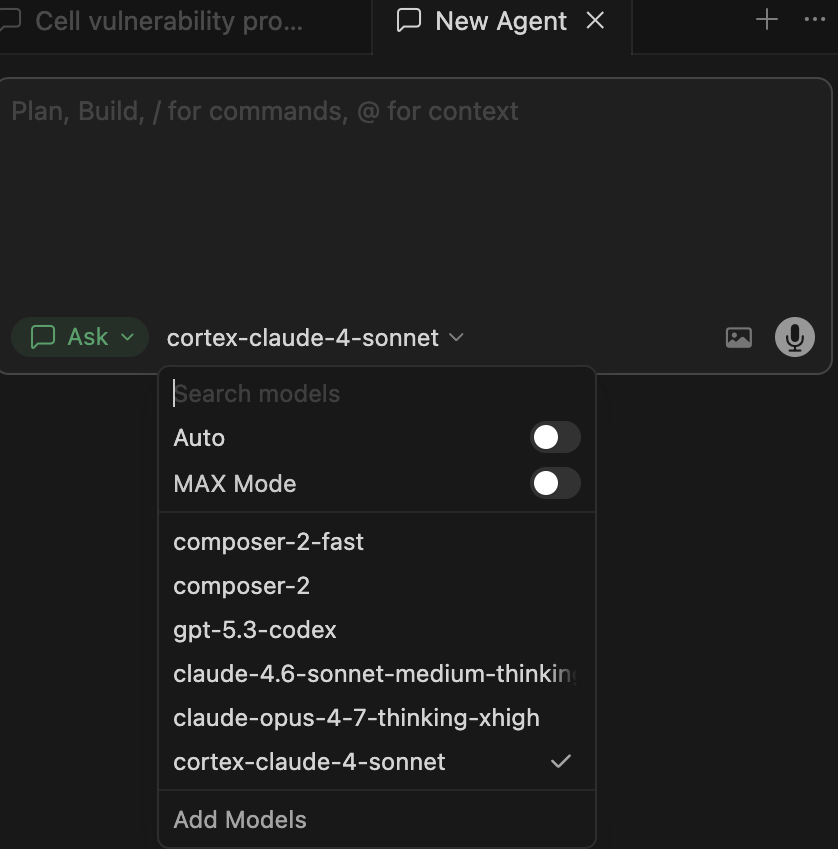
- In any Cursor chat, click the model picker (e.g.
composer-2-fast). - At the bottom of the popup, click Add Models.
- Choose OpenAI (or "OpenAI-compatible") and enter:
- Base URL:
http://127.0.0.1:4000/v1 - API Key: the value of
LITELLM_MASTER_KEYfrom.env - Model name:
cortex-claude-4-sonnet
- Base URL:
- Save / Verify. Select
cortex-claude-4-sonnetin the picker.
8. Verify end-to-end
-
Send a chat message in Cursor → request appears in the LiteLLM stdout log.
-
After ~1–2h, confirm token usage in Snowflake:
SELECT MODEL_NAME, SUM(TOKENS) AS tokens
FROM SNOWFLAKE.ACCOUNT_USAGE.CORTEX_REST_API_USAGE_HISTORY
WHERE START_TIME >= DATEADD(hour, -3, CURRENT_TIMESTAMP())
GROUP BY 1;
Team API key restriction
If Cursor shows:
Your team has disabled OpenAI API keys. Please disable your API key in Cursor Settings > Models.
…your Cursor admin has turned off BYOK at the team level. Options:
- Ask the admin to enable "Allow custom OpenAI API keys" in the Cursor team console.
- Or use the proxy from a personal/non-team Cursor account that doesn't inherit the policy.
- Or, instead of Cursor, point any OpenAI-compatible client (Continue.dev, Aider, Open WebUI, custom scripts) at the same
http://127.0.0.1:<port>/v1proxy — they have no such restriction.
Troubleshooting
| Symptom | Cause | Fix |
|---|---|---|
401 Unauthorized from Cortex | PAT missing or expired | Regenerate PAT, update .env, restart proxy |
Missing Snowflake JWT key from LiteLLM | SNOWFLAKE_PAT not in env | set -a; source .env; set +a before launching |
Proxy returns KEYPAIR_JWT auth error | Forgot pat/ prefix | SNOWFLAKE_PAT=pat/<token> in .env |
Model "claude-x-y" is unavailable | Model not in your region | SHOW FUNCTIONS LIKE 'COMPLETE%' and try a supported Claude variant |
| Cursor "Verify" button fails | Proxy not running on 127.0.0.1:<port> | lsof -i:<port>; restart run-proxy.sh |
File layout
~/cursor-cortex/
├── .env                  # SNOWFLAKE_PAT + LITELLM_MASTER_KEY (mode 0600)
├── .venv/                # isolated python env w/ litellm[proxy]
├── litellm_config.yaml   # model_list + master key reference
└── run-proxy.sh          # source .env && exec litellm
This content is provided as is, and is not maintained on an ongoing basis. It may be out of date with current Snowflake instances
