Nov 12, 2026/4 min readCore Platform
Create Semantics Anywhere with Apache Ossie (Incubating)


As companies build context, they face a tradeoff between authoring flexibility and unified data. Teams want a single tool to manage data pipelines and author semantics. At the same time, enterprises want to colocate their context with their data, creating one governed source of truth (and data) accessible from any AI or BI client. Apache Ossie (Incubating), the open source standard for semantic context, decouples the surface used to create context and the surface used to execute analytic semantics.
In this blog, we go through the path of authoring Snowflake semantic views in data build tool (dbt) using Ossie. We have a companion quickstart guide to follow along.
What is Apache Ossie (Incubating)?
Semantics, the shared definition of metrics, dimensions and relationships, are one of the most important strategic assets for agentic enterprises. Traditionally, each vendor had their own unique representation and standards for semantics. This led to duplicated and inconsistent definitions across tools and platforms.
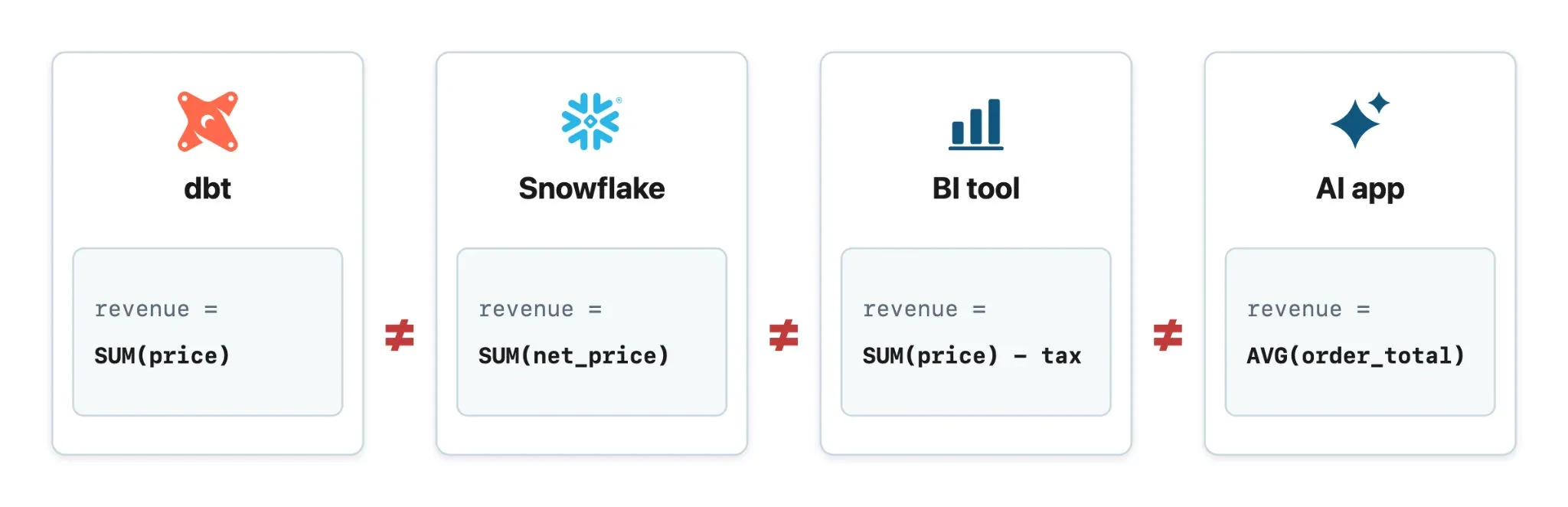
With Ossie, tools can consume and produce content while preserving meaning across supported converters. As an interchange format, Ossie uses converters to go between vendor representations of semantics.
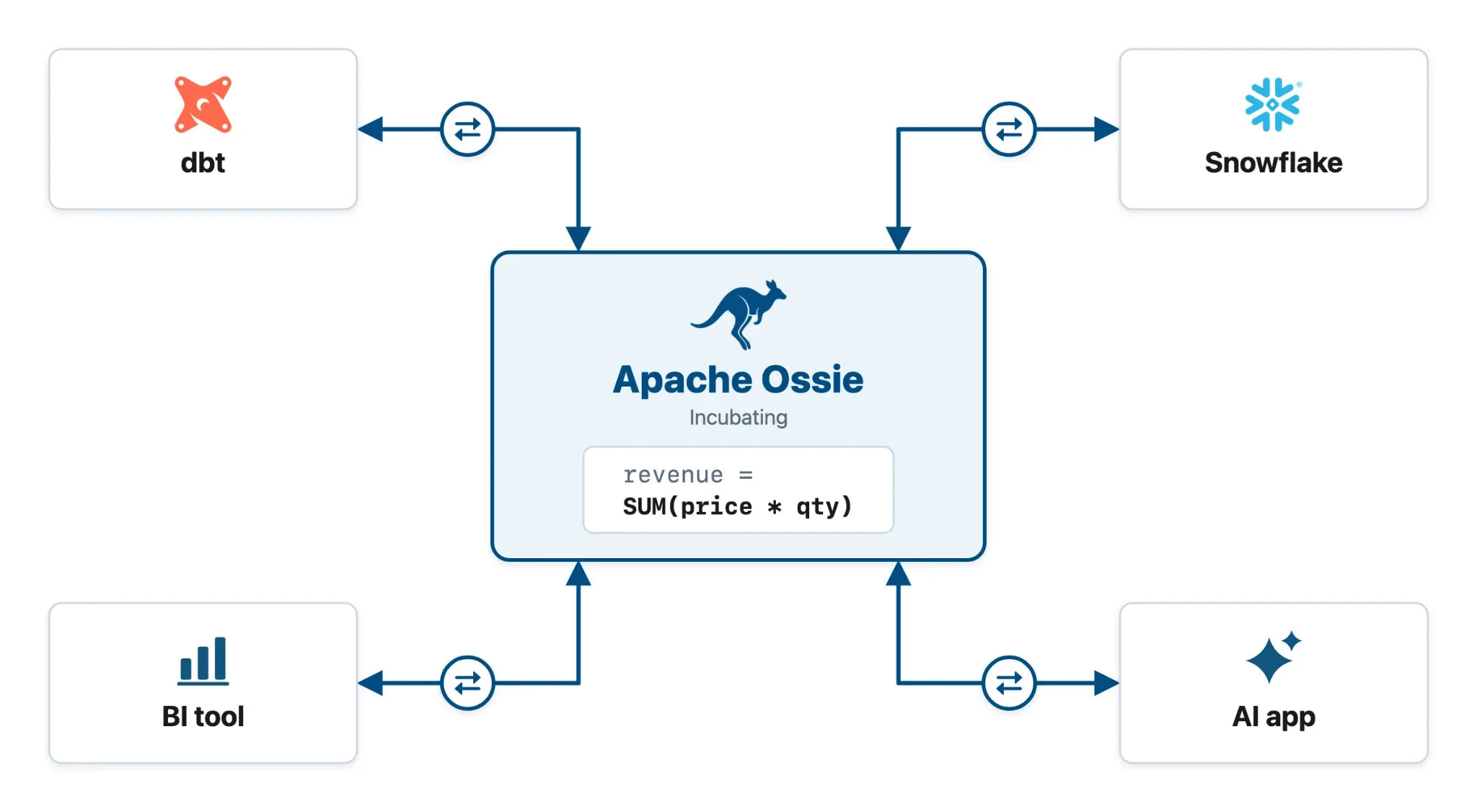
With this converter-based approach, each system can continue offering its specific functionality while maintaining a single source of truth. For example, Sonovate uses Ossie to integrate their Snowflake semantic views into their data architecture:
"We maintain our semantics in Snowflake, our data warehouse, using Ossie to synchronize to our other BI systems."
Andy Wakely
Head of Data and Analytics, Sonovate
We'll now go through an example of using Ossie to author semantic information in dbt, while storing the semantic view in Snowflake1.
Converting semantics from dbt to Snowflake using Ossie
Many data teams use dbt to manage their code for data pipelines. To integrate semantics into these pipelines, we'll create dbt semantic models and metrics in YAML, which MetricFlow (dbt's engine for semantics) can use. Then, we'll use dbt parse to write these definitions as Ossie YAML. After that, we'll construct Snowflake semantic views from the YAML, so they can be queried directly from Snowflake. The exact code steps are covered in the accompanying quickstart guide.
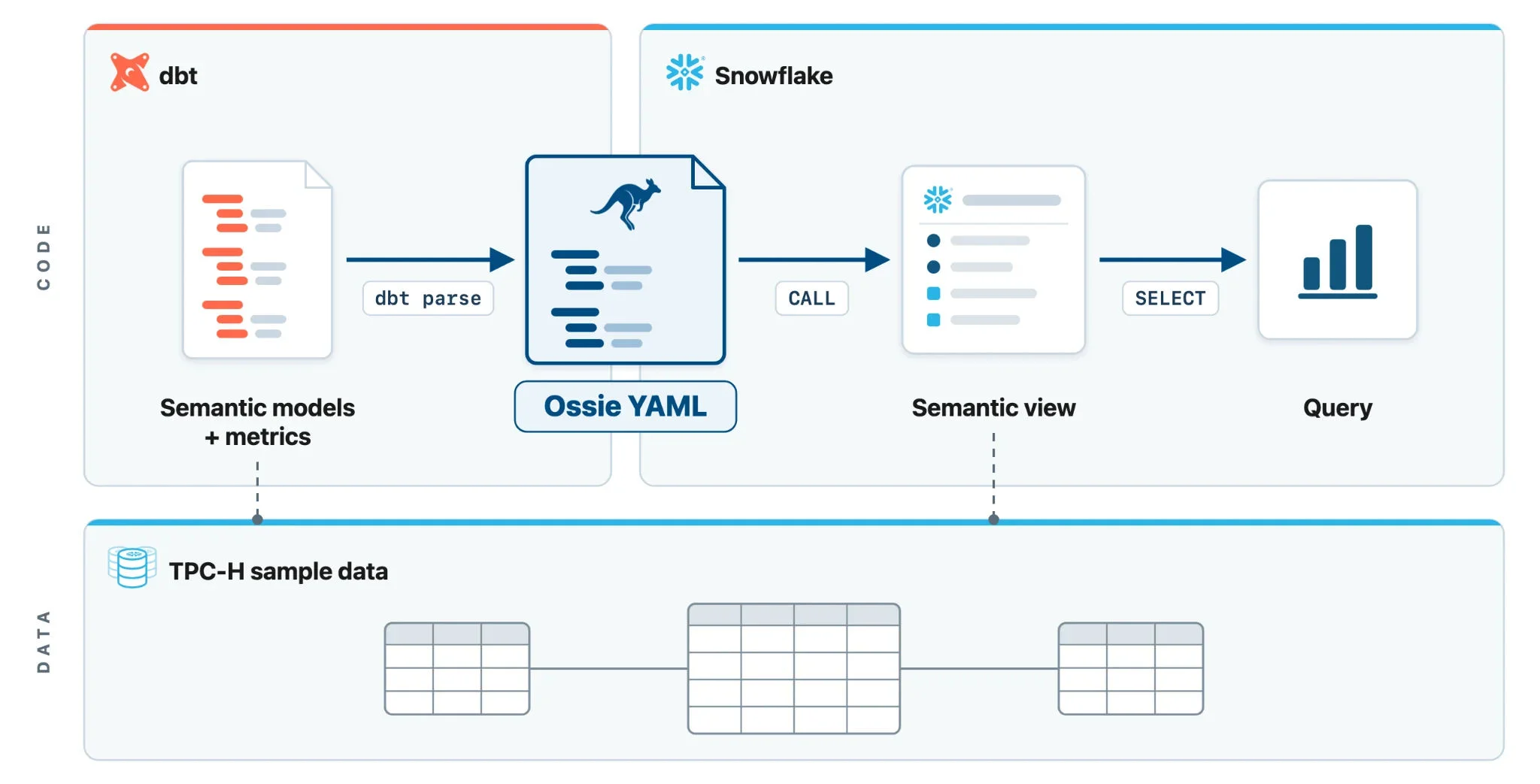
The quickstart contains a three-table star schema with the TPC-H sample data: one fact table at order-item grain, with a customer dimension and a product dimension. In dbt, encode these table-level details as dbt semantic models:
models:
  - name: fct_order_items      # fact table
    semantic_model:
      enabled: true
      name: order_items
    columns:
      - name: order_item_key
        entity:
          type: primary
      - name: customer_key
        entity:
          type: foreign
      - name: part_key
        entity:
          type: foreign
      - name: net_revenue
        dimension:
          type: categorical
    metrics:
      - name: total_revenue
        type: simple
        agg: sum
        expr: net_revenue
  - name: dim_customers        # dimension table
    semantic_model:
      enabled: true
      name: customers
    columns:
      - name: customer_key
        entity:
          type: primary
      - name: market_segment
        dimension:
          type: categorical
    metrics:
      - name: customer_count
        type: simple
        agg: count
        expr: customer_key
  - name: dim_products         # dimension table
    semantic_model:
      enabled: true
      name: products
    columns:
      - name: part_key
        entity:
          type: primary
      - name: brand
        dimension:
          type: categorical
    metrics:
      - name: product_count
        type: simple
        agg: count
        expr: part_key
On top of these models, add two more metrics for revenue per customer and revenue per product:
metrics:
  - name: revenue_per_customer
    type: ratio
    numerator: total_revenue
    denominator: customer_count
  - name: revenue_per_product
    type: ratio
    numerator: total_revenue
    denominator: product_count
Next, use dbt parse, which will write the semantic models as Ossie YAML into a specified target directory. Note that dbt also requires a time spine for all semantic models.
In Snowflake, create a semantic view with the stored procedure SYSTEM$CREATE_SEMANTIC_VIEW_FROM_OSSIE_YAML (currently in Public Preview):
CALL SYSTEM$CREATE_SEMANTIC_VIEW_FROM_OSSIE_YAML(
  'analytics.demo',
  <contents of dbt YAML output>
);
Now, query these metrics directly from Snowflake. For example, calculate revenue per customer by market segment in SQL:
SELECT market_segment,
       AGG(total_revenue)        AS total_revenue,
       AGG(customer_count)       AS customer_count,
       AGG(revenue_per_customer) AS revenue_per_customer
  FROM analytics.demo.semantic_model
 GROUP BY market_segment
 ORDER BY market_segment;
You can also use AI for ad hoc analysis with the same semantics. For example, add the semantic view to a Cortex Agent and ask "What is revenue per product for the top 5 brands?"
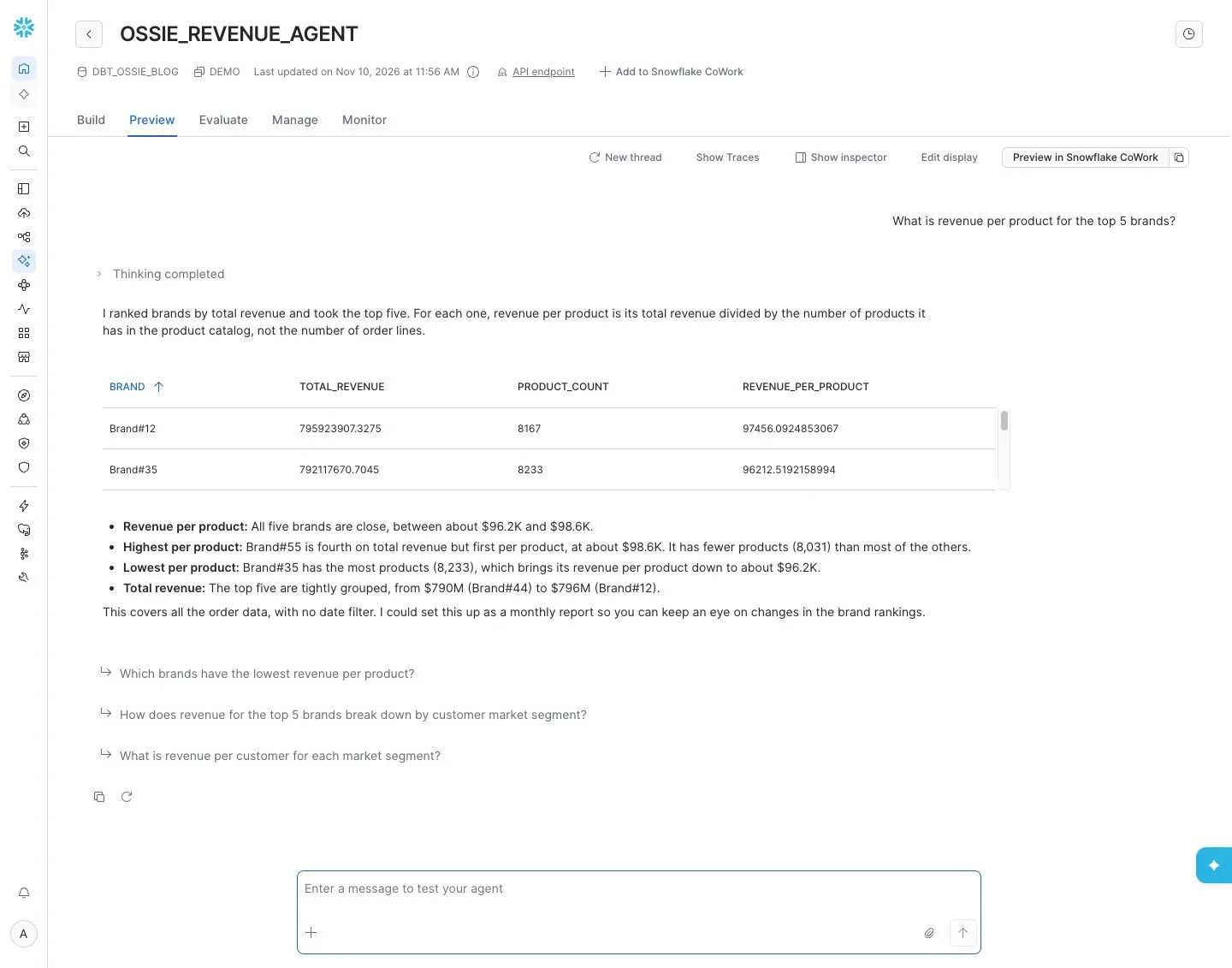
Behind the scenes, the Cortex Agent queries the semantic view to answer the user's question:
SELECT brand,
       AGG(total_revenue)       AS total_revenue,
       AGG(product_count)       AS product_count,
       AGG(revenue_per_product) AS revenue_per_product
  FROM analytics.demo.semantic_model
 GROUP BY brand
 ORDER BY total_revenue DESC
 LIMIT 5;
With this integration, you can use the same dbt code to manage your pipelines for data and semantic creation, while keeping Snowflake as your store for data and semantic views. For Envato, this approach helps them keep a consistent developer experience:
"Ossie bridges the gap between our dbt pipelines and our Snowflake data. We get the developer experience of dbt, but keep our semantics and data together. This keeps our context intact for downstream AI, BI, and applications."
Henry Upton
Data Platform Principal Engineer, Envato
The Ossie specification is still new and has a number of features to add, such as window functions for trailing metrics. Over time, we anticipate that these gaps will close, moving toward full-fidelity semantic conversion between systems.
Get involved with Ossie
Ossie is the key to enterprises owning their context, using the systems of their choice to author, host and use semantics. Each new converter extends that choice to another tool while upcoming roadmap features extend what those tools can express in Ossie.
In the past few months, we've seen tremendous community-led progress:
- 79 participating organizations with 20+ reference converters, which are now in a separate repository
- 80+ contributors with 540+ commits and nearly 400 merged pull requests across the repositories
- Multiple working groups on metrics, querying, catalog integrations, ontology representations and more
Ossie gets better with every tool and team that participates. Become a part of the growing community by subscribing to the dev mailing list, contributing to discussions and converters, and joining the monthly community meetings and the Slack workspace.
1 The code examples in this blog were tested on November 10, 2026, with dbt-core 1.12.6 and dbt-snowflake 1.12.5.
Apache and Apache Ossie are either registered trademarks or trademarks of the Apache Software Foundation in the United States and/or other countries.


