Distributed Text Classification with Mango HPO and Snowflake DPF
Overview




This guide demonstrates building a production-grade distributed text classification pipeline using:
| Component | Technology | Purpose |
|---|---|---|
| HPO | Mango | Bayesian hyperparameter optimization |
| Vectorization | TF-IDF | Text to numeric feature conversion |
| Classifier | MLPClassifier | Multi-layer neural network |
| Distribution | Snowflake DPF | Parallel processing across partitions |
| Data | CFPB Complaints | Real-world consumer financial complaints |
Source Files
| File | Description |
|---|---|
| src/setup.sql | Database, schema, stages, and table DDL |
| src/cfpb_pipeline.py | Complete Python pipeline implementation |
| src/requirements.txt | Python package dependencies |
Prerequisites
- Snowflake account with Container Runtime enabled
- Access to a compute pool (CPU nodes)
- Python 3.10+ environment
- CFPB complaints CSV file
What You'll Learn
- Implement Bayesian hyperparameter optimization with Mango
- Use TF-IDF for text vectorization in distributed environments
- Leverage Snowflake DPF for parallel ML training
- Process unstructured text data at scale
What You'll Build
- End-to-end text classification pipeline for consumer complaint routing
- Distributed training across multiple product category partitions
- Optimized MLP classifier with tuned hyperparameters
Architecture
The pipeline follows a distributed architecture optimized for Snowflake's container runtime:
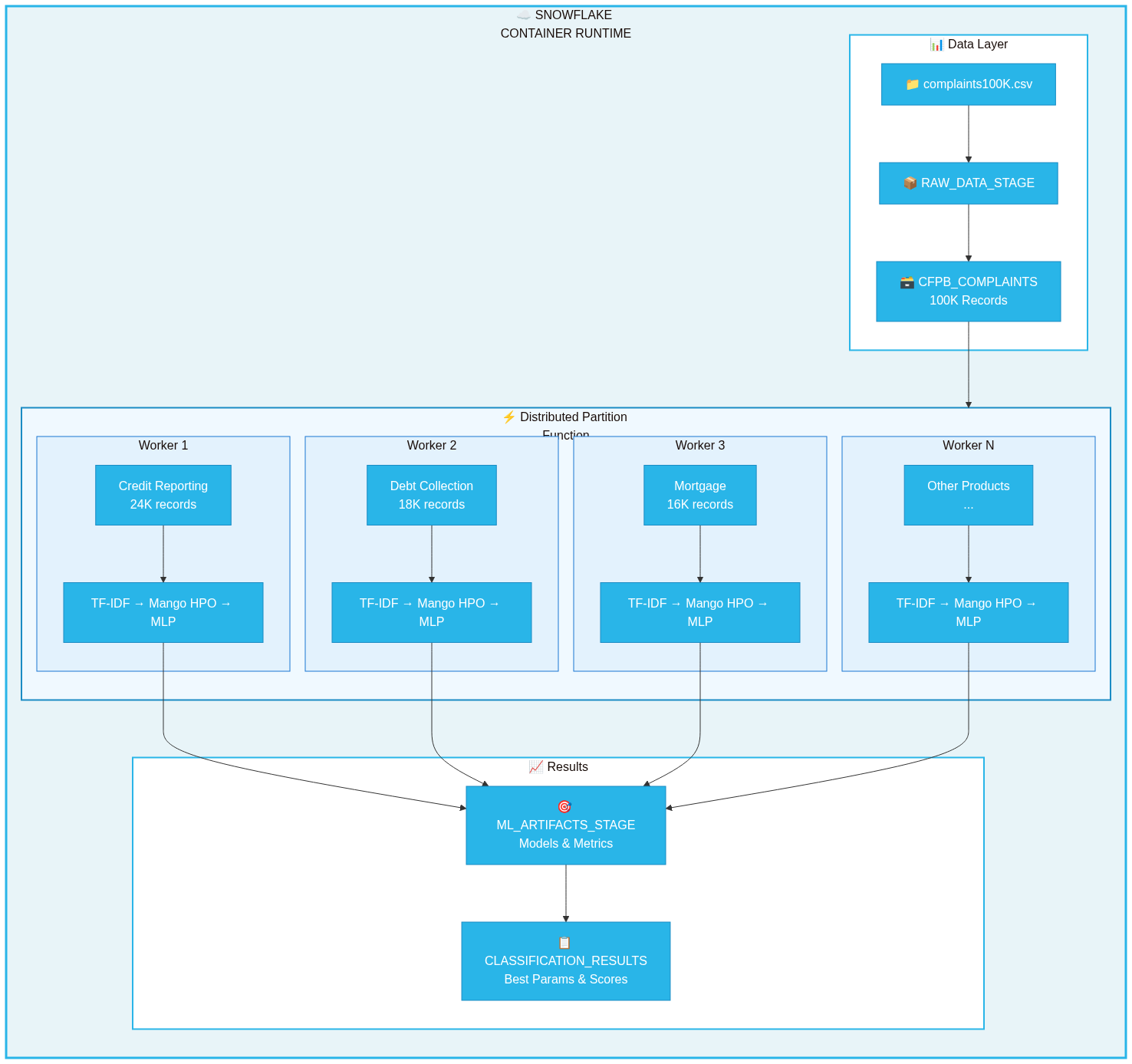
┌─────────────────────────────────────────────────────────────────────────────┐
│                        SNOWFLAKE CONTAINER RUNTIME                          │
├─────────────────────────────────────────────────────────────────────────────┤
│  ┌─────────────┐    ┌─────────────────────────────────────────────────┐     │
│  │   CFPB      │    │           DISTRIBUTED PARTITION FUNCTION        │     │
│  │  Complaints │───▶│  ┌─────────┐ ┌─────────┐ ┌─────────┐ ┌─────────┐│     │
│  │   Table     │    │  │Product 1│ │Product 2│ │Product 3│ │Product N││     │
│  └─────────────┘    │  │ Worker  │ │ Worker  │ │ Worker  │ │ Worker  ││     │
│                     │  │         │ │         │ │         │ │         ││     │
│                     │  │TF-IDF + │ │TF-IDF + │ │TF-IDF + │ │TF-IDF + ││     │
│                     │  │Mango HPO│ │Mango HPO│ │Mango HPO│ │Mango HPO││     │
│                     │  │  + MLP  │ │  + MLP  │ │  + MLP  │ │  + MLP  ││     │
│                     │  └────┬────┘ └────┬────┘ └────┬────┘ └────┬────┘│     │
│                     └───────┼───────────┼───────────┼───────────┼─────┘     │
│                             │           │           │           │           │
│                             ▼           ▼           ▼           ▼           │
│                     ┌─────────────────────────────────────────────────┐     │
│                     │              ML_ARTIFACTS_STAGE                 │     │
│                     │   (Models, Metrics, Best Hyperparameters)       │     │
│                     └─────────────────────────────────────────────────┘     │
└─────────────────────────────────────────────────────────────────────────────┘
Data Flow
- Load: CFPB complaints loaded from CSV to Snowflake table
- Partition: Data partitioned by
PRODUCTcolumn (18 categories) - Distribute: DPF assigns each partition to a worker node
- Process: Each worker runs TF-IDF + Mango HPO + MLP training
- Store: Results saved to stage and results table
Snowflake Environment Setup
Run the SQL setup script to create all required database objects.
Download Setup Script
Quick Setup
Copy and run in a Snowflake worksheet:
-- Create database and schema
CREATE DATABASE IF NOT EXISTS CFPB_ML_DB;
CREATE SCHEMA IF NOT EXISTS CFPB_ML_DB.TEXT_ANALYTICS;
USE DATABASE CFPB_ML_DB;
USE SCHEMA TEXT_ANALYTICS;

-- Create stages
CREATE STAGE IF NOT EXISTS ML_ARTIFACTS_STAGE DIRECTORY = (ENABLE = TRUE);
CREATE STAGE IF NOT EXISTS RAW_DATA_STAGE DIRECTORY = (ENABLE = TRUE);
Full Setup: See src/setup.sql for complete DDL including tables, file formats, and verification queries.
Tables Created
| Table | Purpose |
|---|---|
CFPB_COMPLAINTS | Source data - consumer complaint narratives |
CLASSIFICATION_RESULTS | Output - training metrics and best parameters |
Load CFPB Data
Load the CFPB complaints data into Snowflake.
Option 1: Via Stage (Recommended for Large Files)
# Upload file to stage (run from SnowSQL or Snowflake CLI)
snow stage put /path/to/complaints100K.csv @RAW_DATA_STAGE/
-- Load into table
COPY INTO CFPB_COMPLAINTS
FROM @RAW_DATA_STAGE/complaints100K.csv
FILE_FORMAT = (TYPE='CSV' FIELD_OPTIONALLY_ENCLOSED_BY='"' SKIP_HEADER=1)
ON_ERROR = 'CONTINUE';
Option 2: Via Python
import pandas as pd
from snowflake.snowpark.context import get_active_session

df = pd.read_csv('/path/to/complaints100K.csv')
session = get_active_session()
session.write_pandas(df, 'CFPB_COMPLAINTS', auto_create_table=True, overwrite=True)
Verify Data
SELECT PRODUCT, COUNT(*) AS RECORDS
FROM CFPB_COMPLAINTS
WHERE CONSUMER_COMPLAINT_NARRATIVE IS NOT NULL
GROUP BY PRODUCT ORDER BY RECORDS DESC;
Pipeline Code
The complete pipeline is implemented in src/cfpb_pipeline.py.
Download Files
Dependencies
Install required packages (from src/requirements.txt):
pip install arm-mango>=1.3.0 scikit-learn>=1.3.0 pandas numpy
Configuration
The pipeline uses a configuration dataclass defined in src/cfpb_pipeline.py:
@dataclass
class PipelineConfig:
    database: str = 'CFPB_ML_DB'
    schema: str = 'TEXT_ANALYTICS'
    partition_column: str = 'PRODUCT'
    text_column: str = 'CONSUMER_COMPLAINT_NARRATIVE'
    label_column: str = 'ISSUE'
    max_features: int = 5000
    hpo_iterations: int = 15
Mango HPO Search Space
PARAM_SPACE = {
    'hidden_layer_sizes': [(64,), (128,), (64, 32), (128, 64), (256, 128)],
    'alpha': [0.0001, 0.001, 0.01, 0.1],
    'learning_rate_init': [0.001, 0.01, 0.1],
    'activation': ['relu', 'tanh'],
    'max_iter': [200, 500, 1000]
}
DPF Worker Function
The process_text_partition() function in src/cfpb_pipeline.py runs on each worker node:
- Filters valid records with text narratives
- Applies TF-IDF vectorization (5000 features, bigrams)
- Runs Mango Bayesian HPO (15 iterations)
- Trains final MLP with best parameters
- Returns accuracy, F1 score, and hyperparameters
Run the Pipeline
Execute the pipeline in a Snowflake Notebook with Container Runtime.
Step 1: Create Notebook
- Navigate to Notebooks in Snowflake
- Create new notebook with Container Runtime enabled
- Select a CPU compute pool
Step 2: Upload Pipeline Code
Upload src/cfpb_pipeline.py to your notebook environment or paste inline.
Step 3: Install Dependencies
!pip install arm-mango scikit-learn
Step 4: Run Pipeline
from cfpb_pipeline import run_distributed_text_classification

results = run_distributed_text_classification()
Expected Output
======================================================================
DISTRIBUTED TEXT CLASSIFICATION WITH MANGO HPO + DPF
======================================================================
📦 Database: CFPB_ML_DB
📦 Schema: TEXT_ANALYTICS
📊 Total records: 100,000
📊 Records with text: 87,432
📍 Partitions: 18

🚀 Starting distributed HPO across partitions...

======================================================================
RESULTS BY PARTITION
======================================================================
✅ Credit reporting...
   Records: 24,532 | Classes: 47
   Accuracy: 68.42% | F1: 0.6721
   Best: hidden=(128,64), alpha=0.001

✅ Debt collection
   Records: 18,234 | Classes: 23
   Accuracy: 72.15% | F1: 0.7089

======================================================================
SUMMARY
======================================================================
📊 Partitions Processed: 18
📊 Average Accuracy: 69.8%
📊 Average F1 Score: 0.6834
⏱️  Parallel Speedup: ~14.7x
Performance Considerations
DPF Scaling Formula
DPF Time ≈ Overhead (20-30s) + max(Partition Times)
Sequential Time = Sum of all Partition Times
Speedup = min(num_partitions, num_nodes)
Scaling Examples
| Nodes | Partitions | Speedup |
|---|---|---|
| 4 | 4 | ~4x |
| 8 | 18 | ~8x |
| 18 | 18 | ~18x |
Optimization Tips
| Parameter | Recommendation |
|---|---|
max_features | 5000-10000 balances accuracy/speed |
hpo_iterations | 15-25 for thorough search |
min_samples | 100+ per partition |
| Partitioning | Choose balanced distribution column |
Conclusion and Resources
You've built a distributed text classification pipeline using Mango HPO and Snowflake DPF.
What You Learned
- ✅ Bayesian hyperparameter optimization with Mango
- ✅ TF-IDF vectorization for text data
- ✅ Snowflake DPF for parallel ML training
- ✅ Processing CFPB complaints at scale
Source Files Reference
| File | Description |
|---|---|
| src/setup.sql | Complete SQL DDL |
| src/cfpb_pipeline.py | Full Python implementation |
| src/requirements.txt | Dependencies |
Related Resources
| Resource | Link |
|---|---|
| Mango HPO | arm-mango on PyPI |
| Snowflake DPF | Process Data Across Partitions |
| CFPB Database | Consumer Complaints |
| Snowflake ML | ML Functions Overview |
Next Steps
- Add model persistence to Snowflake Model Registry
- Build inference pipeline with saved models
- Add Cortex Search for similarity-based routing
- Create Streamlit dashboard for visualization
This content is provided as is, and is not maintained on an ongoing basis. It may be out of date with current Snowflake instances
