Introduction to Online Feature Store in Snowflake
Overview
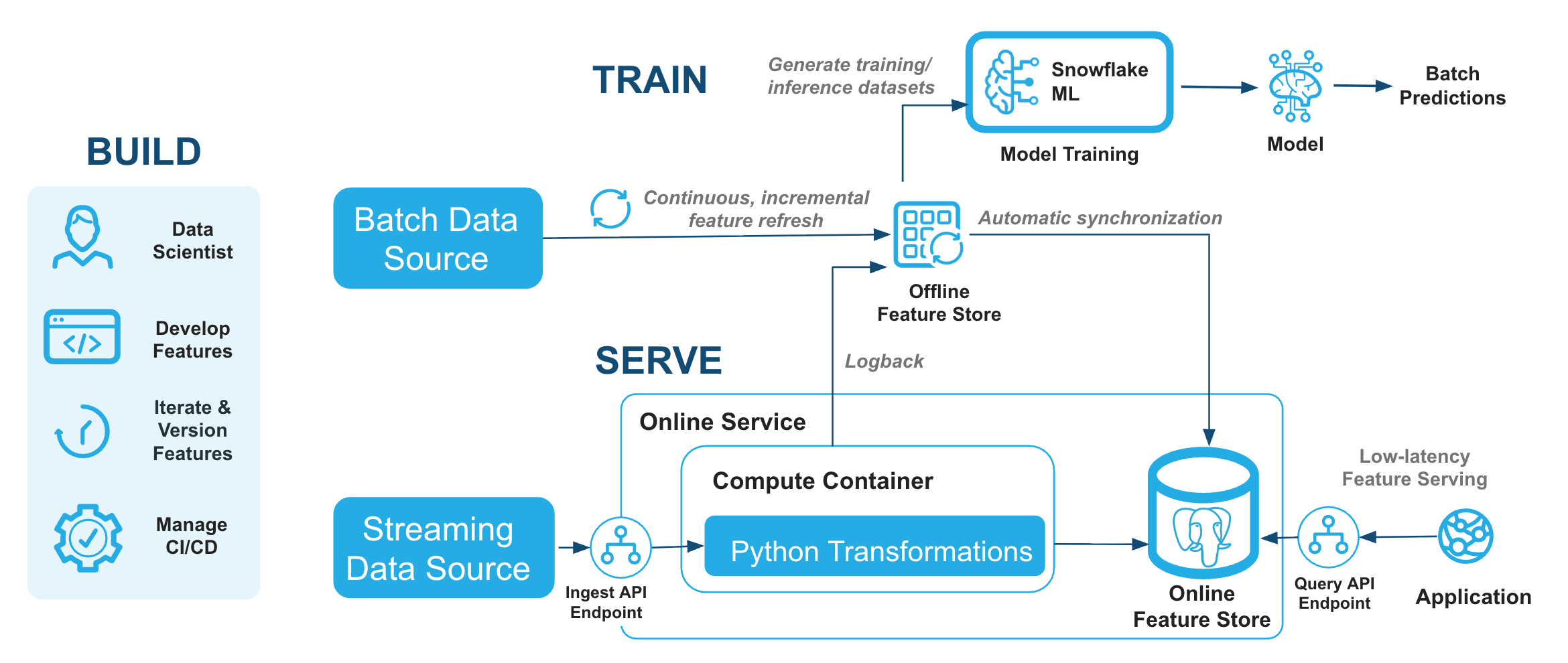
The Snowflake Online Feature Store with Postgres (Public Preview) provides low-letency feature retrieval for real-time ML inference. This guide demonstrates how to build a real-time fraud detection system using the Online Feature Store — covering online feature retrieval, time-windowed aggregations, streaming ingestion, and REST API usage.
You'll learn how to register batch, aggregation, and stream Feature Views backed by a managed Postgres serving layer, and how to query and ingest data through the REST API endpoints.
Prerequisites
- A Snowflake account (non-trial) in AWS or Azure commercial regions
- Basic knowledge of Python and SQL
- Familiarity with machine learning concepts
- ACCOUNTADMIN access or equivalent permissions
snowflake-ml-pythonversion 1.41 or later- A Programmatic Access Token (PAT) for authenticating to the Online Feature Store REST endpoints
What You'll Learn
- How to set up the Snowflake Feature Store with a Postgres-backed online service
- How to register batch, aggregation, and stream Feature Views
- How to query online features with low latency
- How to define Stream and Real-time Feature Views
- How to ingest streaming events and query features through the REST API
- How to integrate with the Snowflake Model Registry
What You'll Need
- A Snowflake account
- Basic understanding of Snowpark and Snowflake ML
- A Programmatic Access Token (PAT)
What You'll Build
- A Feature Store with 3 online Feature Views (batch profile, tiled aggregation, stream velocity)
- Real-time fraud scoring with low lentency feature retrieval
- Stream ingestion pipeline with 2-3 second end-to-end freshness
- REST API integration for feature query and stream ingest
Setup and Data Preparation
This section covers environment setup, creating the online service, and loading synthetic fraud data.
Download and Import the Notebook
- Click this link: online_feature_store_fraud_detection.ipynb
- On the GitHub page, click the Download raw file button (download icon in the top right of the file preview)
- Save the
.ipynbfile to your computer
Now import the notebook into Snowflake:
- Navigate to Projects > Workspaces in Snowsight
- Click + Add New and choose Upload files button
- Select the downloaded
online_feature_store_fraud_detection.ipynbfile from your computer
Run the Setup Cell
The notebook includes a Section 0: Setup cell that creates all required resources:
- A dedicated role:
FS_DEMO_ROLE - A warehouse:
FS_DEMO_WH - A database:
FRAUD_OFS_DEMO_DBwith schemasSOURCE_DATA,FEATURE_STORE,ML_PIPELINE - Network rule and external access integration for the notebook
Run this cell as ACCOUNTADMIN. You only need to run it once.
Set Up Authentication (PAT)
The Postgres online service communicates via REST endpoints. Set your PAT as an environment variable in the notebook before reading online features:
import os
os.environ["SNOWFLAKE_PAT"] = "<your_pat_token>"
To create a PAT in Snowsight: navigate to your profile menu > My profile > Settings > Authentication > Programmatic access tokens > Generate new token.
Initialize Feature Store
Initialize Feature Store
Initialize the Feature Store client, pointing it at the FEATURE_STORE schema. This creates the internal metadata tables if they don't already exist.
from snowflake.ml.feature_store import FeatureStore, CreationMode

fs = FeatureStore(
    session=session,
    database="FRAUD_OFS_DEMO_DB",
    name="FEATURE_STORE",
    default_warehouse="FS_DEMO_WH",
    creation_mode=CreationMode.CREATE_IF_NOT_EXIST,
)
Register Entity
An Entity defines the primary key used to join Feature Views together. Here we register a CUSTOMER entity with CUSTOMER_ID as the join key — all Feature Views in this guide will be keyed by customer.
from snowflake.ml.feature_store import Entity

customer_entity = Entity(
    name="CUSTOMER",
    join_keys=["CUSTOMER_ID"],
    desc="A customer identified by their unique customer ID",
)
fs.register_entity(customer_entity)
fs.list_entities().show()
Create Online Service
The online service is a managed Postgres serving layer. Create it once per Feature Store before registering feature views with online serving.
import time
from snowflake.ml.feature_store import online_service

create_result = fs.create_online_service(
    producer_role="FS_DEMO_ROLE",
    consumer_role="FS_DEMO_ROLE",
)
print(f"Create result: {create_result}")

# Wait for RUNNING status (takes several minutes on first creation)
for i in range(30):
    status = fs.get_online_service_status()
    if status.status == "RUNNING":
        break
    print(f"  [{i}] Status: {status.status}")
    time.sleep(30)

query_url = online_service.endpoint_url(status, "query")
ingest_url = online_service.endpoint_url(status, "ingest")
print(f"Query URL: {query_url}")
print(f"Ingest URL: {ingest_url}")
Register Feature Views
This section demonstrates three types of Feature Views — the core building blocks of the Online Feature Store.
Batch Feature View: Customer Profile
A batch feature view passes pre-computed features from an offline table to the online store. The online store serves the latest row per entity key.
from snowflake.ml.feature_store import FeatureView, OnlineConfig, OnlineStoreType

profile_df = session.table("FRAUD_OFS_DEMO_DB.SOURCE_DATA.CUSTOMER_PROFILES")

profile_fv = FeatureView(
    name="CUSTOMER_PROFILE_FEATURES",
    entities=[customer_entity],
    feature_df=profile_df,
    timestamp_col="UPDATED_AT",
    refresh_freq="1m",
    online_config=OnlineConfig(
        enable=True,
        target_lag="10s",
        store_type=OnlineStoreType.POSTGRES,
    ),
    desc="Customer profile features: account age, total transactions, avg amount",
)

registered_profile_fv = fs.register_feature_view(profile_fv, "V1", overwrite=True)
print(f"Registered: {registered_profile_fv.name}/{registered_profile_fv.version}")
Time-Windowed Aggregation Feature View
Use the Feature class to define rolling-window aggregate features. The online service pre-computes partial aggregates (tiles) and merges them at query time.
from snowflake.ml.feature_store import Feature

txn_features = [
    Feature.sum("TRANSACTION_AMOUNT", "1h").alias("SUM_AMT_1H"),
    Feature.sum("TRANSACTION_AMOUNT", "24h").alias("SUM_AMT_24H"),
    Feature.count("TRANSACTION_AMOUNT", "24h").alias("TXN_COUNT_24H"),
    Feature.avg("TRANSACTION_AMOUNT", "7d").alias("AVG_AMT_7D"),
]

txn_df = session.table("FRAUD_OFS_DEMO_DB.SOURCE_DATA.TRANSACTIONS")

txn_agg_fv = FeatureView(
    name="CUSTOMER_TXN_AGG",
    entities=[customer_entity],
    feature_df=txn_df,
    features=txn_features,
    timestamp_col="TRANSACTION_TS",
    refresh_freq="1m",
    feature_granularity="1 minute",
    online_config=OnlineConfig(
        enable=True,
        store_type=OnlineStoreType.POSTGRES,
    ),
    desc="Rolling transaction aggregations: sum, count, avg over 1h/24h/7d windows",
)

registered_txn_fv = fs.register_feature_view(txn_agg_fv, "V1", overwrite=True)
print(f"Registered: {registered_txn_fv.name}/{registered_txn_fv.version}")
Stream Feature View: Transaction Velocity
Stream Feature Views ingest events in real time and serve updated features with 2-3 second end-to-end freshness.
Register a Stream Source
from snowflake.ml.feature_store import StreamSource, StreamConfig
from snowflake.snowpark.types import (
    StructType, StructField, StringType, FloatType,
    TimestampType, TimestampTimeZone,
)

txn_stream = StreamSource(
    name="TXN_EVENTS",
    schema=StructType([
        StructField("CUSTOMER_ID", StringType()),
        StructField("TRANSACTION_TS", TimestampType(TimestampTimeZone.NTZ)),
        StructField("TRANSACTION_AMOUNT", FloatType()),
        StructField("MERCHANT_CATEGORY", StringType()),
    ]),
    desc="Real-time transaction events for velocity features",
)
fs.register_stream_source(txn_stream)
Define Transformation and Register
Define a Python transformation function that runs on each ingested event. The backfill_df provides historical data so the online store is pre-populated before any new events arrive.
import pandas as pd

def compute_velocity(df: pd.DataFrame) -> pd.DataFrame:
    """Flag high-velocity transactions."""
    df["IS_HIGH_AMOUNT"] = (df["TRANSACTION_AMOUNT"] > 500).astype(int)
    return df

backfill_df = session.table("FRAUD_OFS_DEMO_DB.SOURCE_DATA.TRANSACTIONS")

stream_fv = FeatureView(
    name="TXN_STREAM_VELOCITY",
    entities=[customer_entity],
    timestamp_col="TRANSACTION_TS",
    stream_config=StreamConfig(
        stream_source=txn_stream,
        transformation_fn=compute_velocity,
        backfill_df=backfill_df,
    ),
    online_config=OnlineConfig(
        enable=True,
        target_lag="10s",
        store_type=OnlineStoreType.POSTGRES,
    ),
    desc="Stream-ingested transaction velocity: per-event features with 2-3s freshness",
)

registered_stream_fv = fs.register_feature_view(stream_fv, "V1", overwrite=True)
print(f"Registered: {registered_stream_fv.name}/{registered_stream_fv.version}")
Online Feature Retrieval
Read Features from the Online Store
Retrieve feature values by entity key with low latency:
fv = fs.get_feature_view("CUSTOMER_PROFILE_FEATURES", "V1")

online_df = fs.read_feature_view(
    fv,
    keys=[["CUST_000001"], ["CUST_000042"]],
    store_type="online",
)
online_df.show()
Read Multiple Feature Views
txn_fv = fs.get_feature_view("CUSTOMER_TXN_AGG", "V1")

txn_online = fs.read_feature_view(
    txn_fv,
    keys=[["CUST_000001"]],
    store_type="online",
)
txn_online.show()
Latency Expectations
The Postgres online store achieves:
- p50: sub-10ms
- p95: sub-15ms
- p99: sub-20ms
For benchmarking in your own environment, see the Online Feature Store Benchmark Kit.
Stream Ingestion
Ingest Events via Python SDK
Use fs.stream_ingest() to push events in real time. Ingested events are available in the online store within 2-3 seconds.
import time
from datetime import datetime

# Ingest a new transaction event
fs.stream_ingest(
    stream_source="TXN_EVENTS",
    records=[
        {
            "CUSTOMER_ID": "CUST_000042",
            "TRANSACTION_TS": datetime.now().strftime("%Y-%m-%d %H:%M:%S"),
            "TRANSACTION_AMOUNT": 2500.00,
            "MERCHANT_CATEGORY": "electronics",
        }
    ],
)
print("Event ingested. Waiting for online store to update...")
time.sleep(3)

# Verify the update
stream_fv = fs.get_feature_view("TXN_STREAM_VELOCITY", "V1")
result = fs.read_feature_view(
    stream_fv,
    keys=[["CUST_000042"]],
    store_type="online",
)
result.show()
Before/After Comparison
This demonstrates the end-to-end freshness of stream ingestion. We read the feature value before ingesting a new event, wait 3 seconds, then read again. You should see IS_HIGH_AMOUNT flip to 1 after the high-value transaction is ingested — confirming that the online store updates within seconds.
# Read before ingest
before = fs.read_feature_view(stream_fv, keys=[["CUST_000042"]], store_type="online")
print("BEFORE:", before.to_pandas().to_string(index=False))

# Ingest suspicious transaction
fs.stream_ingest("TXN_EVENTS", records=[{
    "CUSTOMER_ID": "CUST_000042",
    "TRANSACTION_TS": datetime.now().strftime("%Y-%m-%d %H:%M:%S"),
    "TRANSACTION_AMOUNT": 5000.00,
    "MERCHANT_CATEGORY": "crypto_exchange",
}])
time.sleep(3)

# Read after ingest
after = fs.read_feature_view(stream_fv, keys=[["CUST_000042"]], store_type="online")
print("AFTER:", after.to_pandas().to_string(index=False))
REST API: Query and Ingest
The online service exposes HTTP endpoints for feature retrieval and stream ingestion. These can be called from any client (Python, curl, application code).
Get Endpoint URLs
In Python, retrieve the URLs from the online service status:
from snowflake.ml.feature_store import online_service

status = fs.get_online_service_status()
query_url = online_service.endpoint_url(status, "query")
ingest_url = online_service.endpoint_url(status, "ingest")

print(f"Query: {query_url}")
print(f"Ingest: {ingest_url}")
Query Endpoint
Retrieve features via the REST query API:
export SNOWFLAKE_PAT="<your_pat_token>"
export QUERY_URL="<query_endpoint_url>"

curl -s -X POST "$QUERY_URL/api/v1/query" \
  -H "Authorization: Snowflake Token=\"$SNOWFLAKE_PAT\"" \
  -H "Content-Type: application/json" \
  -d '{
    "feature_view": "CUSTOMER_TXN_AGG",
    "version": "V1",
    "keys": [["CUST_000001"], ["CUST_000042"]]
  }'
Ingest Endpoint
Push events via the REST ingest API:
export INGEST_URL="<ingest_endpoint_url>"

curl -s -X POST "$INGEST_URL/api/v1/ingest" \
  -H "Authorization: Snowflake Token=\"$SNOWFLAKE_PAT\"" \
  -H "Content-Type: application/json" \
  -d '{
    "stream_source": "TXN_EVENTS",
    "records": [
      {
        "CUSTOMER_ID": "CUST_000042",
        "TRANSACTION_TS": "2026-07-30 10:15:00",
        "TRANSACTION_AMOUNT": 3200.00,
        "MERCHANT_CATEGORY": "jewelry"
      }
    ]
  }'
Model Registry Integration
The Online Feature Store integrates with the Snowflake Model Registry. When deploying a model as a service, you can configure automatic feature retrieval so the inference endpoint only needs entity IDs.
NOTE: Model training is handled in the notebook. The notebook uses
fs.generate_training_set()to create a point-in-time correct training dataset from the Feature Views above, then trains an XGBoost fraud classifier. See the notebook for full training details.
Log Model to Registry
After training in the notebook, the model is registered:
from snowflake.ml.registry import Registry

registry = Registry(session=session)

mv = registry.log_model(
    model=trained_model,
    model_name="FRAUD_DETECTION_MODEL",
    version_name="V1",
    metrics={"auc": auc_score, "f1": f1_score},
)
Deploy with Automatic Feature Retrieval
Pass feature_sources_per_function to have the service automatically look up features from the online store at inference time. You only need to send the entity ID (CUSTOMER_ID) in the request.
mv.create_service(
    service_name="FRAUD_SCORING_SVC",
    service_compute_pool="ML_INFERENCE_POOL",
    ingress_enabled=True,
    feature_sources_per_function={
        "predict": [registered_profile_fv, registered_txn_fv],
    },
)
With this configuration, a prediction request only needs:
{"CUSTOMER_ID": "CUST_000042"}
The service fetches CUSTOMER_PROFILE_FEATURES and CUSTOMER_TXN_AGG from the online store automatically before invoking the model.
Clean Up
Drop the Online Service
The Postgres online service runs continuously. Drop it from the notebook when done:
fs.drop_online_service()
Run the Teardown Script
- Open Snowflake and navigate to Projects > Workspaces
- Create a new SQL file and paste the following:
USE ROLE ACCOUNTADMIN;

SET USERNAME = (SELECT CURRENT_USER());

-- Drop online service resources (handled by fs.drop_online_service() above)
-- Drop database (drops all schemas, tables, feature views, dynamic tables)
USE ROLE FS_DEMO_ROLE;
DROP DATABASE IF EXISTS FRAUD_OFS_DEMO_DB;
DROP WAREHOUSE IF EXISTS FS_DEMO_WH;
DROP COMPUTE POOL IF EXISTS FS_DEMO_INFERENCE_POOL;

-- Drop integration and role
USE ROLE ACCOUNTADMIN;
DROP INTEGRATION IF EXISTS FRAUD_OFS_DEMO_ALLOW_ALL_INTEGRATION;

REVOKE CREATE DATABASE ON ACCOUNT FROM ROLE FS_DEMO_ROLE;
REVOKE CREATE WAREHOUSE ON ACCOUNT FROM ROLE FS_DEMO_ROLE;
REVOKE CREATE COMPUTE POOL ON ACCOUNT FROM ROLE FS_DEMO_ROLE;
REVOKE BIND SERVICE ENDPOINT ON ACCOUNT FROM ROLE FS_DEMO_ROLE;
REVOKE IMPORT SHARE ON ACCOUNT FROM ROLE FS_DEMO_ROLE;
REVOKE EXECUTE TASK ON ACCOUNT FROM ROLE FS_DEMO_ROLE;
REVOKE EXECUTE MANAGED TASK ON ACCOUNT FROM ROLE FS_DEMO_ROLE;

REVOKE ROLE FS_DEMO_ROLE FROM USER identifier($USERNAME);
DROP ROLE IF EXISTS FS_DEMO_ROLE;

SELECT 'Teardown complete.' AS STATUS;
Conclusion and Resources
Congratulations! You've built a real-time fraud detection system using the Snowflake Online Feature Store with Postgres.
What You Learned
- How to create a Postgres-backed online service with
create_online_service() - How to register batch, aggregation, and stream Feature Views with
OnlineStoreType.POSTGRES - How to retrieve online features with low latency
- How to ingest streaming events with 2-3 second end-to-end freshness
- How to use the REST API endpoints for feature query and stream ingest
- How to integrate with Model Registry for automatic feature retrieval at inference time
Key Takeaways
- Postgres Online Store delivers p50 ~5-10ms in-region latency via the REST query API
- Time-windowed aggregations (
Feature.sum/count/avg) compute rolling metrics automatically - Stream Feature Views provide 2-3 second freshness via REST ingest
- REST API enables language-agnostic integration (curl, Python, any HTTP client)
feature_sources_per_functioneliminates the need for clients to fetch features manually
Related Resources
- Serving Online Features (Postgres)
- Online Feature Store Quickstart Notebook
- Snowflake Feature Store Documentation
- Ingest API Reference
- Query API Reference
- Online Feature Store Benchmark Kit
- Real-time Inference with Online Feature Store
- Advanced Feature Engineering (Aggregations)
- Programmatic Access Tokens
Next Steps
- Try the feature store with your own datasets
- Integrate online features into production applications via the REST query API
This content is provided as is, and is not maintained on an ongoing basis. It may be out of date with current Snowflake instances
