Govern Apache Iceberg Tables for External Engines with Snowflake Horizon
Overview
Snowflake-managed Apache Iceberg tables can be read and written by outside engines through Snowflake Horizon Catalog's Iceberg REST Catalog (IRC) endpoint. On its own, that raises an obvious governance question: if the engine reads Parquet files directly from storage, what happens to the masking policy on your email column?
The answer is that the policies travel with the data. When a table carries policies that apply to the caller, Snowflake stops handing out storage credentials and instead plans the scan server-side, materializing a masked and filtered result before the engine reads anything. When the policies do not apply to the caller, the engine gets credentials and can write as normal. Either way, every operation is audited, and the audit record names the policies that were evaluated.
This guide has you build that end to end: two governed Iceberg tables, two roles, an Apache Spark session that speaks nothing but Iceberg REST, and the audit query that proves enforcement happened.
Everything here works over the open protocol. There is no Snowflake-specific client, driver, or connector anywhere in the engine configuration.
Prerequisites
- A Snowflake account (or free trial) on AWS or Azure. This guide uses Snowflake-managed Iceberg storage, which is available only on AWS and Azure and is not available in government regions or in the People's Republic of China.
- A role that can create databases, roles, users, and policies (
ACCOUNTADMINin a trial) - Apache Spark 3.5 or later with Apache Iceberg 1.11.0 or later
- Familiarity with SQL and basic Spark
What You'll Learn
- How Snowflake enforces masking and row access policies for engines reading over Iceberg REST
- Why a governed table returns no credentials, and what
scan-planning-mode: servermeans - The exact rule that decides whether an external engine may write to a governed table
- How to prove enforcement after the fact using
POLICIES_REFERENCEDinACCESS_HISTORY - Which failure modes look like cloud permission problems but are actually policy decisions
What You'll Need
- A Snowflake warehouse the querying role can use
- Network access from your Spark environment to your Snowflake account URL
What You'll Build
Two Snowflake-managed Iceberg tables, each carrying a different kind of policy, queried and written by a plain Spark session over Iceberg REST — once as a role the policies exempt, and once as a role they apply to, so you can see enforcement happen and then find it in the audit trail.
Create Governed Tables
Create a database, a warehouse, and two roles. FULL_ROLE will be exempt from both policies; RESTRICTED_ROLE will not.
USE ROLE ACCOUNTADMIN;

CREATE OR REPLACE DATABASE ICEBERG_GOVERNANCE_DEMO
  COMMENT = 'Demo database for governing Iceberg tables accessed over Horizon IRC.';

CREATE OR REPLACE WAREHOUSE GOVERNANCE_DEMO_WH
  WAREHOUSE_SIZE = XSMALL
  AUTO_SUSPEND = 60
  INITIALLY_SUSPENDED = TRUE
  COMMENT = 'Compute for scan planning on governed Iceberg reads.';

CREATE ROLE IF NOT EXISTS FULL_ROLE
  COMMENT = 'Exempt from both demo policies - sees unmasked values and all rows, and may write.';
CREATE ROLE IF NOT EXISTS RESTRICTED_ROLE
  COMMENT = 'Subject to both demo policies - sees masked values and filtered rows, and may not write.';
Grant both roles what they need. Scan planning runs on a warehouse, so the querying role must be able to use one — this is a common source of confusing failures later.
GRANT USAGE ON DATABASE ICEBERG_GOVERNANCE_DEMO TO ROLE FULL_ROLE;
GRANT USAGE ON DATABASE ICEBERG_GOVERNANCE_DEMO TO ROLE RESTRICTED_ROLE;
GRANT USAGE ON SCHEMA ICEBERG_GOVERNANCE_DEMO.PUBLIC TO ROLE FULL_ROLE;
GRANT USAGE ON SCHEMA ICEBERG_GOVERNANCE_DEMO.PUBLIC TO ROLE RESTRICTED_ROLE;
GRANT USAGE ON WAREHOUSE GOVERNANCE_DEMO_WH TO ROLE FULL_ROLE;
GRANT USAGE ON WAREHOUSE GOVERNANCE_DEMO_WH TO ROLE RESTRICTED_ROLE;
Now create the first Iceberg table with a masking policy on its email column. These are Snowflake-managed Iceberg tables: EXTERNAL_VOLUME = 'SNOWFLAKE_MANAGED' is a keyword rather than the name of a volume you have to create, and there is no BASE_LOCATION — Snowflake chooses the layout.
USE DATABASE ICEBERG_GOVERNANCE_DEMO;
USE SCHEMA PUBLIC;

CREATE OR REPLACE ICEBERG TABLE USER_INFO (
    USERNAME STRING,
    EMAIL    STRING
)
  CATALOG = 'SNOWFLAKE'
  EXTERNAL_VOLUME = 'SNOWFLAKE_MANAGED'
  COMMENT = 'Demo table with a masking policy on EMAIL.';

INSERT INTO USER_INFO VALUES
  ('alice', 'alice@example.com'),
  ('bob',   'bob@example.com'),
  ('carol', 'carol@example.com');

CREATE OR REPLACE MASKING POLICY MASK_EMAIL AS (val STRING)
  RETURNS STRING ->
    CASE
      WHEN CURRENT_ROLE() IN ('FULL_ROLE') THEN val
      ELSE '****@****.***'
    END
  COMMENT = 'Reveals EMAIL only to FULL_ROLE; masks it for every other role.';

ALTER ICEBERG TABLE USER_INFO MODIFY COLUMN EMAIL
  SET MASKING POLICY MASK_EMAIL;
Then a second table with a row access policy instead, so you can see both policy kinds behave identically from the engine's point of view.
CREATE OR REPLACE ICEBERG TABLE REGIONS (
    REGION    STRING,
    IS_PUBLIC BOOLEAN
)
  CATALOG = 'SNOWFLAKE'
  EXTERNAL_VOLUME = 'SNOWFLAKE_MANAGED'
  COMMENT = 'Demo table with a row access policy on IS_PUBLIC.';

INSERT INTO REGIONS VALUES
  ('us-west-2',  TRUE),
  ('us-east-1',  TRUE),
  ('eu-west-1',  TRUE),
  ('ap-south-1', FALSE),
  ('cn-north-1', FALSE);

CREATE OR REPLACE ROW ACCESS POLICY RAP_PUBLIC_ONLY AS (is_public BOOLEAN)
  RETURNS BOOLEAN ->
    CURRENT_ROLE() IN ('FULL_ROLE') OR is_public = TRUE
  COMMENT = 'FULL_ROLE sees all regions; every other role sees only public ones.';

ALTER ICEBERG TABLE REGIONS ADD ROW ACCESS POLICY RAP_PUBLIC_ONLY ON (IS_PUBLIC);

GRANT SELECT ON ICEBERG TABLE REGIONS TO ROLE FULL_ROLE;
GRANT SELECT ON ICEBERG TABLE REGIONS TO ROLE RESTRICTED_ROLE;

GRANT SELECT, INSERT, UPDATE, DELETE, TRUNCATE
  ON ICEBERG TABLE USER_INFO TO ROLE FULL_ROLE;
GRANT SELECT, INSERT, UPDATE, DELETE, TRUNCATE
  ON ICEBERG TABLE USER_INFO TO ROLE RESTRICTED_ROLE;
USER_INFO is the table you will write to, and a write over Iceberg REST needs the whole DML set — SELECT, INSERT, UPDATE, DELETE and TRUNCATE. TRUNCATE is the one most often left out, because nothing in this guide truncates anything and a Snowflake MERGE does not require it. Omit it and the engine's commit fails on a privilege check that names none of the statements you actually ran.
Note that RESTRICTED_ROLE is granted the full write set as well. That is deliberate — later you will see Snowflake refuse its writes anyway, because the decision is made on policy applicability, not on the SQL grant. Getting the grants right first is what makes that later refusal meaningful: with a privilege missing, both roles fail and you learn nothing.
Configure External Engine
The engine authenticates with a programmatic access token bound to a single role. Create a service user for each role.
USE ROLE ACCOUNTADMIN;

CREATE OR REPLACE USER SVC_FULL
  TYPE = SERVICE
  DEFAULT_ROLE = FULL_ROLE
  DEFAULT_WAREHOUSE = GOVERNANCE_DEMO_WH
  COMMENT = 'Service identity for the policy-exempt role in this guide.';

CREATE OR REPLACE USER SVC_RESTRICTED
  TYPE = SERVICE
  DEFAULT_ROLE = RESTRICTED_ROLE
  DEFAULT_WAREHOUSE = GOVERNANCE_DEMO_WH
  COMMENT = 'Service identity for the policy-restricted role in this guide.';

GRANT ROLE FULL_ROLE TO USER SVC_FULL;
GRANT ROLE RESTRICTED_ROLE TO USER SVC_RESTRICTED;
Now generate the two tokens. A programmatic access token is displayed exactly once, when it is created, and cannot be retrieved afterwards. Open somewhere to keep them — a password manager, or a scratch buffer you will clear — before you run the next statement. If you lose a token, your only option is to remove it and add a new one.
Create the first token and copy the token_secret value from the result:
ALTER USER SVC_FULL ADD PROGRAMMATIC ACCESS TOKEN FULL_PAT
  ROLE_RESTRICTION = 'FULL_ROLE'
  DAYS_TO_EXPIRY = 30;
With that one saved, create the second and copy it too:
ALTER USER SVC_RESTRICTED ADD PROGRAMMATIC ACCESS TOKEN RESTRICTED_PAT
  ROLE_RESTRICTION = 'RESTRICTED_ROLE'
  DAYS_TO_EXPIRY = 30;
Label them as you paste — the two tokens are indistinguishable by eye, and swapping them produces a confusing result rather than an error, because both are valid credentials for different roles.
Point a standard Iceberg REST catalog at Horizon. The catalog URI is your account URL plus the Horizon IRC path, and the warehouse property is the Snowflake database name.
from pyspark.sql import SparkSession

ACCOUNT_URL = "https://<orgname>-<account_name>.snowflakecomputing.com"
CATALOG_URI = f"{ACCOUNT_URL}/polaris/api/catalog"
DATABASE = "ICEBERG_GOVERNANCE_DEMO"
PAT_TOKEN = "<paste the PAT for the role you are testing>"
SESSION_ROLE = "FULL_ROLE"  # or RESTRICTED_ROLE

spark = (
    SparkSession.builder
    .config("spark.jars.packages",
            "org.apache.iceberg:iceberg-spark-runtime-3.5_2.12:1.11.0,"
            "org.apache.iceberg:iceberg-aws-bundle:1.11.0")
    .config("spark.sql.catalog.horizon",
            "org.apache.iceberg.spark.SparkCatalog")
    .config("spark.sql.catalog.horizon.type", "rest")
    .config("spark.sql.catalog.horizon.uri", CATALOG_URI)
    .config("spark.sql.catalog.horizon.warehouse", DATABASE)
    .config("spark.sql.catalog.horizon.credential", PAT_TOKEN)
    .config("spark.sql.catalog.horizon.scope", f"session:role:{SESSION_ROLE}")
    .config("spark.sql.catalog.horizon.header.X-Iceberg-Access-Delegation",
            "vended-credentials")
    .getOrCreate()
)
There is no fallback catalog, no JDBC URL, and no Snowflake connector. Every step that follows runs through that one catalog handle.
iceberg-aws-bundle is what lets Iceberg use the credentials Snowflake vends. Without it the first read fails with Failed to get file system for path: s3://…, which looks like a storage problem but is a missing client library. On Azure, substitute iceberg-azure-bundle.
Run this in a notebook or a pyspark shell, where PySpark starts the JVM and resolves spark.jars.packages for you. Under spark-submit the JVM is already running by the time the builder executes, so the same two packages have to go on the command line instead:
spark-submit --packages \
  org.apache.iceberg:iceberg-spark-runtime-3.5_2.12:1.11.0,org.apache.iceberg:iceberg-aws-bundle:1.11.0 \
  your_script.py
The remaining steps assume a persistent session, in Spark and in Snowflake alike. Keep one Snowflake worksheet for the SQL, because each block builds on the database, schema and role the preceding blocks set.
Read Governed Data
Reads always work on a governed table. What changes is what comes back.
Run the same query as each role, changing only SESSION_ROLE and PAT_TOKEN in the preceding configuration.
spark.sql("SELECT * FROM horizon.PUBLIC.USER_INFO").show(truncate=False)
As FULL_ROLE, three rows come back with email addresses in the clear. As RESTRICTED_ROLE, the same three rows come back with usernames untouched and every email reading ****@****.***. Masking is column-level, so only the sensitive values change.
The row access policy removes rows rather than altering values.
spark.sql("SELECT COUNT(*) AS cnt FROM horizon.PUBLIC.REGIONS").show()
FULL_ROLE gets 5. RESTRICTED_ROLE gets 3. Those two rows are not filtered on the client — they never leave Snowflake, and Spark has no way to know they exist.
How enforcement works
When the policies apply to the caller, the loadTable response contains no storage credentials. Instead it signals that the scan will be planned server-side:
{
  "config": {
    "client.region": "us-west-2",
    "scan-planning-mode": "server"
  }
}
The engine then submits its filters and column projection as a scan plan. Snowflake evaluates the policies for the calling role, runs the query on your warehouse, materializes the masked and filtered result as temporary Iceberg files, and returns a plan plus credentials scoped to those temporary files only. The engine reads already-governed Parquet and never touches the underlying table files.
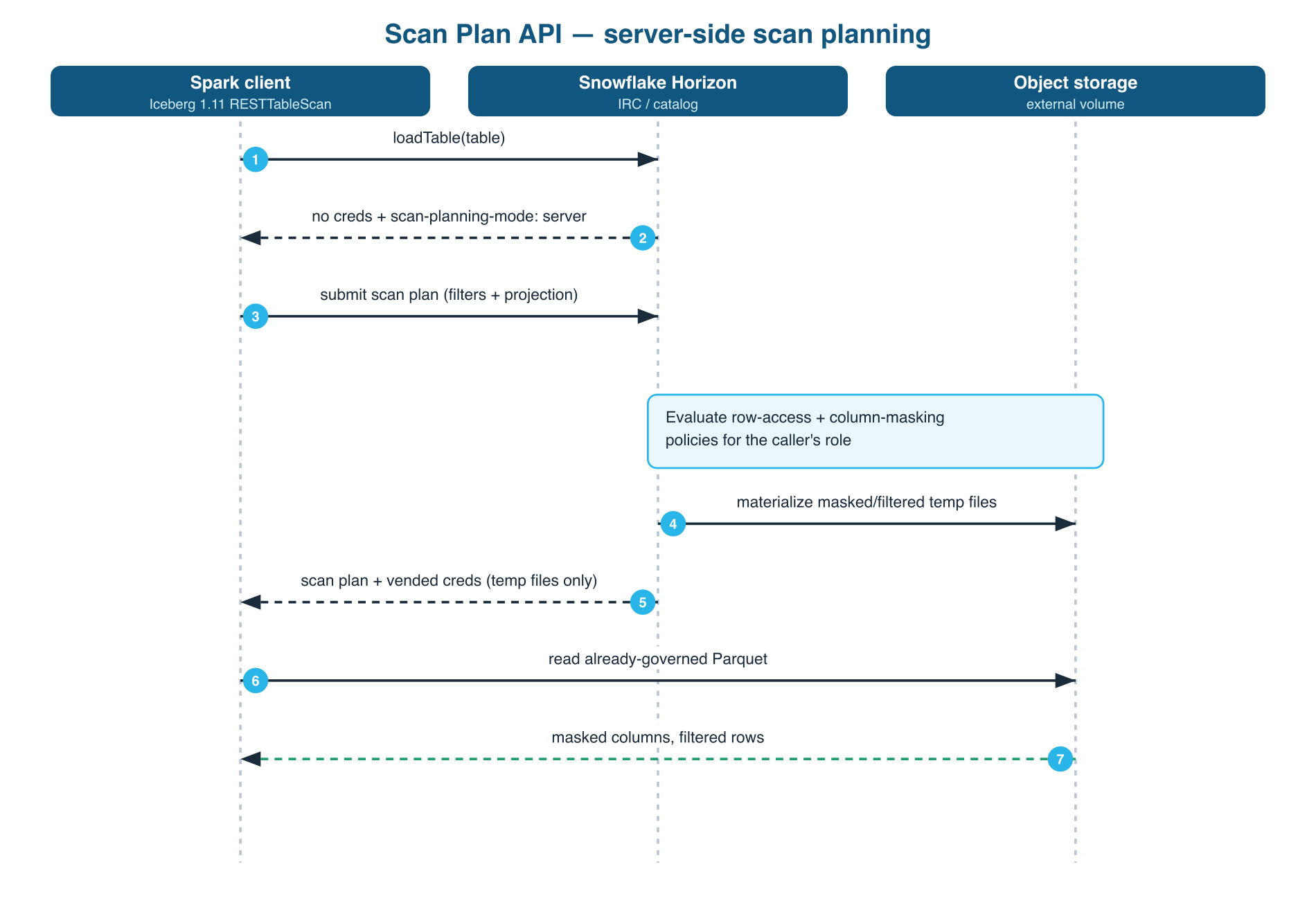
Horizon plans asynchronously: it answers a submission with a plan id, and the client polls until the plan is ready. Spark 3.5 with Iceberg 1.11.0 or later does this. Clients that do not poll will stall on the first governed read even though they otherwise implement the scan API.
Write Governed Data
A policy does not make a table read-only to the outside world. Snowflake asks a sharper question than "does this table have a policy?" — it asks whether the policy would change anything for the role that is asking.
A write is allowed if, and only if, every policy attached to the table is a no-op for the role doing the writing.
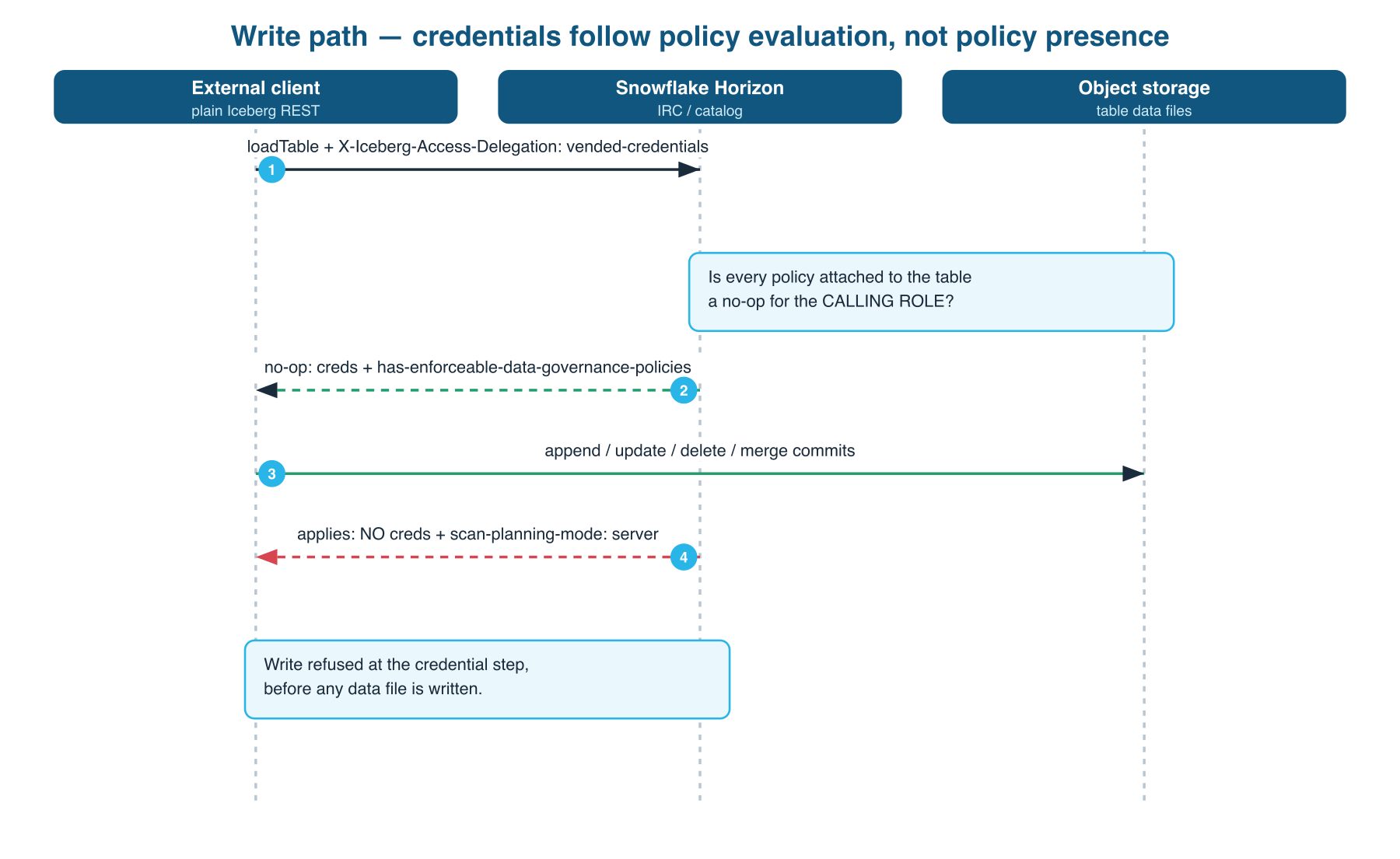
As FULL_ROLE, which both policies exempt, a write behaves like a write to any ordinary table.
spark.sql("""
    CREATE OR REPLACE TEMPORARY VIEW updates AS
    SELECT 'alice' AS USERNAME, 'alice.new@example.com' AS EMAIL
""")

spark.sql("""
    MERGE INTO horizon.PUBLIC.USER_INFO t
    USING updates s ON t.USERNAME = s.USERNAME
    WHEN MATCHED THEN UPDATE SET t.EMAIL = s.EMAIL
    WHEN NOT MATCHED THEN INSERT *
""")
That commits, producing a new snapshot Snowflake sees immediately. Appends, updates and deletes behave the same.
Run the identical statement as RESTRICTED_ROLE and it fails. Confirm in Snowflake that nothing changed:
SELECT USERNAME, EMAIL FROM ICEBERG_GOVERNANCE_DEMO.PUBLIC.USER_INFO ORDER BY USERNAME;
Check the table contents rather than trusting the absence of an error, because "the write failed" and "the write silently stored masked values" look identical from the client side.
The refusal arrives at one of two places, depending on the statement, and the two look nothing like each other:
- A statement that has to read first —
MERGE,UPDATE,DELETE— is refused during scan planning, before any file is written. Iceberg asks for the_filemetadata column to identify the rows it will rewrite, and on a governed table that request comes back rejected:
org.apache.iceberg.exceptions.BadRequestException: Malformed request:
Invalid select field: '_file' does not exist in the table schema
The message names a column you did not remove, which is why it reads as a schema bug rather than the governance decision it is. What matters is where it happens: the plan is refused, so no file is written and nothing is read. A MERGE reads existing rows to decide what to change, so a client that could read masked values and write them back would overwrite real email addresses with ****@****.***. That cannot happen, because the plan is refused before the read.
This is the case that matters most for safety.
- A plain
INSERTis refused at the storage step. There is nothing to read, so the statement gets as far as writing data files and then fails when it tries to complete them:
java.io.UncheckedIOException: Failed to close current writer
Caused by: software.amazon.awssdk.services.s3.model.S3Exception:
The provided token has expired. (Service: S3, Status Code: 400)
The wording points at credential expiry, and the underlying reason is not visible from the client. What is observable is the outcome: no snapshot is committed and the table is unchanged. Be aware, though, that an append is not stopped as early as a MERGE is - it is refused at storage rather than at planning, so data files may be written and abandoned.
Two further properties are worth understanding:
- The check is not column-aware. A
DELETEnever touches the masked column and is refused anyway. The decision is made on the policy and the principal, not on which columns the statement mentions. - Reads never break. Only the write path closes. Governed tables stay readable through scan planning.
Audit Policy Enforcement
Every catalog operation an external engine performs lands in ACCESS_HISTORY alongside Snowflake's own SQL records. Filter on EVENT_SOURCE = 'horizon_irc' to isolate them.
Two things are specific to governed tables. First, the scan-planning handshake is audited in its own right: a governed read produces PlanTableScan when the engine submits its plan and FetchPlanningResult when it collects the answer, alongside the ordinary LoadTable. Second, and more useful, the POLICIES_REFERENCED column names which policies were evaluated, down to the column:
[{
  "objectName": "ICEBERG_GOVERNANCE_DEMO.PUBLIC.USER_INFO",
  "objectDomain": "Table",
  "columns": [
    {"columnName": "EMAIL",
     "policies": [{"policyKind": "MASKING_POLICY",
                   "policyName": "ICEBERG_GOVERNANCE_DEMO.PUBLIC.MASK_EMAIL"}]}
  ]
}]
A masking policy nests under the column it protects. A row access policy has no column to attach to, so it sits at the table level instead — this is what the REGIONS read records:
[{
  "objectName": "ICEBERG_GOVERNANCE_DEMO.PUBLIC.REGIONS",
  "objectDomain": "Table",
  "policies": [{"policyKind": "ROW_ACCESS_POLICY",
                "policyName": "ICEBERG_GOVERNANCE_DEMO.PUBLIC.RAP_PUBLIC_ONLY"}]
}]
Each payload also carries numeric objectId, columnId and policyId fields, omitted here for readability. Because the two policy kinds land in different places, a query that reads only one of them silently misses the other. Flatten both to answer the question an auditor actually asks — was the mask applied when that engine read the table?
SELECT
  h.QUERY_START_TIME,
  h.USER_NAME,
  h.ADDITIONAL_PROPERTIES:irc_event_type::STRING AS IRC_EVENT,
  obj.value:objectName::STRING                   AS TABLE_NAME,
  col.value:columnName::STRING                   AS COLUMN_NAME,
  pol.value:policyKind::STRING                   AS POLICY_KIND,
  pol.value:policyName::STRING                   AS POLICY_NAME
FROM SNOWFLAKE.ACCOUNT_USAGE.ACCESS_HISTORY h,
     LATERAL FLATTEN(input => h.POLICIES_REFERENCED) obj,
     LATERAL FLATTEN(input => obj.value:columns, OUTER => TRUE) col,
     LATERAL FLATTEN(input => NVL(col.value:policies, obj.value:policies),
                     OUTER => TRUE) pol
WHERE h.EVENT_SOURCE = 'horizon_irc'
  AND h.QUERY_START_TIME >= DATEADD('day', -7, CURRENT_TIMESTAMP())
ORDER BY h.QUERY_START_TIME DESC;
Each read of USER_INFO names MASK_EMAIL against the EMAIL column, and each read of REGIONS names RAP_PUBLIC_ONLY at the table level. A table with masks on two columns produces one row per masked column.
One caveat matters for control design: only successful operations are logged. The write that Snowflake refused leaves no row at all. Enforcement is real but the refusal is invisible here, so do not build a detection that looks for denied writes in this view.
ACCESS_HISTORY requires Enterprise Edition or higher, and records are retained for 365 days.
One timing note before you run the query: ACCESS_HISTORY is not real time. Records can take up to about three hours to appear, so an empty result immediately after the Spark reads means the view has not caught up yet — not that enforcement failed. Wait and re-run.
Troubleshoot Common Failures
Four failure modes look like infrastructure problems and are not.
An expired-token error on write
When a policy applies to your writing role, an INSERT fails at the storage step with The provided token has expired from your cloud provider. Nothing in that message mentions Snowflake, masking, or governance, and the wording sends you after the wrong thing: reissuing the token does not help. Forgetting to exempt the writing role is the most likely misconfiguration, and it presents as a credential-rotation problem that does not exist.
A missing _file column on write
A MERGE, UPDATE or DELETE fails earlier, with Invalid select field: '_file' does not exist in the table schema. The column is not missing from your table - this is what a refused row-level write looks like on a governed table. Read it as a governance decision, not a schema problem.
For either error, check the policies attached to the table and whether they are no-ops for your role before investigating cloud permissions:
SELECT * FROM TABLE(
  ICEBERG_GOVERNANCE_DEMO.INFORMATION_SCHEMA.POLICY_REFERENCES(
    REF_ENTITY_NAME   => 'ICEBERG_GOVERNANCE_DEMO.PUBLIC.USER_INFO',
    REF_ENTITY_DOMAIN => 'TABLE'
  )
);
Scan plan submission fails
Scan planning evaluates policies and materializes results on a warehouse, so the calling role needs a usable default warehouse. Without one, plan submission fails and the error does not point at compute. Confirm the service user has a default warehouse and the role has USAGE on it.
An engine stalls on a governed read
If your client implements the scan API but hangs or errors on the first governed read, check whether it polls for asynchronous plans. Horizon returns a plan id and expects the client to poll. A client that treats the submission response as final will never collect the result.
Conclusion And Resources
An engine speaking nothing but Iceberg REST queried tables carrying masking and row access policies and received already-governed data, without knowing anything about Snowflake's policy language. Where those policies did not apply to it, it wrote to the same tables. Every operation left an audit record naming the policies evaluated.
Governed no longer means cordoned off. The rules travel with the data in both directions, and the table stays a first-class citizen of your lakehouse either way.
To clean up:
USE ROLE ACCOUNTADMIN;
DROP USER IF EXISTS SVC_FULL;
DROP USER IF EXISTS SVC_RESTRICTED;
DROP DATABASE IF EXISTS ICEBERG_GOVERNANCE_DEMO;
DROP WAREHOUSE IF EXISTS GOVERNANCE_DEMO_WH;
DROP ROLE IF EXISTS FULL_ROLE;
DROP ROLE IF EXISTS RESTRICTED_ROLE;
What You Learned
- Governed Iceberg tables stay readable to external engines through server-side scan planning, which applies masking and row access policies before the engine sees any data
- An external write is permitted only when every policy on the table is a no-op for the writing role; a row-level write is refused during scan planning, and an append is refused at the storage step
- The write check is made on the policy and the principal, not on the columns the statement touches
POLICIES_REFERENCEDinACCESS_HISTORYproves which policies were evaluated on each external read, and refused operations are not recorded- Policy refusals surface as an expired-token error on
INSERTand a missing_filecolumn onMERGE,UPDATEorDELETE— neither message mentions governance, which makes this the hardest failure mode to diagnose
Resources
- Enforce data protection policies on Apache Iceberg tables using the Scan Plan API — the reference for the mechanism this guide walks through
- Enforce data protection policies when querying Iceberg tables from Apache Spark
- Access Iceberg tables with an external query engine via Snowflake Horizon Catalog
- Horizon Iceberg REST Catalog operations in ACCESS_HISTORY
- Snowflake-managed Apache Iceberg tables
- Masking policies
- Row access policies
- Federate and Govern Iceberg Tables Using Snowpark Connect for Apache Spark — the same governance model reached through Snowpark Connect rather than open Iceberg REST
This content is provided as is, and is not maintained on an ongoing basis. It may be out of date with current Snowflake instances
