Cortex REST API Usage Monitor
Overview
Duration: 2
This quickstart demonstrates how to build a Streamlit in Snowflake (SiS) application to monitor your Cortex REST API token consumption. Track usage by model, user, and time period to optimize costs and understand your AI workload patterns.
What You'll Learn
- How to query
SNOWFLAKE.ACCOUNT_USAGE.CORTEX_REST_API_USAGE_HISTORY - Building interactive dashboards with Streamlit in Snowflake
- Visualizing token consumption patterns with Altair charts
- Tracking usage by model, user, and time period
What You'll Need
- A Snowflake account with Cortex REST API access
- ACCOUNTADMIN role or appropriate privileges to query ACCOUNT_USAGE views
- Basic familiarity with Streamlit
What You'll Build
A comprehensive dashboard showing:
- Overall usage KPIs (total tokens, requests, models, users)
- Token usage trends by model over time
- Input vs output token breakdown
- Usage breakdown by user
- Daily detailed usage tables
Setup
Duration: 3
Prerequisites
Grant access to the SNOWFLAKE database for your role:
USE ROLE ACCOUNTADMIN;
GRANT IMPORTED PRIVILEGES ON DATABASE SNOWFLAKE TO ROLE <your_role>;
Create the Streamlit App
- Navigate to Streamlit in Snowsight
- Click + Streamlit App
- Name your app
CORTEX_REST_API_USAGE_MONITOR - Select your warehouse and database/schema
- Create a notebook. Copy the code in streamlit.py into notebook cell and run.
Understanding the Dashboard
Duration: 5
Overall Usage Summary
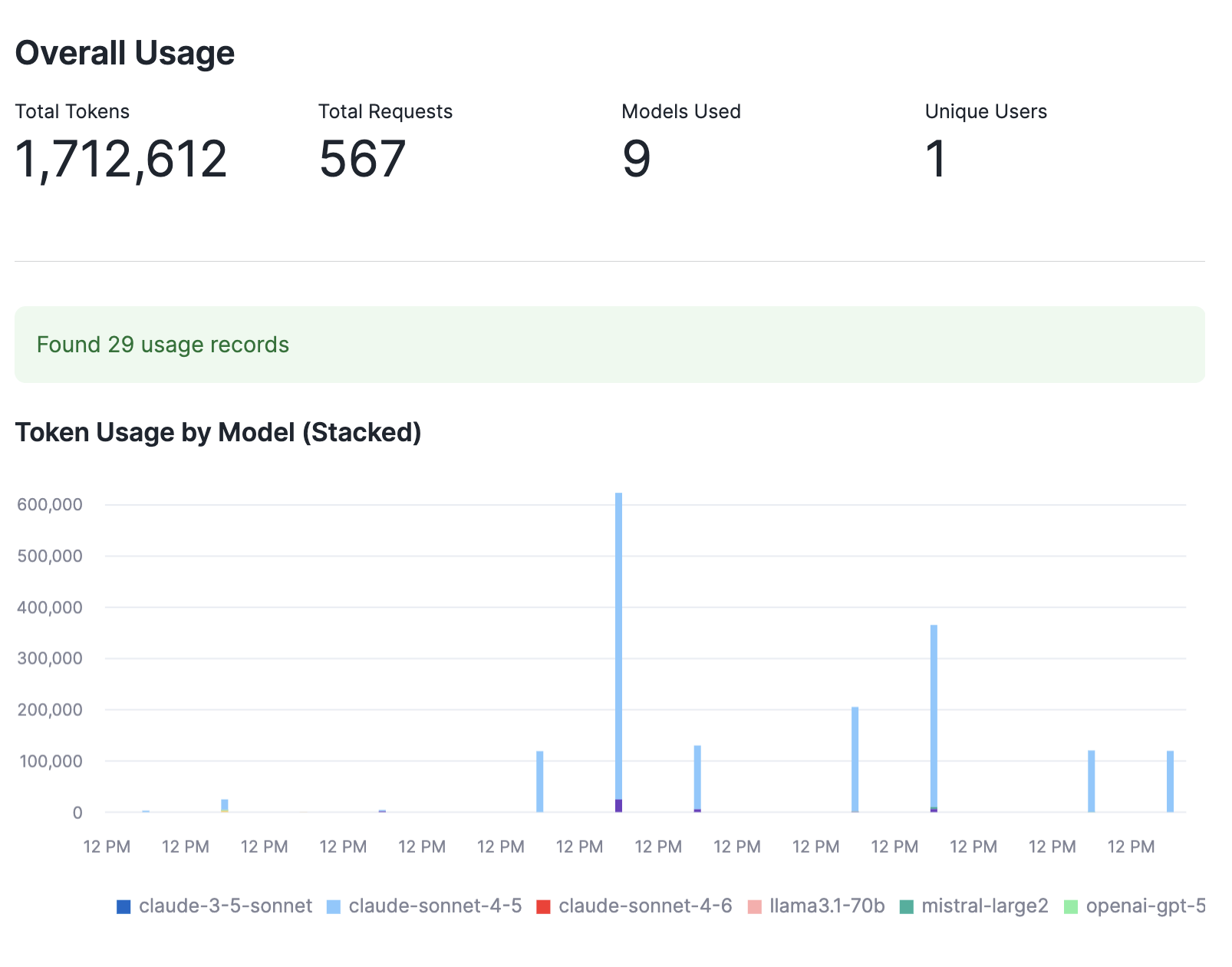
The top KPIs show:
- Total Tokens: Combined input + output tokens consumed
- Total Requests: Number of API calls made
- Models Used: Count of distinct models accessed
- Active Users: Number of users making requests
Token Usage by Model
The stacked bar chart shows daily token consumption broken down by model, helping you identify:
- Usage trends over time
- Which models consume the most tokens
- Peak usage days
Daily Usage by Model
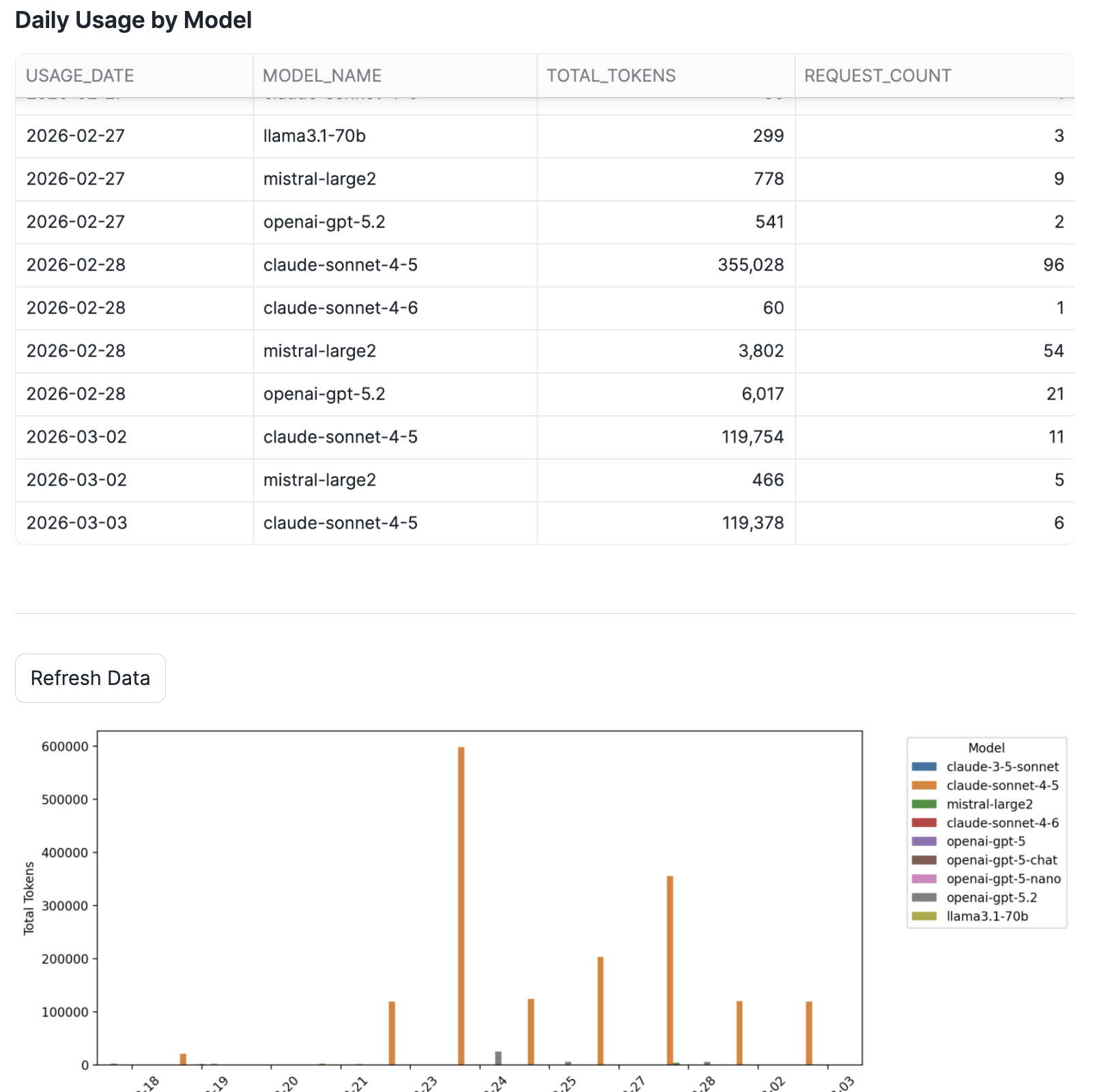
The detailed table and chart view shows daily token consumption with request counts for each model:
Input vs Output Tokens
Understanding the ratio between input and output tokens helps optimize:
- Prompt engineering (reduce input tokens)
- Response limits (control output tokens)
- Model selection for different use cases
Usage by User
Track which users or service accounts consume the most resources for:
- Chargeback reporting
- Identifying optimization opportunities
- Capacity planning

Cost Considerations
Duration: 2
Token Pricing
Cortex REST API costs vary by model. Monitor the CORTEX_REST_API_USAGE_HISTORY view to:
- Track consumption trends
- Set up alerts for unusual usage
- Optimize model selection for cost vs quality
Latency Note
The ACCOUNT_USAGE views have up to 2 hours of latency. For real-time monitoring, consider:
- Using
INFORMATION_SCHEMAviews (15-minute latency, shorter retention) - Building streaming pipelines for critical monitoring
Conclusion
Duration: 1
What You Learned
- Querying Cortex REST API usage data from ACCOUNT_USAGE
- Building interactive monitoring dashboards with Streamlit in Snowflake
- Visualizing token consumption patterns
Related Resources
This content is provided as is, and is not maintained on an ongoing basis. It may be out of date with current Snowflake instances
