AI-Powered Product Review Intelligence with Cortex AI Functions and Hex
Overview
Duration: 5
A product with a 3.7-star rating looks mediocre — maybe worth improving, not worth panicking over. But buried in those reviews could be safety escalations, mold reports, and customers filing complaints — none of which a star average reveals.
In this quickstart, you will use Hex Threads (Hex's AI assistant) and Snowflake Cortex AI Functions to turn 98 raw Amazon product reviews into a published, interactive review intelligence app — in four prompts. You type natural-language instructions into Threads; it generates the SQL using Cortex AI Functions, runs it, and builds the visualizations. No code to write. No models to deploy.
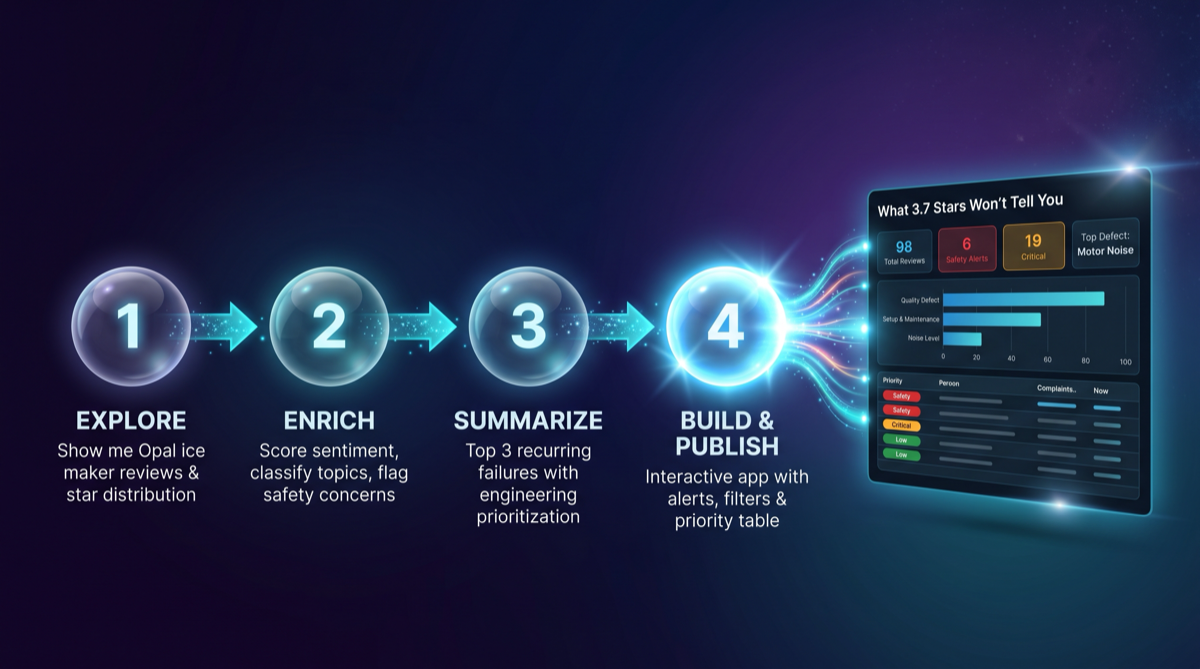
What You'll Build
- An AI-enriched review analysis pipeline using Cortex AI Functions — generated by Hex Threads from your prompts
- A priority scoring system that surfaces safety and critical issues star ratings miss
- An executive summary synthesized from negative reviews
- A published interactive Hex app with summary cards, filters, charts, and a sortable review table
What You'll Learn
- How to use Hex Threads to generate Snowflake Cortex AI Function queries from natural language
- How
AI_SENTIMENT,AI_CLASSIFY,AI_FILTER,AI_EXTRACT,AI_COMPLETE,AI_REDACT,AI_AGG, andAI_TRANSLATEwork under the hood - How to layer business logic on top of AI function outputs for priority scoring
- How to go from raw data to a published interactive app without writing code
What You'll Need
- A Snowflake account in a region where Cortex AI Functions are supported
- A Hex account on the Team plan or higher — Hex Threads requires the Team plan. If you don't have an account, the 14-day free trial starts on the Team plan and includes Threads — no credit card required.
- A Snowflake warehouse (e.g.,
COMPUTE_WH) — an X-Small is sufficient for this guide - Basic familiarity with SQL
Get the Data
Duration: 3
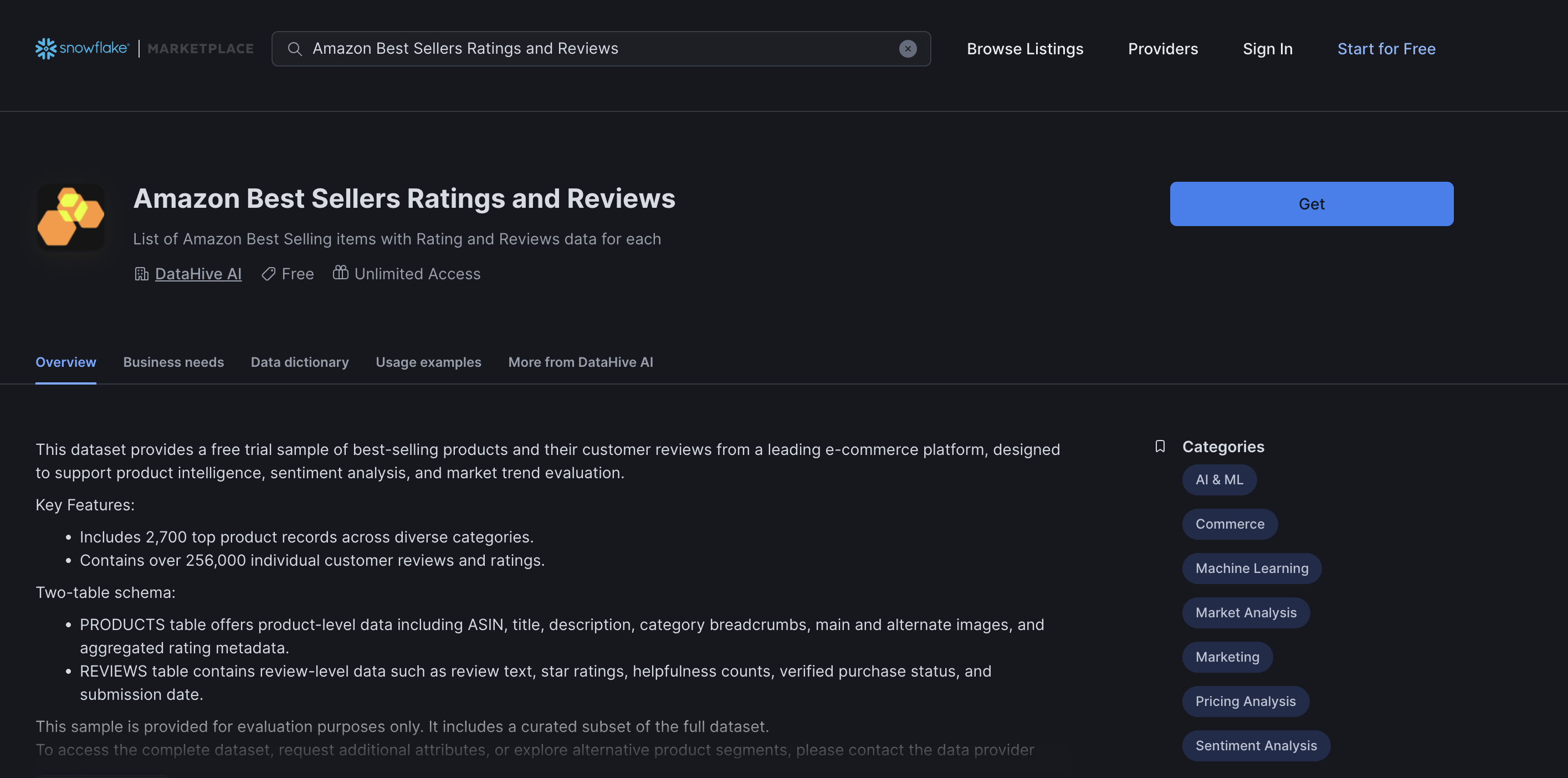
You will use the Amazon Best Sellers Ratings and Reviews dataset, a free listing on Snowflake Marketplace provided by DataHive AI. It contains 256K real customer reviews across 2,700 products.
Install the Marketplace Listing
-
Open Snowflake Marketplace in Snowsight
-
Search for "Amazon Best Sellers Ratings and Reviews"
-
Find the listing by DataHive AI (or go directly to the listing page)
-
Click Get and accept the default database name:
AMAZON_BEST_SELLERS_RATINGS_AND_REVIEWS -
Grant access to the roles that will use this data
Verify the Data
Open a Snowflake worksheet and run:
SELECT COUNT(*) as total_reviews FROM AMAZON_BEST_SELLERS_RATINGS_AND_REVIEWS.PUBLIC.REVIEWS;
-- Expected: ~256,000 rows

SELECT COUNT(*) as total_products FROM AMAZON_BEST_SELLERS_RATINGS_AND_REVIEWS.PUBLIC.PRODUCTS;
-- Expected: ~2,700 rows
Understand the Schema
The dataset has two tables joined on ASIN (Amazon product identifier):
| Table | Key Columns |
|---|---|
| REVIEWS | ID, ASIN, BODY (review text), TITLE, STARS (1-5), VERIFIED_PURCHASE, DATE |
| PRODUCTS | ASIN, TITLE (product name), BREADCRUMBS (category path), RATING, NUMBER_OF_RATINGS |
Positive : This is a free dataset — no cost to install and no time limit. The data is static (not live-updating), which is perfect for learning.
Set Up Hex
Duration: 3
Create a New Hex Notebook
- Log in to Hex. If you don't have an account, sign up for the free 14-day Team trial — no credit card required. The trial includes Hex Threads.
- Click New Project → Notebook
- Name it:
Product Review Intelligence — Cortex AI Functions
Connect to Snowflake
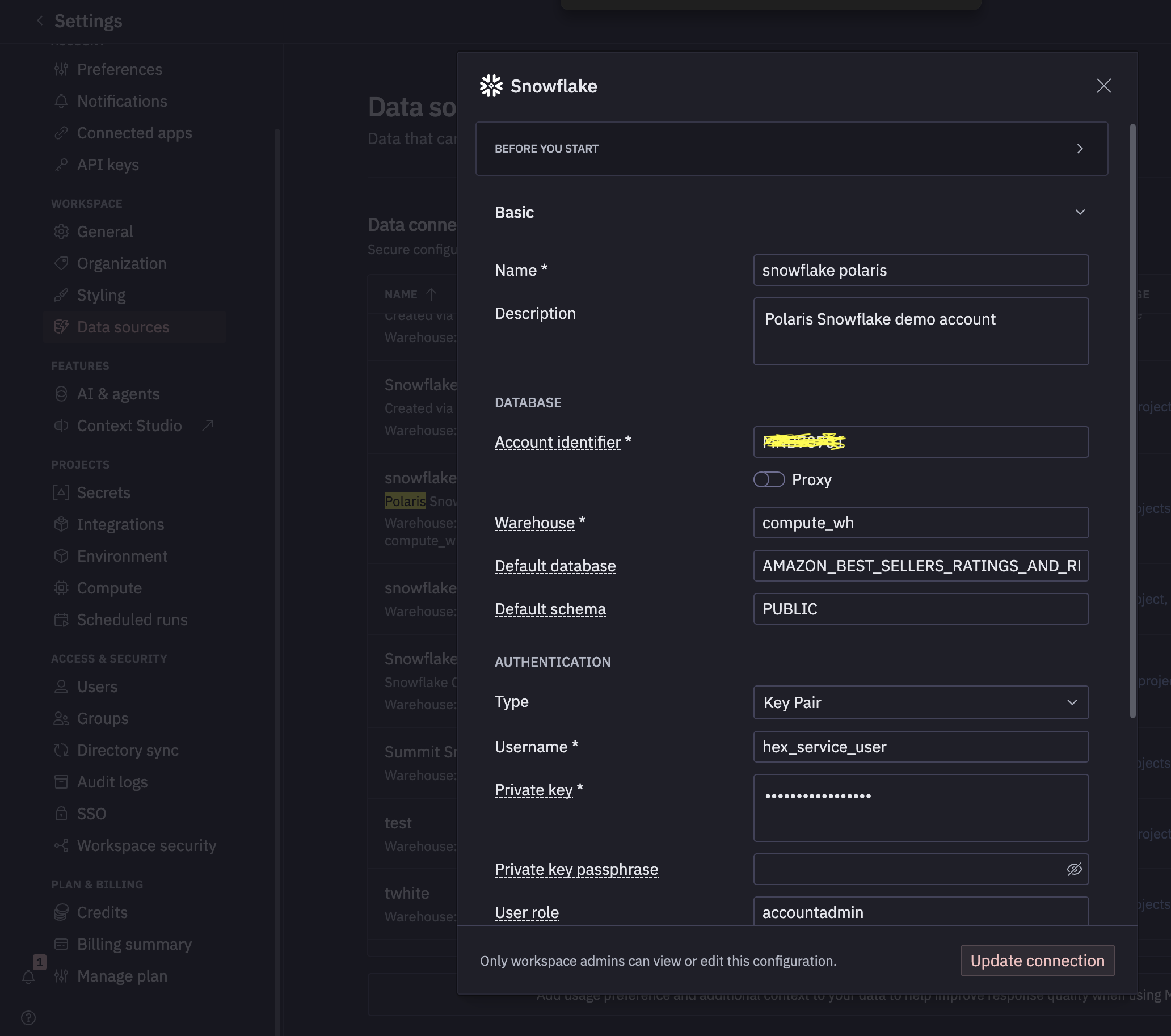
- In your Hex notebook, click the Data sources panel
- Select your Snowflake connection (or create one)
- Set the default database to
AMAZON_BEST_SELLERS_RATINGS_AND_REVIEWSand schema toPUBLIC
Open Threads
Click the Threads panel (chat icon) in your notebook. This is where you will type all four prompts. Threads will generate SQL cells, run them, and create visualizations — all from your natural-language instructions.
Positive : Every prompt in this guide is typed into Hex Threads. Threads generates the SQL using Snowflake Cortex AI Functions, adds it as a notebook cell, and runs it. You can inspect, edit, or re-run any generated cell.
Prompt 1: Explore the Data
Duration: 5
The Prompt
Type this into Hex Threads:
"Show me the GE Profile Opal ice maker reviews. I want to see the star distribution and a sample of reviews across all ratings. The product ASIN is B0964BF4N7."
What Threads Generates
Threads will create SQL cells that query the REVIEWS and PRODUCTS tables, filter to the GE Opal (ASIN B0964BF4N7), and render the star distribution. Expect something like:
Cell 1 — Product Overview:
SELECT
  p.TITLE as product,
  p.RATING as marketplace_rating,
  p.NUMBER_OF_RATINGS as total_ratings,
  p.BREADCRUMBS as category_path,
  COUNT(r.ID) as reviews_in_dataset,
  ROUND(AVG(r.STARS), 1) as avg_stars_in_sample,
  SUM(CASE WHEN r.STARS <= 2 THEN 1 ELSE 0 END) as negative_reviews,
  SUM(CASE WHEN r.STARS = 3 THEN 1 ELSE 0 END) as neutral_reviews,
  SUM(CASE WHEN r.STARS >= 4 THEN 1 ELSE 0 END) as positive_reviews
FROM AMAZON_BEST_SELLERS_RATINGS_AND_REVIEWS.PUBLIC.PRODUCTS p
JOIN AMAZON_BEST_SELLERS_RATINGS_AND_REVIEWS.PUBLIC.REVIEWS r ON p.ASIN = r.ASIN
WHERE p.ASIN = 'B0964BF4N7' AND r.BODY IS NOT NULL AND LENGTH(r.BODY) > 50
GROUP BY p.TITLE, p.RATING, p.NUMBER_OF_RATINGS, p.BREADCRUMBS;
Cell 2 — Sample Reviews:
SELECT
  r.STARS,
  r.TITLE as review_title,
  LEFT(r.BODY, 300) as review_text,
  r.DATE as review_date
FROM AMAZON_BEST_SELLERS_RATINGS_AND_REVIEWS.PUBLIC.REVIEWS r
JOIN AMAZON_BEST_SELLERS_RATINGS_AND_REVIEWS.PUBLIC.PRODUCTS p ON r.ASIN = p.ASIN
WHERE p.ASIN = 'B0964BF4N7' AND r.BODY IS NOT NULL AND LENGTH(r.BODY) > 50
ORDER BY r.STARS ASC, LENGTH(r.BODY) DESC;
What You Should See
- GE Profile Opal 2.0 Nugget Ice Maker — 3.7 stars, ~4,375 total ratings, 98 reviews in the dataset
- A polarized distribution: clusters at 1-star and 5-star with a bulge at 3-star
- 1-star reviews describing mold growth and mechanical failures
- 5-star reviews calling it "the best purchase we've made"
- 3-star reviews that look neutral but describe serious problems
The polarization is visible, but a distribution chart does not tell you why. That takes the next prompt.
Prompt 2: Enrich with AI
Duration: 10
This is the core of the guide. One prompt turns raw reviews into an AI-enriched intelligence dataset.
The Prompt
Type this into Hex Threads:
"Analyze these Opal reviews: score sentiment (more nuanced than stars), classify each by complaint topic (quality_defect, mold_hygiene, customer_support, noise_level, setup_maintenance, value_for_money), flag reviews where the customer is returning the product or describing a health/safety concern, and prioritize them: safety > critical > high > medium > low."
What Threads Generates
Threads will use Snowflake Cortex AI Functions to enrich all 98 reviews in a single query. It may validate on a small sample first (AI functions bill per row), then scale to all reviews. Expect a query using these functions:
SELECT
  r.STARS,
  r.TITLE as review_title,
  LEFT(r.BODY, 300) as review_text,

  -- AI_SENTIMENT: nuanced sentiment beyond star ratings
  AI_SENTIMENT(r.BODY):categories[0]:sentiment::VARCHAR as sentiment,

  -- AI_CLASSIFY: categorize into your custom labels
  AI_CLASSIFY(
    r.BODY,
    ['quality_defect', 'mold_hygiene', 'customer_support', 'noise_level',
     'setup_maintenance', 'value_for_money']
  ):labels[0]::VARCHAR as complaint_topic,

  -- AI_FILTER: natural-language yes/no question per row
  AI_FILTER(
    PROMPT('The reviewer is returning the product, filing a complaint,
            warning others not to buy, or describing a health/safety concern: {0}', r.BODY)
  ) as escalation_risk,

  -- Priority scoring: business logic layered on AI outputs
  CASE
    WHEN AI_FILTER(PROMPT('The reviewer describes a health or safety concern
        including mold, contamination, or injury: {0}', r.BODY))
    THEN 'safety'
    WHEN AI_SENTIMENT(r.BODY):categories[0]:sentiment::VARCHAR = 'negative'
      AND AI_FILTER(PROMPT('The reviewer is returning the product, filing a complaint,
          or warning others not to buy: {0}', r.BODY))
    THEN 'critical'
    WHEN AI_SENTIMENT(r.BODY):categories[0]:sentiment::VARCHAR = 'negative' THEN 'high'
    WHEN AI_SENTIMENT(r.BODY):categories[0]:sentiment::VARCHAR IN ('mixed', 'neutral') THEN 'medium'
    ELSE 'low'
  END as priority

FROM AMAZON_BEST_SELLERS_RATINGS_AND_REVIEWS.PUBLIC.REVIEWS r
JOIN AMAZON_BEST_SELLERS_RATINGS_AND_REVIEWS.PUBLIC.PRODUCTS p ON r.ASIN = p.ASIN
WHERE p.ASIN = 'B0964BF4N7' AND r.BODY IS NOT NULL AND LENGTH(r.BODY) > 50;
What Each AI Function Does
| Function | Purpose | Output |
|---|---|---|
AI_SENTIMENT | Scores emotional tone beyond star ratings | positive, negative, mixed, neutral |
AI_CLASSIFY | Categorizes text into your custom labels — no training data needed | The best-matching label |
AI_FILTER | Answers a natural-language yes/no question about the text | TRUE / FALSE |
CASE expression | Business logic layered on top of AI outputs | safety, critical, high, medium, low |
The Key Insight
3-star reviews are where star ratings lie worst. A 3-star rating implies "mediocre." But when AI_SENTIMENT analyzes the actual text, over 90% of 3-star reviews are high-severity — describing dead pumps, snapped cylinders, and bacteria in the tubing. The real negative rate is not 29% (1-2 stars); it is closer to 55% once 3-star reviews are properly classified.
Safety flags appear in reviews rated 3 stars or higher — a star-based filter would never surface them.
Negative : Cortex AI Functions are billed per row processed. The 98-row GE Opal dataset costs fractions of a cent. If you modify the query to process all 256K reviews, expect higher compute costs — use
LIMITwhen exploring.
Prompt 2b: More AI Functions
Duration: 10
With the enriched data in your notebook, you can ask Threads follow-up questions that use additional Cortex AI Functions. These are optional — try whichever interest you.
Extract Specific Defects (AI_EXTRACT)
"Extract the specific product defect from each negative review so engineering can triage issues."
Threads will generate a query using AI_EXTRACT to pull structured fields from unstructured text:
SELECT
  r.STARS,
  r.TITLE as review_title,
  AI_EXTRACT(
    r.BODY,
    [{'name': 'defect', 'description': 'The specific mechanical or quality defect experienced by the reviewer'}]
  ):response:description::VARCHAR as extracted_defect,
  LEFT(r.BODY, 200) as review_preview
FROM AMAZON_BEST_SELLERS_RATINGS_AND_REVIEWS.PUBLIC.REVIEWS r
JOIN AMAZON_BEST_SELLERS_RATINGS_AND_REVIEWS.PUBLIC.PRODUCTS p ON r.ASIN = p.ASIN
WHERE p.ASIN = 'B0964BF4N7'
  AND r.STARS <= 2
  AND r.BODY IS NOT NULL
  AND LENGTH(r.BODY) > 100
ORDER BY r.STARS ASC, LENGTH(r.BODY) DESC;
Each review becomes a row in a defect database — no manual reading required.
Draft Customer Service Responses (AI_COMPLETE)
"Draft empathetic customer service responses for the most critical reviews so my team can respond faster."
Threads will use AI_COMPLETE with an LLM to generate tailored responses:
SELECT
  r.STARS,
  r.TITLE as review_title,
  LEFT(r.BODY, 200) as review_preview,
  AI_COMPLETE(
    'mistral-large2',
    PROMPT('You are a customer support agent. Write a brief, empathetic 2-sentence
            response to this negative review. Acknowledge the specific issue and offer
            a concrete next step (replacement, refund, or engineering escalation).

Review: {0}', r.BODY)
  ) as suggested_response
FROM AMAZON_BEST_SELLERS_RATINGS_AND_REVIEWS.PUBLIC.REVIEWS r
JOIN AMAZON_BEST_SELLERS_RATINGS_AND_REVIEWS.PUBLIC.PRODUCTS p ON r.ASIN = p.ASIN
WHERE p.ASIN = 'B0964BF4N7'
  AND r.STARS = 1
  AND r.BODY IS NOT NULL
  AND LENGTH(r.BODY) > 100
  AND AI_FILTER(
    PROMPT('The reviewer is returning the product, filing a complaint,
            or warning others not to buy: {0}', r.BODY)
  )
LIMIT 10;
Strip PII Before Sharing (AI_REDACT)
"Before we share this review data with our manufacturing partner, strip any personal information."
SELECT
  LEFT(r.BODY, 300) as original_review,
  LEFT(AI_REDACT(r.BODY), 300) as safe_for_vendor,
  CASE
    WHEN r.BODY != AI_REDACT(r.BODY) THEN 'PII detected & removed'
    ELSE 'No PII found'
  END as pii_status
FROM AMAZON_BEST_SELLERS_RATINGS_AND_REVIEWS.PUBLIC.REVIEWS r
JOIN AMAZON_BEST_SELLERS_RATINGS_AND_REVIEWS.PUBLIC.PRODUCTS p ON r.ASIN = p.ASIN
WHERE p.ASIN = 'B0964BF4N7' AND r.BODY IS NOT NULL AND LENGTH(r.BODY) > 100
LIMIT 20;
Translate Multilingual Reviews (AI_TRANSLATE)
"We also have international reviews in Spanish. Translate them and run the same analysis."
SELECT
  LEFT(r.BODY, 150) as original_review,
  AI_TRANSLATE(r.BODY, '', 'en') as english_translation,
  AI_SENTIMENT(AI_TRANSLATE(r.BODY, '', 'en')):categories[0]:sentiment::VARCHAR as sentiment,
  AI_CLASSIFY(
    AI_TRANSLATE(r.BODY, '', 'en'),
    ['product_quality', 'shipping_delivery', 'value_for_money', 'durability', 'customer_service']
  ):labels[0]::VARCHAR as topic,
  r.STARS
FROM AMAZON_BEST_SELLERS_RATINGS_AND_REVIEWS.PUBLIC.REVIEWS r
WHERE r.BODY IS NOT NULL
  AND LENGTH(r.BODY) > 50
  AND (r.BODY LIKE '%estrellas%' OR r.BODY LIKE '%producto%'
       OR r.BODY LIKE '%muy bueno%' OR r.BODY LIKE '%excelente%')
LIMIT 10;
Positive : All 8 Cortex AI Functions (
AI_SENTIMENT,AI_CLASSIFY,AI_FILTER,AI_EXTRACT,AI_COMPLETE,AI_REDACT,AI_AGG,AI_TRANSLATE) are SQL-native. Hex Threads knows how to use them — just describe what you want in plain English.
Prompt 3: Executive Summary
Duration: 5
The Prompt
Type this into Hex Threads:
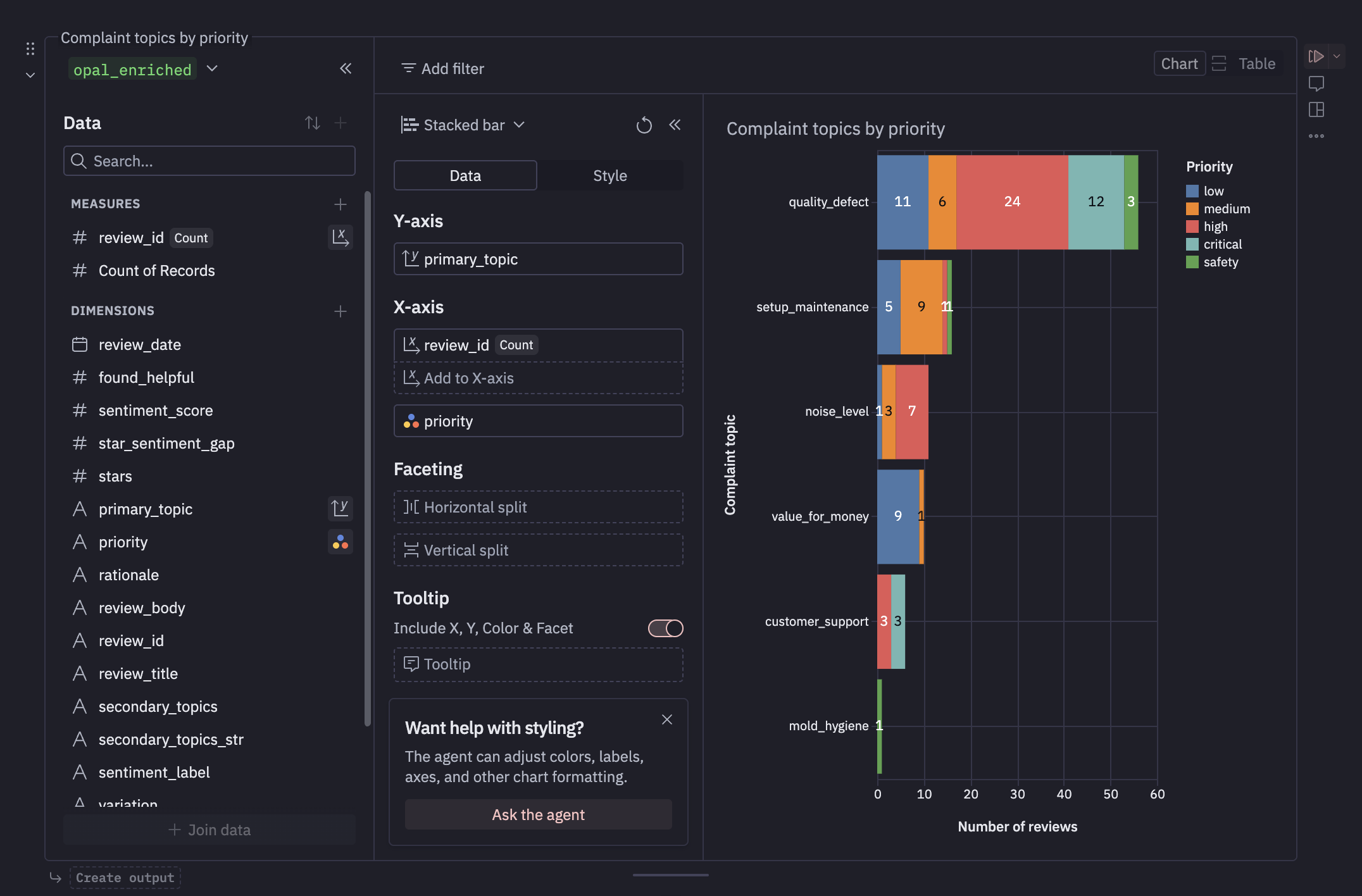
"What are customers complaining about? Show me the topic breakdown as a bar chart. Then summarize the top 3 recurring quality issues across all negative reviews in one executive paragraph. Be specific about what's failing, how quickly, and recommend engineering prioritization."
What Threads Generates
Threads will create two cells:
Cell — Topic Distribution (bar chart):
SELECT
  AI_CLASSIFY(
    r.BODY,
    ['quality_defect', 'mold_hygiene', 'customer_support', 'noise_level',
     'setup_maintenance', 'value_for_money']
  ):labels[0]::VARCHAR as complaint_topic,
  COUNT(*) as review_count
FROM AMAZON_BEST_SELLERS_RATINGS_AND_REVIEWS.PUBLIC.REVIEWS r
JOIN AMAZON_BEST_SELLERS_RATINGS_AND_REVIEWS.PUBLIC.PRODUCTS p ON r.ASIN = p.ASIN
WHERE p.ASIN = 'B0964BF4N7'
  AND r.STARS <= 3
  AND r.BODY IS NOT NULL AND LENGTH(r.BODY) > 50
GROUP BY complaint_topic
ORDER BY review_count DESC;
Cell — Executive Summary (using AI_AGG):
SELECT AI_AGG(
  r.BODY,
  'You are a product analyst writing for the VP of Product. Summarize the top 3
   recurring quality issues with this ice maker based on these negative reviews.
   Be specific: name the component that fails, how quickly it fails, and how many
   reviewers mention it. End with a one-sentence prioritization recommendation
   for the engineering team. Write one concise paragraph.'
) as executive_summary
FROM AMAZON_BEST_SELLERS_RATINGS_AND_REVIEWS.PUBLIC.REVIEWS r
JOIN AMAZON_BEST_SELLERS_RATINGS_AND_REVIEWS.PUBLIC.PRODUCTS p ON r.ASIN = p.ASIN
WHERE p.ASIN = 'B0964BF4N7' AND r.STARS <= 2 AND r.BODY IS NOT NULL AND LENGTH(r.BODY) > 100;
What You Should See
AI_AGG reads across all negative reviews and synthesizes a single output. This is not a generic "summary of reviews" — it is a product engineering brief with component names, failure timelines, and prioritized recommendations. Expect something like:
The Opal 2.0's recurring failures center on three components: (1) the ice auger drivetrain — over half of negative reviews describe progressive squealing or grinding starting at ~6 months, with replacement units failing identically; (2) the water-delivery subsystem — sensor faults, pump failures, and leaks; (3) mold contamination in internal tubing, flagged as a health concern in reviews rated 3+ stars where star-based monitoring would miss them. Engineering priority: P0 auger drivetrain redesign, P0 mold mitigation, P1 water pump reliability.
Bonus Prompt: Find the Mismatches
"Find reviews where the star rating doesn't match the actual sentiment — those are the ones we're misreading."
SELECT
  r.STARS,
  r.TITLE as review_title,
  AI_SENTIMENT(r.BODY):categories[0]:sentiment::VARCHAR as ai_sentiment,
  CASE
    WHEN r.STARS >= 4 AND AI_SENTIMENT(r.BODY):categories[0]:sentiment::VARCHAR IN ('negative', 'mixed')
      THEN 'High stars but negative tone — hidden dissatisfaction'
    WHEN r.STARS <= 2 AND AI_SENTIMENT(r.BODY):categories[0]:sentiment::VARCHAR = 'positive'
      THEN 'Low stars but positive tone — frustrated fan'
  END as mismatch_insight,
  LEFT(r.BODY, 250) as review_text
FROM AMAZON_BEST_SELLERS_RATINGS_AND_REVIEWS.PUBLIC.REVIEWS r
JOIN AMAZON_BEST_SELLERS_RATINGS_AND_REVIEWS.PUBLIC.PRODUCTS p ON r.ASIN = p.ASIN
WHERE p.ASIN = 'B0964BF4N7'
  AND r.BODY IS NOT NULL AND LENGTH(r.BODY) > 50
  AND (
    (r.STARS >= 4 AND AI_SENTIMENT(r.BODY):categories[0]:sentiment::VARCHAR IN ('negative', 'mixed'))
    OR (r.STARS <= 2 AND AI_SENTIMENT(r.BODY):categories[0]:sentiment::VARCHAR = 'positive')
  );
These mismatches are the most interesting reviews — a 4-star review with negative sentiment is hidden dissatisfaction that your team should know about.
Prompt 4: Build & Publish
Duration: 10
The Prompt
Type this into Hex Threads:
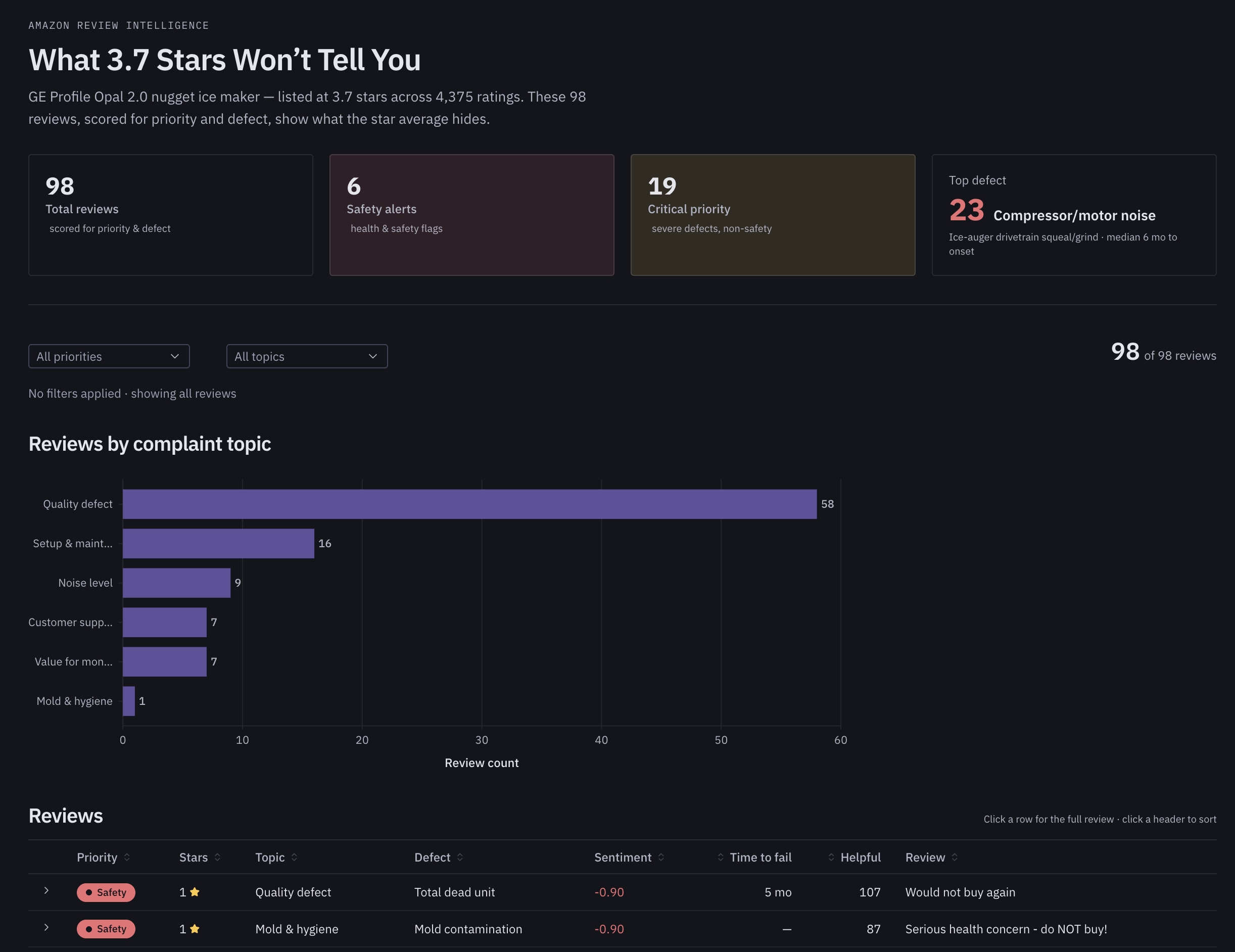
"Build me an interactive app with: summary cards (total reviews, safety alerts, critical count, top defect), filters for priority and complaint topic, a bar chart of topics, and a sortable review table with priority coloring. Title it 'What 3.7 Stars Won't Tell You'. Then publish it."
What Threads Generates
Hex Threads generates a Generative Data App — a full interactive application with layout, components, and live data. It will:
- Query the enriched review data
- Create summary metric cards at the top (98 total, 6 safety alerts, 19 critical, top defect: compressor/motor noise)
- Add filter dropdowns for priority and complaint topic
- Build a horizontal bar chart of reviews by complaint topic
- Create a sortable table with priority-colored badges (Safety=red, Critical=orange, High=yellow)
- Wire everything together so filters update all components
Publish
- Click the Publish button in the top-right corner of Hex
- Choose visibility settings (team, workspace, or public link)
- Share the URL with stakeholders
The result: a live, interactive review intelligence dashboard that anyone on the team can open — no technical setup required.
Positive : See it live: Open the published app →
From a free Marketplace dataset to a published, AI-powered product intelligence app. One person. One notebook. Four prompts.
Dynamic Tables Pipeline
Duration: 5
For production use with live review data, you can wrap the enrichment in a Snowflake Dynamic Table that auto-refreshes. This step is run directly in Snowflake (or ask Threads to generate it).
"Turn this enrichment into a dynamic table that auto-refreshes every hour."
Expected SQL
CREATE OR REPLACE DYNAMIC TABLE AMAZON_BEST_SELLERS_RATINGS_AND_REVIEWS.PUBLIC.OPAL_REVIEW_INTELLIGENCE
  TARGET_LAG = '1 hour'
  WAREHOUSE = COMPUTE_WH
AS
SELECT
  r.ID as review_id,
  r.ASIN,
  r.STARS,
  r.TITLE as review_title,
  r.BODY as review_text,
  r.DATE as review_date,
  r.VERIFIED_PURCHASE,

  AI_SENTIMENT(r.BODY):categories[0]:sentiment::VARCHAR as sentiment,

  AI_CLASSIFY(
    r.BODY,
    ['quality_defect', 'mold_hygiene', 'customer_support', 'noise_level',
     'setup_maintenance', 'value_for_money']
  ):labels[0]::VARCHAR as complaint_topic,

  AI_FILTER(
    PROMPT('The reviewer is returning the product, filing a complaint,
            warning others not to buy, or describing a health/safety concern: {0}', r.BODY)
  ) as escalation_risk,

  AI_EXTRACT(
    r.BODY,
    [{'name': 'defect', 'description': 'The specific defect, quality issue, or complaint experienced'}]
  ):response:description::VARCHAR as extracted_defect,

  CASE
    WHEN AI_FILTER(PROMPT('The reviewer describes a health or safety concern
        including mold, contamination, or injury: {0}', r.BODY))
    THEN 'safety'
    WHEN AI_SENTIMENT(r.BODY):categories[0]:sentiment::VARCHAR = 'negative'
      AND AI_FILTER(PROMPT('The reviewer is returning the product, filing a complaint,
          or warning others not to buy: {0}', r.BODY))
    THEN 'critical'
    WHEN AI_SENTIMENT(r.BODY):categories[0]:sentiment::VARCHAR = 'negative' THEN 'high'
    WHEN AI_SENTIMENT(r.BODY):categories[0]:sentiment::VARCHAR IN ('mixed', 'neutral') THEN 'medium'
    ELSE 'low'
  END as priority

FROM AMAZON_BEST_SELLERS_RATINGS_AND_REVIEWS.PUBLIC.REVIEWS r
JOIN AMAZON_BEST_SELLERS_RATINGS_AND_REVIEWS.PUBLIC.PRODUCTS p ON r.ASIN = p.ASIN
WHERE p.ASIN = 'B0964BF4N7' AND r.BODY IS NOT NULL AND LENGTH(r.BODY) > 50;
Positive : Change
WAREHOUSE = COMPUTE_WHto match your warehouse name. Cortex AI Functions support incremental refresh in Dynamic Tables — you only pay for new rows, not re-processing the entire table.
Verify the Pipeline
SELECT priority, complaint_topic, COUNT(*) as cnt
FROM AMAZON_BEST_SELLERS_RATINGS_AND_REVIEWS.PUBLIC.OPAL_REVIEW_INTELLIGENCE
GROUP BY priority, complaint_topic
ORDER BY
  CASE priority WHEN 'safety' THEN 0 WHEN 'critical' THEN 1 WHEN 'high' THEN 2 WHEN 'medium' THEN 3 ELSE 4 END,
  cnt DESC;
In production with live review data, this Dynamic Table refreshes automatically. Point your Hex app at this table instead of the inline queries, and the dashboard always shows current state.
Conclusion and Resources
Duration: 2
What You Built
You built an AI-powered product review intelligence app — from a free Marketplace dataset to a published interactive dashboard — using four prompts in Hex Threads backed by Snowflake Cortex AI Functions. No code written manually. No models deployed. No infrastructure managed.
What You Learned
- Hex Threads generates Cortex AI Function queries from natural language — describe what you want, and it writes the SQL
- AI_SENTIMENT reveals nuance that star ratings hide — 3-star reviews can contain serious safety issues
- AI_CLASSIFY categorizes unstructured text into your custom labels with no training data
- AI_FILTER answers natural-language yes/no questions about each row
- AI_EXTRACT pulls structured fields from free-form text (defect names, failure timelines)
- AI_COMPLETE generates tailored content (customer service responses) using an LLM
- AI_REDACT strips PII for safe data sharing with vendors and partners
- AI_AGG synthesizes insights across many rows into executive summaries
- AI_TRANSLATE handles multilingual data seamlessly
- Dynamic Tables automate AI enrichment pipelines with incremental refresh
Go Further
This pattern applies beyond product reviews. Swap the data source and classification labels:
| Your Data | Example Labels | Use Case |
|---|---|---|
| Support tickets | billing, technical, account, feature_request | Escalation dashboard |
| NPS comments | product, onboarding, pricing, support | Churn risk radar |
| Employee feedback | compensation, management, growth, culture | Retention risk analysis |
| Call transcripts | complaint, inquiry, cancellation, upsell | Revenue intelligence |
Cleanup
To remove the objects created in this guide:
DROP DYNAMIC TABLE IF EXISTS AMAZON_BEST_SELLERS_RATINGS_AND_REVIEWS.PUBLIC.OPAL_REVIEW_INTELLIGENCE;
The Marketplace dataset (AMAZON_BEST_SELLERS_RATINGS_AND_REVIEWS) can be kept for further exploration or removed from Data Products → Installed Listings in Snowsight.
Resources
- Snowflake Cortex AI Functions Documentation
- Amazon Best Sellers Reviews (free Marketplace listing)
- Hex Documentation — Connecting to Snowflake
- Hex Threads — AI-Powered Notebook Assistant
- Snowflake Dynamic Tables Documentation
- Published App: "What 3.7 Stars Won't Tell You"
- Blog Post: "What 3.7 Stars Won't Tell You"
This content is provided as is, and is not maintained on an ongoing basis. It may be out of date with current Snowflake instances
