Comprehensive Guide to Snowflake Dynamic Tables
Overview
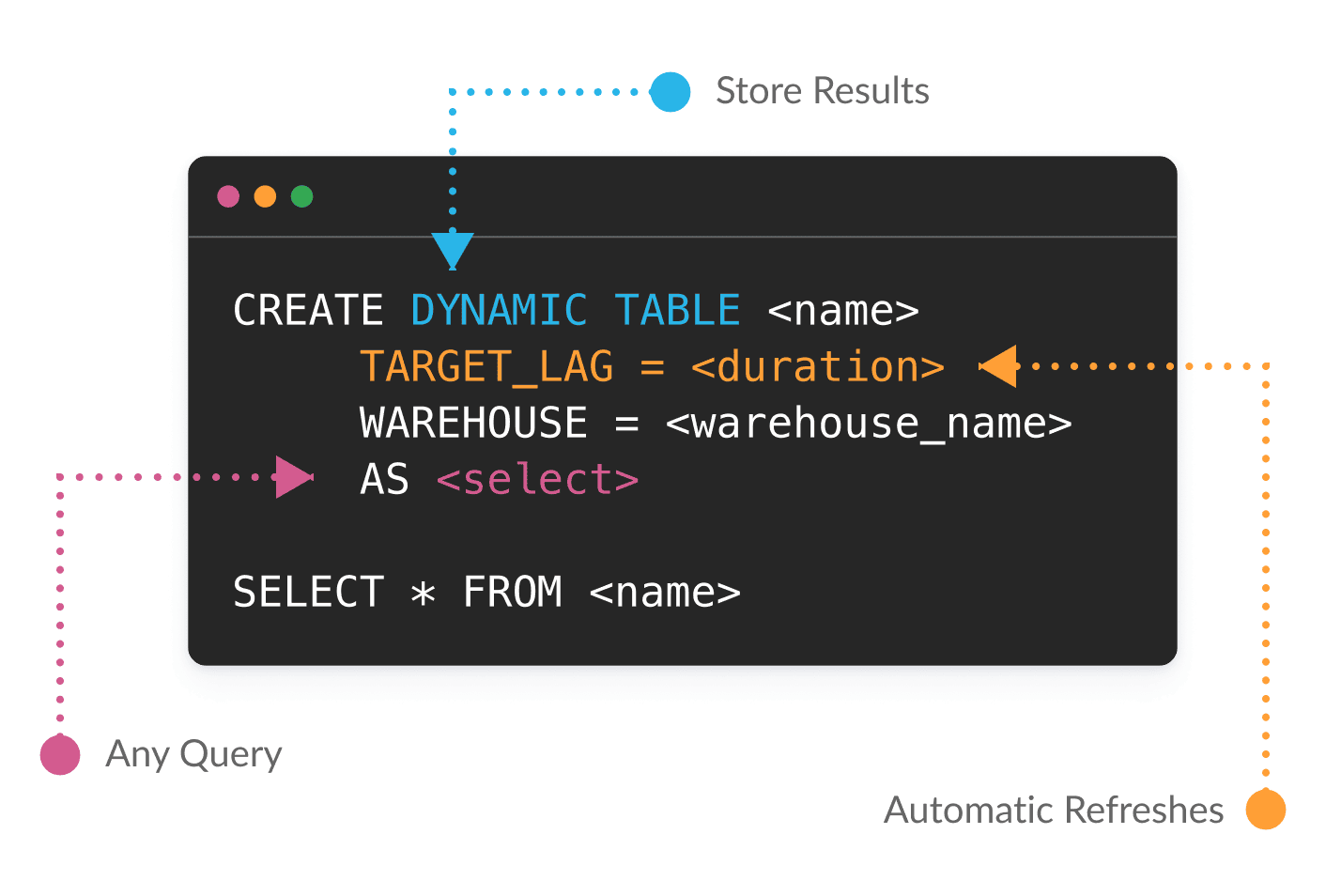
Building data pipelines usually means gluing together schedules, streams, tasks, and a quiet prayer that they all fire in the right order. Dynamic Tables throw out that whole toolbox.
You write a SELECT. You say how fresh you want the data. That's it. Snowflake works out the dependencies, processes only what actually changed, and keeps everything current while you get on with your life.
No orchestration code. No refresh babysitting. No "why didn't my task run?" at 2am.
And it's one model for both batch and streaming: the same Dynamic Table keeps its results current whether new data lands in nightly loads or a continuous feed.
This guide takes you from your very first Dynamic Table all the way to the good stuff — layered pipelines, custom MERGE logic, open Iceberg output, and even AI running right inside your pipeline. By the end you'll see why, if your logic fits a query, a Dynamic Table is simply the best way to run it.
Work smarter with Cortex Code (CoCo): Snowflake's coding agent ships a
/dynamic-tablesskill that scaffolds, optimizes, and debugs Dynamic Table pipelines for you. Describe the pipeline you want and let CoCo drive — it's the fastest way to go from idea to a running Dynamic Table.
What You'll Learn
- Keep data fresh with
TARGET_LAGand incremental refresh — across both batch and streaming pipelines - Build multi-layer pipelines with joins and dependent Dynamic Tables
- Choose the right refresh mode (
AUTO,INCREMENTAL,FULL,ADAPTIVE) and monitor refreshes - Build pipelines with fewer moving parts — declarative and Custom Incremental Dynamic Tables (
REFRESH USING), and Dynamic Tables from Python with Snowpark - Apply common patterns: stream-static joins, deduplication, and SCD Type 1 & 2
- Materialize output in open Apache Iceberg™ format
- Enrich data in-pipeline with Cortex AI (
AI_CLASSIFY) - Operationalize with orchestration (Task DAGs, dbt) and CI/CD (DCM)
Prerequisites
- A Snowflake account with
ACCOUNTADMIN(or a role that can create schemas, warehouses, and dynamic tables) - A warehouse named
COMPUTE_WH(adjust as needed) — the guide creates its own database - Familiarity with basic SQL
Load Sample Data
We use the Tasty Bytes menu dataset from a public S3 bucket. Every object is created in a dedicated DYNAMIC_TABLES_GUIDE database, so it's easy to find and to clean up at the end.
-- =============================================================================
-- LOAD DATA
-- =============================================================================
USE ROLE ACCOUNTADMIN;
USE WAREHOUSE COMPUTE_WH;

-- Create a dedicated database and schema for this guide
CREATE DATABASE IF NOT EXISTS DYNAMIC_TABLES_GUIDE;
CREATE SCHEMA IF NOT EXISTS DYNAMIC_TABLES_GUIDE.DEMO;
USE SCHEMA DYNAMIC_TABLES_GUIDE.DEMO;

CREATE OR REPLACE FILE FORMAT csv_ff TYPE = 'CSV';

CREATE OR REPLACE STAGE tasty_bytes_stage
  URL = 's3://sfquickstarts/tastybytes/'
  FILE_FORMAT = csv_ff;

CREATE OR REPLACE TABLE menu_raw (
  menu_id NUMBER(19,0), menu_type_id NUMBER(38,0), menu_type VARCHAR, truck_brand_name VARCHAR,
  menu_item_id NUMBER(38,0), menu_item_name VARCHAR, item_category VARCHAR, item_subcategory VARCHAR,
  cost_of_goods_usd NUMBER(38,4), sale_price_usd NUMBER(38,4), menu_item_health_metrics_obj VARIANT
);

COPY INTO menu_raw FROM @tasty_bytes_stage/raw_pos/menu/;

SELECT * FROM menu_raw LIMIT 10;
You should load 100 menu items across 4 item categories.
Your First Dynamic Table
A Dynamic Table declares what the data should look like and how fresh it must be. Snowflake handles the rest.
| Parameter | Purpose |
|---|---|
TARGET_LAG | How fresh the data should be (e.g. '10 minutes', '1 hour', 'DOWNSTREAM') |
WAREHOUSE | Compute used for refresh |
REFRESH_MODE | AUTO (default), INCREMENTAL, FULL, or ADAPTIVE |
AS SELECT | The query defining the contents |
CREATE OR REPLACE DYNAMIC TABLE menu_profitability
  TARGET_LAG = '3 hours'
  WAREHOUSE = COMPUTE_WH
  REFRESH_MODE = ADAPTIVE
  AS
  SELECT
    menu_item_id, menu_item_name, truck_brand_name, menu_type, item_category, item_subcategory,
    cost_of_goods_usd, sale_price_usd,
    (sale_price_usd - cost_of_goods_usd) AS profit_usd,
    ROUND(((sale_price_usd - cost_of_goods_usd) / NULLIF(sale_price_usd, 0)) * 100, 2) AS profit_margin_pct,
    CASE
      WHEN sale_price_usd < 5 THEN 'Budget'
      WHEN sale_price_usd BETWEEN 5 AND 10 THEN 'Mid-Range'
      ELSE 'Premium'
    END AS price_tier
  FROM menu_raw
  WHERE sale_price_usd IS NOT NULL AND cost_of_goods_usd IS NOT NULL;
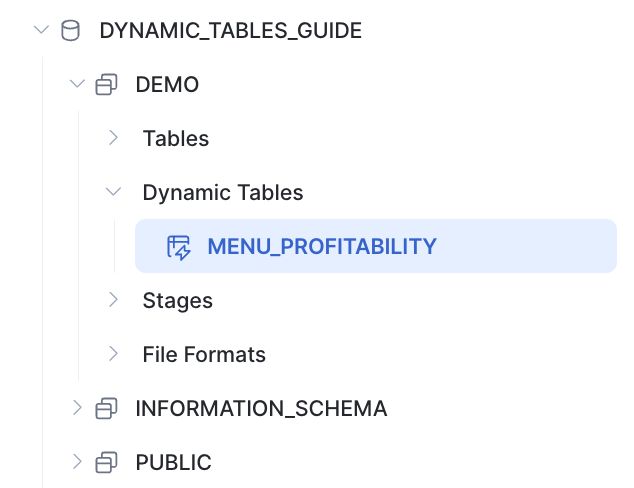
Once created, your Dynamic Table shows up in the database object explorer alongside regular tables:

Query it like any other table:
SELECT truck_brand_name, menu_item_name, price_tier, profit_usd, profit_margin_pct
FROM menu_profitability
ORDER BY profit_margin_pct DESC
LIMIT 10;
Building a Pipeline: Layered Dynamic Tables
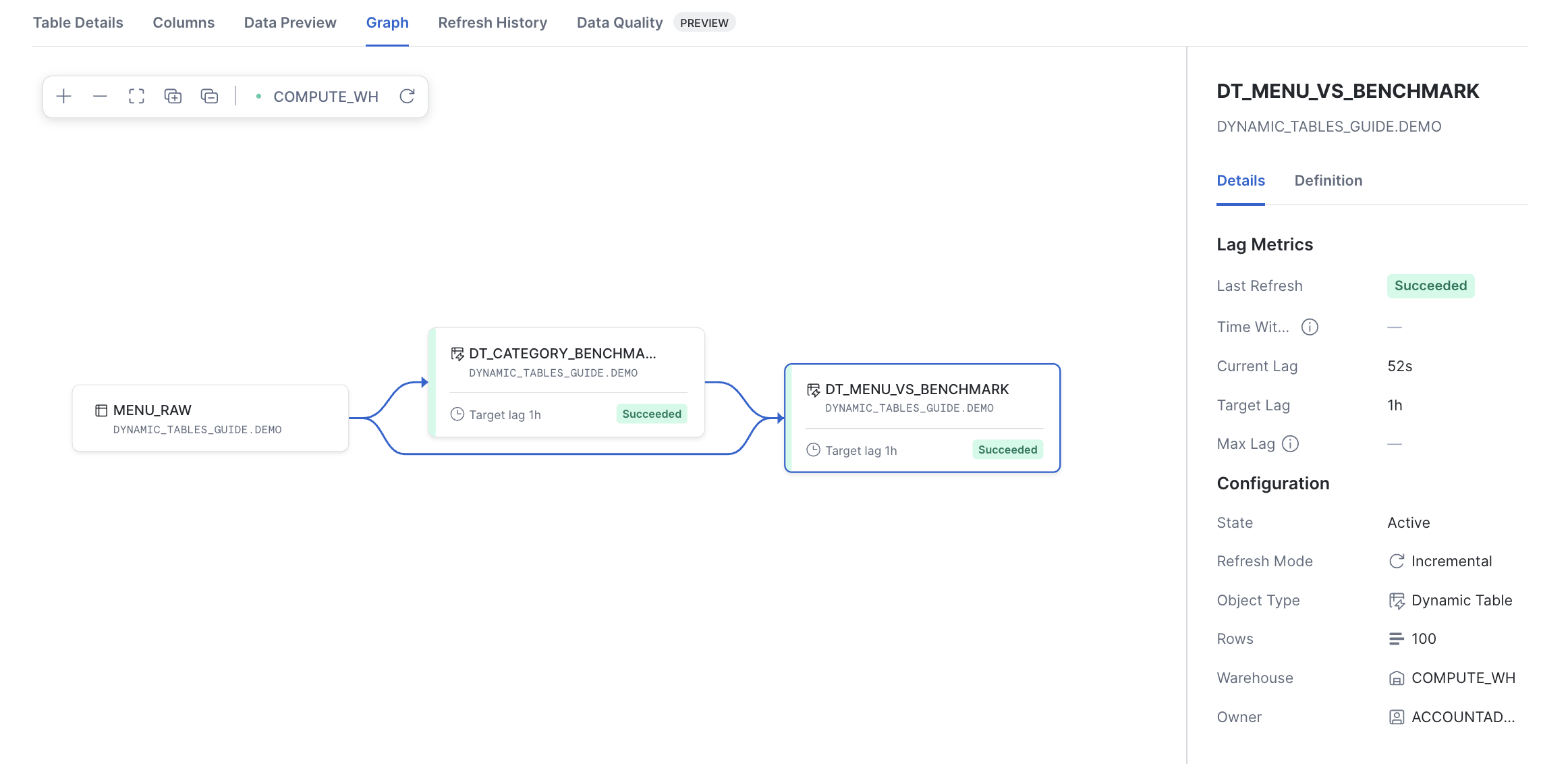
Real pipelines rarely stop at one table. Dynamic Tables can read from other Dynamic Tables and use joins — Snowflake infers the dependency graph and refreshes everything in order.
First, an aggregate Dynamic Table with the average price per category. Because it only feeds a downstream table, set TARGET_LAG = 'DOWNSTREAM' so it refreshes only when something below it needs fresh data:
CREATE OR REPLACE DYNAMIC TABLE dt_category_benchmarks
  TARGET_LAG = 'DOWNSTREAM'
  WAREHOUSE = COMPUTE_WH
  AS
  SELECT item_category, ROUND(AVG(sale_price_usd), 2) AS avg_category_price
  FROM menu_raw
  WHERE sale_price_usd IS NOT NULL
  GROUP BY item_category;
Next, a Dynamic Table that joins each menu item back to its category benchmark. It reads from both dt_category_benchmarks (a Dynamic Table) and menu_raw (a base table):
CREATE OR REPLACE DYNAMIC TABLE dt_menu_vs_benchmark
  TARGET_LAG = '1 hour'
  WAREHOUSE = COMPUTE_WH
  AS
  SELECT m.menu_item_name, m.item_category, m.sale_price_usd,
         b.avg_category_price,
         ROUND(m.sale_price_usd - b.avg_category_price, 2) AS price_vs_category_avg
  FROM menu_raw m
  JOIN dt_category_benchmarks b ON m.item_category = b.item_category
  WHERE m.sale_price_usd IS NOT NULL;

SELECT menu_item_name, item_category, sale_price_usd, avg_category_price, price_vs_category_avg
FROM dt_menu_vs_benchmark
ORDER BY price_vs_category_avg DESC
LIMIT 5;
Expected result — the priciest items relative to their category average:
| MENU_ITEM_NAME | ITEM_CATEGORY | SALE_PRICE_USD | AVG_CATEGORY_PRICE | PRICE_VS_CATEGORY_AVG |
|---|---|---|---|---|
| Rack of Pork Ribs | Main | 21.0000 | 12.29 | 8.71 |
| The King Combo | Main | 20.0000 | 12.29 | 7.71 |
| Tandoori Mixed Grill | Main | 18.0000 | 12.29 | 5.71 |
| Spicy Miso Vegetable Ramen | Main | 17.2500 | 12.29 | 4.96 |
Snowflake maintains this as a pipeline: menu_raw → dt_category_benchmarks → dt_menu_vs_benchmark. When menu_raw changes, both Dynamic Tables refresh in dependency order — no orchestration code required.
Every refresh sees a single, consistent snapshot. Snowflake evaluates each refresh at one transactional point in time — its data timestamp — so every input reflects all committed base data up to that instant and nothing after. A table that joins several sources can never read a half-updated picture, and across a layered pipeline the whole graph refreshes against a consistent snapshot. Each new result is swapped in atomically: your queries always see the fully-old or fully-new table, never a partial one.
Incremental Refresh
Incremental refresh processes only the rows that changed since the last refresh, instead of recomputing the whole table. Let's generate new data and watch it work.
CREATE OR REPLACE PROCEDURE generate_menu_items(num_rows INTEGER)
RETURNS STRING
LANGUAGE SQL
AS
$$
DECLARE
  items_before INTEGER;
  items_after INTEGER;
BEGIN
  SELECT COUNT(*) INTO :items_before FROM menu_raw;
  INSERT INTO menu_raw
  SELECT
    (SELECT COALESCE(MAX(menu_id), 0) FROM menu_raw) + ROW_NUMBER() OVER (ORDER BY RANDOM()),
    menu_type_id, menu_type, truck_brand_name,
    (SELECT COALESCE(MAX(menu_item_id), 0) FROM menu_raw) + ROW_NUMBER() OVER (ORDER BY RANDOM()),
    'New Menu Item ' || ((SELECT COALESCE(MAX(menu_item_id), 0) FROM menu_raw) + ROW_NUMBER() OVER (ORDER BY RANDOM())),
    item_category, item_subcategory,
    cost_of_goods_usd * (0.8 + UNIFORM(0, 0.4, RANDOM())),
    sale_price_usd * (0.8 + UNIFORM(0, 0.4, RANDOM())),
    menu_item_health_metrics_obj
  FROM menu_raw WHERE menu_item_id IS NOT NULL
  ORDER BY RANDOM() LIMIT :num_rows;
  SELECT COUNT(*) INTO :items_after FROM menu_raw;
  RETURN 'Inserted ' || (:items_after - :items_before)::STRING || ' items. Total: ' || :items_after::STRING;
END;
$$;

CALL generate_menu_items(100);
Trigger a refresh now instead of waiting for the schedule. The ALTER ... REFRESH command returns a statistics column showing exactly how many rows were inserted, updated, or copied — proof that only the changed rows were processed:
ALTER DYNAMIC TABLE menu_profitability REFRESH;
Expected output — only the 100 new rows are processed, not the whole table:
| DT_NAME | STATISTICS | REFRESHED_DT_COUNT |
|---|---|---|
| ...MENU_PROFITABILITY | {"insertedRows":100,"copiedRows":0,"deletedRows":0} | 1 |
Not every transformation can refresh incrementally. For the full list of supported constructs, see Supported queries for dynamic tables.
Refresh Modes
Every Dynamic Table has a refresh mode that controls how it updates. You set it with REFRESH_MODE at creation time.
| Mode | What it does | Use when |
|---|---|---|
AUTO (default) | Snowflake resolves to INCREMENTAL or FULL once at creation | Prototyping; verify the resolved mode with SHOW DYNAMIC TABLES |
INCREMENTAL | Processes only changed rows and merges them in | The definition supports it and a small fraction of data changes per refresh |
FULL | Re-runs the whole query and replaces the result | The definition can't incrementalize (e.g. EXCEPT, exact percentiles) or most rows change each cycle |
ADAPTIVE | Refreshes incrementally, but auto-reinitializes when a large change makes a rebuild cheaper | Mostly-incremental workloads with occasional bulk loads |
ADAPTIVE is the mode to reach for on messy, real-world data. It refreshes incrementally by default, but the moment a bulk load or large update would make incremental processing more expensive than a full rebuild, it reinitializes automatically — then drops right back to incremental on the next cycle. You get incremental economics on steady data and graceful handling of big swings, with no mode to babysit.
Verify the resolved mode after creation:
SHOW DYNAMIC TABLES LIKE 'menu_profitability';
-- Inspect the refresh_mode and refresh_mode_reason columns
Monitoring Refreshes
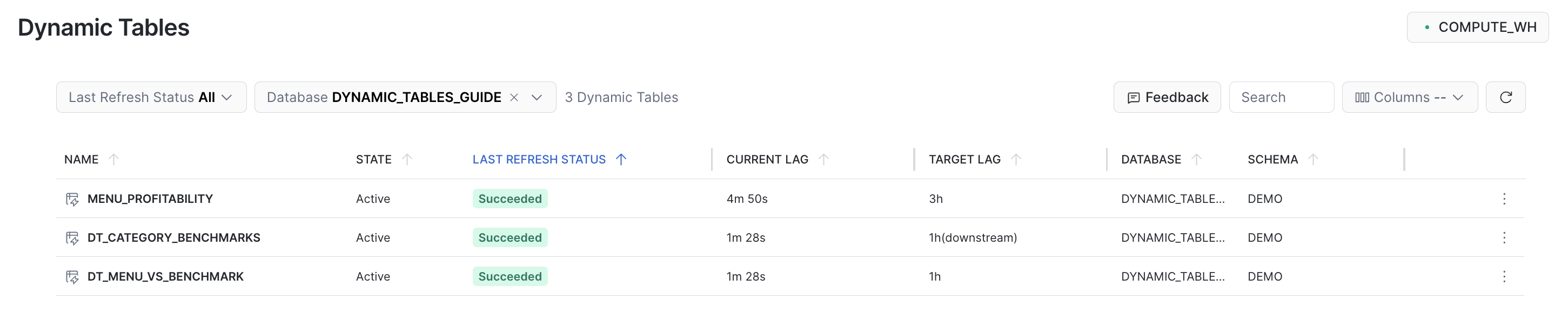
Dynamic Tables report their health through several surfaces — pick the one that matches the question you're asking:
| Question | Where to look | Retention |
|---|---|---|
| Current config & resolved refresh mode | SHOW DYNAMIC TABLES | live |
| Fleet health — is anything falling behind its lag? | INFORMATION_SCHEMA.DYNAMIC_TABLES() | live snapshot |
| Per-refresh detail — incremental vs full, duration, errors | INFORMATION_SCHEMA.DYNAMIC_TABLE_REFRESH_HISTORY() | 7 days |
| Long-term trends & audits | SNOWFLAKE.ACCOUNT_USAGE.DYNAMIC_TABLE_REFRESH_HISTORY | 365 days |
| The dependency graph over time | INFORMATION_SCHEMA.DYNAMIC_TABLE_GRAPH_HISTORY() | 7 days |
Start with per-refresh history to confirm a refresh ran and whether it was incremental, its state, and how long it took:
SELECT name, refresh_action, state,
       DATEDIFF('second', refresh_start_time, refresh_end_time) AS duration_seconds
FROM TABLE(INFORMATION_SCHEMA.DYNAMIC_TABLE_REFRESH_HISTORY())
WHERE name = 'MENU_PROFITABILITY'
ORDER BY refresh_start_time DESC
LIMIT 5;
The refresh_action column shows INCREMENTAL when Snowflake processed only the changed rows.
To watch a whole pipeline at once, INFORMATION_SCHEMA.DYNAMIC_TABLES() gives a live health snapshot of every Dynamic Table — its lag behavior and the snapshot it's currently serving:
SELECT name, target_lag_sec, mean_lag_sec, maximum_lag_sec,
       time_within_target_lag_ratio, last_completed_refresh_state, latest_data_timestamp
FROM TABLE(INFORMATION_SCHEMA.DYNAMIC_TABLES())
ORDER BY time_within_target_lag_ratio;
time_within_target_lag_ratio is the fraction of time each table met its TARGET_LAG — anything drifting below ~0.90 is falling behind and worth a look. latest_data_timestamp is the data timestamp of the snapshot that table is currently serving (the same consistent snapshot described earlier). To triage just the failures, filter refresh history with ERROR_ONLY => TRUE:
SELECT name, state, refresh_action, refresh_end_time
FROM TABLE(INFORMATION_SCHEMA.DYNAMIC_TABLE_REFRESH_HISTORY(ERROR_ONLY => TRUE))
ORDER BY refresh_end_time DESC;
The INFORMATION_SCHEMA functions keep 7 days of history; for longer audits or trend analysis, query the SNOWFLAKE.ACCOUNT_USAGE.DYNAMIC_TABLE_REFRESH_HISTORY view, which retains 365 days. To be paged automatically when a refresh fails, route the event to an alert on the refresh history. You can also monitor refresh history, lag, and the dependency graph visually in Snowsight under Monitoring » Dynamic Tables. For the full set of monitoring tools — including event tables and OpenTelemetry spans — see Monitor Dynamic Tables.
Simplified Pipelines
Two of the most common pipelines to modernize are Materialized Views and Streams + Tasks. A Dynamic Table can replace either with a single, self-refreshing object.
Replacing a Materialized View
A Materialized View pre-computes and stores query results, but it comes with real limits: you can't control its refresh timing, it has no incremental-refresh guarantees, it can't chain into other materialized views, and it can't use joins or many complex aggregations. Dynamic Tables have hardly any of these restrictions — they support joins, complex aggregations, and window functions, and chain into multi-layer pipelines.
To migrate, you keep the same query and change the DDL header:
-- Materialized View:
CREATE OR REPLACE MATERIALIZED VIEW menu_summary_mv AS
SELECT
  truck_brand_name, menu_type, item_category,
  COUNT(*) AS item_count,
  ROUND(AVG(sale_price_usd - cost_of_goods_usd), 2) AS avg_profit_usd
FROM menu_raw
WHERE sale_price_usd IS NOT NULL AND cost_of_goods_usd IS NOT NULL
GROUP BY truck_brand_name, menu_type, item_category;
-- Becomes a Dynamic Table (same query, new header):
CREATE OR REPLACE DYNAMIC TABLE menu_summary_dt
  TARGET_LAG = '1 hour'
  WAREHOUSE = COMPUTE_WH
  AS
  SELECT
    truck_brand_name, menu_type, item_category,
    COUNT(*) AS item_count,
    ROUND(AVG(sale_price_usd - cost_of_goods_usd), 2) AS avg_profit_usd
  FROM menu_raw
  WHERE sale_price_usd IS NOT NULL AND cost_of_goods_usd IS NOT NULL
  GROUP BY truck_brand_name, menu_type, item_category;
You now control freshness with TARGET_LAG, get incremental refresh when possible, and can chain this table into downstream Dynamic Tables.
Replacing Streams and Tasks
A classic CDC pipeline uses a Stream to capture changes and a Task to MERGE them into a target table. Dynamic Tables can replace that pattern with far fewer moving parts. We show two approaches.
The traditional Streams + Tasks pattern
CREATE OR REPLACE STREAM menu_changes_stream ON TABLE menu_raw;

CREATE OR REPLACE TABLE menu_profitability_cdc (
  menu_item_id NUMBER(38,0), menu_item_name VARCHAR, truck_brand_name VARCHAR,
  profit_usd NUMBER(38,4), profit_margin_pct NUMBER(38,2), updated_at TIMESTAMP_NTZ
);

CREATE OR REPLACE TASK update_menu_profitability
  WAREHOUSE = COMPUTE_WH
  SCHEDULE = '3 HOURS'
  WHEN SYSTEM$STREAM_HAS_DATA('menu_changes_stream')
  AS
  MERGE INTO menu_profitability_cdc t
  USING (
    SELECT menu_item_id, menu_item_name, truck_brand_name,
           sale_price_usd - cost_of_goods_usd AS profit_usd,
           ROUND(((sale_price_usd - cost_of_goods_usd) / NULLIF(sale_price_usd, 0)) * 100, 2) AS profit_margin_pct,
           METADATA$ACTION
    FROM menu_changes_stream
  ) s ON t.menu_item_id = s.menu_item_id
  WHEN MATCHED AND s.METADATA$ACTION = 'DELETE' THEN DELETE
  WHEN MATCHED THEN UPDATE SET t.profit_usd = s.profit_usd, t.profit_margin_pct = s.profit_margin_pct, t.updated_at = CURRENT_TIMESTAMP()
  WHEN NOT MATCHED THEN INSERT (menu_item_id, menu_item_name, truck_brand_name, profit_usd, profit_margin_pct, updated_at)
                        VALUES (s.menu_item_id, s.menu_item_name, s.truck_brand_name, s.profit_usd, s.profit_margin_pct, CURRENT_TIMESTAMP());
That's a stream, a task, a target table, and a schedule to manage.
Approach A: a declarative Dynamic Table
When the transformation is expressible as a SELECT, a single Dynamic Table replaces all of it:
CREATE OR REPLACE DYNAMIC TABLE menu_profitability_dt
  TARGET_LAG = '3 hours'
  WAREHOUSE = COMPUTE_WH
  AS
  SELECT menu_item_id, menu_item_name, truck_brand_name,
         (sale_price_usd - cost_of_goods_usd) AS profit_usd,
         ROUND(((sale_price_usd - cost_of_goods_usd) / NULLIF(sale_price_usd, 0)) * 100, 2) AS profit_margin_pct
  FROM menu_raw;
Approach B: a Custom Incremental Dynamic Table (REFRESH USING)
Sometimes your logic isn't a plain SELECT — you need explicit MERGE/INSERT control (per-row update vs. delete, stream-static joins, accumulators). Custom incremental dynamic tables let you write exactly the MERGE you'd have put in the task, but Snowflake still owns scheduling, retries, and dependency tracking. They're especially strong at stream-static joins — enriching a fast, append-only event stream against slowly-changing dimension tables — because CHANGES() feeds only the new events while the dimensions are read fresh on every refresh.
The refresh logic is a single
MERGEorINSERTstatement insideREFRESH USING.SELFrefers to the dynamic table itself, andCHANGES(...)streams the base table's changes automatically — no offsets to manage.
ALTER TABLE menu_raw SET CHANGE_TRACKING = TRUE;

CREATE OR REPLACE DYNAMIC TABLE menu_profitability_cidt (
  menu_item_id NUMBER(38,0), menu_item_name VARCHAR, truck_brand_name VARCHAR,
  profit_usd NUMBER(38,4), profit_margin_pct NUMBER(38,2), updated_at TIMESTAMP_NTZ
)
  TARGET_LAG = '3 hours'
  WAREHOUSE = COMPUTE_WH
  REFRESH USING (
    MERGE INTO SELF t USING (
      SELECT menu_item_id, menu_item_name, truck_brand_name,
             (sale_price_usd - cost_of_goods_usd) AS profit_usd,
             ROUND(((sale_price_usd - cost_of_goods_usd) / NULLIF(sale_price_usd, 0)) * 100, 2) AS profit_margin_pct,
             act
      FROM (
        SELECT menu_item_id, menu_item_name, truck_brand_name, sale_price_usd, cost_of_goods_usd,
               METADATA$ACTION AS act,
               ROW_NUMBER() OVER (PARTITION BY menu_item_id ORDER BY CASE WHEN METADATA$ACTION = 'INSERT' THEN 1 ELSE 0 END DESC) AS rn
        FROM menu_raw CHANGES(INFORMATION => DEFAULT)
      ) WHERE rn = 1
    ) s ON t.menu_item_id = s.menu_item_id
    WHEN MATCHED AND s.act = 'DELETE' THEN DELETE
    WHEN MATCHED THEN UPDATE SET menu_item_name = s.menu_item_name, truck_brand_name = s.truck_brand_name,
                                 profit_usd = s.profit_usd, profit_margin_pct = s.profit_margin_pct, updated_at = CURRENT_TIMESTAMP()
    WHEN NOT MATCHED AND s.act = 'INSERT' THEN
      INSERT (menu_item_id, menu_item_name, truck_brand_name, profit_usd, profit_margin_pct, updated_at)
      VALUES (s.menu_item_id, s.menu_item_name, s.truck_brand_name, s.profit_usd, s.profit_margin_pct, CURRENT_TIMESTAMP())
  );
Insert and update a row, refresh, and confirm the custom logic ran:
INSERT INTO menu_raw (menu_id, menu_type_id, menu_type, truck_brand_name, menu_item_id, menu_item_name, item_category, item_subcategory, cost_of_goods_usd, sale_price_usd, menu_item_health_metrics_obj)
VALUES (9999, 1, 'Snack', 'Test Truck', 9999, 'CIDT Test Taco', 'Main', 'Taco', 2.00, 8.00, NULL);
UPDATE menu_raw SET sale_price_usd = 99.00 WHERE menu_item_id = 9999;

ALTER DYNAMIC TABLE menu_profitability_cidt REFRESH;

SELECT menu_item_id, menu_item_name, profit_usd, profit_margin_pct
FROM menu_profitability_cidt WHERE menu_item_id = 9999;
Expected result — the insert and the update collapse to the final value:
| MENU_ITEM_ID | MENU_ITEM_NAME | PROFIT_USD | PROFIT_MARGIN_PCT |
|---|---|---|---|
| 9999 | CIDT Test Taco | 97.0000 | 97.98 |
When to use which
| Streams + Tasks | Declarative Dynamic Table | Custom Incremental Dynamic Table | |
|---|---|---|---|
| Objects to manage | Stream + Task + Table | One Dynamic Table | One Dynamic Table |
| Refresh control | Task schedule + WHEN | TARGET_LAG | TARGET_LAG |
| Transformation | Any DML | SELECT only | Single MERGE/INSERT |
| Best for | Legacy pipelines | Expressible as SELECT | Imperative logic, CDC with deletes, accumulators |
From Python (Snowpark)
Prefer Python? Snowpark's DataFrame API creates Dynamic Tables directly with create_or_replace_dynamic_table — build the transformation as a DataFrame and materialize it as a self-refreshing table:
from snowflake.snowpark import Session
from snowflake.snowpark.functions import col

session = Session.builder.getOrCreate()

df = (
    session.table("menu_raw")
    .filter(col("sale_price_usd").is_not_null())
    .select(
        col("menu_item_id"),
        col("menu_item_name"),
        col("truck_brand_name"),
        (col("sale_price_usd") - col("cost_of_goods_usd")).alias("profit_usd"),
    )
)

df.create_or_replace_dynamic_table(
    "menu_profitability_snowpark",
    warehouse="COMPUTE_WH",
    lag="1 hour",
    refresh_mode="INCREMENTAL",
)
Same TARGET_LAG, refresh, and incremental behavior — you just define the pipeline in Python.
Common Pipeline Patterns
A handful of patterns cover most real pipelines. Three you'll reach for constantly: enriching a live stream, deduplicating a change log, and tracking history — each just a few lines with a Dynamic Table.
Stream processing: stream-static joins
Dynamic Tables are a natural fit for stream processing. Here an append-only order_events stream is enriched against the static menu_raw dimension — a classic stream-static join. A custom incremental table with CHANGES(INFORMATION => APPEND_ONLY) feeds only the new events; the menu dimension is read fresh on each refresh:
CREATE OR REPLACE TABLE order_events (
  order_id NUMBER, menu_item_id NUMBER, quantity NUMBER, event_ts TIMESTAMP_NTZ
) CHANGE_TRACKING = TRUE;

-- Two order events land in the stream
INSERT INTO order_events
  SELECT 1, menu_item_id, 2, '2026-06-17 12:00:00' FROM menu_raw WHERE menu_item_name = 'Ice Tea' LIMIT 1;
INSERT INTO order_events
  SELECT 2, menu_item_id, 1, '2026-06-17 12:01:00' FROM menu_raw WHERE menu_item_name = 'Lemonade' LIMIT 1;

CREATE OR REPLACE DYNAMIC TABLE enriched_order_events (
  order_id NUMBER, menu_item_id NUMBER, menu_item_name VARCHAR,
  quantity NUMBER, revenue_usd NUMBER(38,4), event_ts TIMESTAMP_NTZ
)
  TARGET_LAG = '1 minute'
  WAREHOUSE = COMPUTE_WH
  REFRESH USING (
    INSERT INTO SELF
    SELECT e.order_id, e.menu_item_id, m.menu_item_name, e.quantity,
           e.quantity * m.sale_price_usd AS revenue_usd, e.event_ts
    FROM order_events CHANGES(INFORMATION => APPEND_ONLY) AS e
    JOIN menu_raw AS m ON e.menu_item_id = m.menu_item_id
  );

SELECT order_id, menu_item_name, quantity, revenue_usd
FROM enriched_order_events ORDER BY order_id;
Each new order event is enriched with its menu details and revenue as it arrives — only the new events are processed, never the whole history:
| ORDER_ID | MENU_ITEM_NAME | QUANTITY | REVENUE_USD |
|---|---|---|---|
| 1 | Ice Tea | 2 | 6.0000 |
| 2 | Lemonade | 1 | 3.5000 |
Deduplication & history (SCD Types 1 and 2)
A huge share of pipeline work is really just deduplication — collapsing a noisy change log down to the current row per key. That's SCD Type 1, and it's a one-liner with a Dynamic Table. Keeping the full version history (SCD Type 2) is nearly as easy. Both are plain SELECTs. Start with a small change log of price events:
CREATE OR REPLACE TABLE menu_item_history (
  menu_item_id NUMBER, menu_item_name VARCHAR, sale_price_usd NUMBER(38,4), event_ts TIMESTAMP_NTZ
);
INSERT INTO menu_item_history VALUES
  (1, 'Ice Tea', 3.00, '2026-06-01 09:00:00'),
  (1, 'Ice Tea', 3.50, '2026-06-10 09:00:00'),
  (1, 'Ice Tea', 4.25, '2026-06-17 09:00:00'),
  (2, 'Lemonade', 3.50, '2026-06-01 09:05:00');
SCD Type 1 — latest row per key
Deduplicate to the newest row per key with QUALIFY ROW_NUMBER() ... = 1:
CREATE OR REPLACE DYNAMIC TABLE dt_menu_scd1
  TARGET_LAG = '1 hour'
  WAREHOUSE = COMPUTE_WH
  AS
  SELECT menu_item_id, menu_item_name, sale_price_usd, event_ts AS last_updated
  FROM menu_item_history
  QUALIFY ROW_NUMBER() OVER (PARTITION BY menu_item_id ORDER BY event_ts DESC) = 1;
Expected result:
| MENU_ITEM_ID | SALE_PRICE_USD |
|---|---|
| 1 | 4.2500 |
| 2 | 3.5000 |
SCD Type 2 — full version history
Keep every version with validity ranges. LEAD() computes each version's valid_to from the next version's start:
CREATE OR REPLACE DYNAMIC TABLE dt_menu_scd2
  TARGET_LAG = '1 hour'
  WAREHOUSE = COMPUTE_WH
  AS
  SELECT menu_item_id, menu_item_name, sale_price_usd,
         event_ts AS valid_from,
         LEAD(event_ts) OVER (PARTITION BY menu_item_id ORDER BY event_ts) AS valid_to,
         LEAD(event_ts) OVER (PARTITION BY menu_item_id ORDER BY event_ts) IS NULL AS is_current
  FROM menu_item_history;
Expected result — item 1 retains all three versions; the open-ended row is current:
| MENU_ITEM_ID | SALE_PRICE_USD | VALID_FROM | IS_CURRENT |
|---|---|---|---|
| 1 | 3.0000 | 2026-06-01 09:00:00 | FALSE |
| 1 | 3.5000 | 2026-06-10 09:00:00 | FALSE |
| 1 | 4.2500 | 2026-06-17 09:00:00 | TRUE |
| 2 | 3.5000 | 2026-06-01 09:05:00 | TRUE |
What about partial updates? The clean SCD Type 1 above assumes each change carries all columns. Real CDC feeds often send only the columns that changed, leaving the rest
NULL— and a naive "latest row wins" would wipe good data. Custom incremental dynamic tables solve this by coalescing partial updates against the current state — for the full story, see Managing Partial Updates in an SCD-1 Pipeline on Snowflake.
Dynamic Iceberg Tables
A Dynamic Iceberg Table stores its output in open Apache Iceberg™ format on Snowflake-managed storage, so external engines (Spark, Trino, etc.) can read it directly — while it still refreshes like any other Dynamic Table.
Dynamic Iceberg Tables can read from both Iceberg v2 and v3 source tables, and materialize their output as either version — control it with
ICEBERG_VERSIONon the table (or the database-levelICEBERG_VERSION_DEFAULT).
CREATE OR REPLACE DYNAMIC ICEBERG TABLE dt_menu_profit_iceberg
  TARGET_LAG = '1 hour'
  WAREHOUSE = COMPUTE_WH
  REFRESH_MODE = INCREMENTAL
  ICEBERG_VERSION = 3
  AS
  SELECT menu_item_id, menu_item_name, truck_brand_name,
         (sale_price_usd - cost_of_goods_usd) AS profit_usd
  FROM menu_raw
  WHERE sale_price_usd IS NOT NULL AND cost_of_goods_usd IS NOT NULL;
Confirm it's stored as Iceberg with the is_iceberg flag:
SHOW DYNAMIC TABLES LIKE 'dt_menu_profit_iceberg';
The is_iceberg column reads true. Everything else — TARGET_LAG, incremental refresh, monitoring — behaves exactly as before.
Want to go deeper on Iceberg — v3 features, external-engine interop, and catalog options? See the Comprehensive Guide to Apache Iceberg™ v3 Tables.
AI Functions in Dynamic Tables
Because a Dynamic Table is just a query that stays fresh, you can embed Cortex AI functions directly in the definition and let the pipeline maintain AI-enriched columns automatically. Here we use AI_CLASSIFY to categorize each menu item.
AI_CLASSIFY returns an object; pull the label out of :labels[0]:
CREATE OR REPLACE DYNAMIC TABLE dt_menu_ai_classified
  TARGET_LAG = '1 hour'
  WAREHOUSE = COMPUTE_WH
  AS
  SELECT menu_item_id, menu_item_name, item_category AS source_category,
         AI_CLASSIFY(menu_item_name, ['Vegetarian','Meat','Seafood','Dessert','Beverage']):labels[0]::STRING AS ai_predicted_category
  FROM menu_raw
  WHERE menu_item_name IS NOT NULL;

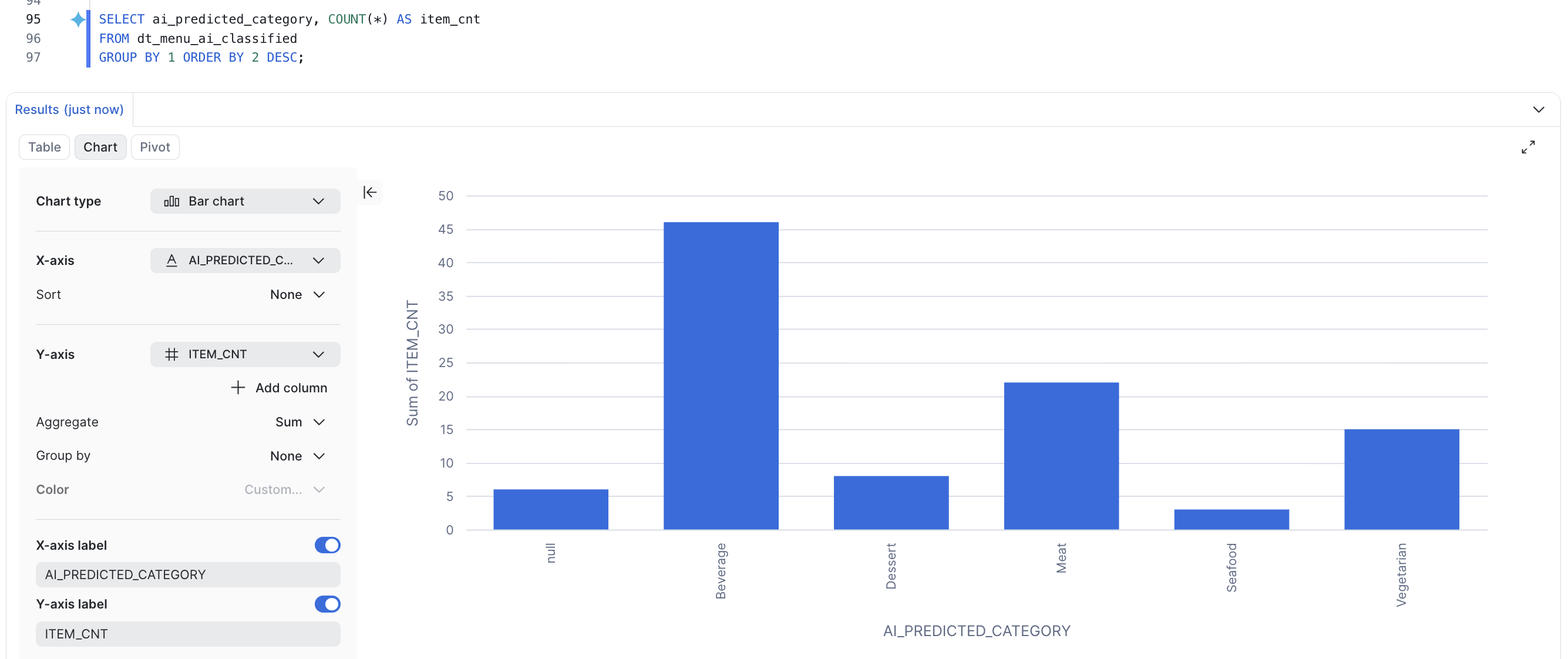
SELECT ai_predicted_category, COUNT(*) AS item_cnt
FROM dt_menu_ai_classified
GROUP BY 1 ORDER BY 2 DESC;
Expected distribution (yours may vary slightly — model output isn't perfectly deterministic):
| AI_PREDICTED_CATEGORY | ITEM_CNT |
|---|---|
| Beverage | 46 |
| Meat | 23 |
| Vegetarian | 15 |
| Dessert | 8 |
| Seafood | 3 |
AI functions are non-deterministic, but that doesn't stop you from using them in a Dynamic Table's
SELECT. The table still refreshes incrementally — each new row is classified once as it arrives, and existing rows aren't re-scored on every refresh. You get AI enrichment that stays current while only paying to process new data.
Orchestration and DevOps
Dynamic Tables schedule themselves, but they also fit into broader orchestration and CI/CD practices.
Coordinating with other work
Snowflake refreshes a pipeline of Dynamic Tables in dependency order automatically — you don't build a DAG for the refreshes themselves. When you need to coordinate Dynamic Tables with other steps (loads, exports, notifications), you have options:
- Task graphs (DAGs): Chain Tasks with predecessor relationships to run steps in order — for example, load a stage, then
EXECUTE TASKto kick a manual refresh, then export results. Use a finalizer task for teardown/notification steps. - dbt: If you manage transformations in dbt, you can define and orchestrate Dynamic Tables from dbt models. See Dynamic Tables and dbt.
CI/CD with DCM
Database Change Management (DCM) projects let you define Dynamic Tables (and their upstream tables, roles, and grants) declaratively and deploy them with a plan/deploy workflow — infrastructure-as-code for Snowflake. Use INITIALIZE = 'ON_SCHEDULE' so a deployment returns immediately instead of blocking on the initial refresh.
For an end-to-end DCM pipeline built around Dynamic Tables, see the companion guide: DCM Projects for Dynamic Tables.
DCM (and dbt) manage declarative, SELECT-based Dynamic Tables. Custom incremental dynamic tables (
REFRESH USING) are not currently supported by DCM or dbt — manage those with direct SQL orCREATE OR ALTER.
Cleanup
Everything you created lives in one dedicated database, so cleanup is a single command:
DROP DATABASE IF EXISTS DYNAMIC_TABLES_GUIDE;
Conclusion and Resources
That's the whole journey — from a first SELECT-and-forget table to layered pipelines, custom MERGE logic, open Iceberg output, and AI right in the flow.
Here's the takeaway: almost anything you'd normally wire up with multiple tools or objects, a Dynamic Table can run with less code and far less to babysit. If your logic fits a query, this is the way to build your pipelines.
What You Learned
- Built self-refreshing pipelines with
TARGET_LAGand incremental refresh, for batch and streaming - Layered Dynamic Tables with joins and dependencies
- Chose refresh modes and monitored refreshes
- Built pipelines with declarative and Custom Incremental Dynamic Tables, and from Python with Snowpark
- Applied stream-static joins, deduplication, and SCD Type 1 & 2
- Materialized output as open Apache Iceberg™ tables
- Enriched data in-pipeline with Cortex AI (
AI_CLASSIFY) - Orchestrated with Task DAGs / dbt and deployed with DCM
Additional Resources
No menu items — or late-night pipeline pages — were harmed in the making of this guide.
This content is provided as is, and is not maintained on an ongoing basis. It may be out of date with current Snowflake instances
