Build a Voice Assistant App with Streamlit and Snowflake Cortex
Overview
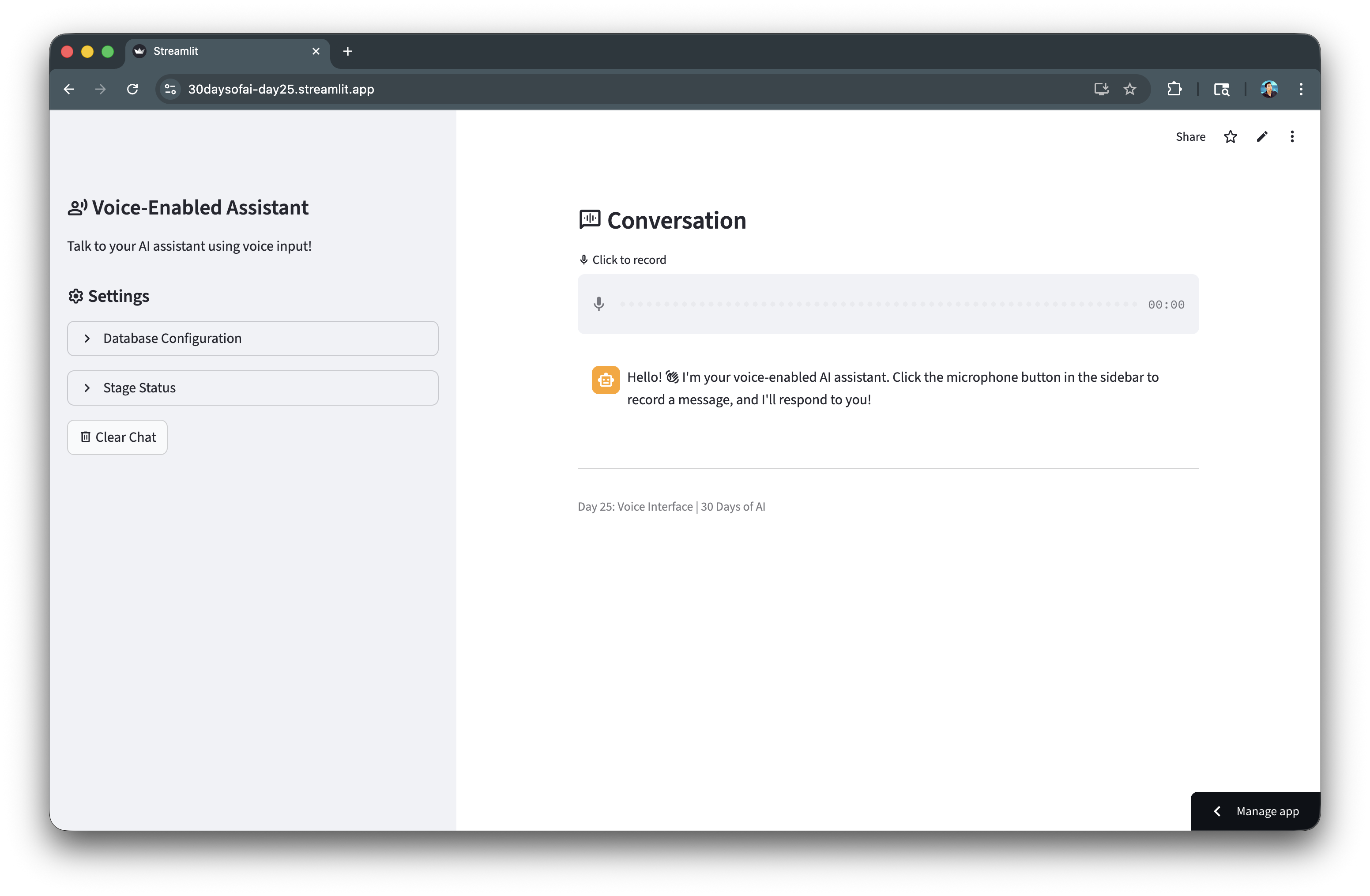
In this quickstart, you'll build a voice-enabled AI assistant using Snowflake Cortex's AI_TRANSCRIBE function. Users can record audio messages that get transcribed and processed by an LLM for intelligent conversational responses.
What You'll Learn
- How to use Snowflake Cortex
AI_TRANSCRIBEfor speech-to-text - How to create stages with proper encryption for audio processing
- How to integrate Streamlit's audio input with Snowflake
- How to build a conversational voice assistant
What You'll Build
A voice-enabled chatbot where users record audio messages, which are transcribed and processed by an LLM, creating a natural voice conversation interface.
Prerequisites
- Access to a Snowflake account
- Basic knowledge of Python and Streamlit
- Access to Cortex AI_TRANSCRIBE function
Getting Started
Clone or download the code from the 30daysofai GitHub repository:
git clone https://github.com/streamlit/30DaysOfAI.git
cd 30DaysOfAI/app
The app code for this quickstart:
Setup Stage for Audio
Audio transcription requires a stage with server-side encryption. The AI_TRANSCRIBE function can only access files stored in stages that use Snowflake-managed encryption (SNOWFLAKE_SSE), as this ensures secure handling of audio data within Snowflake's processing environment.
Create the Stage
CREATE DATABASE IF NOT EXISTS RAG_DB;
CREATE SCHEMA IF NOT EXISTS RAG_DB.RAG_SCHEMA;

DROP STAGE IF EXISTS RAG_DB.RAG_SCHEMA.VOICE_AUDIO;
CREATE STAGE RAG_DB.RAG_SCHEMA.VOICE_AUDIO
    DIRECTORY = ( ENABLE = true )
    ENCRYPTION = ( TYPE = 'SNOWFLAKE_SSE' );
Create a stage with SNOWFLAKE_SSE encryption, required for AI_TRANSCRIBE to access audio files.
Important: The stage must use
SNOWFLAKE_SSEencryption forAI_TRANSCRIBEto access audio files.
Build the Voice Interface
Connection and State Setup
Start by importing necessary libraries and setting up the Snowflake connection. The try/except pattern enables the app to work in both Streamlit in Snowflake and local environments:
import streamlit as st
import json
from snowflake.snowpark.functions import ai_complete
import io
import time
import hashlib

try:
    from snowflake.snowpark.context import get_active_session
    session = get_active_session()
except:
    from snowflake.snowpark import Session
    session = Session.builder.configs(st.secrets["connections"]["snowflake"]).create()

def call_llm(prompt_text: str) -> str:
    df = session.range(1).select(
        ai_complete(model="claude-3-5-sonnet", prompt=prompt_text).alias("response")
    )
    response_raw = df.collect()[0][0]
    response_json = json.loads(response_raw)
    if isinstance(response_json, dict):
        return response_json.get("choices", [{}])[0].get("messages", "")
    return str(response_json)

if "voice_messages" not in st.session_state:
    st.session_state.voice_messages = []

if len(st.session_state.voice_messages) == 0:
    st.session_state.voice_messages = [
        {"role": "assistant", "content": "Hello! :material/waving_hand: I'm your voice-enabled AI assistant. Click the microphone button to record a message, and I'll respond to you!"}
    ]

if "voice_database" not in st.session_state:
    st.session_state.voice_database = "RAG_DB"
    st.session_state.voice_schema = "RAG_SCHEMA"

if "processed_audio_id" not in st.session_state:
    st.session_state.processed_audio_id = None
The session state tracks conversation messages, database configuration, and a hash of the last processed audio. The hash prevents reprocessing the same recording on Streamlit reruns.
Sidebar Settings
The sidebar houses the app title, settings, and stage management controls:
database = st.session_state.voice_database
schema = st.session_state.voice_schema
full_stage_name = f"{database}.{schema}.VOICE_AUDIO"
stage_name = f"@{full_stage_name}"

with st.sidebar:
    st.title(":material/record_voice_over: Voice-Enabled Assistant")
    st.write("Talk to your AI assistant using voice input!")

    st.header(":material/settings: Settings")

    with st.expander("Stage Status", expanded=False):
        try:
            stage_info = session.sql(f"SHOW STAGES LIKE 'VOICE_AUDIO' IN SCHEMA {database}.{schema}").collect()
            if stage_info:
                session.sql(f"DROP STAGE IF EXISTS {full_stage_name}").collect()
            session.sql(f"""
            CREATE STAGE {full_stage_name}
                DIRECTORY = ( ENABLE = true )
                ENCRYPTION = ( TYPE = 'SNOWFLAKE_SSE' )
            """).collect()
            st.success(":material/check_box: Audio stage ready (server-side encrypted)")
        except Exception as e:
            st.error(f":material/cancel: Could not create stage")

    if st.button(":material/delete: Clear Chat"):
        st.session_state.voice_messages = [
            {"role": "assistant", "content": "Hello! :material/waving_hand: I'm your voice-enabled AI assistant. Click the microphone button to record a message, and I'll respond to you!"}
        ]
        st.rerun()
The sidebar contains settings and controls. The stage status expander ensures the audio stage exists with proper encryption. Stage recreation handles edge cases where the stage is misconfigured.
Transcribe Audio with AI_TRANSCRIBE
Process Recorded Audio
The main area displays the conversation and audio input widget. When audio is recorded, it's uploaded to the stage and transcribed:
st.subheader(":material/voice_chat: Conversation")

audio = st.audio_input(":material/mic: Click to record")

for msg in st.session_state.voice_messages:
    with st.chat_message(msg["role"]):
        st.markdown(msg["content"])

status_container = st.container()

if audio is not None:
    audio_bytes = audio.read()
    audio_hash = hashlib.md5(audio_bytes).hexdigest()

    if audio_hash != st.session_state.processed_audio_id:
        st.session_state.processed_audio_id = audio_hash

        with status_container:
            transcript = None
            with st.spinner(":material/mic: Transcribing audio..."):
                try:
                    timestamp = int(time.time())
                    filename = f"audio_{timestamp}.wav"

                    audio_stream = io.BytesIO(audio_bytes)
                    full_stage_path = f"{stage_name}/{filename}"

                    session.file.put_stream(
                        audio_stream,
                        full_stage_path,
                        overwrite=True,
                        auto_compress=False
                    )

                    safe_file_name = filename.replace("'", "''")

                    sql_query = f"""
                    SELECT SNOWFLAKE.CORTEX.AI_TRANSCRIBE(
                        TO_FILE('{stage_name}', '{safe_file_name}')
                    ) as transcript
                    """

                    result_rows = session.sql(sql_query).collect()

                    if result_rows:
                        json_string = result_rows[0]['TRANSCRIPT']
                        transcript_data = json.loads(json_string)
                        transcript = transcript_data.get("text", "")

                        if transcript:
                            st.session_state.voice_messages.append({
                                "role": "user",
                                "content": transcript
                            })

                except Exception as e:
                    st.error(f"Error during transcription: {str(e)}")
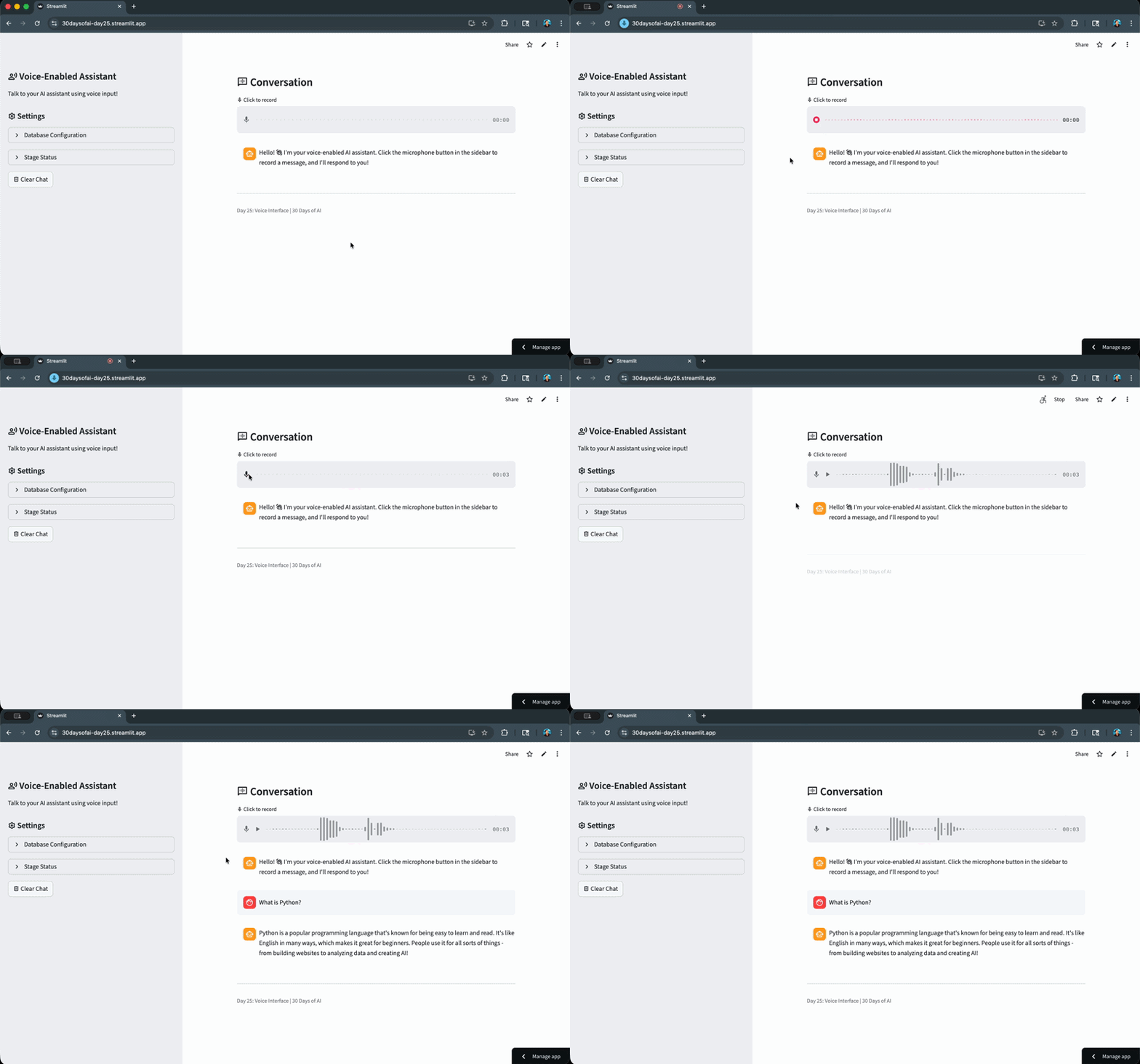
st.audio_input() provides the microphone button for recording in the main area. Audio bytes are hashed with MD5 to create a unique ID. put_stream() uploads the audio to the stage. AI_TRANSCRIBE with TO_FILE() converts speech to text. The transcript is parsed from JSON and added to the conversation.
Generate Voice Responses
Build Conversational Context
After transcription, the conversation history is formatted as context for the LLM to generate a relevant response:
            if transcript:
                with st.spinner(":material/smart_toy: Generating response..."):
                    conversation_context = "You are a friendly voice assistant. Keep responses short and conversational.\n\nConversation history:\n"

                    history_messages = [msg for msg in st.session_state.voice_messages[:-1]
                                       if not (msg["role"] == "assistant" and "Click the microphone" in msg["content"])]

                    for msg in history_messages:
                        role = "User" if msg["role"] == "user" else "Assistant"
                        conversation_context += f"{role}: {msg['content']}\n"

                    conversation_context += f"\nUser: {transcript}\n\nAssistant:"

                    response = call_llm(conversation_context)

                    st.session_state.voice_messages.append({
                        "role": "assistant",
                        "content": response
                    })

                try:
                    session.sql(f"REMOVE {stage_name}/{safe_file_name}").collect()
                except:
                    pass

                st.rerun()
else:
    st.session_state.processed_audio_id = None
Conversation history is formatted as a dialogue for context. The LLM generates a conversational response. The REMOVE command cleans up the temporary audio file. st.rerun() refreshes the display with new messages.
Finally, the else block resets processed_audio_id to None when no audio is present, allowing subsequent recordings to be processed.
Complete Application
Putting this together, we have a full working Voice Assistant App:
import streamlit as st
import json
from snowflake.snowpark.functions import ai_complete
import io
import time
import hashlib

try:
    from snowflake.snowpark.context import get_active_session
    session = get_active_session()
except:
    from snowflake.snowpark import Session
    session = Session.builder.configs(st.secrets["connections"]["snowflake"]).create()

def call_llm(prompt_text: str) -> str:
    """Call Snowflake Cortex LLM."""
    df = session.range(1).select(
        ai_complete(model="claude-3-5-sonnet", prompt=prompt_text).alias("response")
    )
    response_raw = df.collect()[0][0]
    response_json = json.loads(response_raw)
    if isinstance(response_json, dict):
        return response_json.get("choices", [{}])[0].get("messages", "")
    return str(response_json)

if "voice_messages" not in st.session_state:
    st.session_state.voice_messages = []

if len(st.session_state.voice_messages) == 0:
    st.session_state.voice_messages = [
        {
            "role": "assistant",
            "content": "Hello! :material/waving_hand: I'm your voice-enabled AI assistant. Click the microphone button to record a message, and I'll respond to you!"
        }
    ]

if "voice_database" not in st.session_state:
    st.session_state.voice_database = "RAG_DB"
    st.session_state.voice_schema = "RAG_SCHEMA"

if "processed_audio_id" not in st.session_state:
    st.session_state.processed_audio_id = None

database = st.session_state.voice_database
schema = st.session_state.voice_schema
full_stage_name = f"{database}.{schema}.VOICE_AUDIO"
stage_name = f"@{full_stage_name}"

with st.sidebar:
    st.title(":material/record_voice_over: Voice-Enabled Assistant")
    st.write("Talk to your AI assistant using voice input!")

    st.header(":material/settings: Settings")

    with st.expander("Database Configuration", expanded=False):
        database = st.text_input("Database", value=st.session_state.voice_database, key="db_input")
        schema = st.text_input("Schema", value=st.session_state.voice_schema, key="schema_input")

        st.session_state.voice_database = database
        st.session_state.voice_schema = schema

        st.caption(f"Stage: `{database}.{schema}.VOICE_AUDIO`")
        st.caption(":material/edit_note: Stage uses server-side encryption (required for AI_TRANSCRIBE)")

        if st.button(":material/autorenew: Recreate Stage", help="Drop and recreate the stage with correct encryption"):
            try:
                full_stage = f"{database}.{schema}.VOICE_AUDIO"
                session.sql(f"DROP STAGE IF EXISTS {full_stage}").collect()
                session.sql(f"""
                    CREATE STAGE {full_stage}
                        DIRECTORY = ( ENABLE = true )
                        ENCRYPTION = ( TYPE = 'SNOWFLAKE_SSE' )
                """).collect()
                st.success(f":material/check_circle: Stage recreated successfully!")
                st.rerun()
            except Exception as e:
                st.error(f"Failed to recreate stage: {str(e)}")

    with st.expander("Stage Status", expanded=False):
        database = st.session_state.voice_database
        schema = st.session_state.voice_schema
        full_stage_name = f"{database}.{schema}.VOICE_AUDIO"

        try:
            stage_info = session.sql(f"SHOW STAGES LIKE 'VOICE_AUDIO' IN SCHEMA {database}.{schema}").collect()

            if stage_info:
                st.info(f":material/autorenew: Recreating stage with server-side encryption...")
                session.sql(f"DROP STAGE IF EXISTS {full_stage_name}").collect()

            session.sql(f"""
                CREATE STAGE {full_stage_name}
                    DIRECTORY = ( ENABLE = true )
                    ENCRYPTION = ( TYPE = 'SNOWFLAKE_SSE' )
            """).collect()
            st.success(f":material/check_box: Audio stage ready (server-side encrypted)")

        except Exception as e:
            st.error(f":material/cancel: Could not create stage")

    if st.button(":material/delete: Clear Chat"):
        st.session_state.voice_messages = [
            {
                "role": "assistant",
                "content": "Hello! :material/waving_hand: I'm your voice-enabled AI assistant. Click the microphone button to record a message, and I'll respond to you!"
            }
        ]
        st.rerun()

st.subheader(":material/voice_chat: Conversation")

audio = st.audio_input(":material/mic: Click to record")

for msg in st.session_state.voice_messages:
    with st.chat_message(msg["role"]):
        st.markdown(msg["content"])

status_container = st.container()

if audio is not None:
    audio_bytes = audio.read()
    audio_hash = hashlib.md5(audio_bytes).hexdigest()

    if audio_hash != st.session_state.processed_audio_id:
        st.session_state.processed_audio_id = audio_hash

        with status_container:
            transcript = None
            with st.spinner(":material/mic: Transcribing audio..."):
                try:
                    timestamp = int(time.time())
                    filename = f"audio_{timestamp}.wav"

                    audio_stream = io.BytesIO(audio_bytes)
                    full_stage_path = f"{stage_name}/{filename}"

                    session.file.put_stream(
                        audio_stream,
                        full_stage_path,
                        overwrite=True,
                        auto_compress=False
                    )

                    safe_file_name = filename.replace("'", "''")

                    sql_query = f"""
                    SELECT SNOWFLAKE.CORTEX.AI_TRANSCRIBE(
                        TO_FILE('{stage_name}', '{safe_file_name}')
                    ) as transcript
                    """

                    result_rows = session.sql(sql_query).collect()

                    if result_rows:
                        json_string = result_rows[0]['TRANSCRIPT']
                        transcript_data = json.loads(json_string)
                        transcript = transcript_data.get("text", "")

                        if transcript:
                            st.session_state.voice_messages.append({
                                "role": "user",
                                "content": transcript
                            })
                        else:
                            st.error("Transcription returned no text.")
                            st.json(transcript_data)
                    else:
                        st.error("Transcription query returned no results.")

                except Exception as e:
                    st.error(f"Error during transcription: {str(e)}")

            if transcript:
                with st.spinner(":material/smart_toy: Generating response..."):
                    conversation_context = "You are a friendly voice assistant. Keep responses short and conversational.\n\nConversation history:\n"

                    history_messages = st.session_state.voice_messages[:-1] if len(st.session_state.voice_messages) > 1 else []

                    history_messages = [msg for msg in history_messages if not (msg["role"] == "assistant" and "Click the microphone button" in msg["content"])]

                    for msg in history_messages:
                        role = "User" if msg["role"] == "user" else "Assistant"
                        conversation_context += f"{role}: {msg['content']}\n"

                    conversation_context += f"\nUser: {transcript}\n\nAssistant:"

                    response = call_llm(conversation_context)

                    st.session_state.voice_messages.append({
                        "role": "assistant",
                        "content": response
                    })

                try:
                    session.sql(f"REMOVE {stage_name}/{safe_file_name}").collect()
                except:
                    pass

                st.rerun()
else:
    st.session_state.processed_audio_id = None

st.divider()
st.caption("Day 25: Voice Interface | 30 Days of AI")
Let's now take a look at the voice assistant app that we've built:
Deploy the App
Save the code above as streamlit_app.py and deploy using one of these options:
- Local: Run
streamlit run streamlit_app.pyin your terminal - Streamlit Community Cloud: Deploy your app from a GitHub repository
- Streamlit in Snowflake (SiS): Create a Streamlit app directly in Snowsight
Conclusion And Resources
Congratulations! You've successfully built a voice-enabled AI assistant using Snowflake Cortex's AI_TRANSCRIBE function. Users can now speak their questions and receive intelligent conversational responses.
What You Learned
- Using Snowflake Cortex
AI_TRANSCRIBEfor speech-to-text - Creating stages with proper encryption for audio processing
- Integrating Streamlit's audio input with Snowflake
- Building a conversational voice assistant
Related Resources
Documentation:
Additional Reading:
Source Material
This quickstart was adapted from Day 25 of the 30 Days of AI challenge:
- Day 25: Voice AI with AI_TRANSCRIBE
Learn more:
This content is provided as is, and is not maintained on an ongoing basis. It may be out of date with current Snowflake instances
