Build AI Apps with LangChain, Streamlit and Snowflake Cortex
Overview
In this quickstart, you'll learn how to integrate LangChain with Streamlit and Snowflake Cortex to build composable LLM applications. LangChain provides powerful abstractions for prompt templates, chains, and output handling that work seamlessly with Cortex models.
What You'll Learn
- How to install and configure
langchain-snowflake - How to create prompt templates with variables
- How to build LangChain chains with Cortex LLMs
- How to compose templates and models into pipelines
What You'll Build
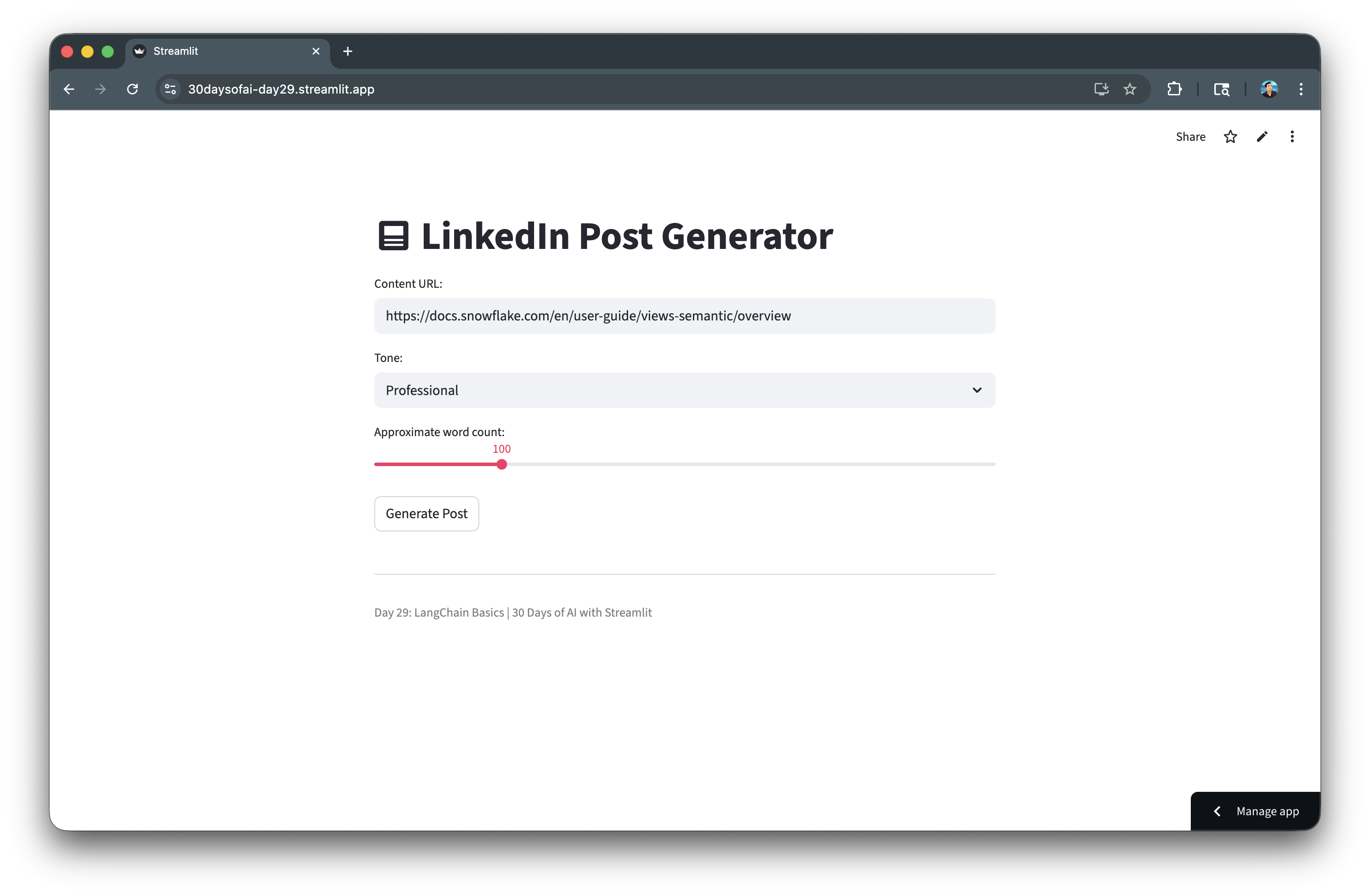
A LinkedIn Post Generator that uses LangChain prompt templates with Streamlit and Snowflake Cortex to generate customized social media content.
Prerequisites
- Access to a Snowflake account
- Basic knowledge of Python and Streamlit
langchain-snowflakepackage installed
Getting Started
Clone or download the code from the 30daysofai GitHub repository:
git clone https://github.com/streamlit/30DaysOfAI.git
cd 30DaysOfAI/app
The app code for this quickstart:
Install LangChain Snowflake
Install the required package.
Note: This section is repurposed from Day 29 of the #30DaysOfAI learning challenge.
Installation
pip install langchain-snowflake
Or add to your requirements.txt:
streamlit
snowflake-snowpark-python
langchain-core
langchain-snowflake
Verify Installation
Test that the LangChain Snowflake integration is properly installed:
from langchain_snowflake import ChatSnowflake
print("LangChain Snowflake installed successfully!")
langchain-snowflake provides the ChatSnowflake class that connects LangChain's abstractions to Snowflake Cortex models.
Setup Snowflake Connection
Establish the connection for LangChain to use.
Note: This section is repurposed from Day 29 of the #30DaysOfAI learning challenge.
Connection Code
Establish the Snowflake session that LangChain will use for Cortex access:
import streamlit as st
from langchain_snowflake import ChatSnowflake

try:
    from snowflake.snowpark.context import get_active_session
    session = get_active_session()
except:
    from snowflake.snowpark import Session
    session = Session.builder.configs(st.secrets["connections"]["snowflake"]).create()
The standard Snowflake connection pattern works with LangChain. The session object is passed to ChatSnowflake to enable Cortex model access.
Create the LLM Instance
Wrap Cortex models with LangChain's interface:
llm = ChatSnowflake(model="claude-3-5-sonnet", session=session)
ChatSnowflake wraps Cortex models with LangChain's interface. Pass the model name and session to create an LLM instance that works with chains and templates.
Available Models
| Model | Best For |
|---|---|
claude-3-5-sonnet | Complex reasoning, long outputs |
mistral-large | Balanced speed and quality |
llama3.1-8b | Fast responses |
mixtral-8x7b | General purpose |
Create Prompt Templates
Prompt templates allow you to define reusable prompts with variables.
Note: This section is repurposed from Day 29 of the #30DaysOfAI learning challenge.
Basic Template
Create reusable prompts with variable placeholders:
from langchain_core.prompts import PromptTemplate

template = PromptTemplate.from_template(
    "Explain {topic} in simple terms."
)

formatted = template.format(topic="machine learning")
print(formatted)
# Output: "Explain machine learning in simple terms."
PromptTemplate.from_template() creates reusable prompts with {variable} placeholders. The format() method substitutes variables with actual values.
Multi-Variable Template
Add multiple variables and detailed instructions for consistent output:
template = PromptTemplate.from_template(
    """You are an expert social media manager. Generate a LinkedIn post based on:

    Tone: {tone}
    Desired Length: Approximately {word_count} words
    Use content from this URL: {content}

    Generate only the LinkedIn post text. Use dash for bullet points."""
)
Templates can include multiple variables and detailed instructions. Clear formatting guidelines help the LLM produce consistent output.
Template with Instructions
Use message-based templates for finer control over system and human roles:
from langchain_core.prompts import ChatPromptTemplate

template = ChatPromptTemplate.from_messages([
    ("system", "You are a helpful assistant that writes {style} content."),
    ("human", "Write about: {topic}")
])
ChatPromptTemplate supports message-based templates with system and human roles, giving you finer control over how the LLM receives instructions.
Build Chains
Chains compose templates and LLMs into pipelines.
Note: This section is repurposed from Day 29 of the #30DaysOfAI learning challenge.
Basic Chain
Compose templates and LLMs into chains using the pipe operator:
import streamlit as st
from langchain_core.prompts import PromptTemplate
from langchain_snowflake import ChatSnowflake

try:
    from snowflake.snowpark.context import get_active_session
    session = get_active_session()
except:
    from snowflake.snowpark import Session
    session = Session.builder.configs(st.secrets["connections"]["snowflake"]).create()

template = PromptTemplate.from_template(
    "Explain {topic} in simple terms for a beginner."
)

llm = ChatSnowflake(model="claude-3-5-sonnet", session=session)

chain = template | llm
The pipe operator (|) composes templates and LLMs into chains. When invoked, the template formats the prompt, which then passes to the LLM for generation.
Execute the Chain
Invoke the chain with a dictionary matching the template variables:
result = chain.invoke({"topic": "neural networks"})
print(result.content)
chain.invoke() accepts a dictionary matching the template variables. The result is a message object with the LLM's response in the .content attribute.
Chain with Multiple Variables
Pass all required values in the invoke dictionary:
template = PromptTemplate.from_template(
    """Generate a {tone} message about {topic} in {word_count} words."""
)

chain = template | llm

result = chain.invoke({
    "tone": "professional",
    "topic": "data engineering",
    "word_count": 100
})
Chains handle any number of variables. Simply pass all required values in the invoke dictionary.
Build Post Generator App
Create a complete application using LangChain and Streamlit.
Note: This section is repurposed from Day 29 of the #30DaysOfAI learning challenge.
Application Code
Build the complete LinkedIn Post Generator with customizable tone and word count:
import streamlit as st
from langchain_core.prompts import PromptTemplate
from langchain_snowflake import ChatSnowflake

try:
    from snowflake.snowpark.context import get_active_session
    session = get_active_session()
except:
    from snowflake.snowpark import Session
    session = Session.builder.configs(st.secrets["connections"]["snowflake"]).create()

template = PromptTemplate.from_template(
    """You are an expert social media manager. Generate a LinkedIn post based on:

    Tone: {tone}
    Desired Length: Approximately {word_count} words
    Use content from this URL: {content}

    Generate only the LinkedIn post text. Use dash for bullet points."""
)

llm = ChatSnowflake(model="claude-3-5-sonnet", session=session)
chain = template | llm

st.title(":material/post: LinkedIn Post Generator")

content = st.text_input(
    "Content URL:",
    "https://docs.snowflake.com/en/user-guide/views-semantic/overview"
)
tone = st.selectbox("Tone:", ["Professional", "Casual", "Funny"])
word_count = st.slider("Approximate word count:", 50, 300, 100)

if st.button("Generate Post"):
    result = chain.invoke({
        "content": content,
        "tone": tone,
        "word_count": word_count
    })

    st.subheader("Generated Post:")
    st.markdown(result.content)
The complete app combines UI inputs with chain invocation. The button triggers the chain, and st.markdown() renders the formatted output.
Advanced Chain Patterns
Note: This section is repurposed from Day 29 of the #30DaysOfAI learning challenge.
Chain with Processing
Add a function to the chain pipe for post-processing output:
def process_output(result):
    """Post-process LLM output."""
    return result.content.strip()

chain = template | llm | process_output

result = chain.invoke({"topic": "Snowflake"})
# result is now a string, not a message object
Adding a function to the chain pipe processes the output. This pattern extracts just the text content and strips whitespace.
Multiple Chains
Combine separate chains for multi-step workflows:
summary_template = PromptTemplate.from_template(
    "Summarize this in one sentence: {text}"
)

expand_template = PromptTemplate.from_template(
    "Expand on this topic: {summary}"
)

summary_chain = summary_template | llm
expand_chain = expand_template | llm

summary_result = summary_chain.invoke({"text": long_text})

expanded_result = expand_chain.invoke({"summary": summary_result.content})
Separate chains can be combined by passing one chain's output as another's input. This enables multi-step workflows like summarize-then-expand.
Error Handling
Wrap chain invocations in try/except for graceful error recovery:
try:
    result = chain.invoke({"topic": user_input})
    st.success("Generated successfully!")
    st.markdown(result.content)
except Exception as e:
    st.error(f"Generation failed: {str(e)}")
    st.info("Try rephrasing your request or selecting a different model.")
Wrapping chain invocations in try/except handles API errors gracefully. Providing actionable suggestions helps users recover from failures.
Complete Application
Here's the complete LinkedIn Post Generator combining LangChain prompt templates, Snowflake Cortex integration, and Streamlit UI controls.
Full Code
Copy the code below to create your complete LangChain Post Generator app:
import streamlit as st
from langchain_core.prompts import PromptTemplate
from langchain_snowflake import ChatSnowflake

try:
    from snowflake.snowpark.context import get_active_session
    session = get_active_session()
except:
    from snowflake.snowpark import Session
    session = Session.builder.configs(st.secrets["connections"]["snowflake"]).create()

template = PromptTemplate.from_template(
    """You are an expert social media manager. Generate a LinkedIn post based on:

    Tone: {tone}
    Desired Length: Approximately {word_count} words
    Use content from this URL: {content}

    Generate only the LinkedIn post text. Use dash for bullet points."""
)

llm = ChatSnowflake(model="claude-3-5-sonnet", session=session)
chain = template | llm

st.title(":material/post: LinkedIn Post Generator")
content = st.text_input("Content URL:", "https://docs.snowflake.com/en/user-guide/views-semantic/overview")
tone = st.selectbox("Tone:", ["Professional", "Casual", "Funny"])
word_count = st.slider("Approximate word count:", 50, 300, 100)

if st.button("Generate Post"):
    result = chain.invoke({"content": content, "tone": tone, "word_count": word_count})
    st.subheader("Generated Post:")
    st.markdown(result.content)

st.divider()
st.caption("Day 29: LangChain Basics | 30 Days of AI with Streamlit")
Here's the app with the generated response:

Deploy the App
Save the code above as streamlit_app.py and deploy using one of these options:
- Local: Run
streamlit run streamlit_app.pyin your terminal - Streamlit Community Cloud: Deploy your app from a GitHub repository
- Streamlit in Snowflake (SiS): Create a Streamlit app directly in Snowsight
Conclusion And Resources
Congratulations! You've learned how to integrate LangChain with Streamlit and Snowflake Cortex to build composable LLM apps. You can now create reusable prompt templates, build chains, and compose powerful AI pipelines.
What You Learned
- Installing and configuring
langchain-snowflake - Creating prompt templates with variables
- Building LangChain chains with Cortex LLMs
- Composing templates and models into pipelines
Related Resources
Documentation:
Source Material
This quickstart was adapted from Day 29 (LangChain integration with Cortex) of the 30 Days of AI challenge
Learn more:
This content is provided as is, and is not maintained on an ongoing basis. It may be out of date with current Snowflake instances
