Accelerate Data Product Delivery with CoCo
Overview
Duration: 5 minutes
This guide shows how to deliver a governed data product in a single sprint using CoCo and a machine-readable data contract as the single source of truth. One document captures the requirements; an agent reads it and generates, deploys, and monitors every artifact automatically.
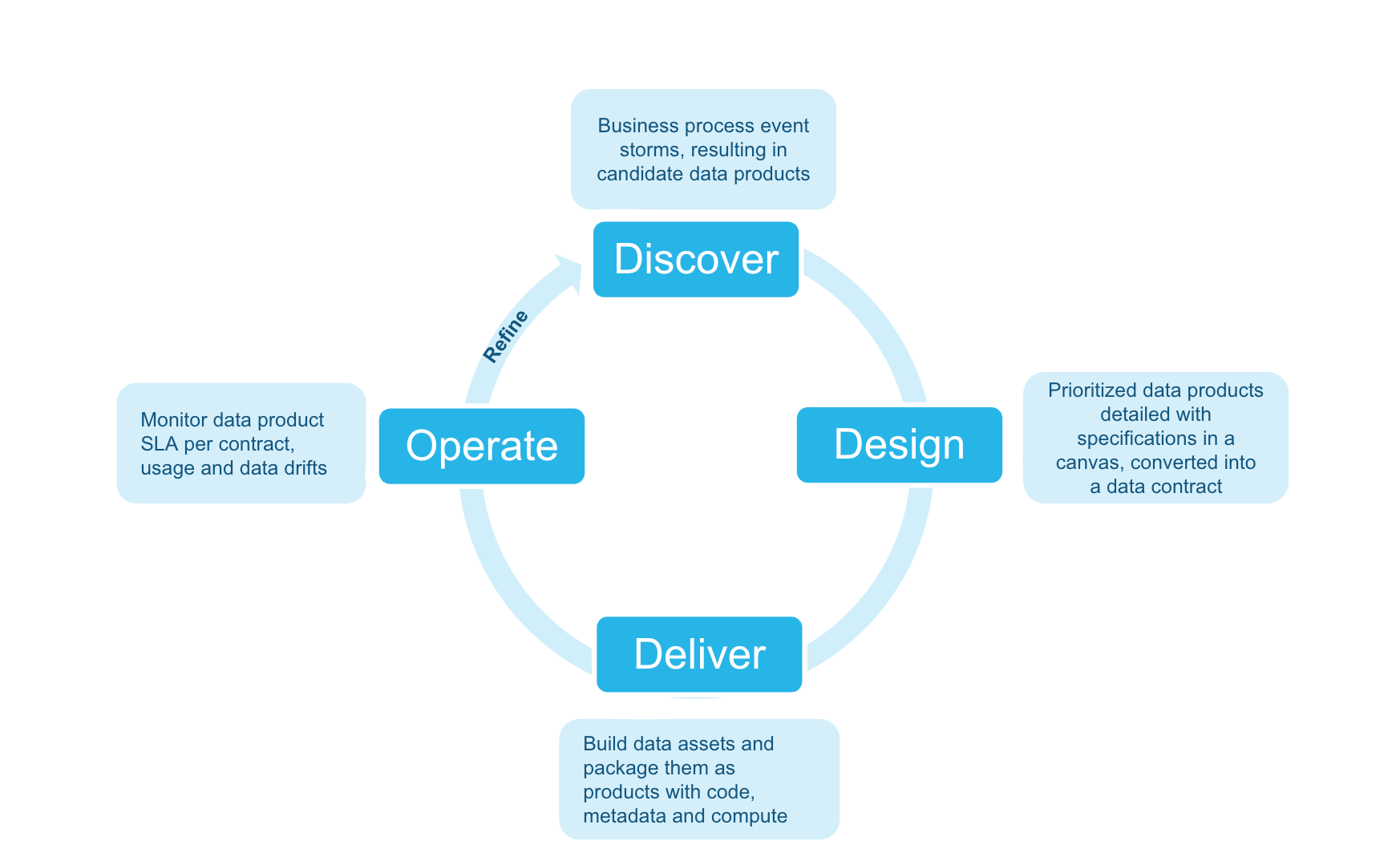
The example uses a Retail Customer Churn Risk data product in a retail banking context, but the approach works for any data product in any industry.
Note: The Discover phase is pre-done. Open
01_discover/data_product_canvas.pngto see the agreed requirements — this canvas is the only input to all phases that follow. The sprint goal is to deliverRETAIL_BANKING_DB.DATA_PRODUCTS.RETAIL_CUSTOMER_CHURN_RISK— governed, tested, and monitored — by end of sprint.
What You'll Learn
- How a machine-readable data contract (ODCS v2.2) drives all downstream automation — one document replaces days of manual artifact authoring
- How a CoCo agent generates a dbt project, masking policies, and DMF quality checks from the contract in minutes
- How to deploy, monitor, and evolve a governed data product on Snowflake
What You'll Need
What You'll Build
In one sprint you will produce a complete, production-ready data product. Source tables are pre-loaded — everything below is generated and deployed by the CoCo agent:
- A dbt model transforming five source tables into a governed output table
- Masking policies protecting PII columns (email, phone, date of birth)
- Data Metric Functions enforcing null, range, and freshness quality expectations
- Automated monitoring for SLA freshness, quality gate status, and usage by role
Environment Setup
Duration: 10 minutes
Step 1: Clone the Repository
Clone https://github.com/srini86/data-products-lifecycle-fsi-example and cd into the repo root.
Step 2: Run Setup SQL in Snowsight
Open 00_setup/setup.sql in Snowsight and run each step in order:
| Step | What it does |
|---|---|
| Step 1 | Creates RETAIL_BANKING_DB with four schemas (RAW, DATA_PRODUCTS, GOVERNANCE, MONITORING) and an XSmall warehouse |
| Step 2 | Creates two Snowflake stages in GOVERNANCE: data_contracts and streamlit_apps |
| Step 3 | Creates five source tables in the RAW schema |
| Step 4 | Loads synthetic FSI sample data into the source tables |
| Step 5 (optional) | Deploys a Streamlit code generator app — skip if following the CoCo path |
| Step 6 | Verifies all five source tables exist with expected row counts |
Source tables loaded by Steps 3–4:
| Table | Description | Rows |
|---|---|---|
CUSTOMERS | Demographics, segment, KYC status | ~1,000 |
ACCOUNTS | Accounts by type, balance, status | ~2,500 |
TRANSACTIONS | Six months of transaction history | ~25,000 |
DIGITAL_ENGAGEMENT | App logins, feature usage, NPS | ~1,000 |
COMPLAINTS | Complaint records and resolution times | ~200 |
Confirm Step 6 shows all five tables before continuing.
Start CoCo
Duration: 2
From the repo root, run cortex to start a session, then invoke the lifecycle accelerator with $dplc-accelerator (or type start lifecycle). The skill detects your current phase, displays a progress tracker, and presents each prompt one step at a time.
Keep this session open for all phases — Design through Refine. You will return to it at the start of each phase.
Design: Create the Data Contract
Duration: 10 minutes
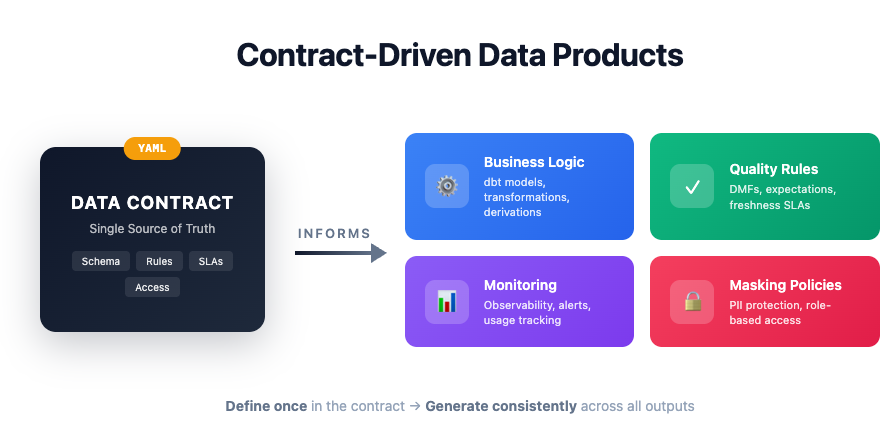
A data contract (ODCS v2.2 YAML) is the sprint's single source of truth — every artifact in the Deliver phase is generated from it.
Prompt 1: Review the Example Contract
Open 02_design/_example/churn_risk_data_contract.yaml. The contract has three key sections:
Schema — every output column with type, description, derivation logic, and a pii flag. Columns marked pii: true (email, phone, date of birth) automatically trigger masking policy generation in the Deliver phase.
Quality rules — null checks on required columns, a value range rule (churn score must be 0–100), and a freshness rule (max 24-hour age). These drive the DMF setup generated in Deliver.
SLAs and governance — daily refresh schedule, 99.5% availability target, data steward contact, retention period, and regulatory tags (GDPR, PSD2). These drive the monitoring alerts and access control setup.
Prompt 2: Generate Your Own Contract (Optional)
Use CoCo to generate a contract from your own canvas:
"Generate an ODCS v2.2 data contract for <your data product>. Use 02_design/_example/churn_risk_data_contract.yaml as a reference."
Deliver: CoCo Agent
Duration: 25 minutes
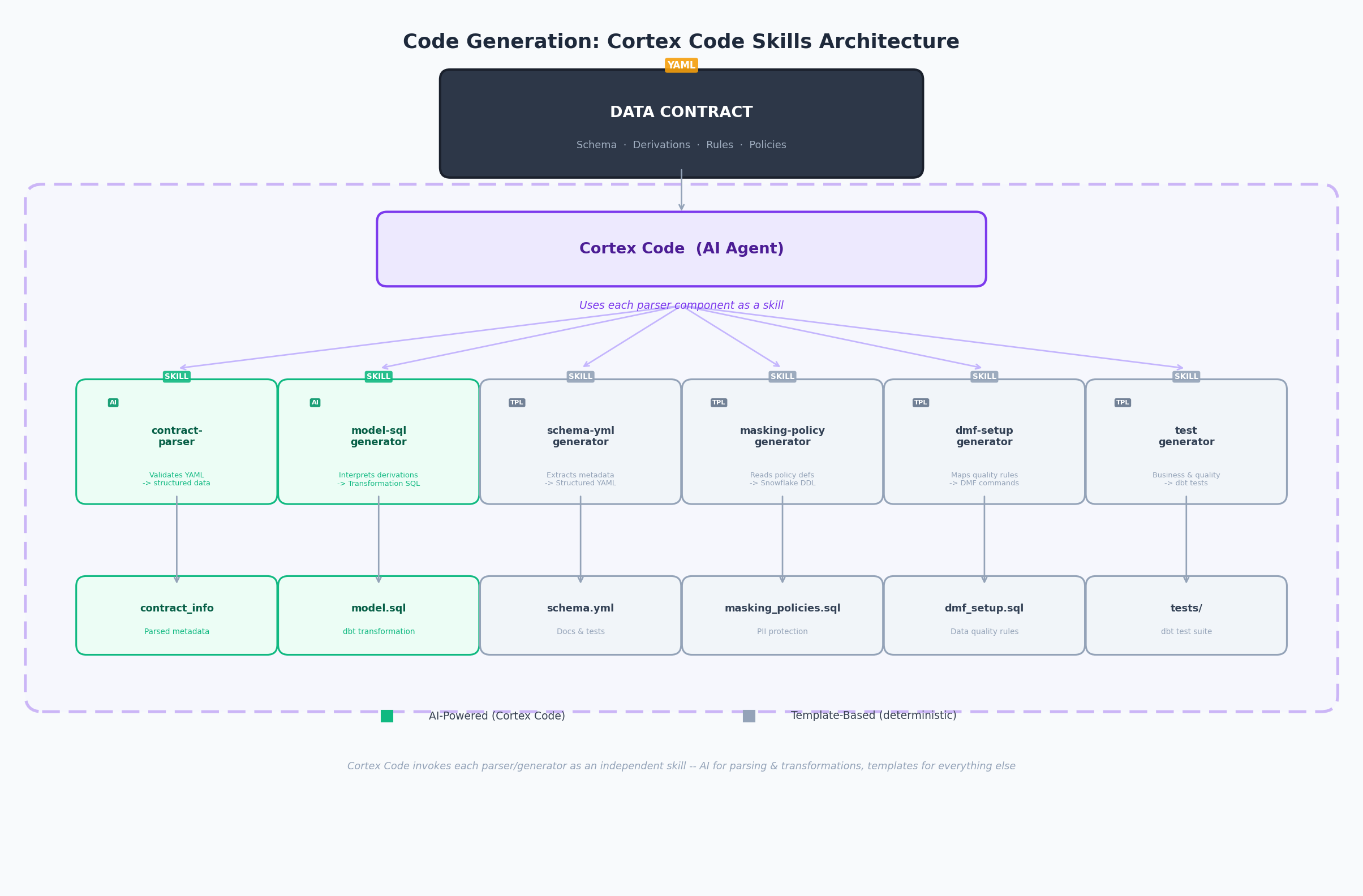
This phase uses the dplc-accelerator skill — an interactive orchestrator that detects your current phase, displays a progress tracker, and presents each prompt one step at a time.
Prompt 1: Generate the dbt Project
"Read the data contract at 02_design/_example/churn_risk_data_contract.yaml and generate a complete dbt project — model SQL, schema.yml, and tests."
Output: 03_deliver/dbt_project/models/ — model SQL joining all five source tables, schema.yml with not_null/unique/accepted_values tests, and singular tests for range and referential integrity rules.
Review checkpoint: Verify the join logic matches the source tables in the contract. Confirm the churn score derivation aligns with the contract's
derivationfield.
Prompt 2: Generate Governance Artifacts
"Generate masking policies and DMF setup SQL based on the governance rules in the data contract."
Output: masking_policies.sql — one conditional masking policy per pii: true column, granting unmasked access to privileged roles only. dmf_setup.sql — attaches Snowflake Data Metric Functions for each quality rule, scheduled to match the contract's refresh schedule.
Review checkpoint: Every
pii: truecolumn has a masking policy. The DMF schedule matches the contract'srefresh_schedule.
Prompt 3: Generate Monitoring SQL
"Generate monitoring and observability SQL — freshness SLAs, quality checks, usage tracking, and alerts."
Output: 04_operate/_example/monitoring_observability.sql — freshness check, DMF quality dashboard (PASS/FAIL per rule), usage tracking by role/user, and a Snowflake Alert that fires on SLA or quality breach.
Review checkpoint: Confirm the freshness threshold in the generated SQL matches
sla.max_acceptable_lag_hours(24 hours) from the contract.
Prompt 4: Deploy via Snow CLI
"Deploy the dbt project to Snowflake using snow dbt deploy and run it."
The agent runs snow dbt deploy targeting RETAIL_BANKING_DB.DATA_PRODUCTS, then snow dbt run to materialise the output table. It then applies masking policies and DMF attachments from Prompts 1 and 2.
Review checkpoint: Confirm
RETAIL_BANKING_DB.DATA_PRODUCTS.RETAIL_CUSTOMER_CHURN_RISKexists with ~1,000 rows in Snowsight.
Prompt 5: Validate the Deployment
"Validate the deployment — run tests, check row counts, verify masking is applied."
The agent runs dbt test, checks row and null counts, then queries the table as the PUBLIC role to confirm PII columns are masked (email → *****@domain.com, phone → ***-***-XXXX).
Review checkpoint: All dbt tests pass. If any fail, CoCo consults the Error Playbook and suggests a targeted fix.
Operate: Automated Monitoring
Duration: 5 minutes
The monitoring SQL was generated in Deliver Prompt 3. Open 04_operate/_example/monitoring_observability.sql in Snowsight to review or re-run any check independently.
Prompt 1: Run Monitoring Checks
Open 04_operate/_example/monitoring_observability.sql in Snowsight and run each section in order:
| Check | What it does |
|---|---|
| Freshness SLA | Reports hours since last refresh; flags SLA_BREACH if > 24 hours |
| Quality gate | Queries DMF metric history and reports PASS/FAIL per quality rule |
| Usage tracking | Returns query count and compute time per role/user over the last 7 days |
RACI Template: 04_operate/raci_template.md provides a reusable responsibility matrix — copy and fill in for your team.
Refine: Evolve the Data Product
Duration: 3 minutes
Prompt 1: Review the v2 Contract
Open 05_refine/_example/churn_risk_data_contract_v2.yaml. Two new columns have been added driven by consumer feedback. Compare with the v1 contract to see what changed — the agent will use this diff to regenerate only the affected artifacts.
Prompt 2: Regenerate Affected Artifacts
"The contract has been updated to v2 with new columns. Regenerate only the affected dbt model SQL, schema.yml, and DMF setup — no full rebuild required."
The agent compares the contract versions, identifies the changed sections, and regenerates only those artifacts. Review 05_refine/_example/evolution_example.sql to see the incremental ALTER TABLE statements produced.
Adapting to your industry: Update any contract field — schema, quality rules, or SLAs — and re-run this prompt. Only the downstream artifacts that depend on the changed section are regenerated.
Cleanup
Duration: 2 minutes
Run 06_cleanup/cleanup.sql in Snowsight. It drops RETAIL_BANKING_DB and DATA_PRODUCTS_WH, removing all objects created by this guide.
Note: This permanently deletes all tables, views, stages, and data. Save any outputs you want to keep before running.
Conclusion and Resources
Duration: 2 minutes
What You Learned
- How a data contract (ODCS v2.2) drives all downstream automation — one document replaces days of manual artifact authoring
- How the
dplc-acceleratorskill orchestrates dbt generation, governance, deployment, and monitoring in a single sprint - How to evolve a data product by updating the contract and re-running only the affected artifacts
Related Resources
This content is provided as is, and is not maintained on an ongoing basis. It may be out of date with current Snowflake instances
