

Up to 10x Faster Large Inserts on Snowflake Hybrid Tables
With our release of Hybrid Table Bulk INSERT, we are bringing the faster performance of Optimized Bulk Loads to more INSERT queries, achieving up to 10x faster batch INSERTs.[0]
Hybrid Tables leverage a row store as the primary data store to provide excellent operational query performance. When you write to a Hybrid Table, the data is written directly into the row store. Data is asynchronously copied into object storage in order to provide better performance and workload isolation for large scans without affecting your ongoing operational workloads.[1]
SELECT on Hybrid Tables can dynamically choose between these two storage engines to optimize individual queries based on the expected cardinality of the read. Bulk INSERT brings that same dynamic selection to our most utilized data manipulation language (DML) path: INSERT.
Today we'll discuss how we did it and how we have accelerated large ingestion workloads with this new capability.
Bulk Loading
Between tens of millions of daily insert queries sit a few hundred queries which perform Bulk Loads. Despite being a fraction of a percent of queries by volume, these humble DMLs account for over 80% of all data loaded into Hybrid Tables, based on internal platform telemetry as of September 2026.
- Bulk Loading is limited to CTAS and INSERT into freshly created tables.[0]
- INSERTing large amounts of data into a nonempty table (or even a truncated table) results in the row store being used where quotas and throttling kick in.
In March, Snowflake removed request-based billing from Hybrid Tables.[2] This alleviated the cost aspect of large row-store-based INSERT queries, but it didn't solve the performance and workload isolation aspects of running these queries.
Bulk INSERT
Bulk INSERT is the first generalized DML extension of Bulk Loading on Hybrid Tables. We have extended the Object Store of the Hybrid Storage system to allow back propagation seamlessly into the Row Store. In the same way that changes to the Row Store are synchronized to the Object Store, changes to the Object Store are now synchronized to the Row Store. This allows the system to dynamically decide which storage medium to write to based on the estimated size of the INSERT.
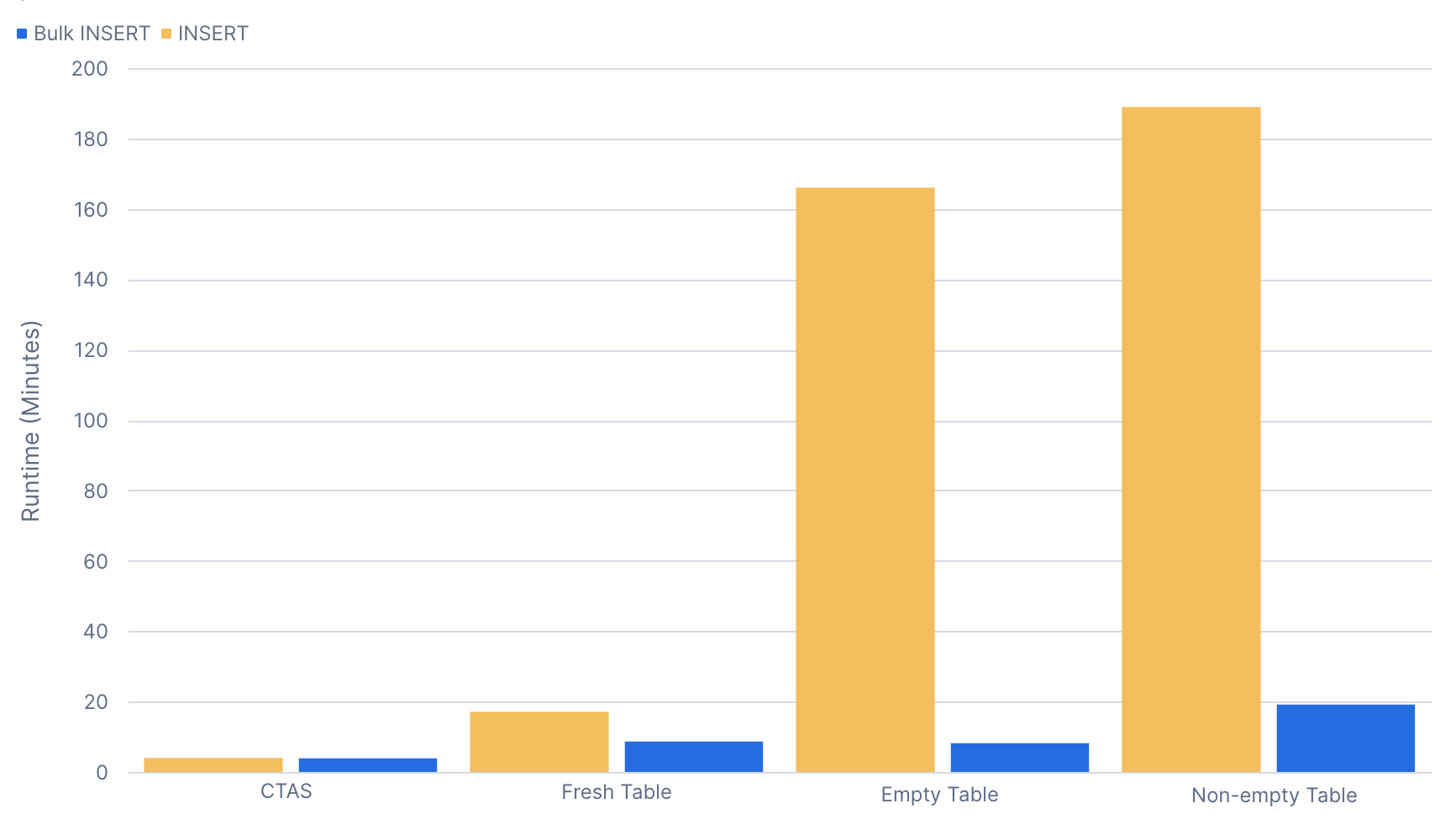
Below, we compare a 100-GB data load (10 million rows), on a Large warehouse, before and after the introduction of Bulk INSERT.
Constraints are supported
The recommendation for best performance on bulk loading data for some other databases is to drop or disable constraints before the load and re-enable or validate the constraint after the load is completed. Bulk INSERT into a Hybrid Table uses the object store and batched row-level locking to enforce constraints efficiently during the load. This means there is no need to disable UNIQUE or FOREIGN KEY constraints during that load and that concurrent online transaction processing (OLTP) workloads that rely on the constraints can continue to operate.
Better workload isolation
Since the synchronization between the two data stores happens seamlessly, there is little to no impact on Row Store operations during the Bulk INSERT. This means so long as there are no direct data conflicts, you can continue servicing your OLTP applications while loading large amounts of data into the same table.
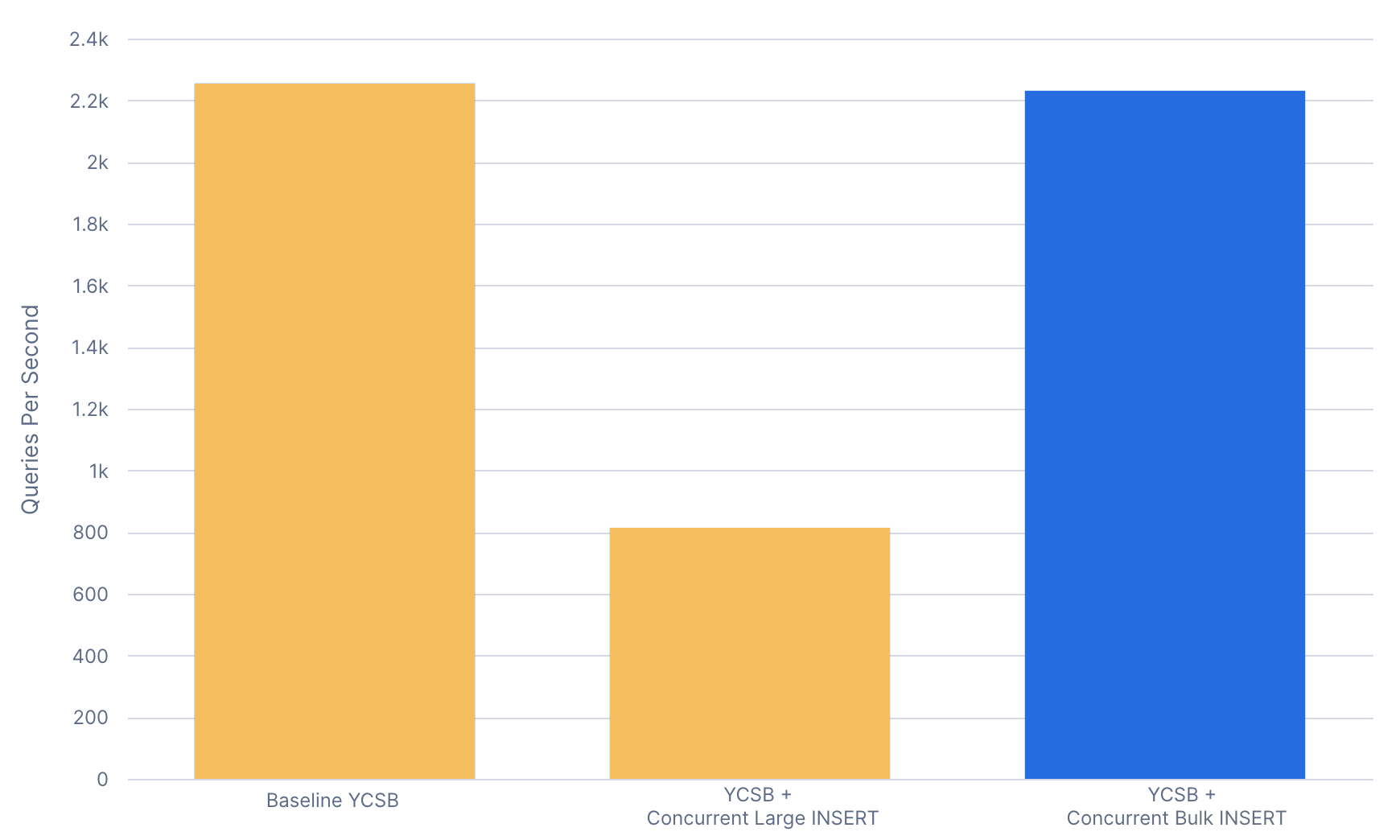
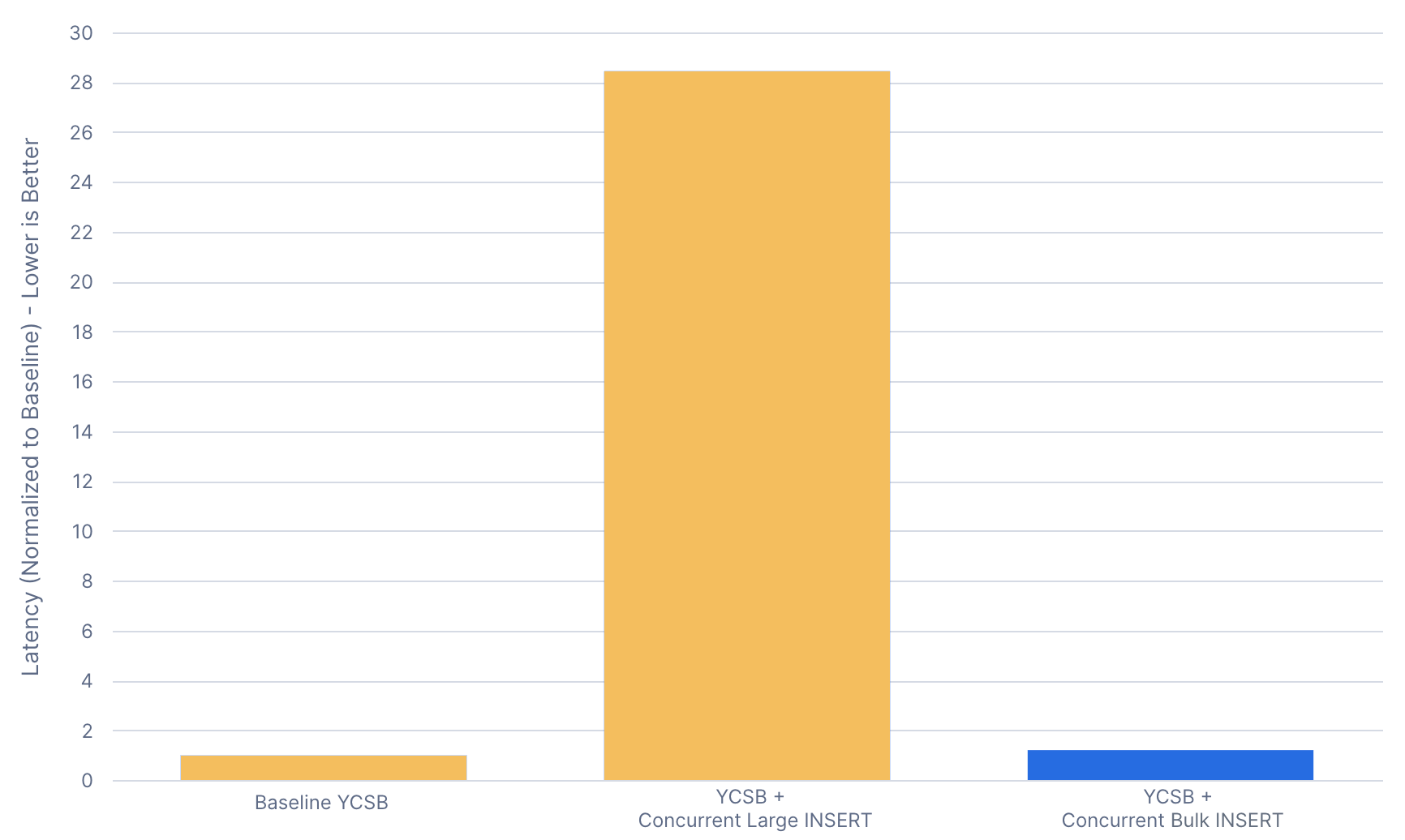
To demonstrate this, we run a 5-GB scale YCSB with a concurrent continuous Large INSERT workload on the same table. Before Bulk INSERT, there is a shared throughput quota between all DMLs. With pure Row Store INSERT, the large data load will consume most of the quota. With Bulk INSERT, the larger insert is decoupled from this quota, so while there is still a minor impact on the operational workload, it is approximately 1%. P90 Latency numbers scale similarly.
How to use it
- Bulk INSERT is generally available on all Hybrid Tables as of July 2026 and applies to all INSERT variants except INSERT ALL.
- Bulk INSERT works similarly to object store scans: The query engine will automatically utilize Bulk INSERT when it detects large amounts of data being written.
Next up
- Further optimization on workload isolation and constraint-checking performance is coming.
- Bringing these optimizations to more DML types:
- DELETE
- UPDATE
- MERGE
- Bringing this optimization to online index builds.
How we measured performance
End-to-end query runtimes
Numbers were captured using a Large warehouse. 100 GB of data was randomly generated and loaded into a standard Snowflake table and the standard table was used as the source of the INSERT. Times reported are from the client and include the read from the standard table. The warehouse was warmed up before test runs so the standard table is read from local disk instead of remote storage.
Data setup
create table if not exists source_10mil_10kb (
  key varchar(32), field1 varchar(5000), field2 varchar(5000)
)
as select randstr(32, random()), randstr(5000, random()), randstr(5000, random())
from table(generator(rowcount => 10000000));
Test queries
-- Warmup Standard Table in the warehouse
select * from source_10mil_10kb;

-- CTAS into Hybrid Table
create or replace hybrid table hybrid_ctas_10mil_10kb (
  key varchar(32) primary key, field1 varchar(5000), field2 varchar(5000)
)
as select * from source_10mil_10kb;

-- Fresh Table INSERT
create or replace hybrid table hybrid_table_10mil_10kb (
  key varchar(32) primary key, field1 varchar(5000), field2 varchar(5000)
);

insert into hybrid_table_10mil_10kb select * from source_10mil_10kb;

-- Empty Table Insert
truncate table hybrid_table_10mil_10kb;
insert into hybrid_table_10mil_10kb select * from source_10mil_10kb;

-- Recreate the table using new random data to avoid primary key violations.
create or replace hybrid table hybrid_ctas_10mil_10kb (
  key varchar(32) primary key, field1 varchar(5000), field2 varchar(5000)
)
as select randstr(32, random()), randstr(5000, random()), randstr(5000, random())
from table(generator(rowcount => 10000000));

-- Non-empty Table Insert
insert into hybrid_table_10mil_10kb select * from source_10mil_10kb;
Raw results
| Metric | Time |
|---|---|
| CTAS | 4 min |
| Fresh table row store INSERT | 17 min |
| Empty table row store INSERT | 2 hours 46 min |
| Nonempty table row store INSERT | 3 hours 9 min |
| Fresh table Bulk INSERT | 9 min |
| Empty table Bulk INSERT | 8 min |
| Nonempty table Bulk INSERT | 19 min |
YCSB workload
For this test, we ran a slightly modified "sparse" version of YCSB [3] at the 5-GB scale for 10 minutes with a 5-minute warm-up period. The "sparse" version locks all of the YCSB keys to odd numbers. This forms gaps between the rows, where we can perform a concurrent operation without a direct data conflict. With no direct data conflict, there will not be primary key violations, but there will be concurrent, interleaving writes to ranges in the storage layer of the system. The YCSB test runner has 50 clients and a fixed maximum throughput of 2.2K QPS. The 51st client runs the Bulk INSERT workload continuously. The YCSB queries were run on an X-Small warehouse, while the Bulk INSERT queries were run on a separate Large warehouse.
Raw results
| Metric | Value |
|---|---|
| Baseline YCSB QPS | 2,255 |
| YCSB + Concurrent Large row store INSERT QPS | 814 |
| YCSB + Concurrent Bulk INSERT QPS | 2,231 |
| Baseline YCSB P90 Latency | Baseline |
| YCSB + Concurrent Large INSERT P90 Latency | 28.5x |
| YCSB + Concurrent Bulk INSERT P90 Latency | 1.2x |
Sources and disclaimers
This article contains forward-looking statements, including those about our future product offerings, and are not commitments to deliver any product offerings. Actual results and offerings may differ and are subject to known and unknown risks and uncertainties. See our latest 10-Q for more information.
[0]: Create Hybrid Tables - Loading Data
[1]: Create Hybrid Tables - Architecture