Stream Snowflake Changes to Postgres with pg_lake
Overview
What You'll Build
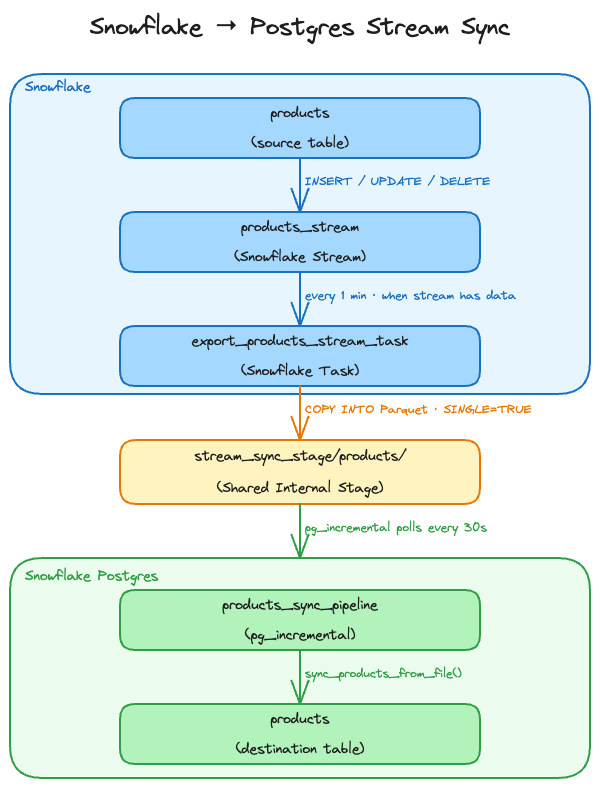
This quickstart demonstrates how to build an automated pipeline that streams row-level changes (INSERT, UPDATE, DELETE) from a Snowflake table down to a Snowflake Postgres table. Changes made in Snowflake are exported as Parquet files to a shared internal stage by a scheduled Task, then detected and merged into Postgres by a pg_incremental pipeline — with no S3 bucket, no external pipeline, and no manual intervention.
What You'll Learn
- How Snowflake Streams present captured changes
- Easy way to setup change data capture from Snowflake to Postgres
- Automate file loads with pg_incremental
- Managing floating point numbers when exporting to parquet
What You'll Need
- Snowflake account with ACCOUNTADMIN access
- Local terminal session to run
psql psqlclient installed locally (install withbrew install postgresqlon macOS)- Familiarity with SQL and basic Postgres concepts
How It Works
Snowflake Streams capture every row-level change made to a table since the stream was last consumed. A scheduled Snowflake Task reads the stream and writes the captured changes as Parquet files to a shared internal stage. On the Postgres side, pg_incremental polls the stage every 30 seconds and calls a sync function for each new file. The sync function reads the Parquet file using a pg_lake foreign table and merges each record into the local Postgres table.
Architecture
Stream Change Record Semantics
Snowflake streams encode all three change types using two metadata columns:
_action | _is_update | Meaning | Postgres action |
|---|---|---|---|
INSERT | FALSE | New row inserted | INSERT |
INSERT | TRUE | New version of an updated row | INSERT |
DELETE | FALSE | Row deleted | DELETE |
DELETE | TRUE | Old version of an updated row | DELETE |
An UPDATE produces two stream records for the same product_id — a DELETE (old values) and an INSERT (new values), both with _is_update=TRUE. Crucially, a Snowflake stream reports the net outcome of each row between two consumes, not a full statement-by-statement history: within a single exported file, each product_id appears as at most a single INSERT, a single DELETE, or one DELETE+INSERT update pair. The sync function uses this guarantee to apply each file with a single set-based MERGE: the _is_update flag distinguishes a genuine deletion (_is_update=FALSE) from the delete-half of an update (_is_update=TRUE), so after filtering out the update-half deletes there is exactly one intended action per key. This makes UPDATE handling completely transparent — no row-by-row loop and no special update-detection logic is needed.
File Ordering Guarantee
With a scheduled task writing files over time, Postgres must apply files in the order they were written to preserve data integrity. This is handled in two layers:
Cross-run ordering is guaranteed by one property and enforced by a sorted wrapper function:
- Snowflake tasks run serially. A task never executes concurrently with itself. Each run atomically consumes the full stream snapshot and writes its file before the next run can start. All files from task run N therefore have an earlier modification timestamp than any file from task run N+1.
lake_file.list()does not sort its results. It passes through whatever order the object storage API returns with no sort step.pg_incrementalalso applies no sort — it builds an internal list in whatever row order the list function returns and processes files in that order. To guarantee modification-time ordering, this quickstart passes apublic.list_files_sortedwrapper function (created in Postgres Setup Step 5) that addsORDER BY last_modified_time ASC. Without this, file order would be undefined and older files could be applied after newer ones.
Within-run ordering is handled by using SINGLE = TRUE in the COPY INTO statement. This forces all stream records from a single task run into one file. Without this, the COPY INTO may split records across multiple files with no guaranteed distribution order — meaning the DELETE and INSERT halves of the same UPDATE pair could land in different files and be applied out of order, producing incorrect results. With SINGLE = TRUE, each task run produces exactly one file containing a complete, self-consistent batch, which the sync function processes safely in a single transaction.
Data Model
Snowflake products table:
| Column | Type | Description |
|---|---|---|
product_id | INT | Primary key |
product_name | VARCHAR(100) | Display name |
category | VARCHAR(50) | Product category |
price | NUMBER(10,2) | Current price |
status | VARCHAR(20) | active or discontinued |
updated_at | TIMESTAMP_NTZ | Last modified in Snowflake |
Postgres products table — same schema plus:
| Column | Type | Description |
|---|---|---|
synced_at | TIMESTAMP | When the row was last written by the sync pipeline |
Prerequisites
- Snowflake account with ACCOUNTADMIN access
- Local terminal session to run
psql - Familiarity with SQL and basic Postgres concepts
Postgres Instance Setup
Create a Snowflake Postgres instance. Skip this section if you already have an instance you want to use — just substitute its name for PG_LAB throughout.
Step 1: Create Network Policy
Snowflake Postgres requires a network policy to allow client connections. Replace nnn.nnn.nnn.nnn/32 with a specific IP address or CIDR for your organization.
-- Postgres Instance Setup: Step 1 - Create Network Policy
-- Execute in: Snowsight (Snowflake)
USE ROLE ACCOUNTADMIN;

CREATE DATABASE IF NOT EXISTS pg_network_db;
CREATE SCHEMA  IF NOT EXISTS pg_network_db.pg_network;

USE SCHEMA pg_network_db.pg_network;

-- Run this to find your current IP address if needed
SELECT current_ip_address();

CREATE OR REPLACE NETWORK RULE pg_lab_ingress_rule
    TYPE       = IPV4
    VALUE_LIST = ('nnn.nnn.nnn.nnn/32')
    MODE       = POSTGRES_INGRESS
    COMMENT    = 'Allow Postgres client connections (restrict in production)';

CREATE OR REPLACE NETWORK POLICY pg_lab_network_policy
    ALLOWED_NETWORK_RULE_LIST = ('pg_lab_ingress_rule')
    COMMENT = 'Network policy for Snowflake Postgres instances';
Step 2: Create Postgres Instance
-- Postgres Instance Setup: Step 2 - Create Postgres Instance
-- Execute in: Snowsight (Snowflake)

CREATE POSTGRES INSTANCE PG_LAB
    AUTHENTICATION_AUTHORITY = POSTGRES_OR_SNOWFLAKE
    COMPUTE_FAMILY           = 'STANDARD_L'
    STORAGE_SIZE_GB          = 50
    POSTGRES_VERSION         = 18
    HIGH_AVAILABILITY        = FALSE
    NETWORK_POLICY           = 'pg_lab_network_policy'
    COMMENT                  = 'Postgres instance for stream-to-postgres quickstart';
Important: Save the username and password displayed in the
access_rolesfield and thehostvalue — you will need them to connect.
Step 3: Monitor Instance Status
Wait for the instance to reach READY state before proceeding.
-- Postgres Instance Setup: Step 3 - Monitor Instance Status
-- Execute in: Snowsight (Snowflake)

SHOW POSTGRES INSTANCES;
Step 4: Configure psql Connection
Set environment variables in your terminal once the instance is READY:
export PGHOST=<hostname from SHOW POSTGRES INSTANCES>
export PGPORT=5432
export PGDATABASE=postgres
export PGUSER=snowflake_admin
export PGPASSWORD=<password from CREATE POSTGRES INSTANCE output>
export PGSSLMODE=require
Test the connection:
psql -c "SELECT version();"
Snowflake Setup
Create the Snowflake database, table, stage, stream, and export task.
Role Required: This section requires ACCOUNTADMIN to create the storage integration.
Step 1: Create Database, Schema, Products Table, and Sample Data
This simulates a realistic starting point where a table already exists and contains data before the sync pipeline is set up.
-- Snowflake Setup: Step 1 - Create Database, Schema, Products Table, and Sample Data
-- Execute in: Snowsight (Snowflake)

CREATE DATABASE IF NOT EXISTS stream_lab;
CREATE SCHEMA  IF NOT EXISTS stream_lab.catalog;

USE SCHEMA stream_lab.catalog;

CREATE OR REPLACE TABLE products (
    product_id    INT            NOT NULL,
    product_name  VARCHAR(100)   NOT NULL,
    category      VARCHAR(50)    NOT NULL,
    price         NUMBER(10,2)   NOT NULL,
    status        VARCHAR(20)    NOT NULL,
    updated_at    TIMESTAMP_NTZ  DEFAULT current_timestamp(),  -- must be set on every INSERT and UPDATE; used for sync ordering
    PRIMARY KEY (product_id)
);

INSERT INTO products (product_id, product_name, category, price, status)
VALUES
    (1, 'Wireless Headphones',   'electronics',  89.99, 'active'),
    (2, 'USB-C Hub 7-Port',      'electronics',  49.99, 'active'),
    (3, 'Mechanical Keyboard',   'electronics', 129.99, 'active'),
    (4, 'Running Jacket',        'apparel',       74.99, 'active'),
    (5, 'Merino Wool Socks',     'apparel',       18.99, 'active'),
    (6, 'Trail Running Shoes',   'apparel',      119.99, 'active'),
    (7, 'Bamboo Desk Organizer', 'home',          34.99, 'active'),
    (8, 'LED Desk Lamp',         'home',          55.99, 'active');
Step 2: Create Storage Integration, Stage, and Verify
The storage integration links the Snowflake internal stage to the Postgres instance's internal storage so both sides can read and write the same files.
-- Snowflake Setup: Step 2 - Create Storage Integration, Stage, and Verify
-- Execute in: Snowsight (Snowflake)
CREATE OR REPLACE STORAGE INTEGRATION pg_lab_stream_int
    TYPE              = POSTGRES_INTERNAL_STORAGE
    POSTGRES_INSTANCE = 'PG_LAB'
    ENABLED           = TRUE;

CREATE OR REPLACE STAGE stream_sync_stage
    STORAGE_INTEGRATION = pg_lab_stream_int
    RELATIVE_URL        = '/';

-- Confirm stage is accessible (returns empty result if no files yet)
LIST @stream_sync_stage/;
Step 3: Create Stream and View Initial Rows
SHOW_INITIAL_ROWS = TRUE causes the stream to surface all existing rows as INSERT records the first time it is consumed, regardless of when those rows were inserted. This is the recommended approach when setting up sync against a table that already contains data — no separate initial-load step is needed.
APPEND_ONLY = FALSE captures INSERT, UPDATE, and DELETE operations going forward. Each UPDATE produces two stream records: a DELETE record (old values) and an INSERT record (new values).
-- Snowflake Setup: Step 3 - Create Stream and View Initial Rows
-- Execute in: Snowsight (Snowflake)
CREATE OR REPLACE STREAM products_stream
    ON TABLE products
    APPEND_ONLY       = FALSE
    SHOW_INITIAL_ROWS = TRUE
    COMMENT = 'Captures all changes to the products table for sync to Postgres';

-- All 8 existing rows should appear with _action = 'INSERT', _is_update = FALSE
SELECT
    METADATA$ACTION   AS _action,
    METADATA$ISUPDATE AS _is_update,
    product_id, product_name, category, price, status
FROM products_stream
ORDER BY product_id;
Step 4: Create Export Procedure, Task, and Verify
SINGLE = TRUE and INCLUDE_QUERY_ID = TRUE cannot be used together — Snowflake raises a compilation error. The solution is a stored procedure that builds a timestamp-based suffix using EXECUTE IMMEDIATE, so each task run writes its single file with a unique time based suffix (e.g. products/product_stream_20240115_103000.parquet). The task then calls the procedure instead of running COPY INTO directly.
-- Snowflake Setup: Step 4 - Create Export Procedure, Task, and Verify
-- Execute in: Snowsight (Snowflake)
CREATE OR REPLACE PROCEDURE export_products_stream()
RETURNS STRING
LANGUAGE SQL
EXECUTE AS CALLER
AS
$$
DECLARE
    stage_path TEXT;
    row_count  INTEGER;
BEGIN
    row_count := (SELECT COUNT(*) FROM stream_lab.catalog.products_stream);

    IF (row_count = 0) THEN
        RETURN NULL;
    END IF;

    stage_path := '@stream_sync_stage/products/product_stream_'
                  || TO_CHAR(CURRENT_TIMESTAMP(), 'YYYYMMDD_HH24MISS')
                  || '.parquet';

    EXECUTE IMMEDIATE
        'COPY INTO ' || :stage_path || '
        FROM (
            SELECT
                product_id,
                product_name,
                category,
                ROUND(price * 100)::INTEGER AS price_cents,
                status,
                updated_at,
                METADATA$ACTION            AS _action,
                METADATA$ISUPDATE::BOOLEAN AS _is_update
            FROM stream_lab.catalog.products_stream
        )
        FILE_FORMAT = (TYPE = ''PARQUET'')
        SINGLE      = TRUE';

    RETURN :stage_path || ' (' || :row_count::TEXT || ' rows)';
END;
$$;

CREATE OR REPLACE TASK export_products_stream_task
    WAREHOUSE = COMPUTE_WH
    SCHEDULE  = '1 MINUTE'
WHEN
    SYSTEM$STREAM_HAS_DATA('stream_lab.catalog.products_stream')
AS
    CALL export_products_stream();

ALTER TASK export_products_stream_task RESUME;

-- Wait up to 1 minute for the task to run on schedule, then verify
-- Files land at products/product_stream_YYYYMMDD_HH24MISS.parquet
LIST @stream_sync_stage/products/;

-- Confirm the stream is now empty (task consumed the initial rows)
SELECT count(*) AS pending_changes FROM products_stream;
Wait up to 1 minute for the task to run. You should see a Parquet file containing a timestamp in the file name and pending_changes = 0.
Postgres Setup
Install extensions, create the products table, create the sync function, and start the pg_incremental pipeline.
Step 1: Enable Extensions
psql is the interactive terminal for PostgreSQL, allowing you to enter queries, execute SQL commands, and manage the database from the command line.
Connect to Postgres via psql and enable the required extensions (assumes you set the PG* environment variables from the earlier step):
psql
-- Postgres Setup: Step 1 - Enable Extensions
-- Execute in: psql (Postgres)
CREATE EXTENSION IF NOT EXISTS pg_lake CASCADE;
CREATE EXTENSION IF NOT EXISTS pg_cron;
CREATE EXTENSION IF NOT EXISTS pg_incremental;
| Extension | Purpose |
|---|---|
pg_lake | Reads Parquet files from the internal stage via SQL |
pg_cron | In-database scheduler used by pg_incremental |
pg_incremental | Tracks processed files and schedules new-file callbacks |
Step 2: Create Products Table
The schema mirrors the Snowflake source table exactly, with an additional synced_at column to record when each row was last written by the pipeline.
-- Postgres Setup: Step 2 - Create Products Table
-- Execute in: psql (Postgres)
CREATE TABLE IF NOT EXISTS products (
    product_id    INTEGER        NOT NULL PRIMARY KEY,
    product_name  TEXT           NOT NULL,
    category      TEXT           NOT NULL,
    price         NUMERIC(10,2)  NOT NULL,
    status        TEXT           NOT NULL,
    updated_at    TIMESTAMP      NOT NULL,
    synced_at     TIMESTAMP      NOT NULL DEFAULT now()
);
Step 3: Create Foreign Table
The foreign table covers all Parquet files written by the Snowflake task using a wildcard path. The filename 'true' option instructs pg_lake to include the source file path as a _filename column on every row, enabling the sync function to filter down to exactly one file per call.
Note on monetary values: Snowflake exports
NUMBER(10,2)columns asDOUBLE PRECISIONin Parquet format (IEEE 754 binary float). Most decimal fractions — including common prices like89.99— cannot be represented exactly in binary floating point. While PostgreSQL's shortest-representation conversion handles most cases correctly, this is not guaranteed for all possible values. To eliminate this risk entirely, the Snowflake task exportspriceas integer cents (price * 100) and the sync function divides by 100 when inserting into Postgres. This keeps monetary values as exact integers throughout the pipeline.Format comparison for fixed-point values:
Format How NUMBER(10,2)travelsPrecision risk Foreign table type Parquet Exported as DOUBLE(float64)Yes — cents approach required INTEGER(cents)CSV Exported as decimal string "89.99"None — exact text round-trip NUMERIC(10,2)directlyJSON Exported as decimal string 89.99, but many JSON parsers parse numbers as float64 internallyDepends on pg_lake implementation Test before trusting NUMERICIf you switch to CSV format, you can remove the cents conversion entirely — declare
price NUMERIC(10,2)in the foreign table and remove theprice_centscolumn and division from the sync function.
-- Postgres Setup: Step 3 - Create Foreign Table
-- Execute in: psql (Postgres)
CREATE FOREIGN TABLE products_stream_files (
    product_id    INTEGER,
    product_name  TEXT,
    category      TEXT,
    price_cents   INTEGER,
    status        TEXT,
    updated_at    TIMESTAMP,
    _action       TEXT,
    _is_update    BOOLEAN,
    _filename     TEXT
)
SERVER pg_lake
OPTIONS (
    path     '@STAGE/products/product_stream_*.parquet',
    format   'parquet',
    filename 'true'
);
Step 4: Create Sync Function
The sync function applies a single Parquet file inside a single transaction using one set-based MERGE — no row-by-row loop. To understand why a single statement is sufficient (and correct), you first need to understand what a Snowflake stream actually hands you.
How Snowflake streams work — net outcome, not history: A standard (delta) stream does not replay every DML statement applied to the source. It exposes the net change of each row between two offsets (the last time the stream was consumed and now). All intermediate churn for a given key is collapsed before you ever see it. Concretely, within a single consume — and therefore within a single exported file — each
product_idappears as at most one of the following:
Records for a key in one file METADATA$ISUPDATE(_is_update)Net meaning INSERTalonefalsenet-new row DELETEalonefalsegenuine removal DELETE+INSERTpairtrue(both)update You can never get two independent inserts, or an unrelated delete and insert, for the same key in one file. For example, if a row is deleted and then re-inserted before the next consume, the stream nets it to a single
INSERT(if the row was absent at the start offset) or to aDELETE+INSERTupdate pair (if it was present) — never to two separate events. This is why a per-key final-state resolution is always well defined.
The _is_update flag is the key to routing each record correctly. The important property: a DELETE with _is_update = true always has its partner INSERT in the same file (the pair is emitted atomically in one consume). So the delete-half of an update is noise — the paired INSERT already carries the correct final state — and only a DELETE with _is_update = false should actually remove a row.
By filtering out the update-half deletes (_action = 'DELETE' AND _is_update = true), the source reduces to exactly one row per product_id, each carrying a single intended action. That is precisely the shape Postgres MERGE needs (it cannot delete and insert the same target row in one pass), so the whole file collapses into one statement:
- net update and reinsert of an existing row: the
DELETEis filtered out; theINSERTmatches the existing row →UPDATE. - net insert: no matching target row →
INSERT. - net delete:
DELETEwith_is_update = falsematches the target row →DELETE.
Note on
updated_at: Because routing is decided by record structure (_is_update) rather than by ordering,updated_atis not a control key for this function — it is stored as a plain data column. Cross-file ordering is handled separately by the sorted list wrapper in Step 5 (file modification time), which sequences one file after another. Within a file there is only one net state per key, so no per-record ordering is required. Snowflake streams expose only three metadata columns —METADATA$ACTION,METADATA$ISUPDATE, andMETADATA$ROW_ID— and_is_update(METADATA$ISUPDATE) is the one that makes this deterministic.
-- Postgres Setup: Step 4 - Create Sync Function
-- Execute in: psql (Postgres)
CREATE OR REPLACE FUNCTION sync_products_from_file(filepath TEXT)
RETURNS VOID
LANGUAGE SQL AS $$
    MERGE INTO products t
    USING (
        SELECT product_id, product_name, category, (price_cents::NUMERIC / 100)::NUMERIC(10,2) AS price,
               status, updated_at::TIMESTAMP AS updated_at, _action
        FROM   products_stream_files
        WHERE  _filename = filepath
               AND  NOT (_action = 'DELETE' AND _is_update = true)  -- drop the delete-half of updates
    ) s
    ON t.product_id = s.product_id
    WHEN MATCHED AND s._action = 'DELETE' THEN
        DELETE
    WHEN MATCHED AND s._action = 'INSERT' THEN
        UPDATE SET product_name = s.product_name,
                   category     = s.category,
                   price        = s.price,
                   status       = s.status,
                   updated_at   = s.updated_at,
                   synced_at    = now()
    WHEN NOT MATCHED AND s._action = 'INSERT' THEN
        INSERT (product_id, product_name, category, price, status, updated_at, synced_at)
        VALUES (s.product_id, s.product_name, s.category, s.price, s.status, s.updated_at, now());
$$;
Step 5: Create Sorted List Wrapper and pg_incremental Pipeline
Neither pg_lake nor pg_incremental sorts file results. pg_incremental processes files in whatever order the list function returns them, and lake_file.list() passes through the object storage API order with no sort step. To guarantee that files are applied in modification-time order, create a thin SQL wrapper that adds ORDER BY last_modified_time ASC and pass it as the list_function argument.
-- Postgres Setup: Step 5 - Create Sorted List Wrapper and pg_incremental Pipeline
-- Execute in: psql (Postgres)

-- Sorted wrapper: returns files ordered by modification time ascending.
-- pg_incremental calls this with one text argument (the file pattern) and
-- reads only the path column, so additional columns are harmless.
CREATE OR REPLACE FUNCTION public.list_files_sorted(url_wildcard text,
    OUT path text,
    OUT file_size bigint,
    OUT last_modified_time timestamptz,
    OUT etag text)
RETURNS SETOF record
LANGUAGE SQL STABLE AS $$
    SELECT path, file_size, last_modified_time, etag
    FROM   lake_file.list(url_wildcard)
    ORDER BY last_modified_time ASC NULLS LAST;
$$;

-- Pipeline: polls every 30 seconds, calls sync_products_from_file per new file,
-- and processes files in modification-time order via the sorted wrapper.
SELECT incremental.create_file_list_pipeline(
    pipeline_name => 'products_sync_pipeline',
    file_pattern  => '@STAGE/products/product_stream_*.parquet',
    command       => $$SELECT sync_products_from_file($1)$$,
    list_function => 'public.list_files_sorted',
    schedule      => '30 seconds'
);
pg_incremental records every successfully processed file in incremental.processed_files, guaranteeing exactly-once delivery even if the pipeline restarts.
Step 6: Monitor the Pipeline
Wait 30-60 seconds for the pipeline to detect and process the initial Parquet files written by the Snowflake task.
-- Postgres Setup: Step 6 - Monitor the Pipeline
-- Execute in: psql (Postgres)
SELECT   jobname, start_time, end_time, status, return_message
FROM     cron.job_run_details
         JOIN cron.job USING (jobid)
WHERE    jobname LIKE '%products_sync_pipeline%'
ORDER BY start_time DESC
LIMIT    10;
Step 7: Verify Initial Data Loaded
All 8 products inserted in Snowflake should now be present in Postgres.
-- Postgres Setup: Step 7 - Verify Initial Data Loaded
-- Execute in: psql (Postgres)
SELECT   product_id, product_name, category, price, status, updated_at, synced_at
FROM     products
ORDER BY product_id;
Step 8: Check Processed Files
-- Postgres Setup: Step 8 - Check Processed Files
-- Execute in: psql (Postgres)
SELECT *
FROM   incremental.processed_files
WHERE  pipeline_name = 'products_sync_pipeline';
Step 9: Schedule Stage File Purge
incremental.processed_files accumulates one row per processed file and the Parquet files themselves remain on the stage indefinitely. Create a maintenance function that purges files older than a configurable number of days and schedule it with pg_cron to run daily.
Operation order matters for safety. If the processed_files row were deleted first and the stage delete then failed, pg_incremental would no longer recognise the file as processed and would apply it again on the next pipeline run, producing duplicate rows. To prevent this, the function deletes the stage file and flushes the cache before removing the tracking row. If lake_file.delete raises an error, the processed_files row is left intact and the file cannot be reprocessed. A per-file loop with an inner exception block isolates failures so one bad file does not abort the entire purge run — skipped files are logged as warnings.
-- Postgres Setup: Step 9 - Schedule Stage File Purge
-- Execute in: psql (Postgres)

CREATE OR REPLACE FUNCTION purge_old_sync_files(older_than_days INT DEFAULT 7)
RETURNS INT LANGUAGE plpgsql AS $$
DECLARE
    rec           RECORD;
    deleted_count INT := 0;
BEGIN
    FOR rec IN
        SELECT file_path
        FROM   incremental.processed_files
        WHERE  pipeline_name = 'products_sync_pipeline'
          AND  processed_at  < now() - (older_than_days || ' days')::interval
    LOOP
        BEGIN
            -- Stage delete first: if this fails the processed_files row is
            -- preserved and the file will not be reprocessed
            PERFORM lake_file.delete(rec.file_path);
            PERFORM lake_file_cache.remove(rec.file_path);

            -- Only remove the tracking row after the stage delete succeeds
            DELETE FROM incremental.processed_files
            WHERE  file_path = rec.file_path;

            deleted_count := deleted_count + 1;
        EXCEPTION WHEN OTHERS THEN
            RAISE WARNING 'purge_old_sync_files: skipping % — %',
                          rec.file_path, SQLERRM;
        END;
    END LOOP;

    RETURN deleted_count;
END;
$$;

-- Run daily at 03:00 UTC, retaining the last 30 days of files
SELECT cron.schedule(
    'purge-old-sync-files',
    '0 3 * * *',
    $$SELECT purge_old_sync_files(7)$$
);

-- Confirm the job is registered
SELECT jobid, jobname, schedule, active FROM cron.job ORDER BY jobid;
Adjust the 7 day default in the cron.schedule call to match your retention requirements.
Observe Live Sync
With both sides running, make changes in Snowflake and watch them propagate to Postgres automatically.
Step 1: Make Changes in Snowflake
-- Observe Live Sync: Step 1 - Make Changes in Snowflake
-- Execute in: Snowsight (Snowflake)
USE SCHEMA stream_lab.catalog;

-- Update: raise product 1 price from 89.99 to 99.99
UPDATE products
SET    price = 99.99, updated_at = current_timestamp()
WHERE  product_id = 1;

-- Insert: add a new product
INSERT INTO products (product_id, product_name, category, price, status)
VALUES (9, 'Smart Water Bottle', 'home', 42.99, 'active');

-- Delete: discontinue product 5
DELETE FROM products WHERE product_id = 5;
Step 2: View Pending Stream Changes
-- Observe Live Sync: Step 2 - View Pending Stream Changes
-- Execute in: Snowsight (Snowflake)
SELECT
    METADATA$ACTION   AS _action,
    METADATA$ISUPDATE AS _is_update,
    product_id, product_name, category, price, status
FROM products_stream
ORDER BY product_id;
You should see 5 records: 2 for the UPDATE (DELETE old + INSERT new), 1 INSERT, and 1 DELETE.
Step 3: Wait for Task to Export Changes
The task runs every minute when the stream has data. Wait up to 1 minute, then confirm the new file appeared and the stream is empty:
-- Observe Live Sync: Step 3 - Wait for Task to Export Changes
-- Execute in: Snowsight (Snowflake)
LIST @stream_sync_stage/products/;

-- Confirm stream is empty (task consumed the changes)
SELECT count(*) AS pending_changes FROM products_stream;
You should see a new Parquet file in the stage and pending_changes = 0.
Step 4: Verify Changes in Postgres
Within approximately 30 seconds of the Parquet file appearing, the pg_incremental pipeline will detect and process it. Check that all three changes arrived:
-- Observe Live Sync: Step 4 - Verify Changes in Postgres
-- Execute in: psql (Postgres)
SELECT   product_id, product_name, price, status, updated_at, synced_at
FROM     products
ORDER BY product_id;
Expected results:
- Product 1 (
Wireless Headphones) price =99.99 - Product 5 (
Merino Wool Socks) is absent - Product 9 (
Smart Water Bottle) is present
Cleanup
Postgres Cleanup
-- Cleanup: Postgres Cleanup
-- Execute in: psql (Postgres)
SELECT cron.unschedule('purge-old-sync-files');

DROP FUNCTION      IF EXISTS purge_old_sync_files(INT);

SELECT incremental.drop_pipeline('products_sync_pipeline');

DROP FUNCTION      IF EXISTS sync_products_from_file(TEXT);
DROP FOREIGN TABLE IF EXISTS products_stream_files;
DROP TABLE         IF EXISTS products;

SELECT lake_file_cache.remove(path) FROM lake_file_cache.list();
Snowflake Cleanup
-- Cleanup: Snowflake Cleanup
-- Execute in: Snowsight (Snowflake)
USE ROLE ACCOUNTADMIN;
USE SCHEMA stream_lab.catalog;

ALTER TASK IF EXISTS stream_lab.catalog.export_products_stream_task SUSPEND;
DROP  TASK      IF EXISTS stream_lab.catalog.export_products_stream_task;
DROP  PROCEDURE IF EXISTS stream_lab.catalog.export_products_stream();

DROP STREAM IF EXISTS stream_lab.catalog.products_stream;
DROP TABLE  IF EXISTS stream_lab.catalog.products;

REMOVE @stream_sync_stage/products/;

DROP STAGE               IF EXISTS stream_lab.catalog.stream_sync_stage;
DROP STORAGE INTEGRATION IF EXISTS PG_LAB_stream_int;

DROP SCHEMA   IF EXISTS stream_lab.catalog;
DROP DATABASE IF EXISTS stream_lab;
Infrastructure Cleanup (Optional)
The Postgres instance, network policy, and network rule are preserved by the cleanup above to avoid lengthy recreation time. To fully remove all infrastructure:
-- Cleanup: Infrastructure Cleanup (Optional)
-- Execute in: Snowsight (Snowflake)
USE ROLE ACCOUNTADMIN;

DROP POSTGRES INSTANCE IF EXISTS PG_LAB;
DROP NETWORK POLICY    IF EXISTS PG_LAB_network_policy;
DROP NETWORK RULE      IF EXISTS pg_network_db.pg_network.PG_LAB_ingress_rule;
Conclusion and Resources
What You Learned
Congratulations! You have successfully:
- Created a Snowflake Stream to capture row-level changes (INSERT, UPDATE, DELETE)
- Created a Snowflake Task that exports stream records to Parquet files on a shared internal stage
- Understood stream metadata columns (
METADATA$ACTION,METADATA$ISUPDATE) and how streams report the net outcome per row across INSERT, UPDATE, and DELETE - Written a Postgres sync function that applies each file with a single set-based
MERGE, using_is_updateto route each change correctly - Used
pg_incrementalto automatically detect and process new stage files with exactly-once delivery - Observed end-to-end sync — a change made in Snowflake appeared in Postgres within ~30 seconds
Key Capabilities Demonstrated
| Snowflake | Snowflake Postgres |
|---|---|
| Streams for change capture | pg_lake foreign tables for Parquet reads |
| Tasks for scheduled export | pg_incremental for file-list pipelines |
| Internal stage (shared with Postgres) | pg_cron for in-database scheduling |
INCLUDE_QUERY_ID for unique filenames | Upsert with ON CONFLICT DO UPDATE |
Related Resources
This content is provided as is, and is not maintained on an ongoing basis. It may be out of date with current Snowflake instances
