Multi-Agent Orchestration in Snowflake CoWork
Overview
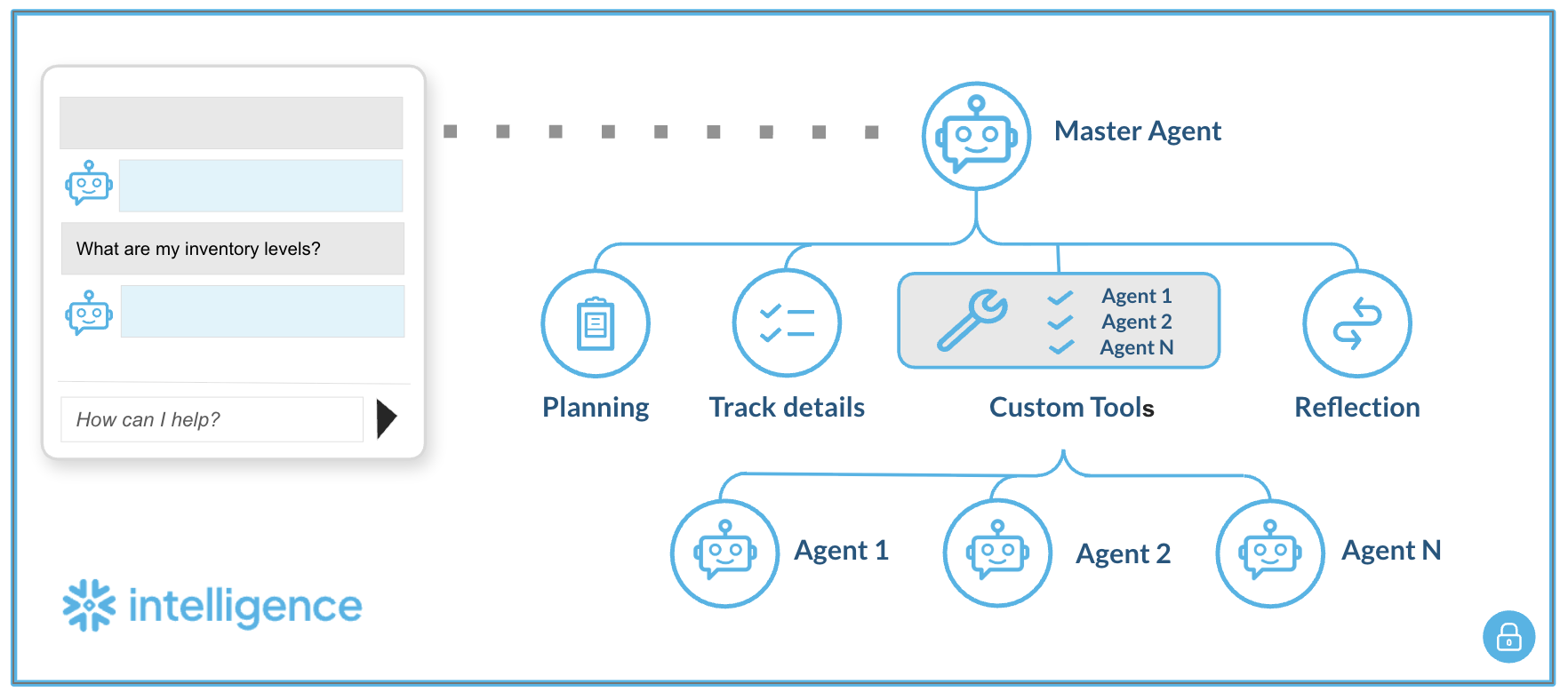
This guide describes how to configure a master agent that routes user queries to multiple, specialized Cortex Agents using custom tools. Please note: this approach may evolve as Snowflake adds native support for multi-agent workflows.
This pattern enables a hierarchical agent system where:
- A master agent receives user queries and routes them to the appropriate sub-agent
- Sub-agents handle domain-specific tasks (multiple Cortex Agents, each cover one domain or use cases)
- Communication happens via custom tools (UDFs)
Prerequisites
- Snowflake account with Cortex enabled
- ACCOUNTADMIN role (for initial setup)
- Cortex Agents already created (your sub-agents)
- Personal Access Token (PAT) from Snowflake UI
Part 1: Infrastructure Setup
Step 1: Generate Personal Access Token (PAT)
- Log into Snowflake UI
- Click User Menu (bottom left)
- Go to My Profile → Authentication
- Click Generate Token
- Copy and save the token securely
⚠️ PAT tokens expire. Track expiration and regenerate as needed.
Step 2: Configure and Run Setup Script
Open SQL Code and replace all placeholders:
| Placeholder | Description | Example |
|---|---|---|
<YOUR_ACCOUNT> | Snowflake account identifier | ABC12345 |
<YOUR_DATABASE> | Database containing agents | MY_DATABASE |
<YOUR_SCHEMA> | Schema containing agents | AGENTS |
<YOUR_AGENT_NAME> | Name of sub-agent | AGENT_1 |
<YOUR_ROLE> | Execution role | SYSADMIN |
<YOUR_PAT_TOKEN> | Token from Step 1 | eyJhbGci... |
Execute the script steps in order:
-- Step 1: Network Rule (egress to Snowflake API)
CREATE OR REPLACE NETWORK RULE cortex_agent_egress_rule ...

-- Step 2: Store PAT Token as Secret
CREATE OR REPLACE SECRET cortex_agent_token_secret ...

-- Step 3: External Access Integration
CREATE OR REPLACE EXTERNAL ACCESS INTEGRATION cortex_agent_external_access ...

-- Step 4: Grant Permissions
GRANT READ ON SECRET ... TO ROLE <YOUR_ROLE>;
GRANT USAGE ON INTEGRATION ... TO ROLE <YOUR_ROLE>;

-- Step 5: Create Agent Caller UDF (template)
CREATE OR REPLACE FUNCTION call_cortex_agent(user_query STRING) ...
Step 3: Create a UDF for each sub-agent
Duplicate the UDF template for each sub-agent. Only change the function name and URL:
-- Agent 1
CREATE OR REPLACE FUNCTION ASK_AGENT_1(user_query VARCHAR)
RETURNS STRING
LANGUAGE PYTHON
RUNTIME_VERSION = '3.12'
PACKAGES = ('requests', 'snowflake-snowpark-python')
EXTERNAL_ACCESS_INTEGRATIONS = (cortex_agent_external_access)
SECRETS = ('agent_token' = cortex_agent_token_secret)
HANDLER = 'run_agent'
AS
$$
...
url = "https://<YOUR_ACCOUNT>.snowflakecomputing.com/api/v2/databases/<DB>/schemas/<SCHEMA>/agents/AGENT_1:run"
...
$$;

-- Agent 2
CREATE OR REPLACE FUNCTION ASK_AGENT_2(user_query VARCHAR)
RETURNS STRING
...
url = "https://<YOUR_ACCOUNT>.snowflakecomputing.com/api/v2/databases/<DB>/schemas/<SCHEMA>/agents/AGENT_2:run"
...
$$;
Part 2: Master agent setup (UI)
Step 4: Create master agent in Snowflake CoWork
- Navigate to AI & ML → Agents
- Click + Create Agent
- Name it:
MULTIAGENT(or your preferred name)
Step 5: Configure agent description
In the About tab, add a description:
A multi-domain routing agent that serves as a central interface, automatically delegating user questions to specialized sub-agents based on query intent.
Step 6: Add custom tools
In the Tools tab, click + Add under Custom tools for each sub-agent:
| Tool Name | Function Name | Warehouse | Description |
|---|---|---|---|
AGENT_1 | ASK_AGENT_1(VARCHAR) | <YOUR_WAREHOUSE> | Provides information on [domain 1 description] |
AGENT_2 | ASK_AGENT_2(VARCHAR) | <YOUR_WAREHOUSE> | Provides information on [domain 2 description] |
Example Configuration:
Tool Name:       AGENT_1
Function name:   ASK_AGENT_1(VARCHAR)
Warehouse:       SNOWFLAKE_INTELLIGENCE_WH
Description:     Provides information on [Agent 1's domain]
Repeat for each sub-agent you want to add.
Step 7: Configure orchestration prompt
In the Orchestration tab, define routing logic:
You are an intelligent router. Analyze the user's inquiry to determine the correct domain:

Agent 1: Use this for questions regarding [domain 1 topics].

Agent 2: Use this for questions regarding [domain 2 topics].

Agent N: Use this for questions regarding [domain N topics].

Rule: Do not attempt to answer the question yourself. You must strictly invoke the appropriate tool to get the answer.
Example with specific domains:
You are an intelligent router. Analyze the user's inquiry to determine the correct domain:

Agent 1 (AGENT_1): Use this for questions regarding sports, matches, player statistics, teams, or game history.

Agent 2 (AGENT_2): Use this for questions regarding business performance, revenue, orders, customer lists, or sales data.

Rule: Do not attempt to answer the question yourself. You must strictly invoke the appropriate tool to get the answer.
Step 8: Configure Access (Access Tab)
Grant access to roles/users who need to use the Master Agent.
Usage
Via Master Agent (Recommended)
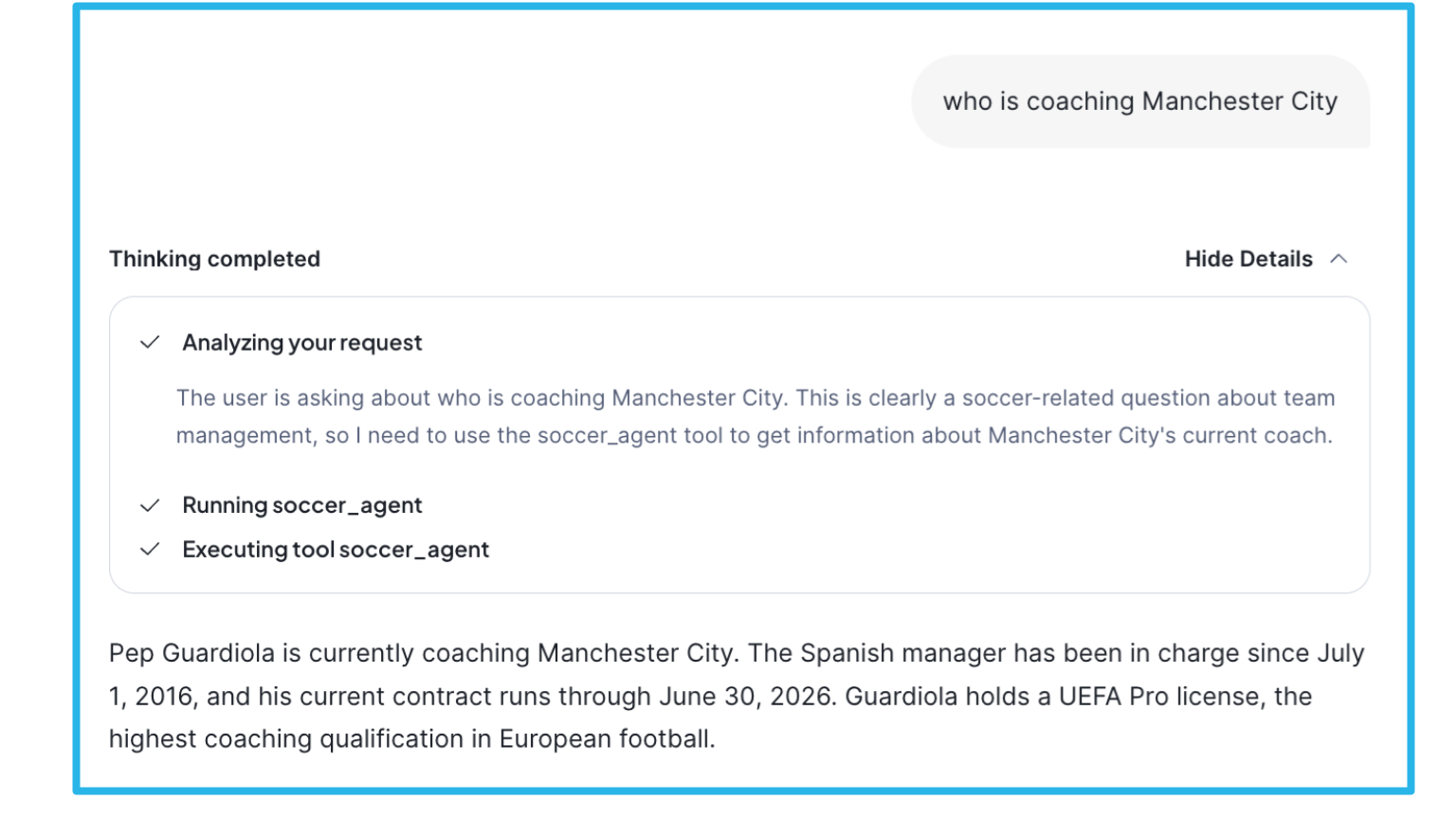
Query the Master Agent in Snowflake CoWork UI. It will automatically route to the appropriate sub-agent based on your question.
Direct Sub-Agent Calls (Testing/Debugging)
-- Test Agent 1 directly
SELECT ASK_AGENT_1('What is the status of X?');

-- Test Agent 2 directly
SELECT ASK_AGENT_2('Show me the report for Y');
Examples:
Important notes:
-
Visibility: The "Thinking completed" details only show Master Agent level reasoning and tool invocation. Sub-agent internal reasoning, thinking, and tool usage are not visible in the response.
-
Latency: Total response time is impacted by the actual sub-agent query execution. Complex sub-agent queries (e.g., involving multiple tool calls, database queries, or search operations) will increase overall latency.
Architecture components
| Component | Purpose |
|---|---|
| Network Rule | Allows egress traffic to Snowflake API |
| Secret | Securely stores PAT token |
| External Access Integration | Bridges network + secrets for UDFs |
| UDF (Python) | Calls sub-agent REST API, parses SSE response |
| Master Agent | Routes queries to sub-agents via custom tools |
| Custom Tools | Links Master Agent to sub-agent UDFs |
API endpoint format
https://<ACCOUNT>.snowflakecomputing.com/api/v2/databases/<DATABASE>/schemas/<SCHEMA>/agents/<AGENT_NAME>:run
Troubleshooting
| Error | Cause | Solution |
|---|---|---|
Could not read secret | Missing grants | GRANT READ ON SECRET ... TO ROLE |
API Error 401 | Invalid/expired token | Regenerate PAT, update secret |
API Error 403 | Insufficient permissions | Check role has USAGE on agent |
Connection error | Network rule issue | Verify network rule includes account URL |
Agent returned no text | Agent config issue | Check sub-agent in UI |
| Tool not invoked | Orchestration prompt unclear | Refine routing instructions |
Security considerations
- PAT Token Expiration: Monitor and rotate before expiry
- Role-Based Access: Grant UDF execution only to required roles
- Network Rules: Scope egress to only your account URL
- Secret Management: Never expose tokens in logs
Resources
SQL Code
-- CORTEX AGENT MULTI-AGENT SETUP (GENERIC TEMPLATE)*
-- ============================================================================*
-- This script sets up the infrastructure to call Cortex Agents programmatically*
-- via UDFs, enabling multi-agent orchestration patterns.*
--*
-- PLACEHOLDERS TO REPLACE:*
--   <YOUR_ACCOUNT>       - Your Snowflake account identifier (e.g., ABC12345)*
--   <YOUR_DATABASE>      - Database where agents are defined*
--   <YOUR_SCHEMA>        - Schema where agents are defined*
--   <YOUR_AGENT_NAME>    - Name of your Cortex Agent*
--   <YOUR_ROLE>          - Role that will execute the agent UDFs*
--   <YOUR_PAT_TOKEN>     - Personal Access Token (generated from Snowflake UI)*
-- ============================================================================*

USE ROLE ACCOUNTADMIN;

-- ============================================================================*
-- STEP 1: CREATE NETWORK RULE FOR EGRESS TO SNOWFLAKE API*
-- ============================================================================*
-- Allows the UDF to make outbound calls to your Snowflake account's REST API.*
-- Required for the agent to call itself via HTTP.*

CREATE OR REPLACE NETWORK RULE cortex_agent_egress_rule
 MODE = EGRESS
 TYPE = HOST_PORT
 VALUE_LIST = ('<YOUR_ACCOUNT>.snowflakecomputing.com');

-- ============================================================================*
-- STEP 2: STORE PAT TOKEN AS A SECRET*
-- ============================================================================*
-- Securely stores the Personal Access Token.*
-- Generate PAT from Snowflake UI: User Menu → My Profile → Authentication → Generate Token*
-- NOTE: PAT tokens have an expiration date. Regenerate and update secret as needed.*

CREATE OR REPLACE SECRET cortex_agent_token_secret
 TYPE = GENERIC_STRING
 SECRET_STRING = '<YOUR_PAT_TOKEN>';

-- ============================================================================*
-- STEP 3: CREATE EXTERNAL ACCESS INTEGRATION*
-- ============================================================================*
-- Bridges the network rule and secrets, allowing UDFs to make authenticated*
-- external calls to the Snowflake API.*

CREATE OR REPLACE EXTERNAL ACCESS INTEGRATION cortex_agent_external_access
 ALLOWED_NETWORK_RULES = (cortex_agent_egress_rule)
 ALLOWED_AUTHENTICATION_SECRETS = ALL
 ENABLED = TRUE;

-- ============================================================================*
-- STEP 4: GRANT PERMISSIONS TO EXECUTION ROLE*
-- ============================================================================*
-- Grant the necessary permissions to the role that will call the agent UDFs.*

GRANT READ ON SECRET cortex_agent_token_secret TO ROLE <YOUR_ROLE>;
GRANT USAGE ON INTEGRATION cortex_agent_external_access TO ROLE <YOUR_ROLE>;

-- ============================================================================*
-- STEP 5: CREATE GENERIC AGENT CALLER UDF*
-- ============================================================================*
-- Template UDF that calls a Cortex Agent via REST API.*
-- Duplicate and customize for each agent you want to call.*

CREATE OR REPLACE FUNCTION call_cortex_agent(user_query STRING)
RETURNS STRING
LANGUAGE PYTHON
RUNTIME_VERSION = '3.12'
PACKAGES = ('requests', 'snowflake-snowpark-python')
EXTERNAL_ACCESS_INTEGRATIONS = (cortex_agent_external_access)
SECRETS = ('agent_token' = cortex_agent_token_secret)
HANDLER = 'run_agent'
AS
$$
import _snowflake
import requests
import json

def run_agent(user_query):
   """
   Calls a Cortex Agent via REST API and returns the text response.
   Handles Server-Sent Events (SSE) streaming format.
   """
   # Retrieve the stored PAT token
   try:
       token = _snowflake.get_generic_secret_string('agent_token')
   except Exception as e:
       return f"Error: Could not read secret. Verify grants. Details: {str(e)}"

   # Construct the agent API endpoint
   # Format: https://<account>.snowflakecomputing.com/api/v2/databases/<db>/schemas/<schema>/agents/<agent>:run
   url = "https://<YOUR_ACCOUNT>.snowflakecomputing.com/api/v2/databases/<YOUR_DATABASE>/schemas/<YOUR_SCHEMA>/agents/<YOUR_AGENT_NAME>:run"

   headers = {
       "Authorization": f"Bearer {token}",
       "Content-Type": "application/json",
       "Accept": "text/event-stream"
   }

   payload = {
       "messages": [
           {
               "role": "user",
               "content": [{"type": "text", "text": user_query}]
           }
       ]
   }

   try:
       # Make streaming request to agent API
       response = requests.post(url, headers=headers, json=payload, stream=True)

       if response.status_code != 200:
           return f"API Error {response.status_code}: {response.text}"

       # Parse Server-Sent Events (SSE) stream
       final_answer = []
       current_event = None

       for line in response.iter_lines():
           if not line:
               continue

           decoded_line = line.decode('utf-8')

           # Track event type
           if decoded_line.startswith('event: '):
               current_event = decoded_line[7:].strip()

           # Extract data payload
           if decoded_line.startswith('data: '):
               data_str = decoded_line[6:]
               if data_str == '[DONE]':
                   break

               try:
                   data = json.loads(data_str)
                   # Collect text delta events (the actual response content)
                   if current_event == 'response.text.delta' and 'text' in data:
                       final_answer.append(data['text'])
               except json.JSONDecodeError:
                   continue

       return "".join(final_answer) if final_answer else "Agent returned no text content."

   except Exception as e:
       return f"Connection error: {str(e)}"
$$;

-- ============================================================================*
-- EXAMPLE: CREATE ADDITIONAL AGENT CALLERS*
-- ============================================================================*
-- Copy and modify the UDF above for each agent. Only change the URL endpoint.*
--*
-- Example for a second agent:*
--*
-- CREATE OR REPLACE FUNCTION call_second_agent(user_query STRING)*
-- RETURNS STRING*
-- ... (same as above, but change the url variable to point to different agent)*

-- ============================================================================*
-- USAGE EXAMPLES*
-- ============================================================================*
-- SELECT call_cortex_agent('What is the current status?');*

-- ============================================================================*
-- OPTIONAL: NETWORK POLICY MODIFICATION (IF REQUIRED)*
-- ============================================================================*
-- If your account has network policies blocking agent traffic, you may need*
-- to add Cortex Agent IP ranges. Check with your admin first.*
--*
-- -- View current network policies*
-- SHOW PARAMETERS LIKE 'NETWORK_POLICY' IN ACCOUNT;*
-- SHOW PARAMETERS LIKE 'NETWORK_POLICY' IN USER <YOUR_USERNAME>;*
--*
-- -- If modification is needed, add required IPs to allowed list*
-- ALTER NETWORK POLICY <YOUR_POLICY_NAME> SET ALLOWED_IP_LIST = (*
--     ... existing IPs ...,*
--     '<AGENT_IP_RANGE>'  -- Add agent IPs here*
-- );*
This content is provided as is, and is not maintained on an ongoing basis. It may be out of date with current Snowflake instances
