How Cortex AI Function Studio can help improve quality while reducing AI inference costs.


Many AI engineers building pipelines for unstructured data default to using the most powerful (and most expensive) model for every task. While this approach accelerates prototyping, it often sacrifices efficiency and cost optimization in production. However, as AI adoption matures, organizations are increasingly focused on optimizing AI usage.
For some workloads, prompt tuning with smaller models can deliver comparable results while reducing cost and increasing throughput. The challenge is determining where frontier models are truly necessary and where optimized alternatives can achieve the same outcome.
This requires moving from intuition-based model selection to empirical evaluation and optimization. This is why we are so excited to introduce Cortex AI Function Studio, currently in public preview, purpose built to automate this optimization and deployment lifecycle.
Benchmarking real-world complexity
Standard benchmarks often fail to reflect the nuance of actual enterprise AI workloads. In order to demonstrate what the Cortex AI Function Studio can actually do, we needed a data set that mirrors the complexity of real-world use cases, such as routing nuanced customer support tickets to parsing complex financial inquiries.
We chose the BANKING77 data set because it represents these challenges. Unlike standard sentiment analysis, this benchmark requires precise intent classification across 77 distinct banking scenarios—ranging from 'card arrival' to 'exchange rate' inquiries. Because it demands high-level domain understanding, BANKING77 serves as an ideal proving ground for the Cortex AI Function Studio.
Our testing revealed that the AI Function Studio delivers tangible production benefits:
- Significant accuracy gains: Achieve a +4pp improvement over baselines (80% to 84%) while reducing costs by over 50%, from 2.653 to 1.155 credits per 1,000 rows.
- Optimized efficiency: Dynamically balance cost and performance by identifying the Pareto frontier, enabling you to select the leanest model that meets your specific accuracy threshold.
- Automated optimization: Eliminate manual prompt engineering. The built-in optimization algorithm (GEPA) systematically explores prompt variations and model selection to identify the Pareto frontier.
- Enterprise governance: Deployments result in top-level SQL objects protected by role-based access control (RBAC), ensuring production-grade observability and a simplified interface for downstream consumers.
These results represent an ideal balance of cost and accuracy. To understand how to achieve this for your organization, let's first look at how AI engineers traditionally implement custom logic using AI_COMPLETE, followed by how the Cortex AI Function Studio workflow makes it easy to optimize your AI workloads.
The path to production with AI_COMPLETE
AI_COMPLETE is our native SQL primitive for granular LLM control. With support for multimodal inputs and custom signatures, it is the primary tool for complex, domain-specific tasks that go beyond off-the-shelf AI functions.
AI_COMPLETE offers flexibility, giving AI engineers control over their AI workloads. However, to successfully deploy into production, teams must master three core operational areas:
- Model selection and cost efficiency: Teams must pinpoint the most efficient model that meets their accuracy threshold requirements for a given task. The challenge is needing to build out empirical benchmarks across multiple models on your specific data. Without this, many typically default to the largest, most expensive frontier model just to be safe, leading to severe over-provisioning that is not economical.
- Prompt refinement: Teams need to ensure reliable outputs. Achieving this requires highly optimized, task-specific prompts that can consistently handle edge cases. This requires the development of a systematic, data-driven feedback loop to test and iterate on prompts automatically. Instead, many organizations resort to a classic engineering anti-pattern of manual trial-and-error — a cycle that doesn't scale, is slow, and remains notoriously unreliable.
- Governance and production readiness: Teams must also ensure that AI deployments operate with strict security, role-based access control (RBAC), and continuous usage monitoring. Because we treat every function as a native Snowflake object, you get security, RBAC and observability out of the box — no custom infrastructure required.
Cortex AI Function Studio resolves these challenges by automating the creation, evaluation, optimization and governance lifecycle. Users interact with the studio conversationally, through Cortex Code (CLI or Desktop) or the Snowsight Cortex Code web interface — describing what you want in natural language and iterating interactively. Behind the scenes, the system orchestrates the full pipeline inside your Snowflake account and produces top-level, durable Snowflake objects that are RBAC-governed, observable via account usage views and callable like standard SQL functions.
The Cortex AI Function Studio workflow
Cortex AI Function Studio provides a guided create → evaluate → optimize workflow that takes you from a task description to a production-ready Custom AI Function. Whether you are working with text, documents, or images, the studio automates the development lifecycle. The following walkthrough uses the BANKING77 data set to demonstrate the creation of a custom classification function.
Create: describe the task, get a working function
In the create step, we define the task intent, inputs, and expected output format. The studio then generates a clean, production-ready SQL UDF backed by AI_COMPLETE with structured output. For our BANKING77 example, it produces the following function structure:
CREATE OR REPLACE FUNCTION CLASSIFY_BANKING_INTENT(TEXT VARCHAR)
RETURNS VARCHAR
LANGUAGE SQL
AS '
  AI_COMPLETE(
    model=''claude-sonnet-4-6'',
    messages=>ARRAY_CONSTRUCT(
      OBJECT_CONSTRUCT(
        ''role'', ''system'',
        ''content'', ''You are an expert banking customer service intent classifier...''
      ),
      OBJECT_CONSTRUCT(
        ''role'', ''user'',
        ''content'', ''Classify the following message:'' || TEXT
      )
    ),
    response_format=>PARSE_JSON(''{
      "type": "json",
      "schema": { ... }
    }'')
  ):intent::VARCHAR
';
Evaluate: measure accuracy against ground truth
Evaluation is triggered via the agent interfaces, running the function against a labeled data set to return quantified scores and per-row details automatically. A table is provided containing input columns and an "expected output" column. The system supports simple pre-written metrics like exact or fuzzy match, an agentic custom metric writer or LLM-as-judge for tasks where semantic comparisons are needed (note: all metrics must output a score between 0.0 and 1.0, inclusive). The function is evaluated on each row of the data set, and the results are averaged.
For the BANKING77 test data set, the un-optimized function from the create step (using claude-sonnet-4-6) produces a score of 80.0% using the exact match metric.
Optimize: automated search over prompts and models
The optimization phase utilizes the Genetic-Pareto (GEPA) algorithm, an iterative technique that uses a reflection model to systematically mutate prompts and logic across a range of models. Central to this process is the identification of the Pareto frontier — the set of optimal configurations where no other option achieves higher quality at a lower cost. To ensure efficiency, GEPA prunes any configurations that are statistically dominated, meaning they provide lower quality at a higher or equal cost compared to another candidate on the frontier.
For the BANKING77 example, six models representing different price points and families were explored: openai-gpt-5-nano, openai-gpt-5, qwen3-32b, qwen3-vl-235b-a22b, claude-haiku-4-6 and claude-sonnet-4-6. Following optimization, the qwen3-32b, claude-haiku-4-6 and claude-sonnet-4-6 models were filtered out entirely, as they were not on the Pareto frontier. The results for the remaining optimal models are shown below.
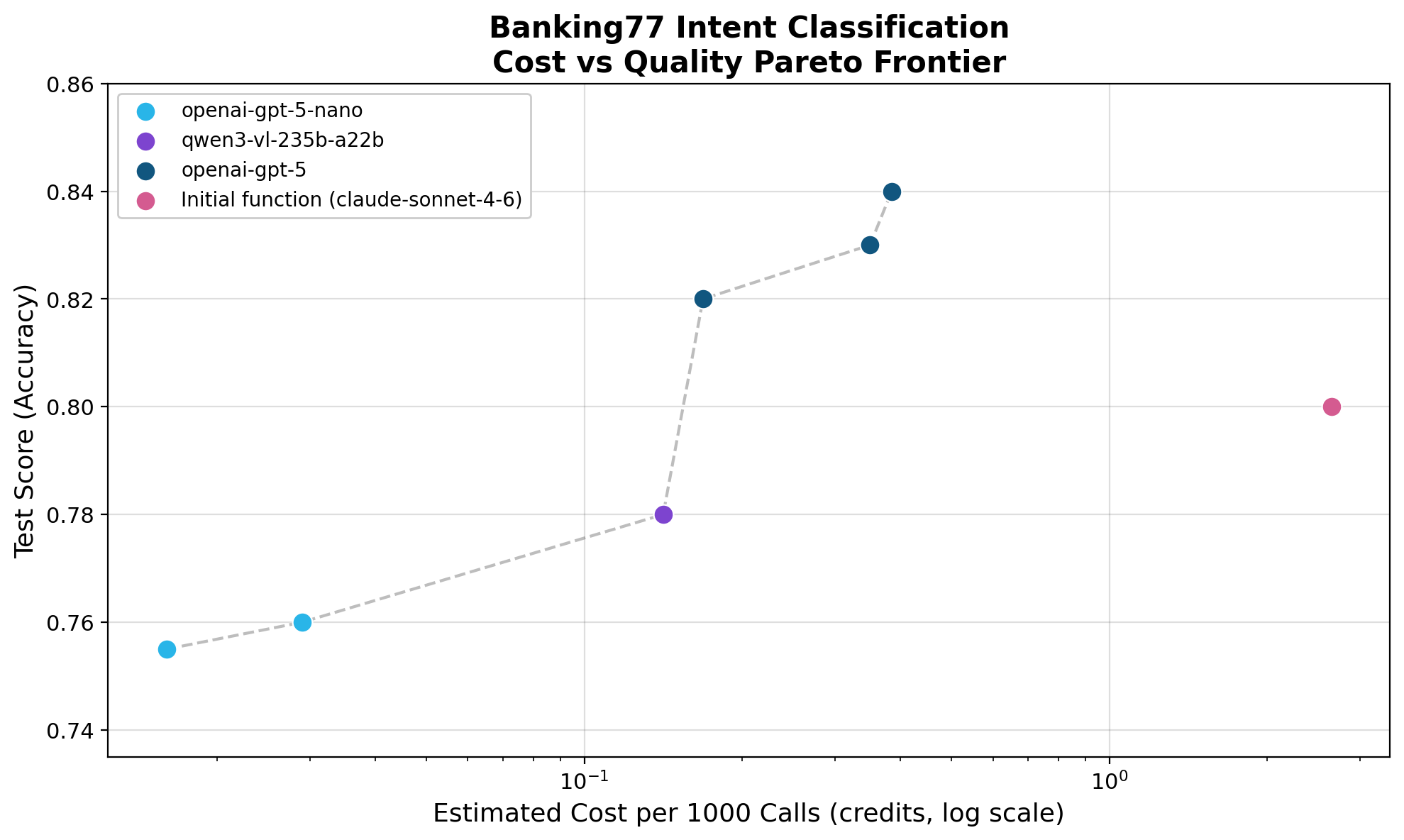
| Model | System Prompt Input Tokens | Test Score | Cost (Snowflake credits per 1,000 rows of BANKING77 data) |
|---|---|---|---|
| openai-gpt-5-nano | 613 | 75.5% | 0.048 |
| openai-gpt-5-nano | 1407 | 76.0% | 0.087 |
| qwen3-vl-235b-a22b | 1432 | 78.0% | 0.424 |
| openai-gpt-5 | 1568 | 82.0% | 0.505 |
| openai-gpt-5 | 1685 | 83.0% | 1.050 |
| openai-gpt-5 | 2828 | 84.0% | 1.155 |
By comparison, the un-optimized claude-sonnet-4-6 function achieved a score of 80.0% and a cost of 2.653 credits per 1,000 rows (Note: token counts given by AI_COUNT_TOKENS).
These results empower practitioners to make empirical decisions aligned with their specific business requirements. Whether a use case demands the highest accuracy for critical workflows or prioritizes cost-efficiency for high-volume data processing, the Pareto frontier identifies the specific model configuration required to meet those thresholds.
Deploy: promote to a governed production artifact
Once an optimal configuration is identified, the studio promotes it to a Custom AI Function, a durable, RBAC-controlled SQL UDF. This artifact encapsulates the optimized model and prompt, ensuring that the cost-efficiency gains identified during evaluation are locked into production. Because the deployment creates a standardized SQL object, it inherits Snowflake's built-in observability and governance, making it immediately ready for downstream consumption. Furthermore, the workflow remains future-proof; as new model capabilities become available, the studio enables frictionless re-optimization, allowing practitioners to update their functions without manual re-tuning.
Getting started
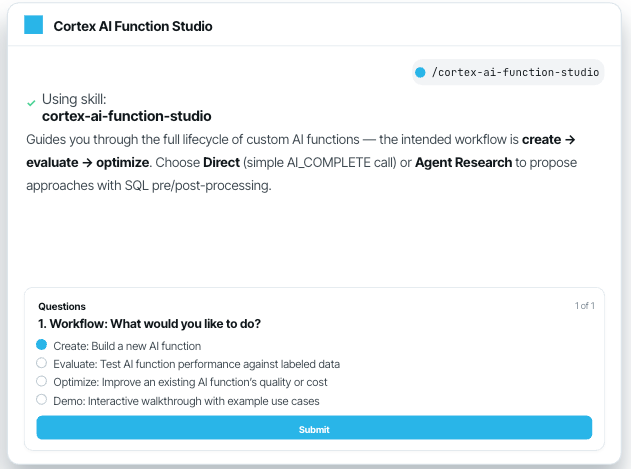
Cortex AI Function Studio is available today in public preview. Integration begins by invoking the /cortex-ai-function-studio command within Cortex Code to initiate the guided create, evaluate and optimize workflows. This process applies to any task expressible through AI_COMPLETE — from extraction and summarization to complex policy-based filtering. As model capabilities expand, re-running the optimizer against established training data allows for the continuous discovery of the updated cost-quality frontier without manual re-tuning.
With Cortex AI Function Studio, the transition from prototype designed for production is no longer an engineering burden, but a streamlined, data-driven workflow 100% within Snowflake.
We invite you to test these workflows on your own data to see how Cortex AI Function Studio can optimize your specific production requirements.
