Getting Started with Snowflake and BigQuery via Iceberg
Overview
Apache Iceberg has become the de-facto open table format for the data lakehouse because it lets multiple engines read and write the same physical tables without copying data. This guide shows you how to make Snowflake and Google BigQuery interoperate on one shared set of Iceberg tables using the modern, catalog-based approach: the Google BigLake Iceberg REST catalog (part of Google's Lakehouse for Apache Iceberg), Snowflake catalog-linked databases, and workload identity federation for keyless authentication.
Use Case
There is often no one-size-fits-all engine for every workload. Teams land data with one platform and serve it with another, or inherit multiple platforms through mergers and acquisitions. Sharing a single set of Iceberg tables through a common catalog lets you:
- Modernize a data lake into an open lakehouse
- Enable data interoperability and a joint data-mesh architecture
- Build batch or streaming ingestion, transformation, and CDC pipelines
- Serve analytics-ready data to teams on the engine they prefer — without duplicating storage
The Two Interoperability Patterns You Will Build
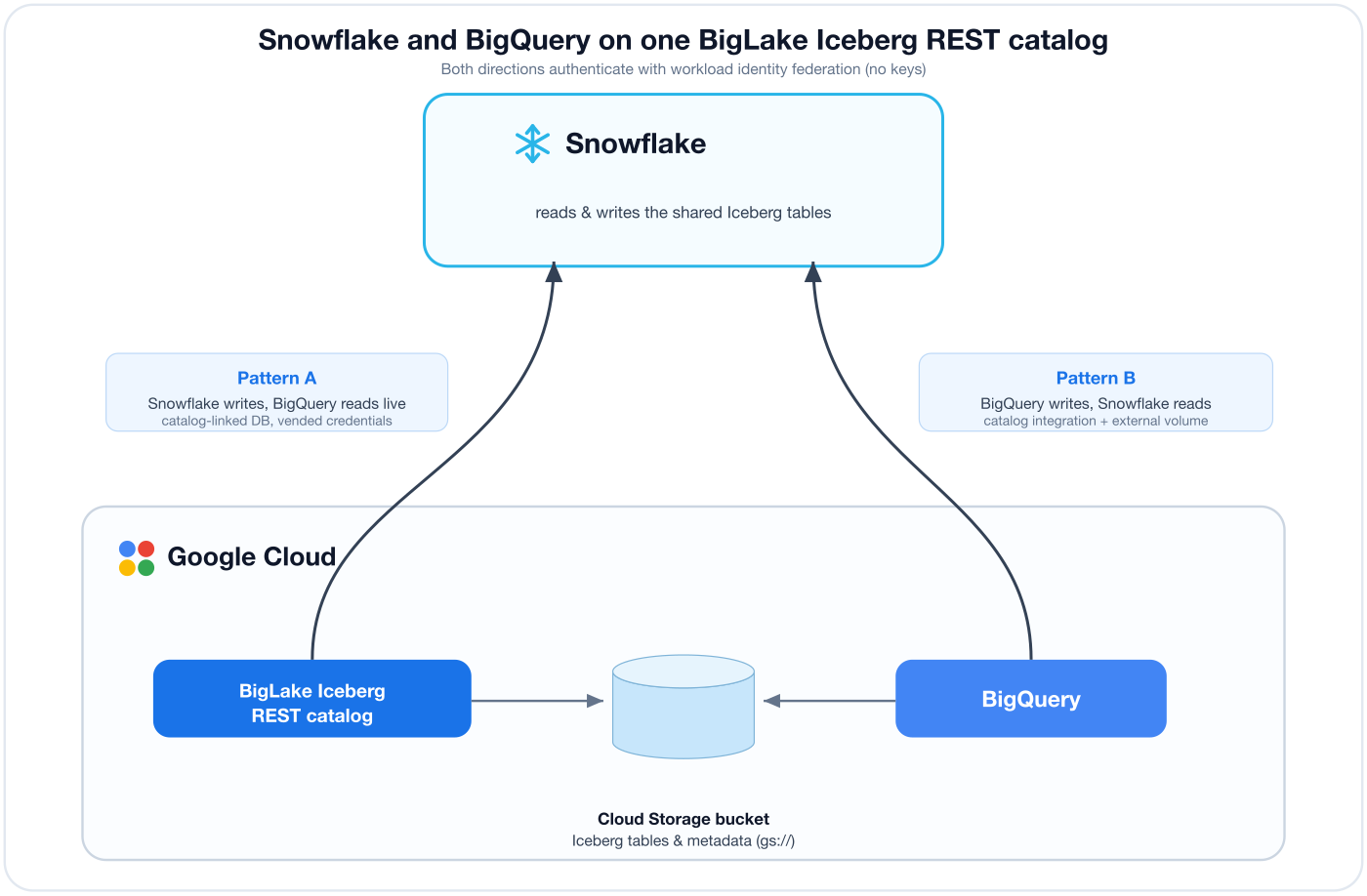
The BigLake Iceberg REST catalog exposes one endpoint (https://biglake.googleapis.com/iceberg/v1/restcatalog) but supports two warehouse flavours. Which flavour a catalog uses determines who owns the tables and who can write. This guide walks through both, because real deployments usually need one specific direction:
| Pattern A — Snowflake writes, BigQuery reads | Pattern B — BigQuery writes, Snowflake reads | |
|---|---|---|
| Catalog warehouse | gs://<bucket> (GCS flavour) | bq://projects/<project> (BigQuery federation) |
| Who owns the tables | The BigLake catalog (files in GCS) | BigQuery (Apache Iceberg managed tables) |
| Primary writer | Snowflake (via catalog-linked database) | BigQuery (DML / streaming / CDC) |
| Reader | BigQuery, live, via project.catalog.namespace.table | Snowflake, via catalog integration + external volume |
| Credential vending | Supported (no external volume needed) | Not supported (external volume required) |
| Data freshness | Live for readers | Reader refreshes after writer publishes metadata |
Prerequisites
- Familiarity with Snowflake and a Snowflake account (with
ACCOUNTADMINor a role that can create catalog integrations, external volumes, and databases) - Familiarity with Google Cloud and a Google Cloud project where you can enable APIs and grant IAM roles
- The
gcloudCLI installed and authenticated (gcloud auth login)
What You'll Learn
- The BigLake Iceberg REST catalog model and its two warehouse flavours
- How to authenticate Snowflake to Google with workload identity federation (no keys)
- Pattern A: create an Iceberg table in Snowflake through a catalog-linked database and read it live in BigQuery
- Pattern B: create a BigQuery-managed Iceberg table and read it in Snowflake via a catalog integration + external volume
- How data freshness works in each direction and how to keep readers in sync
What You'll Build
- A shared GCS bucket, a BigLake Iceberg REST catalog, and a workload identity federation pool/provider
- A Snowflake catalog-linked database that writes an Iceberg table BigQuery reads (Pattern A)
- A BigQuery Apache Iceberg managed table that Snowflake reads (Pattern B)
Regions must line up. Keep your GCS bucket, BigLake catalog, BigQuery datasets/connections, and Snowflake account in compatible regions to avoid cross-region latency and egress. This guide uses
us-west1on the Google side; substitute your own region consistently everywhere it appears.
Understanding the Architecture
Before touching a keyboard, it helps to have the mental model straight — this is what makes the two patterns click.
One catalog, one REST endpoint. Google's Lakehouse runtime catalog (the service historically called the BigLake metastore) speaks the open Apache Iceberg REST catalog protocol at https://biglake.googleapis.com/iceberg/v1/restcatalog. Any Iceberg-aware engine — Snowflake, BigQuery, Apache Spark, Trino — can talk to it.
Two warehouse flavours decide who owns the tables. When you create a catalog (or point an engine at one), the warehouse you choose changes the behavior fundamentally:
-
GCS flavour (
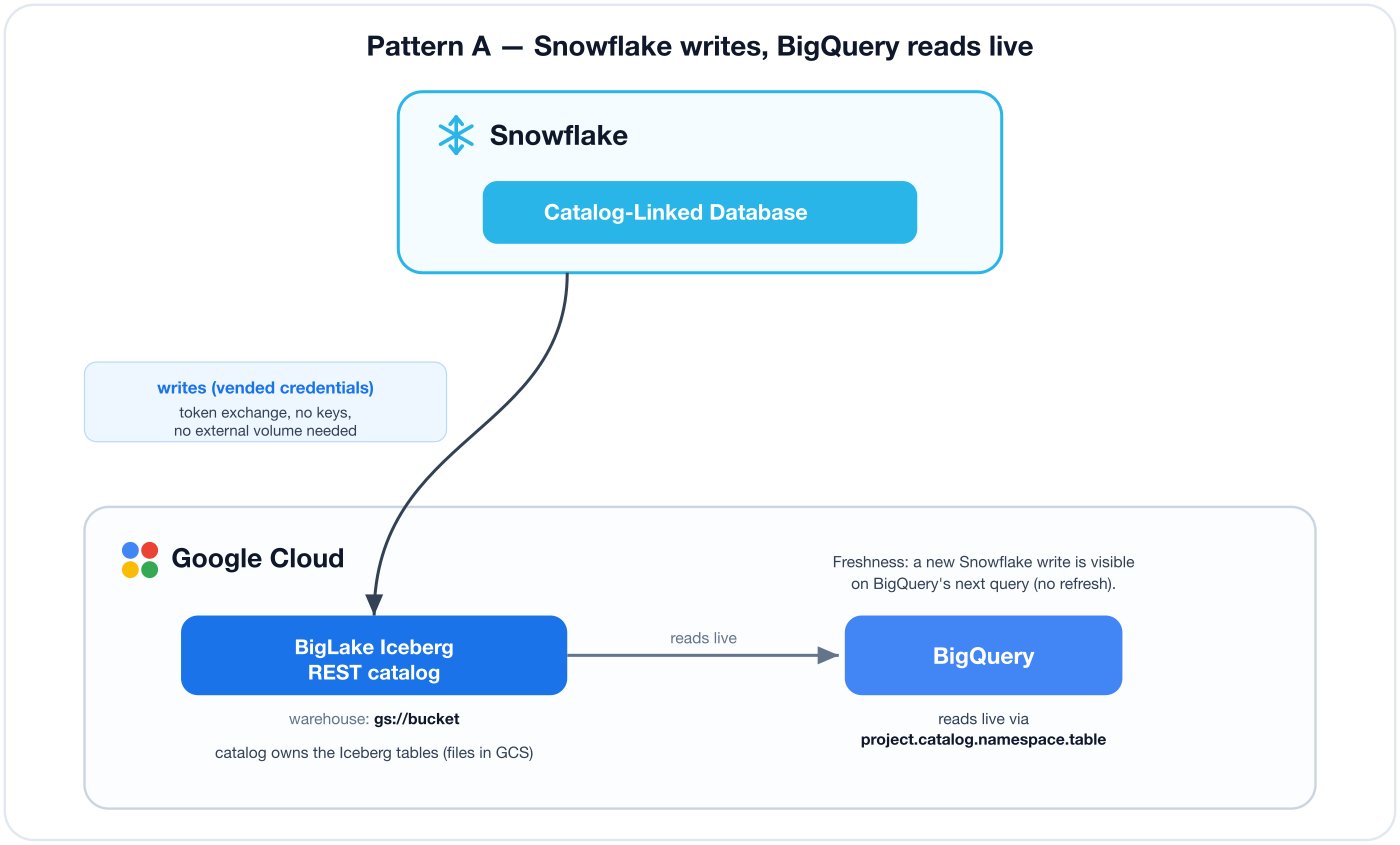
warehouse = gs://<bucket>): the catalog itself owns Iceberg tables whose files live in your bucket. These are Google-managed Iceberg REST catalog tables. External engines that can write Iceberg (Snowflake via a catalog-linked database, or Spark) create and mutate these tables, and the catalog can vend short-lived, scoped storage credentials to readers/writers so they never need direct bucket IAM. BigQuery reads these tables live and natively using the four-part nameproject.catalog.namespace.table— but today BigQuery cannot run DML against them. → This is Pattern A. -
BigQuery federation flavour (
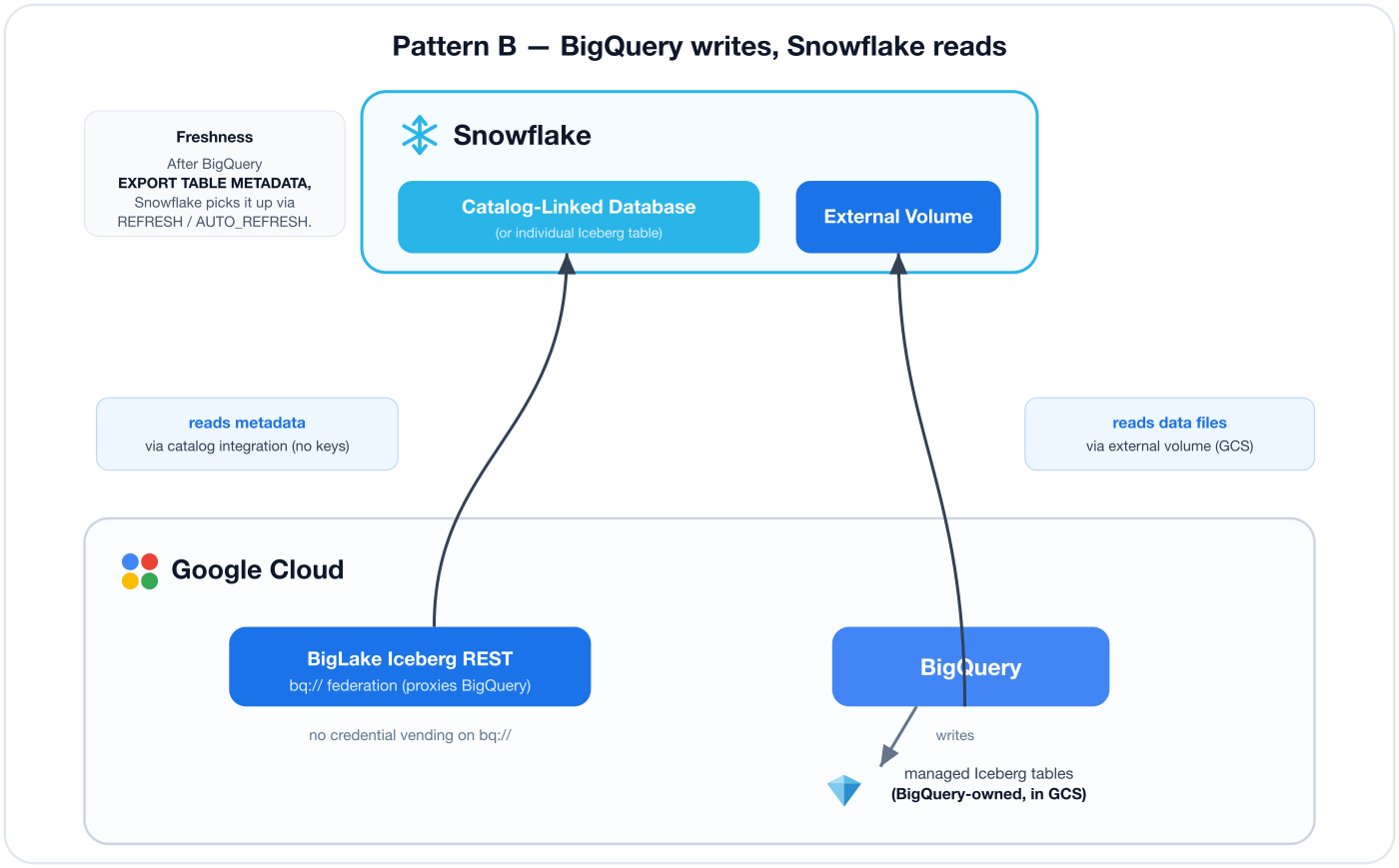
warehouse = bq://projects/<project>/locations/<location>): the catalog proxies BigQuery's own catalog. The tables here are Apache Iceberg managed tables — BigQuery-managed Iceberg tables (formerly "BigLake tables for Apache Iceberg in BigQuery"). BigQuery is the writer (full DML, streaming, CDC). This flavour does not vend credentials, so external readers like Snowflake attach their own storage access through an external volume. → This is Pattern B.
Keyless by design. In both patterns Snowflake authenticates to Google using workload identity federation with an OAuth
TOKEN_EXCHANGEgrant. Snowflake presents a signed identity token; Google exchanges it for a short-lived access token scoped to the roles you grant a federated subject. There are no service-account keys to create, store, or rotate.
A note on names. In April 2026 Google rebranded BigLake to Lakehouse for Apache Iceberg and the BigLake metastore to the Lakehouse runtime catalog. The APIs, CLI (
gcloud biglake), IAM roles, and endpoint hostname are unchanged and still saybiglake, and Snowflake's documentation still refers to "BigLake." This guide uses BigLake to match the tooling.
Shared Setup: Project, Bucket, and Keyless Auth
Both patterns share the same Google project, storage bucket, and workload identity federation (WIF) trust between Snowflake and Google. Do this section once.
Set your variables
Run these in a local terminal. Substitute your own values; the rest of the guide reuses these names.
export PROJECT_ID="<your-gcp-project>"
export REGION="us-west1"
export BUCKET="<your-unique-bucket-name>"
export POOL_ID="snowflake-pool"
export PROVIDER_ID="snowflake-oidc"

gcloud config set project "$PROJECT_ID"
export PROJECT_NUMBER=$(gcloud projects describe "$PROJECT_ID" --format='value(projectNumber)')
echo "Project number: $PROJECT_NUMBER"
Enable the required APIs
gcloud services enable \
  biglake.googleapis.com \
  bigquery.googleapis.com \
  storage.googleapis.com \
  iam.googleapis.com \
  iamcredentials.googleapis.com \
  sts.googleapis.com \
  cloudresourcemanager.googleapis.com
Create the shared GCS bucket
gcloud storage buckets create "gs://$BUCKET" \
  --location="$REGION" \
  --uniform-bucket-level-access
Get Snowflake's identity issuer URL
Snowflake publishes an OIDC issuer that Google will trust. In a Snowflake workspace:
USE ROLE ACCOUNTADMIN;
SELECT SYSTEM$GET_WORKLOAD_IDENTITY_ISSUER_URL();
Copy the returned URL (looks like https://identity.snowflake.com/oauth2/.../.../...). Save it locally:
export SNOWFLAKE_ISSUER_URL="<paste-the-issuer-url-here>"
Create the workload identity pool and OIDC provider
gcloud iam workload-identity-pools create "$POOL_ID" \
  --location=global \
  --display-name="Snowflake pool"

gcloud iam workload-identity-pools providers create-oidc "$PROVIDER_ID" \
  --location=global \
  --workload-identity-pool="$POOL_ID" \
  --issuer-uri="$SNOWFLAKE_ISSUER_URL" \
  --attribute-mapping="google.subject=assertion.sub"
The audience that Snowflake's catalog integration will use is the provider resource name:
export OAUTH_AUDIENCE="//iam.googleapis.com/projects/$PROJECT_NUMBER/locations/global/workloadIdentityPools/$POOL_ID/providers/$PROVIDER_ID"
echo "$OAUTH_AUDIENCE"
Creating a WIF pool requires
roles/iam.workloadIdentityPoolAdmin. If you grant it to yourself, allow ~60–90 seconds for the grant to propagate before the create commands succeed. Ifgcloudprompts hang in your shell, prefix commands withCLOUDSDK_CORE_DISABLE_PROMPTS=1.
You now have the shared foundation. Pick your direction below.
Pattern A: Snowflake Writes, BigQuery Reads
In this pattern the BigLake catalog owns the Iceberg tables (files in your bucket). Snowflake writes through a catalog-linked database and BigQuery reads the same tables live — no metadata copying.
Create the BigLake catalog (GCS flavour) and a namespace
The catalog id is the bucket name. gcs-bucket selects the GCS warehouse flavour.
gcloud biglake iceberg catalogs create "$BUCKET" \
  --catalog-type=gcs-bucket

gcloud biglake iceberg namespaces create "analytics" \
  --catalog="$BUCKET"
Turn on credential vending
Vended credentials let the catalog hand short-lived storage tokens to Snowflake, so Snowflake never needs direct bucket IAM.
gcloud biglake iceberg catalogs update "$BUCKET" \
  --credential-mode=vended-credentials
This prints the catalog's service account (looks like blirc-<PROJECT_NUMBER>-xxxx@gcp-sa-biglakerestcatalog.iam.gserviceaccount.com). Grant it storage access on the bucket so it can vend:
export BIGLAKE_SA="<paste-the-blirc-...-service-account>"
gcloud storage buckets add-iam-policy-binding "gs://$BUCKET" \
  --member="serviceAccount:$BIGLAKE_SA" \
  --role="roles/storage.objectUser"
Create the Snowflake catalog integration
Back in Snowflake. The header key must be double-quoted.
USE ROLE ACCOUNTADMIN;

CREATE OR REPLACE CATALOG INTEGRATION biglake_int
  CATALOG_SOURCE = ICEBERG_REST
  TABLE_FORMAT = ICEBERG
  REST_CONFIG = (
    CATALOG_URI = 'https://biglake.googleapis.com/iceberg/v1/restcatalog'
    CATALOG_NAME = 'gs://<your-unique-bucket-name>'
    ACCESS_DELEGATION_MODE = VENDED_CREDENTIALS
    ADDITIONAL_HEADERS = ( "x-goog-user-project" = '<your-gcp-project>' )
  )
  REST_AUTHENTICATION = (
    TYPE = OAUTH
    OAUTH_GRANT_TYPE = TOKEN_EXCHANGE
    OAUTH_TOKEN_URI = 'https://sts.googleapis.com/v1/token'
    OAUTH_AUDIENCE = '<paste-your-OAUTH_AUDIENCE>'
    OAUTH_ALLOWED_SCOPES = ('https://www.googleapis.com/auth/bigquery')
  )
  ENABLED = TRUE;
Grant the federated subject its Google roles
Get the subject Snowflake will present:
DESC CATALOG INTEGRATION biglake_int;
-- copy the WORKLOAD_IDENTITY_FEDERATION_SUBJECT value
The federated subject changes every time you run
CREATE OR REPLACEon the integration. If you recreate it, re-runDESCand re-apply the grants below.
Grant it (in your terminal). serviceUsageConsumer is required because of the x-goog-user-project billing header; biglake.viewer is enough for read in vended mode.
export SUBJECT="<paste-WORKLOAD_IDENTITY_FEDERATION_SUBJECT>"
export MEMBER="principal://iam.googleapis.com/projects/$PROJECT_NUMBER/locations/global/workloadIdentityPools/$POOL_ID/subject/$SUBJECT"

gcloud projects add-iam-policy-binding "$PROJECT_ID" \
  --member="$MEMBER" --role="roles/serviceusage.serviceUsageConsumer" --condition=None
gcloud projects add-iam-policy-binding "$PROJECT_ID" \
  --member="$MEMBER" --role="roles/biglake.viewer" --condition=None
Verify the integration
Allow ~60–90 seconds for IAM to propagate (a 403 right after granting is normal — wait and retry).
SELECT SYSTEM$VERIFY_CATALOG_INTEGRATION('biglake_int');
Create the catalog-linked database and write a table
A catalog-linked database (CLD) mirrors the BigLake catalog into Snowflake. Because vended credentials are on, no external volume is needed.
CREATE OR REPLACE DATABASE biglake_db
  LINKED_CATALOG = ( CATALOG = 'biglake_int' );

USE DATABASE biglake_db;
USE SCHEMA analytics;

CREATE OR REPLACE ICEBERG TABLE customers (id INT, name STRING);
INSERT INTO customers VALUES (1, 'Ada'), (2, 'Grace'), (3, 'Alan');
SELECT * FROM customers ORDER BY id;
Expected result:
| ID | NAME |
|---|---|
| 1 | Ada |
| 2 | Grace |
| 3 | Alan |
Read the same table live in BigQuery
No metadata copying, no external table definition. BigQuery reads the catalog directly with the four-part name project.catalog.namespace.table. In a BigQuery query window:
SELECT * FROM `<your-unique-bucket-name>.analytics.customers` ORDER BY id;
Expected result — the same three rows Snowflake just wrote:
| id | name |
|---|---|
| 1 | Ada |
| 2 | Grace |
| 3 | Alan |
Freshness in Pattern A is automatic. BigQuery reads the shared catalog on every query, so a new Snowflake
INSERTis visible immediately on the next BigQuerySELECT. There is nothing to refresh.
BigQuery is read-only here today. Running DML (e.g.
INSERT) against a GCS-flavour catalog table from BigQuery returns "DML statements are only supported over tables that have data stored in BigQuery." Bidirectional write to these tables is a Google preview feature (see What's Next). For BigQuery-side writes today, use Pattern B.
Pattern B: BigQuery Writes, Snowflake Reads
Here BigQuery owns the tables as Apache Iceberg managed tables, and Snowflake reads them through a catalog integration that federates BigQuery's catalog (bq://). Because this flavour does not vend credentials, Snowflake attaches its own storage access via an external volume.
Create a BigQuery connection and grant it storage
bq mk --connection --location="$REGION" --connection_type=CLOUD_RESOURCE biglake_conn

# get the connection's service account
bq show --connection --location="$REGION" --format=json "$PROJECT_ID.$REGION.biglake_conn"
export CONN_SA="<paste the serviceAccountId from the output>"

gcloud storage buckets add-iam-policy-binding "gs://$BUCKET" \
  --member="serviceAccount:$CONN_SA" \
  --role="roles/storage.objectUser"
Create a dataset and a BigQuery-managed Iceberg table
In a BigQuery query window:
CREATE SCHEMA IF NOT EXISTS bq_val OPTIONS (location = 'us-west1');

CREATE OR REPLACE TABLE `bq_val.drivers`
(
  driver_id   INT64,
  driver_name STRING
)
WITH CONNECTION `us-west1.biglake_conn`
OPTIONS (
  file_format = 'PARQUET',
  table_format = 'ICEBERG',
  storage_uri = 'gs://<your-unique-bucket-name>/blmt/drivers'
);

INSERT INTO `bq_val.drivers` VALUES (10, 'BQ-Alice'), (20, 'BQ-Bob');
Publish the latest metadata for external readers
BigQuery-managed Iceberg tables publish an Iceberg metadata pointer that external engines read. After a write, publish it:
EXPORT TABLE METADATA FROM `bq_val.drivers`;
Create the Snowflake catalog integration (BigQuery federation)
Point CATALOG_NAME at bq:// and use EXTERNAL_VOLUME_CREDENTIALS — this flavour does not vend.
USE ROLE ACCOUNTADMIN;

CREATE OR REPLACE CATALOG INTEGRATION bq_fed_int
  CATALOG_SOURCE = ICEBERG_REST
  TABLE_FORMAT = ICEBERG
  REST_CONFIG = (
    CATALOG_URI = 'https://biglake.googleapis.com/iceberg/v1/restcatalog'
    CATALOG_NAME = 'bq://projects/<your-gcp-project>'
    ACCESS_DELEGATION_MODE = EXTERNAL_VOLUME_CREDENTIALS
    ADDITIONAL_HEADERS = ( "x-goog-user-project" = '<your-gcp-project>' )
  )
  REST_AUTHENTICATION = (
    TYPE = OAUTH
    OAUTH_GRANT_TYPE = TOKEN_EXCHANGE
    OAUTH_TOKEN_URI = 'https://sts.googleapis.com/v1/token'
    OAUTH_AUDIENCE = '<paste-your-OAUTH_AUDIENCE>'
    OAUTH_ALLOWED_SCOPES = ('https://www.googleapis.com/auth/bigquery')
  )
  ENABLED = TRUE;
Create an external volume over the bucket
The bq:// federation flavour does not support credential vending, so Snowflake cannot rely on the catalog to hand it storage tokens the way Pattern A does. Instead you attach your own read path to the data files with an external volume. Read-only is enough here.
CREATE OR REPLACE EXTERNAL VOLUME bq_extvol
  STORAGE_LOCATIONS = (
    (
      NAME = 'gcs-drivers'
      STORAGE_PROVIDER = 'GCS'
      STORAGE_BASE_URL = 'gcs://<your-unique-bucket-name>/'
    )
  )
  ALLOW_WRITES = FALSE;

DESC EXTERNAL VOLUME bq_extvol;
-- copy STORAGE_GCP_SERVICE_ACCOUNT
Grant Google IAM to BOTH Snowflake principals
Pattern B needs storage read for two distinct identities:
- The external-volume service account (the
STORAGE_GCP_SERVICE_ACCOUNTfromDESC) reads the data files. It also needsbuckets.getto activate the volume — grantlegacyBucketReaderin addition to object read. - The federated subject (from
DESC CATALOG INTEGRATION bq_fed_int) readsmetadata.jsonthrough the REST endpoint using its own identity — it needsstorage.objectViewertoo.
# 1) external-volume SA
export EXTVOL_SA="<paste STORAGE_GCP_SERVICE_ACCOUNT>"
gcloud storage buckets add-iam-policy-binding "gs://$BUCKET" \
  --member="serviceAccount:$EXTVOL_SA" --role="roles/storage.legacyBucketReader" --condition=None
gcloud storage buckets add-iam-policy-binding "gs://$BUCKET" \
  --member="serviceAccount:$EXTVOL_SA" --role="roles/storage.objectViewer" --condition=None

# 2) federated subject (re-DESC after any CREATE OR REPLACE)
export SUBJECT_B="<paste WORKLOAD_IDENTITY_FEDERATION_SUBJECT for bq_fed_int>"
export MEMBER_B="principal://iam.googleapis.com/projects/$PROJECT_NUMBER/locations/global/workloadIdentityPools/$POOL_ID/subject/$SUBJECT_B"
for ROLE in serviceusage.serviceUsageConsumer biglake.viewer bigquery.dataViewer storage.objectViewer; do
  gcloud projects add-iam-policy-binding "$PROJECT_ID" \
    --member="$MEMBER_B" --role="roles/$ROLE" --condition=None
done
Verify, then create the Snowflake Iceberg table and read
SELECT SYSTEM$VERIFY_CATALOG_INTEGRATION('bq_fed_int');
SELECT SYSTEM$VERIFY_EXTERNAL_VOLUME('bq_extvol');

CREATE OR REPLACE DATABASE bq_demo;
USE SCHEMA bq_demo.public;

CREATE OR REPLACE ICEBERG TABLE drivers
  CATALOG = 'bq_fed_int'
  EXTERNAL_VOLUME = 'bq_extvol'
  CATALOG_NAMESPACE = 'bq_val'
  CATALOG_TABLE_NAME = 'drivers';

SELECT * FROM drivers ORDER BY driver_id;
Expected result — the rows BigQuery wrote:
| DRIVER_ID | DRIVER_NAME |
|---|---|
| 10 | BQ-Alice |
| 20 | BQ-Bob |
First activation can be slow. The very first bind of a brand-new cross-cloud external volume can loop on "Query needs to be retried to setup external volume" for a few minutes. This almost always means the external-volume SA is missing
buckets.get— confirm thelegacyBucketReadergrant above — then wait and retry.
Prefer a whole database? You do not have to register tables one at a time. Both patterns can also be consumed as a catalog-linked database, which auto-mirrors every namespace/table from the catalog. Pattern B works the same as Pattern A here, except it needs the external volume (there is no vending on
bq://):CREATE OR REPLACE DATABASE bq_linked LINKED_CATALOG = ( CATALOG = 'bq_fed_int' ) EXTERNAL_VOLUME = 'bq_extvol'; SELECT * FROM bq_linked.bq_val.drivers ORDER BY driver_id;
Keeping Readers in Sync
Freshness behaves differently in each direction, and it is worth stating plainly.
Pattern A (BigQuery reading Snowflake's tables): live. BigQuery queries the shared catalog on every read, so new Snowflake writes appear immediately. Nothing to do.
Pattern B (Snowflake reading BigQuery's tables): reader refreshes after the writer publishes. BigQuery must publish updated Iceberg metadata, and Snowflake must pick it up. To see it in action, write another row in BigQuery:
-- BigQuery
INSERT INTO `bq_val.drivers` VALUES (30, 'BQ-Carol');
EXPORT TABLE METADATA FROM `bq_val.drivers`;
A plain re-query in Snowflake will still show the old rows. Refresh, then re-query:
-- Snowflake
ALTER ICEBERG TABLE bq_demo.public.drivers REFRESH;
SELECT * FROM bq_demo.public.drivers ORDER BY driver_id;
Expected result after refresh:
| DRIVER_ID | DRIVER_NAME |
|---|---|
| 10 | BQ-Alice |
| 20 | BQ-Bob |
| 30 | BQ-Carol |
To avoid manual refreshes, enable automatic refresh so Snowflake polls the catalog for newly published metadata:
ALTER ICEBERG TABLE bq_demo.public.drivers SET AUTO_REFRESH = TRUE;
With
AUTO_REFRESH = TRUE, Snowflake keeps the table current as BigQuery publishes new metadata. You can also have BigQuery publish metadata automatically on mutation for managed Iceberg tables; contact Google to enable that on your project if you want zero manualEXPORT TABLE METADATAcalls.
Cleanup
When you're done, remove everything the guide created so you don't leave billable storage or standing IAM behind. Run the subset for the pattern(s) you built — or all of it if you did both. Tear down Snowflake first (it references the catalogs), then Google Cloud.
Snowflake
USE ROLE ACCOUNTADMIN;

-- Pattern A
DROP DATABASE IF EXISTS biglake_db;              -- catalog-linked database
DROP CATALOG INTEGRATION IF EXISTS biglake_int;

-- Pattern B
DROP TABLE IF EXISTS bq_demo.public.drivers;
DROP DATABASE IF EXISTS bq_demo;
DROP DATABASE IF EXISTS bq_linked;               -- only if you built the CLD variant
DROP EXTERNAL VOLUME IF EXISTS bq_extvol;
DROP CATALOG INTEGRATION IF EXISTS bq_fed_int;
Google Cloud
Run these in the terminal where your $PROJECT_ID, $REGION, $BUCKET, $POOL_ID, and $PROVIDER_ID variables are still set.
# --- Pattern B: BigQuery table, dataset, and connection ---
bq rm -f -t "$PROJECT_ID:bq_val.drivers"
bq rm -f -d "$PROJECT_ID:bq_val"
bq rm --connection --location="$REGION" "$PROJECT_ID.$REGION.biglake_conn"

# --- Pattern A: BigLake table, namespace, and catalog ---
gcloud biglake iceberg tables delete customers \
  --namespace=analytics --catalog="$BUCKET" --quiet
gcloud biglake iceberg namespaces delete analytics \
  --catalog="$BUCKET" --quiet
gcloud biglake iceberg catalogs delete "$BUCKET" --quiet

# --- Shared: workload identity provider + pool ---
gcloud iam workload-identity-pools providers delete "$PROVIDER_ID" \
  --location=global --workload-identity-pool="$POOL_ID" --quiet
gcloud iam workload-identity-pools delete "$POOL_ID" --location=global --quiet

# --- Shared: the GCS bucket (removes all objects it holds) ---
gcloud storage rm --recursive "gs://$BUCKET"
On the IAM grants. The project-level role bindings you added to the federated subject (
principal://.../subject/...) become inert the moment the workload identity pool is deleted, so there is nothing dangling to clean up. If you prefer to remove them explicitly, rungcloud projects remove-iam-policy-binding "$PROJECT_ID" --member=... --role=...for each role before deleting the pool. Deleting the BigQuery connection and BigLake catalog removes their auto-provisioned service accounts with them.
What's Next
- Bidirectional writes to a single table (preview). Google has announced read and write interoperability for GCS-flavour Iceberg REST catalog tables — meaning BigQuery will be able to write the very same tables Snowflake writes in Pattern A. When that reaches your project you can collapse Patterns A and B into one truly shared, multi-writer table. Until then, choose the pattern that matches your primary writer.
- Add a third engine. The same catalog is open to Apache Spark (Google's Managed Service for Apache Spark, or self-managed Spark) using the Iceberg REST catalog config with
GoogleAuthManagerand, for the GCS flavour, theX-Iceberg-Access-Delegation: vended-credentialsheader. Nothing about Snowflake or BigQuery changes. - Automate the plumbing. Move the
gcloud/SQL steps into your IaC of choice and scheduleEXPORT TABLE METADATA(Pattern B) so readers stay fresh without manual steps.
Conclusion and Resources
You built genuine, catalog-based interoperability between Snowflake and BigQuery on shared Apache Iceberg tables — no metadata files copied by hand and no service-account keys. You saw both directions and, importantly, why each one works the way it does: one BigLake Iceberg REST catalog with two warehouse flavours that decide table ownership, write access, credential vending, and freshness.
What You Learned
- The BigLake Iceberg REST catalog model and its GCS vs. BigQuery-federation warehouse flavours
- Keyless Snowflake-to-Google authentication with workload identity federation
- Pattern A: Snowflake writes via a catalog-linked database; BigQuery reads live
- Pattern B: BigQuery writes a managed Iceberg table; Snowflake reads via a federated catalog integration + external volume
- How freshness differs by direction and how to keep readers in sync with
REFRESH/AUTO_REFRESH
Resources
- Snowflake: Configure a catalog integration for BigLake (Iceberg REST)
- Snowflake: Apache Iceberg tables overview
- Google Cloud: Lakehouse for Apache Iceberg — Iceberg REST catalog
- Google Cloud: Apache Iceberg managed tables in BigQuery
- Google Cloud: Workload identity federation
This content is provided as is, and is not maintained on an ongoing basis. It may be out of date with current Snowflake instances
