Getting Started with Horizon for Data Governance in Snowflake
Overview
Snowflake Horizon is a built-in suite of compliance, security, privacy, interoperability, and access features that help you easily find, understand, and trust your data. In this hands-on lab, you'll learn how Horizon enables confident, data-driven decisions while maintaining observability and security of your data assets—including AI-powered analytics.
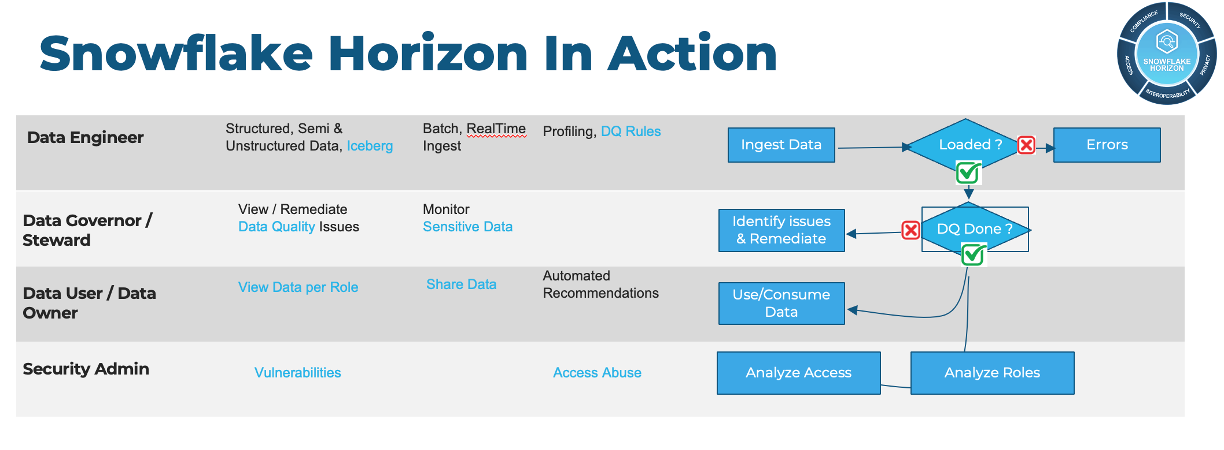
You'll work through a step-by-step guide using a sample database of synthetic customer orders, exploring how Horizon monitors and governs data through three key personas:
- Data Engineer: Monitoring pipelines and data quality
- Data Governor: Protecting PII with masking and classification
- Data Governor Admin: Auditing access, lineage, and compliance
Prerequisites
- Familiarity with SQL
- Basic understanding of data governance concepts
What You'll Learn
Core Governance:
- Protect sensitive data with role-based masking and row access policies
- Visualize column-level lineage for impact analysis
- Monitor data quality with custom and system Data Metric Functions (DMFs)
- Audit data access and track schema changes
AI-Powered Governance:
- Automate PII discovery with CLASSIFICATION_PROFILE
- Create governed semantic views for Cortex Analyst
- Redact sensitive data from unstructured text with AI_REDACT
- Query governance metadata using natural language in Snowsight
- Ensure consistent policy enforcement across structuted, programmmatic and natural language queries
What You'll Need
- A Snowflake account with ACCOUNTADMIN access (trial accounts work)
- Approximately 2 hours to complete all sections
What You'll Build
- A complete data governance framework with RBAC roles for different personas
- AI-powered classification that automatically tags PII across 50+ data types
- Tag-based masking policies that scale automatically to new assets
- Row access policies for consent-based and geographic filtering
- Governed semantic views enabling natural language queries via Cortex Analyst
- Privacy-safe analytics on unstructured text using AI_REDACT
AI-Powered Governance Highlights
Key Principle: Fine-grained access controls are consistently enforced whether users query data via SQL, Python, or AI-powered natural language interfaces.
This lab showcases how Snowflake's AI capabilities enhance governance:
| Feature | Description |
|---|---|
| CLASSIFICATION_PROFILE | Auto-discover and tag 50+ PII types with custom tag mapping |
| Semantic Views | Governance policies automatically apply to Cortex Analyst queries |
| AI_REDACT | Remove PII from unstructured text like customer feedback |
| Natural Language Queries | Query governance metadata in plain English |
Introduction Videos
Setup
Source of Truth: The full SQL scripts for this lab are maintained in the GitHub repository. The repo is the canonical source for execution. This guide provides additional explanatory context and highlights key concepts and some of the SQL has been simplified for illusration purposes.
Run the Setup Script
Script: 0-lab-Setup.sql
- In Snowsight, create a new SQL worksheet named
0_lab_setup - Copy the entire contents of 0-lab-Setup.sql into your worksheet
- Run all statements
What the Setup Creates
| Object | Purpose |
|---|---|
HRZN_DATA_ENGINEER role | Data quality monitoring and pipeline management |
HRZN_DATA_GOVERNOR role | Classification, masking policies, and governance |
HRZN_DATA_USER role | Restricted analyst access (sees masked data, MA only) |
HRZN_WH warehouse | Compute for all lab exercises |
HRZN_DB database | Contains lab schemas: HRZN_SCH, TAG_SCHEMA, CLASSIFIERS |
CUSTOMER table | Synthetic customer PII data (1000 rows) |
CUSTOMER_ORDERS table | Order transactions linked to customers |
Key Setup Concepts
The setup script demonstrates Snowflake's Role-Based Access Control (RBAC):
- Custom roles are created and granted to SYSADMIN
- Each role gets appropriate privileges for their persona
- The
ROW_POLICY_MAPtable controls which states each role can see
Data Quality Monitoring
Script: 1-DataEngineer.sql
Data Governance starts with understanding data quality. This section covers how Data Engineers use Horizon to monitor data quality through Data Metric Functions (DMFs).
RBAC Fundamentals
The Snowflake Access Control Framework combines:
- Role-based Access Control (RBAC): Privileges assigned to roles, then roles to users
- Discretionary Access Control (DAC): Object owners can grant access
Key Concepts:
- Securable Object: Entity to which access can be granted (Database, Schema, Table, View, etc.)
- Role: Container for privileges, can be granted to users or other roles
- Privilege: Defined level of access (SELECT, INSERT, USAGE, etc.)
Data Quality Monitoring with DMFs
Data Metric Functions measure data quality automatically. The script demonstrates:
System DMFs (built-in):
ALTER TABLE HRZN_DB.HRZN_SCH.CUSTOMER
  SET DATA_METRIC_SCHEDULE = 'TRIGGER_ON_CHANGES';

ALTER TABLE HRZN_DB.HRZN_SCH.CUSTOMER
  ADD DATA METRIC FUNCTION SNOWFLAKE.CORE.DUPLICATE_COUNT ON (EMAIL);
Custom DMF (RegEx for invalid emails):
CREATE DATA METRIC FUNCTION HRZN_DB.HRZN_SCH.INVALID_EMAIL_COUNT(
    IN_TABLE TABLE(IN_COL STRING)
)
RETURNS NUMBER
AS
'SELECT COUNT_IF(FALSE = (IN_COL regexp ''^[A-Za-z0-9._%+-]+@[A-Za-z0-9.-]+\\.[A-Za-z]{2,4}$'')) FROM IN_TABLE';
Schedule options: MINUTE, USING CRON, or TRIGGER_ON_CHANGES
View DMF Results
Results appear in
SNOWFLAKE.LOCAL.DATA_QUALITY_MONITORING_RESULTSwith up to a few minutes latency. This view may not work in trial accounts.
Key Takeaways:
- DMFs run automatically on schedule or on data changes
- System DMFs cover common metrics (NULL_COUNT, DUPLICATE_COUNT, ROW_COUNT)
- Custom DMFs extend monitoring with business-specific logic
- Results can trigger alerts for threshold violations
Know and Protect Your Data
Script: 2-DataGovernor_DataUser.sql
The Data Governor defines and applies data policies. This section covers AI-powered classification, masking policies, row access policies, and privacy controls.
AI-Powered Classification with Tag Mapping
The script implements the BYOT (Bring Your Own Tags) pattern with automatic propagation:
-- Create custom tag with propagation enabled
CREATE OR REPLACE TAG HRZN_DB.TAG_SCHEMA.DATA_CLASSIFICATION
    ALLOWED_VALUES 'PII', 'RESTRICTED', 'SENSITIVE', 'INTERNAL', 'PUBLIC'
    PROPAGATE = ON_DEPENDENCY_AND_DATA_MOVEMENT;
PROPAGATE = ON_DEPENDENCY_AND_DATA_MOVEMENTautomatically flows tags to tables created via CTAS or views.
Classification Profile with Tag Map
The classification profile maps AI-detected categories to your custom tags:
CREATE SNOWFLAKE.DATA_PRIVACY.CLASSIFICATION_PROFILE
    HRZN_DB.HRZN_SCH.HRZN_STANDARD_CLASSIFICATION_PROFILE({
    'minimum_object_age_for_classification_days': 0,
      'maximum_classification_validity_days': 90,
      'auto_tag': true,
      'tag_map': {
        'column_tag_map': [
          { 'tag_name': 'HRZN_DB.TAG_SCHEMA.DATA_CLASSIFICATION', 'tag_value': 'PII',
            'semantic_categories': ['EMAIL', 'US_SOCIAL_SECURITY_NUMBER', 'CREDIT_CARD_NUMBER'] },
          { 'tag_name': 'HRZN_DB.TAG_SCHEMA.DATA_CLASSIFICATION', 'tag_value': 'RESTRICTED',
            'semantic_categories': ['PHONE_NUMBER', 'DATE_OF_BIRTH'] }
        ]
      }
    });
Then run classification:
CALL SYSTEM$CLASSIFY('HRZN_DB.HRZN_SCH.CUSTOMER',
    'HRZN_DB.HRZN_SCH.HRZN_STANDARD_CLASSIFICATION_PROFILE');
Tag-Based Masking Policies
Instead of creating masking policies per-column, attach them to tags for automatic protection. The script creates multi-type masking functions:
| Data Type | Mask Function | Example Output |
|---|---|---|
| STRING | PII redaction | ****MASKED**** |
| NUMBER | Zero out | 0 |
| DATE | Epoch date | 1970-01-01 |
| TIMESTAMP | Epoch timestamp | 1970-01-01 00:00:00 |
-- Attach masking policy to tag (protects all tagged columns automatically)
ALTER TAG HRZN_DB.TAG_SCHEMA.DATA_CLASSIFICATION
    SET MASKING POLICY HRZN_DB.TAG_SCHEMA.DATA_CLASSIFICATION_MASK_STRING;
Key Benefit: When new columns are tagged
DATA_CLASSIFICATION='PII', masking is automatically applied—no additional policy assignment needed.
Row Access Policies
Row access policies filter which rows users can see:
Consent-based (Opt-in):
CREATE OR REPLACE ROW ACCESS POLICY HRZN_DB.TAG_SCHEMA.CUSTOMER_OPTIN_POLICY
    AS (OPTIN_STATUS STRING) RETURNS BOOLEAN ->
    CASE
        WHEN CURRENT_ROLE() IN ('ACCOUNTADMIN', 'HRZN_DATA_GOVERNOR') THEN TRUE
        WHEN CURRENT_ROLE() = 'HRZN_DATA_USER' AND OPTIN_STATUS = 'Y' THEN TRUE
        ELSE FALSE
    END;
State-based (Mapping table):
CREATE OR REPLACE ROW ACCESS POLICY HRZN_DB.TAG_SCHEMA.CUSTOMER_STATE_RESTRICTIONS
    AS (STATE STRING) RETURNS BOOLEAN ->
       CURRENT_ROLE() IN ('ACCOUNTADMIN','HRZN_DATA_GOVERNOR')
        OR EXISTS (SELECT 1 FROM HRZN_DB.TAG_SCHEMA.ROW_POLICY_MAP rp
                   WHERE rp.ROLE = CURRENT_ROLE() AND rp.STATE_VISIBILITY = STATE);
Defense in Depth: Row access policies (WHO sees WHICH records) combine with masking policies (HOW data appears) for layered protection.
Privacy Policies
Aggregation Policy
Restricts non-admin users to aggregate queries with minimum group sizes:
CREATE OR REPLACE AGGREGATION POLICY HRZN_DB.TAG_SCHEMA.aggregation_policy
  AS () RETURNS AGGREGATION_CONSTRAINT ->
    CASE
      WHEN CURRENT_ROLE() IN ('ACCOUNTADMIN','HRZN_DATA_GOVERNOR')
      THEN NO_AGGREGATION_CONSTRAINT()
      ELSE AGGREGATION_CONSTRAINT(MIN_GROUP_SIZE => 100)
    END;
Projection Policy
Prevents SELECT from projecting specific columns (but allows them in WHERE):
CREATE OR REPLACE PROJECTION POLICY HRZN_DB.TAG_SCHEMA.projection_policy
  AS () RETURNS PROJECTION_CONSTRAINT ->
  CASE
    WHEN CURRENT_ROLE() IN ('ACCOUNTADMIN','HRZN_DATA_GOVERNOR')
    THEN PROJECTION_CONSTRAINT(ALLOW => true)
    ELSE PROJECTION_CONSTRAINT(ALLOW => false)
  END;
Key Takeaways
| Policy Type | Controls | Use Case |
|---|---|---|
| Masking | HOW data appears | Hide PII from analysts |
| Row Access | WHICH rows visible | Geographic or consent filtering |
| Aggregation | Query type allowed | Force aggregate-only access |
| Projection | Column projectability | Block specific columns in SELECT |
- Tags with
PROPAGATEensure derived tables inherit governance automatically - Tag-based masking scales better than per-column policies
- Multiple row access policies are ANDed together
Access and Audit
Script: 3-Data-governor-Admin.sql
Access History tracks what data was read/written and when—critical for compliance, auditing, and governance.
Important: Access History has latency of up to 3 hours. Some queries may not return results immediately after running lab exercises.
Key Access History Queries
-- Query access patterns
SELECT
    value:"objectName"::STRING AS object_name,
    COUNT(DISTINCT query_id) AS number_of_queries
FROM snowflake.account_usage.access_history,
LATERAL FLATTEN (input => direct_objects_accessed)
WHERE object_name ILIKE 'HRZN%'
GROUP BY object_name
ORDER BY number_of_queries DESC;

-- Read vs Write breakdown
SELECT
    value:"objectName"::STRING AS object_name,
    CASE WHEN object_modified_by_ddl IS NOT NULL THEN 'write' ELSE 'read' END AS query_type,
    COUNT(DISTINCT query_id) AS number_of_queries,
    MAX(query_start_time) AS last_query_start_time
FROM snowflake.account_usage.access_history,
LATERAL FLATTEN (input => direct_objects_accessed)
WHERE object_name ILIKE 'HRZN%'
GROUP BY object_name, query_type
ORDER BY object_name, number_of_queries DESC;
Governance Dashboard Queries
The script includes queries for:
- Longest running queries: Identify performance bottlenecks
- Tagged objects: View all objects with DATA_CLASSIFICATION tags
- Masking policy audit: List all masking policies and their targets
- Row access policy audit: Review row-level security configurations
Key Takeaways:
- Access History provides comprehensive audit trail with 3-hour latency
- Use
snowflake.account_usage.access_historyfor compliance reporting - Combine with tag references to track sensitive data access
Semantic Views for AI Analytics
Script: 4-Semantic-View-Governance.sql
Semantic views enable natural language querying via Cortex Analyst while automatically enforcing existing governance policies. They inherit masking and row access policies from underlying tables.
Create a Semantic View
CREATE OR REPLACE SEMANTIC VIEW CUSTOMER_ORDER_ANALYTICS
[truncated for brevity]
Query with Cortex Analyst
Once your semantic view is created, query it using Cortex Analyst in Snowsight:
- Navigate to AI & ML → Cortex Analyst in the left navigation
- Select your semantic view
CUSTOMER_ORDER_ANALYTICS - Ask natural language questions like:
- "What are the top 5 cities by total revenue?"
- "Show me order counts by state"
- "Which customers have the highest total order amounts?"
Cortex Analyst automatically generates and executes SQL against your semantic view, with all governance policies enforced.
Governance Inheritance
Key Benefit: Masking and row access policies automatically apply to semantic view queries. HRZN_DATA_USER sees:
- Only MA customers (row access policy)
- Masked PII columns (masking policy)
- Same governance as direct table queries!
Key Takeaways:
- Semantic views provide business and AI friendly query interfaces
- Governance policies are inherited automatically—no separate configuration
- Cortex Analyst uses semantic view definition as input for natural language-to-SQL translation
AI_REDACT for Unstructured PII
Script: 5-Cortex-AI-Redact.sql
AI_REDACT uses AI to identify and mask PII in unstructured text (customer feedback, notes, comments). Combined with tag propagation, redacted data remains protected through downstream transformations.
Add Customer Feedback Column
ALTER TABLE HRZN_DB.HRZN_SCH.CUSTOMER ADD COLUMN CUSTOMER_FEEDBACK VARCHAR;

-- Sample feedback with embedded PII
UPDATE HRZN_DB.HRZN_SCH.CUSTOMER
SET CUSTOMER_FEEDBACK = 'My name is ' || FIRST_NAME || ' ' || LAST_NAME ||
    '. I had an issue with order delivery to ' || STREET_ADDRESS ||
    '. Please call me at ' || PHONE_NUMBER || ' or email ' || EMAIL
WHERE RANDOM() > 0.7;
AI_REDACT Function
WITH feedback_sample AS (
    SELECT
        'Contact John Smith at [email protected] or call 555-123-4567 for updates.' as text
)
SELECT
    text as original,
    SNOWFLAKE.CORTEX.AI_REDACT(text) as full_redaction,
    SNOWFLAKE.CORTEX.AI_REDACT(text, ['NAME', 'EMAIL']) as partial_redaction
FROM feedback_sample;
The AI_REDACT function automatically:
- Identifies PII categories (name, email, phone, address, SSN, etc.)
- Replaces with category placeholders:
[NAME],[EMAIL],[PHONE_NUMBER] - Works on freeform unstructured text
Pre-Computed Redacted Table with Tag Propagation
-- Create redacted table - tags propagate automatically
CREATE OR REPLACE TABLE HRZN_DB.HRZN_SCH.CUSTOMER_FEEDBACK_REDACTED AS
SELECT
    ORDER_ID,
    CUSTOMER_ID,
    ORDER_TS,
    CUSTOMER_FEEDBACK as original_feedback,
    SNOWFLAKE.CORTEX.AI_REDACT(CUSTOMER_FEEDBACK) as redacted_feedback,
    CURRENT_TIMESTAMP() as redacted_at,
    CURRENT_USER() as redacted_by
FROM HRZN_DB.HRZN_SCH.CUSTOMER_ORDERS
WHERE CUSTOMER_FEEDBACK IS NOT NULL
LIMIT 100;

-- Verify classification tag propagated
SELECT
    ORDER_ID,
    original_feedback,
    redacted_feedback
FROM HRZN_DB.HRZN_SCH.CUSTOMER_FEEDBACK_REDACTED
WHERE original_feedback NOT LIKE 'Standard order%'
LIMIT 10;
Sentiment Analysis on Redacted Data
SELECT
    ORDER_ID,
    redacted_feedback,
    SNOWFLAKE.CORTEX.SENTIMENT(redacted_feedback) as sentiment_score,
    CASE
        WHEN SNOWFLAKE.CORTEX.SENTIMENT(redacted_feedback) > 0.5 THEN 'Positive'
        WHEN SNOWFLAKE.CORTEX.SENTIMENT(redacted_feedback) < -0.5 THEN 'Negative'
        ELSE 'Neutral'
    END as sentiment_category
FROM HRZN_DB.HRZN_SCH.CUSTOMER_FEEDBACK_REDACTED
WHERE redacted_feedback NOT LIKE 'Standard order%'
ORDER BY sentiment_score DESC
LIMIT 100;
Key Takeaways:
- AI_REDACT enables analytics on unstructured data without PII exposure
- Tags propagate to redacted tables for consistent governance
- Combine with SENTIMENT, COMPLETE for privacy-safe AI analytics
Natural Language Governance Queries
Query your governance metadata using natural language in Snowsight. You can ask questions about tags, policies, and access patterns directly.
Example Governance Questions
In Snowsight, use the natural language interface to ask questions like:
- "Which columns have PII tags applied?"
- "Show me all masking policies and which columns they protect"
- "Who accessed the CUSTOMER table in the last 30 days?"
- "What row access policies are applied to my database?"
Key Takeaways:
- ACCOUNT_USAGE and INFORMATION_SCHEMA views provide comprehensive governance telemetry
- Natural language queries simplify governance auditing
Conclusion And Resources
Congratulations! You've completed the Horizon Data Governance lab covering:
What You Learned
| Section | Key Concepts |
|---|---|
| Data Quality | System and custom DMFs, automated monitoring |
| Classification | AI-powered tagging, BYOT pattern, tag propagation |
| Masking | Multi-type policies, tag-based automatic protection |
| Row Access | Consent-based and state-based filtering |
| Privacy | Aggregation and projection policies |
| Semantic Views | Governance-aware natural language queries |
| AI_REDACT | Unstructured PII protection |
| Governance Queries | Querying governance metadata with SQL |
Clean Up (Optional)
Run 99-lab-teardown.sql to remove all lab objects.
Resources
This content is provided as is, and is not maintained on an ongoing basis. It may be out of date with current Snowflake instances
